1. Įvadas
Thank you for choosing the TeleAdapt LCD Display Alarm Clock. This device is designed to provide accurate timekeeping, reliable alarm functions, and convenient charging for your mobile devices. Its compact design and intuitive features make it an ideal addition to any bedside table, office, or living space. This manual will guide you through the setup, operation, and maintenance of your new alarm clock.
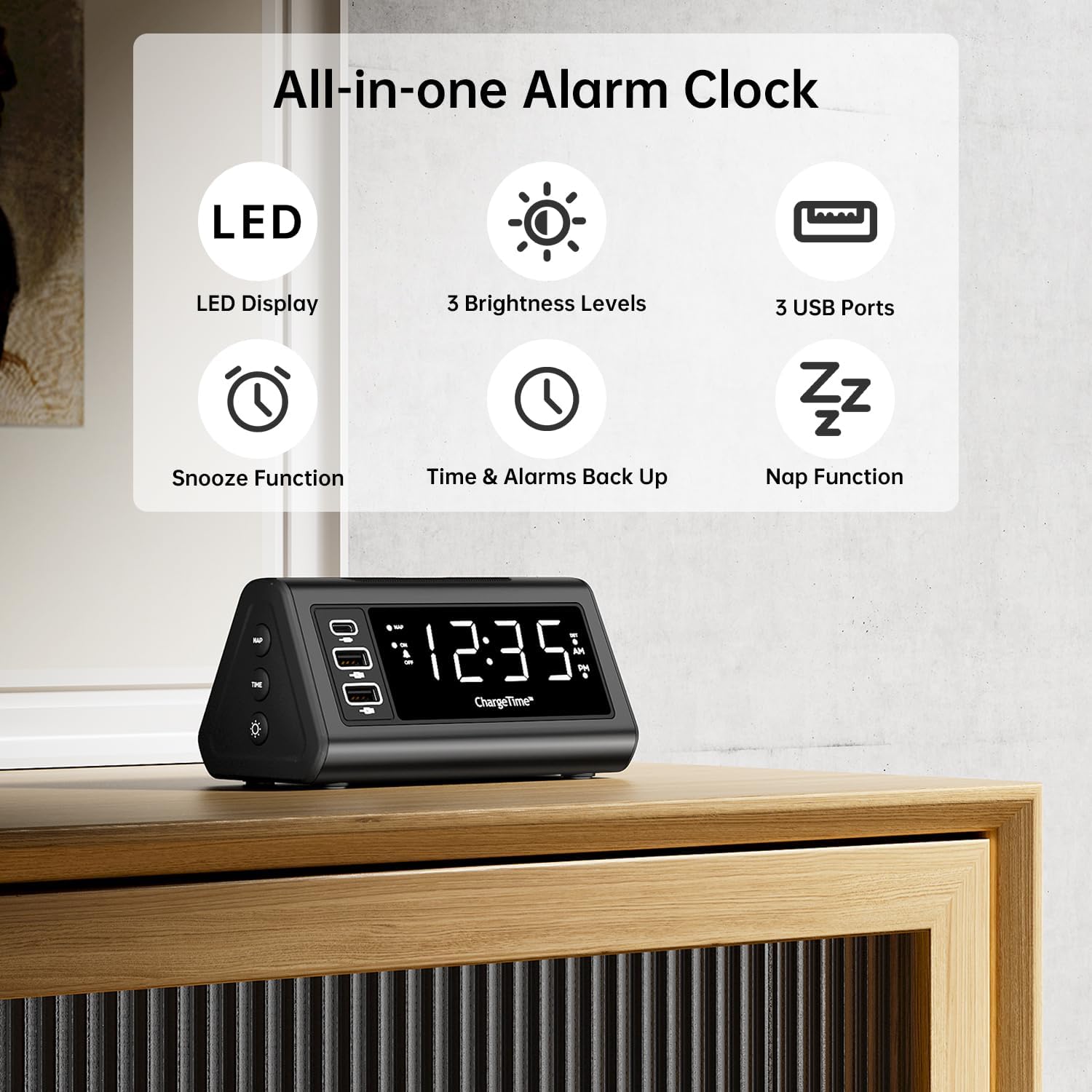
1 pav. Baigtaview of TeleAdapt Alarm Clock features.
2. Svarbi saugos informacija
Prieš naudodami šį gaminį, atidžiai perskaitykite visas saugos instrukcijas. Nesilaikant šių instrukcijų, gali kilti elektros smūgis, gaisras arba sugesti įrenginys.
- Saugokite prietaisą nuo vandens ar per didelės drėgmės.
- Do not disassemble, repair, or modify the device. Refer all servicing to qualified personnel.
- Use only the provided AC power adapter. Using an incompatible adapter may damage the device.
- Ensure proper ventilation around the device. Do not cover ventilation openings.
- Laikykite prietaisą atokiau nuo tiesioginių saulės spindulių, šilumos šaltinių ir atviros liepsnos.
- Tinkamai išmeskite baterijas laikydamiesi vietinių taisyklių.
3. Pakuotės turinys
Patikrinkite, ar pakuotėje yra visi reikalingi daiktai:
- TeleAdapt LCD Display Alarm Clock
- AC Power Adapter with interchangeable plugs
- 2 x AAA Batteries (for backup)
- Instrukcijų vadovas (šis dokumentas)
4. Produktas baigtasview
Familiarize yourself with the various parts and controls of your alarm clock:
Front Display and USB Ports:
- Didelis LED ekranas: Shows current time, AM/PM indicator, and DST status.
- USB-C prievadas (1x): For fast charging compatible devices (5V/3A output).
- USB-A prievadai (2x): For charging various devices (5V/2.4A each output).
- NAP Indicator: Lights up when Nap function is active.
- Aliarmo indikatorius: Lights up when alarm is set.
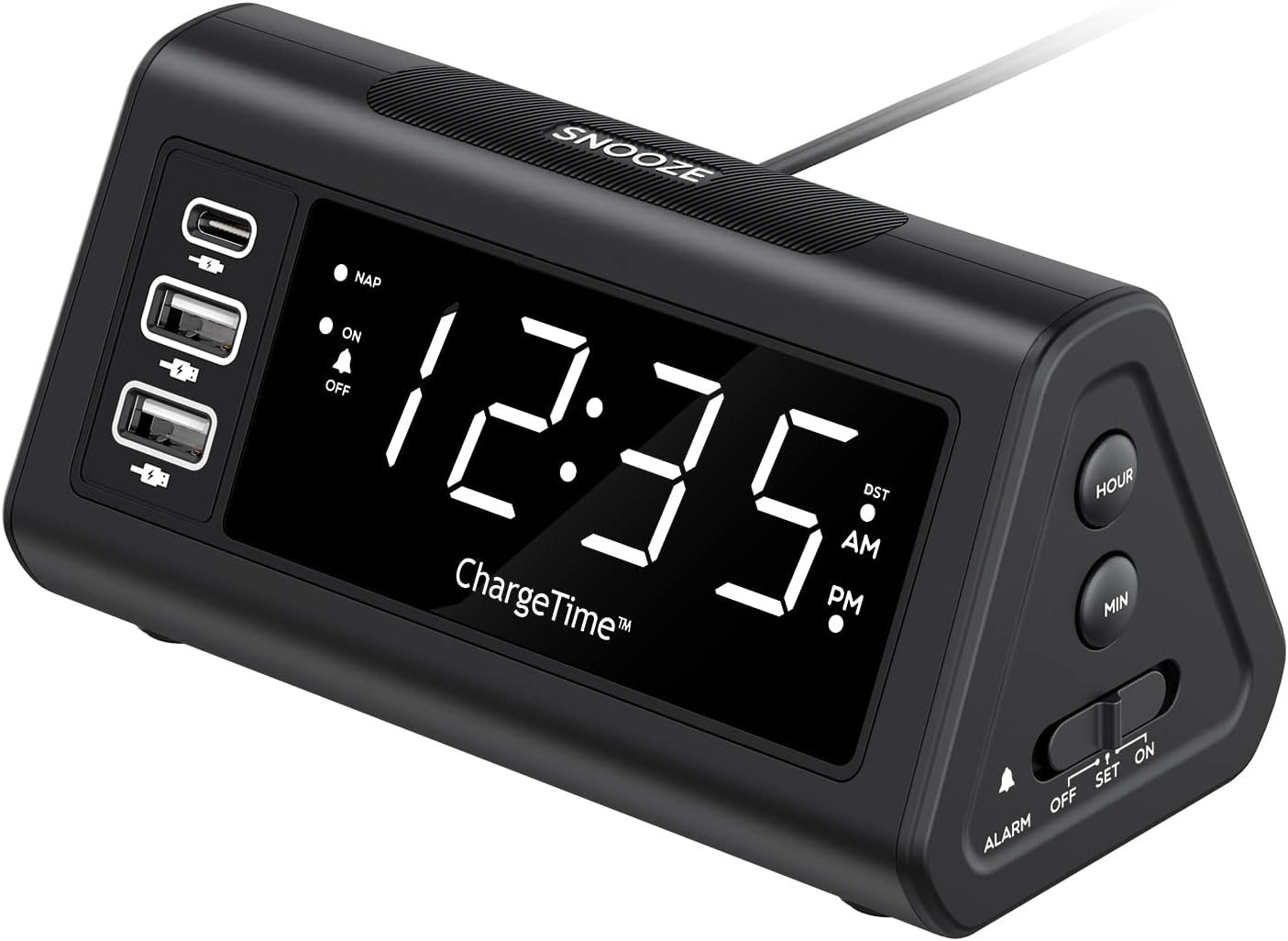
2 pav.: priekis view with display and USB ports.
Šoniniai valdikliai:
- NAP mygtukas: Activates and adjusts the nap timer.
- ĮJUNGIMO-IŠJUNGIMO mygtukas: Toggles the alarm on or off.
- TIME mygtukas: Used in conjunction with SNOOZE to set time.
- DIMMER mygtukas: Adjusts display brightness (Off, Low, High).

Figure 3: Side controls for various functions.
Viršuje ir gale:
- SNOOZE mygtukas: Large button on top for snooze and dimmer adjustment.
- ALARM Switch (OFF/SET/ON): Slider switch to control alarm setting and activation.
- VALANDOS mygtukas: Adjusts hour during time/alarm setting.
- MIN mygtukas: Adjusts minute during time/alarm setting.
- Baterijų skyrius: Holds 2 x AAA batteries for backup power.
- Nuolatinė 12 V / 5 A įvestis: Maitinimo įvestis kintamosios srovės adapteriui.
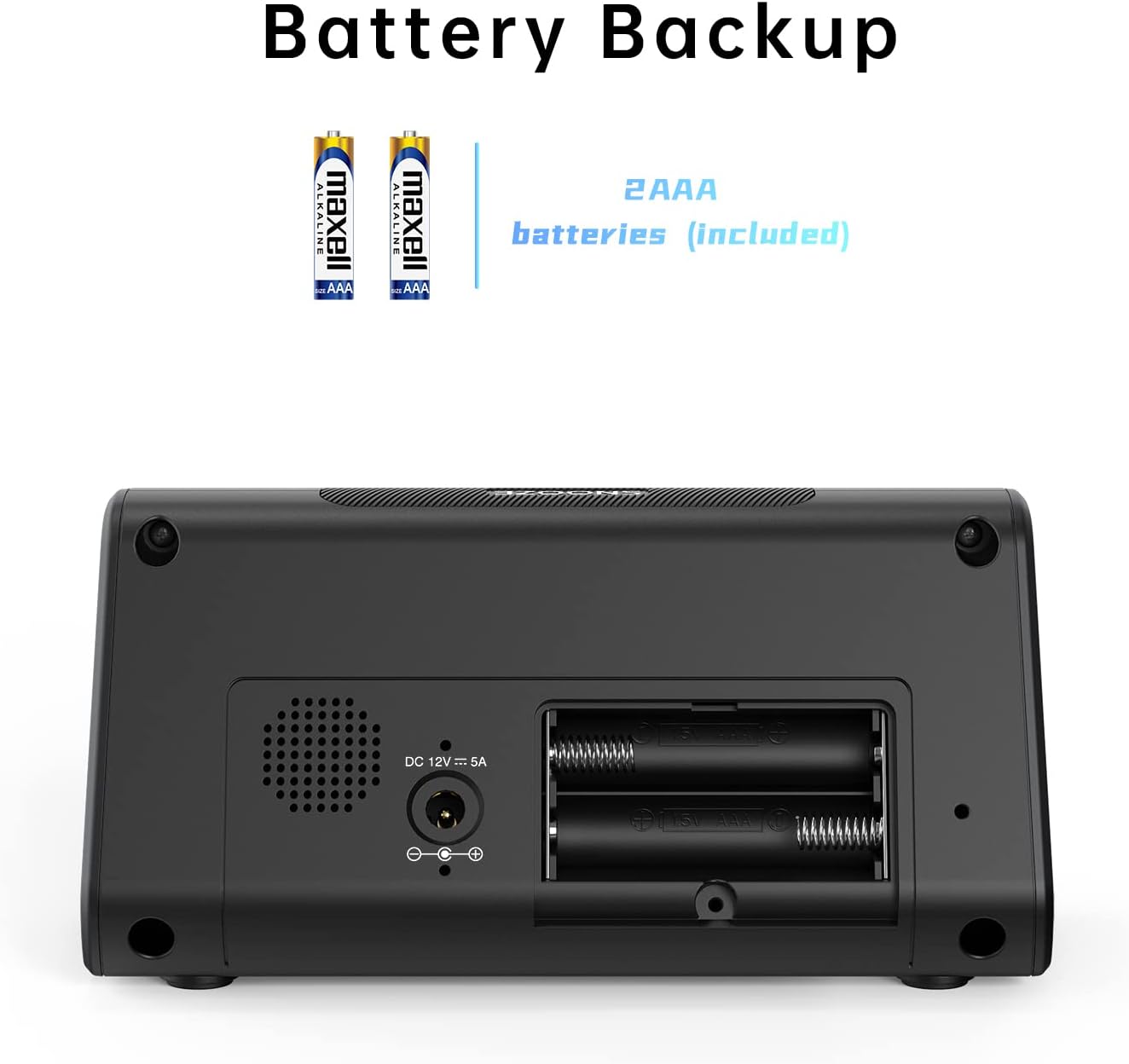
4 pav.: Nugara view with battery compartment and power input.
5. Sąranka
5.1. Maitinimo prijungimas
- Insert the 2 x AAA batteries into the battery compartment on the back of the alarm clock. Ensure correct polarity. These batteries provide backup power to retain time and alarm settings during a power outage.
- Connect the provided AC power adapter to the DC 12V/5A input port on the back of the alarm clock.
- Plug the AC power adapter into a standard wall outlet. The display will light up.

Figure 5: Connecting the AC power adapter.
5.2. Dabartinio laiko nustatymas
- Paspauskite ir palaikykite LAIKAS mygtuką ir SNAIGĖ button simultaneously for 3 seconds. The display will begin to flash, indicating time setting mode.
- Naudokite VALANDA ir MIN buttons on the side to adjust the year, month, and date in sequence. Press the LAIKAS mygtuką, kad patvirtintumėte kiekvieną nustatymą ir pereitumėte prie kito.
- After setting the date, adjust the current hour and minute using the VALANDA ir MIN mygtukai.
- Paspauskite LAIKAS dar kartą paspauskite mygtuką, kad patvirtintumėte laiką.
- You can enable or disable the Auto DST (Daylight Saving Time) feature in this menu. Use the VALANDA or MIN buttons to select ON or OFF, then press LAIKAS to confirm. (Note: Auto DST is only available in US time zones).

Figure 6: Setting the time on the alarm clock.
6. Naudojimo instrukcijos
6.1. Signalo nustatymas
- Stumkite SIGNALAS switch on the side to the NUSTATYTI position. The time display will flash.
- Naudokite VALANDA ir MIN buttons to set your desired wake-up time.
- Stumkite SIGNALAS pereiti prie ON position to activate the alarm. The alarm indicator light will illuminate on the display.
6.2. Snaudimo funkcija
Kai suskamba žadintuvas, paspauskite didelį SNAIGĖ button on top to temporarily silence the alarm. The alarm will sound again after the set snooze duration.
To set the snooze duration (5, 10, or 15 minutes):
- Paspauskite ir palaikykite SNAIGĖ button for 3 seconds. The current snooze time will flash on the display.
- Pakartotinai paspauskite SNAIGĖ button to cycle through 5, 10, or 15 minutes.
- Paspauskite SNAIGĖ mygtuką dar kartą, kad patvirtintumėte pasirinkimą.

Figure 7: Using the Snooze function.
6.3. Nap Function
The Nap function allows you to set a short-term alarm for a nap without affecting your main alarm setting.
- Paspauskite NAP button on the side of the clock. The display will show a nap duration (e.g., 90, 75, 60, 45, 30, 15 minutes) or OFF.
- Toliau spauskite NAP button to cycle through the desired nap times or select OFF to disable. The “NAP” indicator will light when active.
- To stop the nap alarm when it sounds, press either the SNAIGĖ or NAP mygtuką.

Figure 8: Utilizing the Nap function.
6.4. Ekrano ryškumo reguliavimas
The alarm clock features three levels of display brightness: Off, Low, and High.
- Pakartotinai paspauskite SNOZUOTAS/REŽIMUOTOJAS button on the top of the clock to cycle through the brightness levels.

Figure 9: Display brightness options.
6.5. Įkrovimo įrenginiai
The alarm clock includes three USB charging ports for your convenience:
- 1 x USB-C Port: Provides 5V/3A output for fast charging compatible devices.
- 2 x USB-A prievadai: Provide 5V/2.4A output each for charging various smartphones, tablets, and other USB-powered devices.
Simply connect your device's charging cable to the appropriate USB port on the alarm clock. No additional charging station is required.
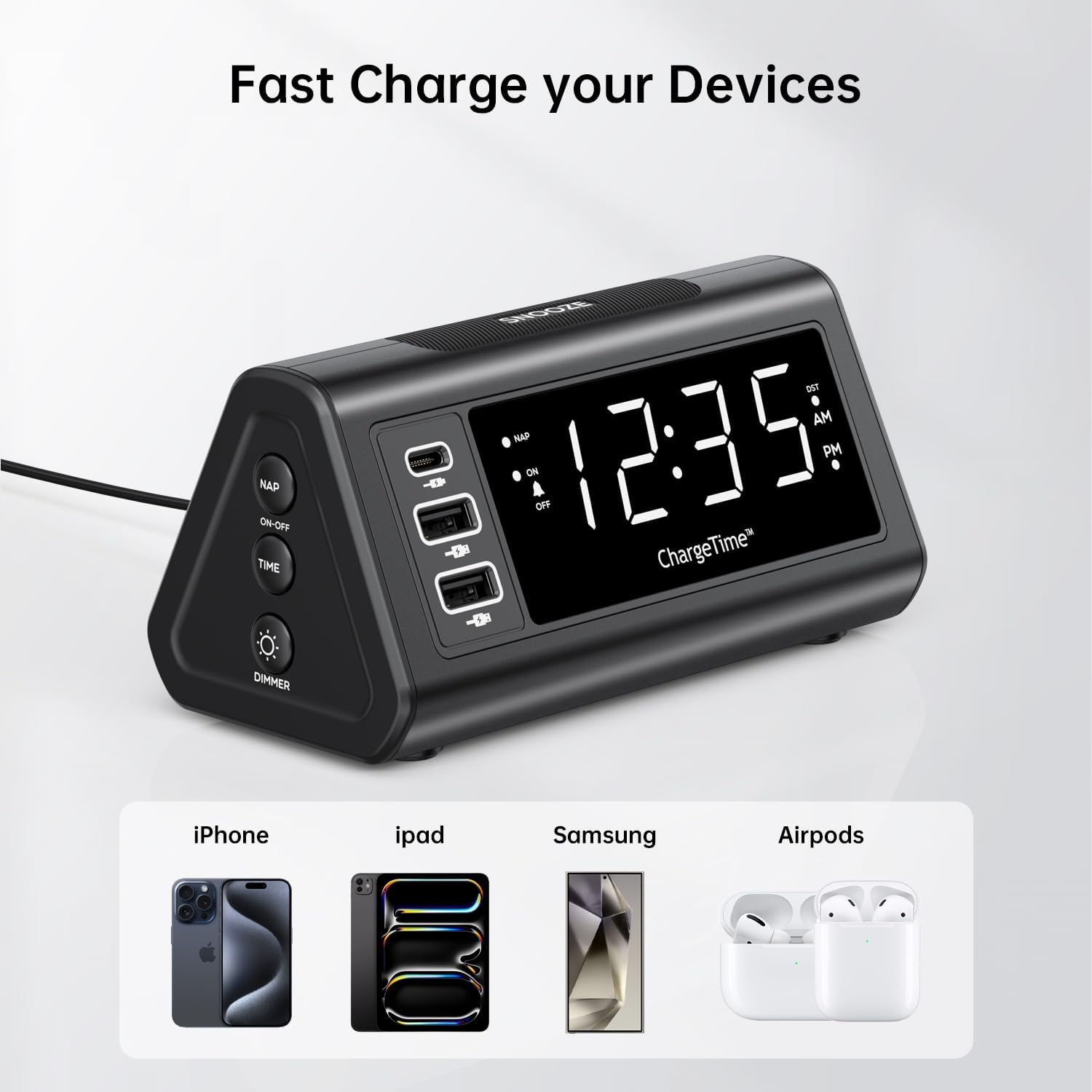
Figure 10: Charging devices via USB ports.
7. Priežiūra
7.1. Valymas
To clean the alarm clock, gently wipe the surface with a soft, dry cloth. Do not use abrasive cleaners, waxes, or solvents as they may damage the finish. Ensure the device is unplugged from the power outlet before cleaning.
7.2. Baterijos keitimas
The 2 x AAA batteries are for backup only and do not power the main functions. Replace them periodically (e.g., once a year) to ensure settings are retained during power outages. To replace, open the battery compartment on the back, remove old batteries, and insert new ones with correct polarity.
8. Problemų sprendimas
| Problema | Galima priežastis | Sprendimas |
|---|---|---|
| Ekranas tuščias arba nešviečia. | No power, power adapter not connected, or display brightness set to OFF. | Ensure AC adapter is securely plugged into the clock and wall outlet. Press the SNOOZE/DIMMER button repeatedly to adjust brightness. |
| Signalizacija neskamba. | Alarm is not set, alarm switch is OFF, or volume is too low (if applicable). | Verify alarm time is set correctly. Slide the ALARM switch to the ON position. |
| Laiko nustatymai prarandami išjungus maitinimątage. | Atsarginės baterijos išsikrovusios arba neįdėtos. | Ensure 2 x AAA batteries are installed correctly and are not depleted. Replace if necessary. |
| Nepavyksta nustatyti laiko / žadintuvo. | Incorrect button combination or sequence. | Refer to Section 5.2 for time setting (TIME + SNOOZE for 3 seconds) and Section 6.1 for alarm setting (ALARM switch to SET). |
| Devices not charging via USB ports. | Device not compatible, cable faulty, or clock not powered. | Ensure the alarm clock is powered by the AC adapter. Try a different USB cable or device to confirm functionality. |
9. Specifikacijos
- Prekinis ženklas: TeleAdapt
- Modelis: ChargeTime USB-C (TA-7835)
- Spalva: Juoda
- Ekrano tipas: Skaitmeninis LED
- Maitinimo šaltinis: Corded Electric (AC mains), Battery Powered (backup)
- USB-C išvestis: 5V/3A
- USB-A išėjimas: 5V/2.4A (each port)
- Baterijos atsarginė kopija: 2 x AAA baterijos (pridedamos)
- Matmenys: Maždaug 7.48 x 5.35 x 3.43 colio
- Prekės svoris: Maždaug 1.54 svaro
- Ypatingos savybės: 3-level display brightness, Snooze function (5/10/15 min), Nap timer (15-90 min), Auto-DST (US time zones only)
10. Garantija ir palaikymas
For warranty information or technical support, please contact TeleAdapt customer service. Details can typically be found on the manufacturer's official website or through your point of purchase. Please retain your proof of purchase for warranty claims.
Gamintojas: TeleAdapt
Websvetainė: www.teleadapt.com (Atkreipkite dėmesį: tai yra vietos rezervavimo ženklas URLTeisingą kontaktinę informaciją apie palaikymą rasite ant gaminio pakuotės arba oficialioje dokumentacijoje.)


