Svarbi saugos informacija
Please read this manual carefully before assembly and use to ensure safe operation and to prevent damage to the product or injury to yourself.
- Neviršykite maksimalios leistinos apkrovos 100 kgPerkrovimas gali sukelti nestabilumą ir žalą.
- Ensure all cables are properly managed and secured to prevent tripping hazards or damage during height adjustments.
- Darbo metu laikykite vaikus ir naminius gyvūnus atokiau nuo stalo.
- Do not place hands or other body parts near moving parts of the desk frame during height adjustment.
- Only use the desk for its intended purpose as a workstation.
- Reguliariai tikrinkite visus varžtus ir veržles, kad jie būtų priveržti.
Produktas baigtasview
The FLEXISPOT E1B Electric Standing Desk is designed to provide a versatile and ergonomic workspace. It features a robust dual-motor system for smooth height adjustments and a durable tabletop.
Pagrindinės funkcijos:
- Dviejų variklių sistema: Ensures stable and efficient height adjustment at 25 mm/s.
- Aukščio diapazonas: Adjustable from 70 cm to 119 cm to suit various user heights and work preferences.
- Apkrova: Supports up to 100 kg, accommodating multiple monitors and office equipment.
- Išankstiniai atminties nustatymai: Control panel with memory functions for saving preferred height settings.
- High-Quality Tabletop: 160x80cm black tabletop, made in the EU from FSC-certified MDF with scratch-resistant high-pressure laminate.
Pakuotės turinys
Prieš pradėdami surinkimą, patikrinkite, ar yra visi toliau išvardyti komponentai ir ar jie nepažeisti. Jei trūksta kokių nors dalių arba jos pažeistos, susisiekite su klientų aptarnavimo tarnyba.
- Desk Frame (E1B) components (legs, feet, crossbar, motor, control box)
- Tabletop (DT1608-BLACK-EU18)
- Control Panel with Memory Functions
- Maitinimo adapteris ir laidas
- Assembly Hardware (screws, bolts, Allen keys)
- Kabelių valdymo priedai
- Vartotojo vadovas
Sąrankos ir surinkimo instrukcijos
Assembly is designed to be straightforward. It is recommended to assemble the desk on a soft, clean surface to prevent scratches. Two people are recommended for easier assembly.
1 veiksmas: išpakuokite komponentus
Atsargiai išimkite visas dalis iš pakuotės ir išdėliokite jas. Patikrinkite pagal pakuotės turinį.
Step 2: Assemble the Desk Frame
- Attach the lifting columns to the crossbar using the provided screws.
- Secure the desk feet to the bottom of the lifting columns.
- Mount the control box to the designated area on the frame.
- Connect the motor cables from the lifting columns to the control box.
- Connect the control panel cable to the control box.

Image: The FLEXISPOT E1B desk frame in black and white, illustrating the height adjustment range from 70cm to 119cm, highlighting the dual motor system, 25mm/s adjustment speed, and low noise operation (less than 50dB).
Step 3: Attach the Tabletop
Carefully place the tabletop upside down on a soft surface. Position the assembled desk frame onto the tabletop, aligning the pre-drilled holes. Secure the tabletop to the frame using the provided screws.

Image: A FLEXISPOT desk with a black tabletop, featuring a laptop, books, and a pen holder, demonstrating a functional and organized workspace.
Step 4: Connect Power and Cable Management
Connect the power adapter to the control box and then to a power outlet. Use the included cable management accessories to organize and secure all cables, preventing them from interfering with the desk's movement.
Naudojimo instrukcijos
Valdymo skydas baigtasview:
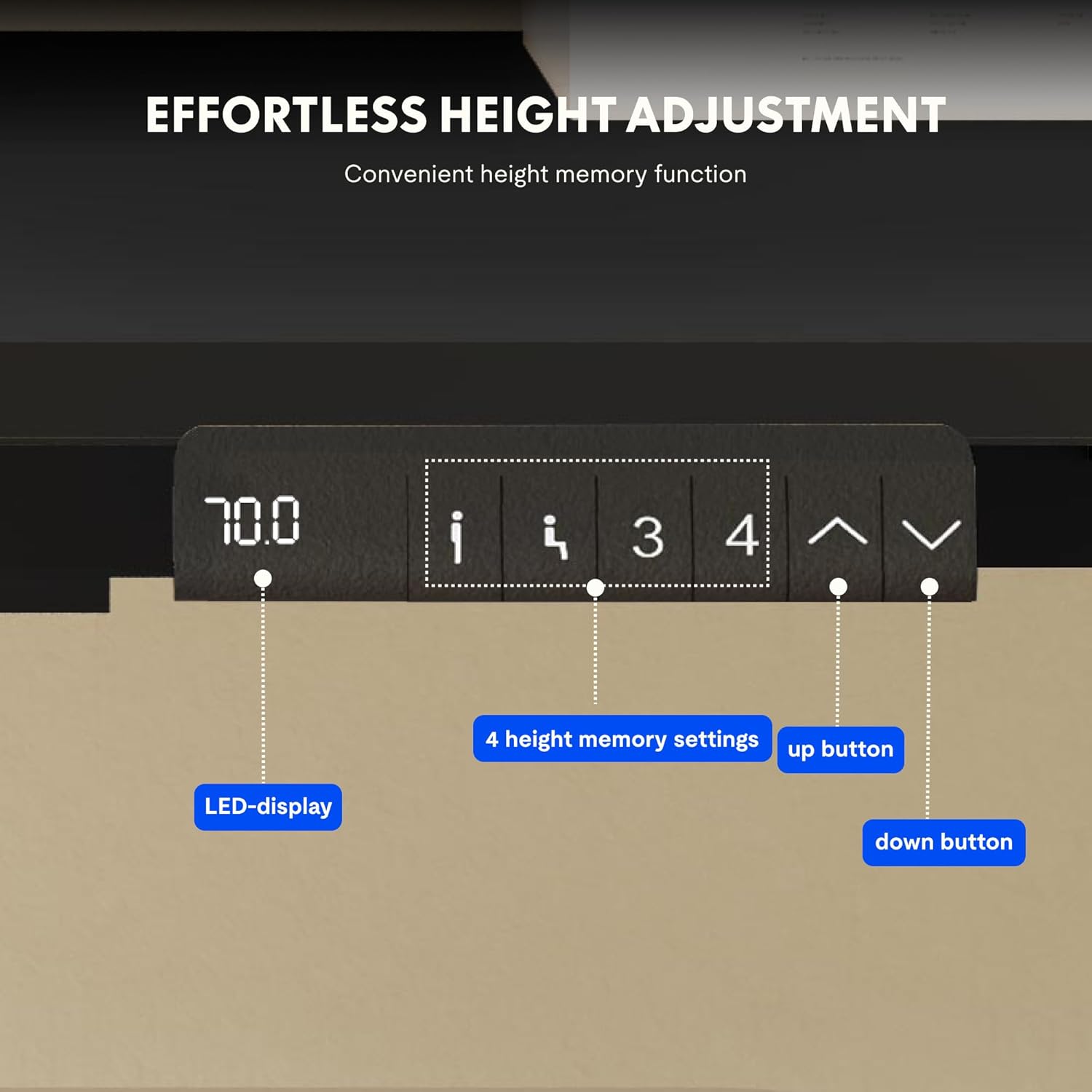
Image: Close-up of the FLEXISPOT desk control panel, showing the LED display for current height, up and down arrow buttons for manual adjustment, and four numbered buttons for saving and recalling height memory presets.
Manual Height Adjustment:
- Paspauskite ir palaikykite Up arrow (^) mygtukas stalui pakelti.
- Paspauskite ir palaikykite Down arrow (v) mygtukas stalui nuleisti.
- Atleiskite mygtuką norimame aukštyje. LED ekrane bus rodomas dabartinis aukštis.
Atminties išankstinių nustatymų nustatymas:
- Reguliuokite stalo aukštį iki norimo aukščio naudodami rodykles aukštyn / žemyn.
- Paspauskite „M“ or "NUSTATYTI" button (if available, otherwise proceed to step 3).
- Press one of the numbered memory buttons (1, 2, 3 arba 4) within 3 seconds. The display will show "S-" followed by the number, indicating the height is saved.
Atminties išankstinių nustatymų atkūrimas:
Simply press the desired numbered memory button (1, 2, 3 arba 4). Stalas automatiškai pasislinks į išsaugotą aukštį.
Atkūrimo funkcija:
If the desk encounters an error or does not move smoothly, a reset may be required. Press and hold the "Žemyn" button until the desk reaches its lowest position, then release and press it again for 5-10 seconds until the display shows "RST" or "E-1" and then returns to the lowest height. The desk will then reset to its factory lowest position.
Priežiūra
- Valymas: Nuvalykite stalo paviršių ir rėmą minkšta,amp skudurėliu. Venkite abrazyvinių valiklių ar stiprių cheminių medžiagų.
- Patikra: Periodiškai patikrinkite visus varžtus ir jungtis, kad įsitikintumėte, jog jie yra tvirtai priveržti. Jei reikia, priveržkite.
- Kabelių valdymas: Ensure cables remain tidy and do not obstruct the desk's movement.
- Svorio pasiskirstymas: Distribute weight evenly on the tabletop to prevent strain on the motors and frame.
Trikčių šalinimas
| Problema | Galima priežastis | Sprendimas |
|---|---|---|
| Stalas nejuda. | Power cable disconnected; control box error; overloaded desk. | Check power connections. Perform a reset (see Operating Instructions). Reduce weight on the desk. |
| Stalas juda netolygiai arba skleidžia neįprastus garsus. | Atsilaisvinusios jungtys; kliūtis; netolygus svorio pasiskirstymas. | Check all screws and connections. Remove any obstructions. Redistribute weight evenly. Perform a reset. |
| Ekrane rodomas klaidos kodas (pvz., E01, E02). | Vidinė sistemos klaida. | Perform a reset. If the error persists, contact customer support. |
| Memory presets not working. | Išankstiniai nustatymai neišsaugoti teisingai. | Re-save the memory presets following the instructions. |
Specifikacijos
| Funkcija | Detalė |
|---|---|
| Prekės ženklas | FLEXISPOT |
| Modelio numeris | E1B+DT1608-BLACK-EU18 |
| Stalviršio matmenys (ilgis x plotis) | 160 cm x 80 cm |
| Aukščio reguliavimo diapazonas | 70 cm–119 cm |
| Apkrova | 100 kg |
| Reguliavimo greitis | 25 mm/s |
| Variklio tipas | Dvigubi varikliai |
| Stalviršio medžiaga | FSC-certified MDF with high-pressure laminate |
| Rėmo medžiaga | Legiruotasis plienas |
| Spalva | Black Tabletop + Black Frame |
Garantija ir palaikymas
FLEXISPOT products are manufactured to high-quality standards. For warranty information and customer support, please refer to the official FLEXISPOT websvetainėje arba susisiekite su savo pardavėju.
- Garantija: Specific warranty terms may vary by region and product. Please check your purchase documentation or the manufacturer's websvetainėje, kur rasite išsamią informaciją.
- Klientų aptarnavimas: For technical assistance, missing parts, or operational questions, please visit the FLEXISPOT Brand Store arba susisiekite su jų oficialiais pagalbos kanalais.


