1. Įvadas
Ačiū, kad pirkoteasing the Muse MT-106 BT Stereo Turntable. This manual provides essential information for the safe and efficient operation of your new device. Please read it thoroughly before use and retain it for future reference.
The Muse MT-106 BT is a versatile 3-speed (33/45/78 RPM) stereo turntable featuring a Bluetooth receiver, a USB port for playback and encoding, and two integrated speakers. It is designed to play vinyl records and can also stream music from any Bluetooth-compatible device such as a tablet, smartphone, or laptop.
2. Saugos instrukcijos
- Maitinimo šaltinis: Užtikrinkite maitinimo šaltinio ttage matches the rating indicated on the unit.
- Vanduo ir drėgmė: Do not expose the unit to rain, moisture, or dripping water. Do not place objects filled with liquids, such as vases, on the unit.
- Vėdinimas: Užtikrinkite tinkamą vėdinimą. Neužblokuokite ventiliacijos angų.
- Šiluma: Laikykite įrenginį atokiau nuo šilumos šaltinių, tokių kaip radiatoriai, šildytuvai, viryklės ar kiti šilumą skleidžiantys prietaisai.
- Valymas: Prieš valydami atjunkite įrenginį nuo elektros lizdo. Naudokite minkštą, sausą šluostę. Nenaudokite skystų ar aerozolinių valiklių.
- Aptarnavimas: Nemėginkite patys aptarnauti šio gaminio. Visą techninę priežiūrą patikėkite kvalifikuotam aptarnavimo personalui.
- Vieta: Padėkite įrenginį ant stabilaus, lygaus paviršiaus, kad jis nenukristų ir nepažeistų.
3. Pakuotės turinys
Patikrinkite, ar jūsų pakuotėje yra šie daiktai:
- Muse MT-106 BT Stereo Turntable
- Vartotojo vadovas
- Maitinimo adapteris
- 45 RPM adapteris
4. Produktas baigtasview
Familiarize yourself with the components and controls of your Muse MT-106 BT Turntable.

4.1 pav. Bendra view of the Muse MT-106 BT Stereo Turntable. This image displays the turntable from an angled perspective, with its transparent dust cover lifted. The wooden base and integrated speakers are visible, along with the black platter, tonearm, and control knobs on the right side.
4.1 Front and Top Components
- Apsauga nuo dulkių: Apsaugo plokštelę ir tonarmą nuo dulkių.
- Lėkštė: Besisukanti platforma, kurioje dedami įrašai.
- Velenė: Holds the record in place on the platter.
- 45 RPM adapteris: Used for playing 7-inch records with large center holes.
- Tonearmas: Laiko rašiklį ir seka plokštelės griovelius.
- Plunksna (adata): The part that reads the record grooves.
- Cue svirtis: Pakelia ir nuleidžia tonarmą.
- Greičio parinkiklis: Perjunkite, kad pasirinktumėte 33, 45 arba 78 aps./min.
- Integruoti garsiakalbiai: Integruoti garsiakalbiai garso išvestims.

Figure 4.2: Control Panel. This image provides a detailed view of the control panel located on the right side of the turntable. It shows three rotary knobs for volume and function selection, along with several buttons for playback control and mode switching.
4.2 Valdymo skydas
- Maitinimo / garsumo rankenėlė: Įjungia / išjungia įrenginį ir reguliuoja garsumą.
- Funkcijų pasirinkimo rankenėlė: Switches between Phono, Bluetooth, USB, and Aux-in modes.
- Atkūrimo valdymo mygtukai: Play/Pause, Skip Forward, Skip Backward (for USB mode).
- Automatinio stabdymo jungiklis: Enables or disables the automatic stop function for vinyl playback.
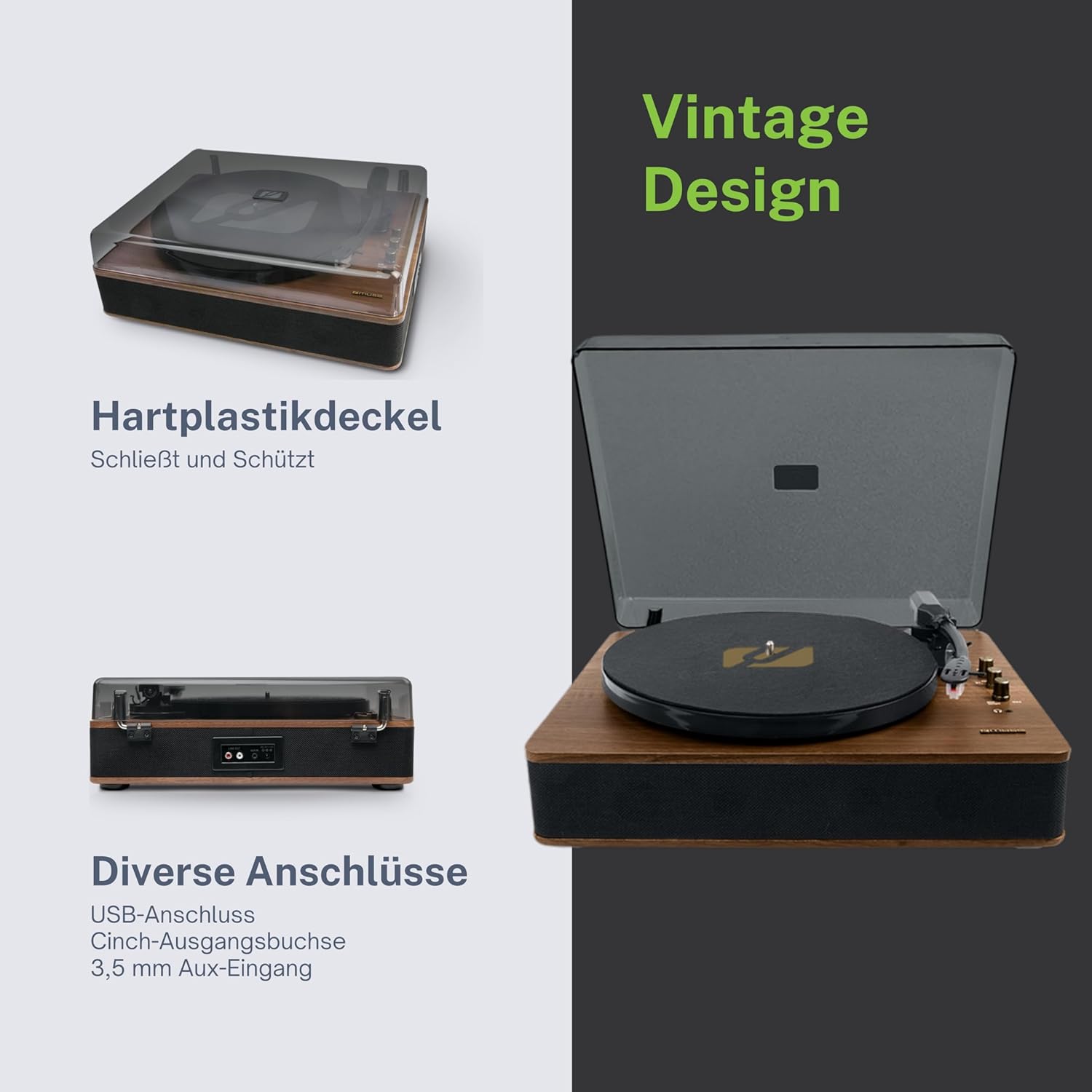
Figure 4.3: Rear Connections. The rear panel of the turntable is shown, featuring various connection ports including RCA audio outputs, a USB port, and an auxiliary input jack, allowing connection to external audio systems or devices.
4.3 Rear and Side Connections
- RCA Output Jacks (L/R): Prisijunkite prie išorinio ampkeltuvai arba maitinami garsiakalbiai.
- USB prievadas: MP3 grojimui files from a USB drive or encoding vinyl to USB.
- AUX IN lizdas (3.5 mm): Prijunkite išorinius garso įrenginius.
- DC IN lizdas: Prijunkite maitinimo adapterį.
- Ausinių lizdas (3.5 mm): Privačiam pasiklausymui.

Figure 4.4: Key Functions Overview. An illustrative graphic highlighting the key functions and connectivity options of the turntable. Icons represent features such as USB encoding, MP3 playback via USB, RCA output, auto-stop, integrated speakers, headphone jack, auxiliary input, and AC power input.
5. Sąranka
5.1 Išpakavimas
- Atsargiai išimkite įrenginį iš pakuotės.
- Nuimkite visas pakavimo medžiagas ir apsaugines plėveles.
- Keep the packaging for future transport or storage.
5.2 Įdėjimas
- Place the turntable on a flat, stable, and level surface.
- Avoid placing it near strong magnetic fields, direct sunlight, or heat sources.
- Įsitikinkite, kad aplink įrenginį yra pakankamai vietos tinkamam vėdinimui.
5.3 Maitinimo jungtis
- Connect the supplied power adapter to the DC IN jack on the rear of the turntable.
- Prijunkite maitinimo adapterį į tinkamą sieninį lizdą.
5.4 Dulkių dangtelio montavimas
- Carefully attach the dust cover to the hinges on the back of the turntable.
- The dust cover protects the unit when not in use. Remove it or lift it fully when playing records.
6. Naudojimo instrukcijos
6.1 Vinilinių plokštelių grojimas
- Pakelkite dangtelį nuo dulkių.
- Rotate the Power/Volume knob clockwise to turn on the unit.
- Set the Function Selector knob to 'Phono'.
- Padėkite plokštelę ant plokštelės. Jei grojate 45 aps./min. singlą, pirmiausia ant veleno uždėkite 45 aps./min. adapterį.
- Select the correct speed (33, 45, or 78 RPM) using the Speed Selector switch.
- Nuimkite rašiklio apsaugą nuo rašiklio.
- Lift the tonearm using the cue lever.
- Perkelkite tonarmą virš norimo įrašo pradžios taško.
- Gently lower the tonearm onto the record using the cue lever. The music will begin to play.
- Garsumą reguliuokite naudodami maitinimo / garsumo rankenėlę.
- At the end of the record, if the Auto Stop switch is ON, the platter will stop rotating. If OFF, the platter will continue to rotate. Manually lift the tonearm and return it to its rest.
6.2 „Bluetooth“ režimas
- Rotate the Power/Volume knob clockwise to turn on the unit.
- Set the Function Selector knob to 'BT' (Bluetooth). The Bluetooth indicator will flash, indicating pairing mode.
- Įjunkite „Bluetooth“ savo išoriniame įrenginyje (išmaniajame telefone, planšetiniame kompiuteryje ir kt.) ir ieškokite galimų įrenginių.
- Select 'MUSE MT-106 BT' from the list of devices. Once connected, the Bluetooth indicator will stop flashing and remain solid.
- You can now play music from your external device through the turntable's speakers. Adjust volume using both the turntable's knob and your external device.
6.3 USB atkūrimas ir kodavimas
6.3.1 USB atkūrimas
- Rotate the Power/Volume knob clockwise to turn on the unit.
- Set the Function Selector knob to 'USB'.
- Insert a USB flash drive into the USB port. The unit will automatically detect and begin playing MP3 files.
- Use the Playback Control Buttons (Play/Pause, Skip Forward, Skip Backward) to navigate tracks.
6.3.2 USB kodavimas (vinilo įrašymas į USB)
The MT-106 BT allows you to convert your vinyl records into digital MP3 fileUSB diske.
- Įsitikinkite, kad USB atmintinė įdėta į USB prievadą.
- Set the Function Selector knob to 'Phono'.
- Start playing your vinyl record as described in section 6.1.
- Press the 'Record' button (refer to Figure 4.2 for button location, typically indicated by a circle or 'REC' label). The recording indicator will illuminate.
- To stop recording, press the 'Record' button again. The recording indicator will turn off.
- The recorded audio will be saved as an MP3 file jūsų USB diske.
6.4 Pagalbinė įvestis (AUX IN)
- Rotate the Power/Volume knob clockwise to turn on the unit.
- Set the Function Selector knob to 'AUX'.
- Connect an external audio device (e.g., MP3 player, CD player) to the AUX IN jack (3.5mm) on the rear of the turntable using an audio cable (not supplied).
- Play audio from your external device. The sound will be output through the turntable's speakers.
6.5 RCA išvestis
Norėdami prijungti patefono prie išorinio įrenginio amplifier arba maitinami garsiakalbiai:
- Ensure the turntable and the external audio system are turned off.
- Connect an RCA audio cable (not supplied) from the RCA Output Jacks (L/R) on the rear of the turntable to the corresponding audio input jacks on your ampkeltuvai arba maitinami garsiakalbiai.
- Turn on both the turntable and your external audio system.
- Select the appropriate input on your external audio system.
7. Priežiūra
7.1 Rašiklio valymas
- Use a soft brush, specifically designed for stylus cleaning, to gently brush the stylus from back to front.
- Nenaudokite per didelės jėgos ir nebraukite iš vienos pusės į kitą, nes tai gali pažeisti rašiklį.
- Keiskite rašiklį maždaug kas 300–500 grojimo valandų arba pastebėję garso kokybės pablogėjimą.
7.2 Įrenginio valymas
- Wipe the exterior of the turntable with a soft, dry, lint-free cloth.
- Nenaudokite abrazyvinių valiklių, vaško ar tirpiklių, nes jie gali pažeisti apdailą.
- Dulkių dangteliui valyti, jei reikia, naudokite minkštą šluostę ir švelnų, neabrazyvinį valiklį.
8. Problemų sprendimas
If you experience issues with your turntable, please consult the following table before contacting support.
| Problema | Galima priežastis | Sprendimas |
|---|---|---|
| Nėra galios | Neprijungtas maitinimo adapteris arba sugedęs lizdas. | Įsitikinkite, kad maitinimo adapteris yra tvirtai prijungtas, o lizdas veikia. |
| Nėra garso | Volume too low; incorrect function mode; external speakers not connected/powered. | Increase volume; select correct function (Phono, BT, USB, AUX); check external speaker connections and power. |
| Poor sound quality (vinyl) | Dirty or worn stylus; dirty record; incorrect speed selected. | Clean or replace stylus; clean record; select correct RPM. |
| Bluetooth neprisijungia | Turntable not in pairing mode; device too far; already connected to another device. | Ensure turntable is in BT mode and flashing; move device closer; disconnect from other devices. |
| USB atkūrimas neveikia | USB atmintinė netinkamai įdėta; nepalaikoma file formatavimas; USB atmintinė sugedusi. | Įdėkite USB atmintinę iš naujo; įsitikinkite, kad files are MP3 format; try a different USB drive. |
9. Specifikacijos
| Prekės ženklas | MŪZA |
| Modelio pavadinimas | MT-106 BT |
| Spalva | Mediena |
| Medžiaga | Mediena |
| Prekės svoris | 4.3 kilogramo |
| Sukimosi greičiai | 33, 45, 78 aps./min |
| Ryšys | Bluetooth, USB, RCA Output, 3.5mm AUX Input, 3.5mm Headphone Jack |
| Ypatingos savybės | Integrated Speaker, Dust Protection, Adjustable Speed, USB Encoding |
| Suderinami įrenginiai | Išmanusis telefonas, planšetinis kompiuteris |
| Maitinimo šaltinis | AC Adapter (1 AAAA battery required for unspecified function, likely remote or internal clock) |
| Kilmės šalis | Kinija |
10. Garantija ir palaikymas
This product is covered by a manufacturer's warranty. Please refer to the warranty card included with your purchase or visit the official MUSE websvetainėje, kurioje pateikiamos išsamios garantijos sąlygos.
For technical support, troubleshooting assistance, or inquiries regarding spare parts, please contact MUSE customer service through their official channels. Information regarding spare parts availability is currently not available.


