1. Įvadas
Ačiū, kad pirkoteasing the Top Tech Audio Spike-4 Bluetooth Speaker. This manual provides important information regarding the setup, operation, maintenance, and troubleshooting of your new speaker. Please read this manual thoroughly before using the product to ensure proper and safe operation.
2. Saugos informacija
Svarbios saugos instrukcijos:
- Nelaikykite garsiakalbio ekstremalioje temperatūroje, drėgmėje ar tiesioginiuose saulės spinduliuose.
- Do not immerse the speaker in water or other liquids. This product is not waterproof.
- Do not attempt to disassemble, repair, or modify the speaker. Refer all servicing to qualified personnel.
- Use only the power cord supplied with the speaker.
- Laikykite garsiakalbį atokiau nuo šilumos šaltinių, tokių kaip radiatoriai, šildytuvai, viryklės ar kiti prietaisai (įskaitant ampkeltuvai), kurie gamina šilumą.
- Valykite tik sausa šluoste.
- Užtikrinkite tinkamą vėdinimą ir neužblokuokite jokių ventiliacijos angų.
- Venkite klausytis dideliu garsu ilgą laiką, kad nepažeistumėte klausos.
3. Pakuotės turinys
Patikrinkite pakuotės turinį, kad įsitikintumėte, jog yra visi reikalingi daiktai:
- 1 x AL-802 Party Speaker (Top Tech Audio Spike-4 Bluetooth Speaker)
- 1x mikrofonas
- 1 x maitinimo laidas
4. Produktas baigtasview ir Savybės
The Top Tech Audio Spike-4 is a portable Bluetooth speaker designed to deliver powerful sound with dynamic light displays, suitable for both indoor and outdoor use.
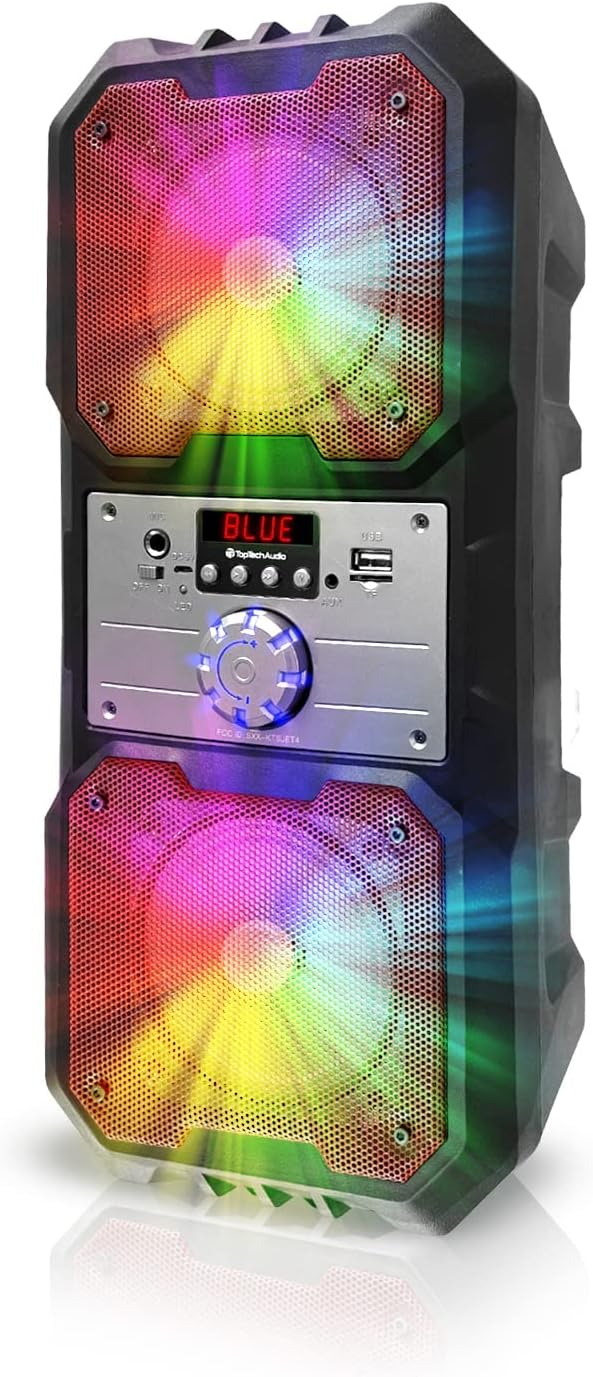
4.1 paveikslas: Priekyje view of the Top Tech Audio Spike-4 speaker, showcasing its dual 4-inch woofers with vibrant, multi-color LED lighting effects. The central control panel is visible between the two speaker grilles.

4.2 paveikslas: Baigėsiview of the speaker's connectivity options and features, including Easy Portable design, USB Port, TF Card Port, Mic Port, AUX Port, and Bluetooth Wireless capability. These features are indicated by clear icons around the speaker.

4.3 paveikslas: Illustration of the speaker's dynamic lighting features, including Multicolor Gradation where lights move with the rhythm, and Reactive Color Show where colors change and rotate slowly, enhancing the audio experience.
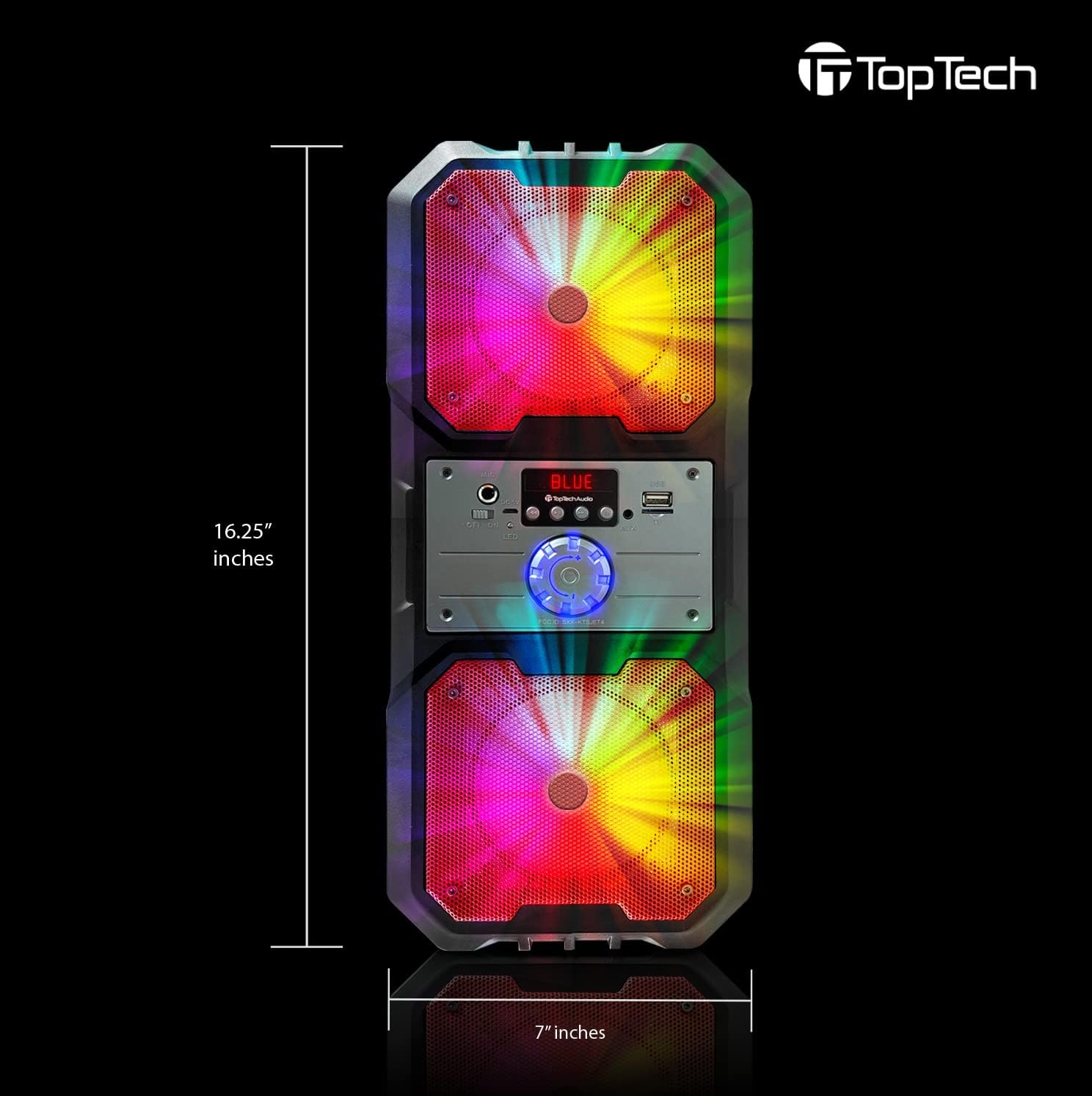
4.4 paveikslas: Dimensions of the Top Tech Audio Spike-4 speaker, showing a height of 16.25 inches and a width of 7 inches, emphasizing its compact yet powerful design.
Pagrindinės funkcijos:
- Galingas garsas: Dual 4-inch woofers deliver full-range audio with deep bass and vibrant highs.
- Rhythmic Disco Lights: Built-in LED lighting effects synchronize with your music for a dynamic visual experience.
- Belaidis „Bluetooth“ srautas: Easily connect your smartphone or tablet with up to 33ft (10 meters) wireless range.
- Keli atkūrimo režimai: Supports USB, TF card, AUX input, and FM radio for versatile listening options.
- Built-in Karaoke Function: Includes a microphone input and a microphone for sing-alongs and parties.
- Nešiojamas dizainas: Įrengtas rankena lengvam transportavimui.
5. Sąranka
5.1 Pradinis įkrovimas
Before first use, fully charge the speaker. Connect the supplied power cord to the speaker's charging port and plug the other end into a standard wall outlet. The charging indicator light will illuminate. Once fully charged, the light may change color or turn off, depending on the model.
5.2 Įjungimas / išjungimas
To power on the speaker, locate the power button, usually on the control panel, and press and hold it for a few seconds until you hear an audible prompt or see the display light up. To power off, repeat the process.
5.3 Bluetooth poravimas
- Ensure the speaker is powered on and in Bluetooth mode. If not, press the "Mode" button to switch to Bluetooth. The display will show "BLUE" or a similar indicator, and you may hear a pairing prompt.
- Mobiliajame įrenginyje (išmaniajame telefone, planšetiniame kompiuteryje ir kt.) įjunkite „Bluetooth“ ir ieškokite galimų įrenginių.
- Select "Spike-4" or "TOPTECH" from the list of found devices.
- Once paired, the speaker will indicate a successful connection, usually with an audible tone.
- Dabar galite leisti garsą iš savo įrenginio per garsiakalbį.
5.4 Connecting Other Audio Sources
- AUX įvestis: Connect an external audio device (e.g., MP3 player, computer) to the speaker's AUX port using a 3.5mm audio cable (not included). Press the "Mode" button to switch to AUX mode.
- USB atkūrimas: Įdėkite USB atmintinę, kurioje yra MP3 garso įrašų files into the USB port. The speaker will automatically switch to USB mode and begin playing.
- TF kortelės atkūrimas: Įdėkite TF (microSD) kortelę su MP3 garso įrašais files into the TF card slot. The speaker will automatically switch to TF card mode and begin playing.
5.5 Mikrofono prijungimas
Plug the supplied microphone into the speaker's microphone input port. The microphone is ready for use in any mode, allowing for karaoke or public address functions.
6. Naudojimo instrukcijos
6.1 Garsumo valdymas
Adjust the master volume using the large rotary knob on the control panel. Turn clockwise to increase volume, counter-clockwise to decrease.
6.2 Režimo pasirinkimas
Press the "Mode" button repeatedly to cycle through available input modes: Bluetooth, FM Radio, AUX, USB, and TF Card. The current mode will be indicated on the display.
6.3 šviesos režimai
The speaker features dynamic LED lights. There may be a dedicated button (e.g., "Light" or "LED") to cycle through different light patterns or to turn the lights on/off. Refer to the control panel for specific button functions.
6.4 FM radijo veikimas
- Switch the speaker to FM Radio mode using the "Mode" button.
- Press the "Play/Pause" button (often labeled with a play symbol) to initiate an automatic scan for available FM stations. The speaker will save detected stations.
- Use the "Previous/Next Track" buttons (often labeled with arrow symbols) to navigate between saved stations.
6.5 Karaoke funkcija
With the microphone connected, simply speak or sing into the microphone. The speaker will amplify your voice. Adjust the microphone volume (if available) and echo effects (if available) using dedicated knobs or buttons on the control panel.
7. Priežiūra
7.1 Valymas
Garsiakalbio išorę nuvalykite minkšta, sausa šluoste. Nenaudokite abrazyvinių valiklių, vaško ar tirpiklių. Įsitikinkite, kad į garsiakalbio angas nepatektų skysčių.
7.2 Saugykla
When not in use for extended periods, store the speaker in a cool, dry place, away from direct sunlight and extreme temperatures. It is recommended to partially charge the battery before storing to prolong its lifespan.
7.3 Akumuliatoriaus priežiūra
The speaker contains a rechargeable battery. To maximize battery life:
- Venkite dažnai visiškai iškrauti akumuliatorių.
- Reguliariai įkraukite garsiakalbį, net jei juo nesinaudojate dažnai.
- Nelaikykite garsiakalbio aukštesnėje nei 45 °C (113 °F) arba žemesnėje nei 0 °C (32 °F) temperatūroje.
8. Problemų sprendimas
| Problema | Galima priežastis | Sprendimas |
|---|---|---|
| Garsiakalbis neįsijungia. | Baterija išsikrovusi. | Connect the speaker to a power source and charge it. |
| Iš garsiakalbio nėra garso. | Garsumas per mažas; pasirinktas neteisingas režimas; įrenginys netinkamai prijungtas. | Increase volume; Ensure correct input mode (Bluetooth, AUX, USB, TF); Reconnect device. |
| „Bluetooth“ susiejimas nepavyksta. | Garsiakalbis neįjungtas susiejimo režimu; Įrenginio „Bluetooth“ išjungtas; Per toli nuo garsiakalbio. | Ensure speaker is in Bluetooth pairing mode; Turn on Bluetooth on your device; Move device closer to speaker (within 10 meters). |
| Mikrofonas neveikia. | Mikrofonas netinkamai prijungtas; Mikrofono garsumas per mažas. | Ensure microphone is fully inserted into the mic port; Adjust microphone volume knob if available. |
| FM radijo statinis garsas. | Silpnas signalas; trukdžiai. | Relocate the speaker to an area with better reception; Perform an auto-scan again. |
9. Specifikacijos
| Funkcija | Detalė |
|---|---|
| Modelio pavadinimas | Spike-4 |
| Prekės ženklas | TOPTECH |
| Garsiakalbio tipas | Outdoor / Portable |
| Garsiakalbio dydis | Dvigubi 4 colių (žemųjų dažnių garsiakalbiai) |
| Ryšio technologija | Bluetooth, USB, AUX |
| Belaidžio ryšio technologija | Bluetooth |
| Bluetooth diapazonas | 10 metro (33 pėdos) |
| Maitinimo šaltinis | Maitinamas baterijomis |
| Baterijos veikimo laikas | Iki 5 valandų |
| Įtraukti komponentai | AL-802 Party Speaker, Microphone, Power Cord |
| Spalva | Juoda |
| UPC | 752574407043 |
| Matmenys (apytiksliai) | 16.25 inches (Height) x 7 inches (Width) |
10. Garantija ir palaikymas
The Top Tech Audio Spike-4 Bluetooth Speaker comes with a Limited Warranty. Please retain your proof of purchase for warranty claims.
For technical support, warranty inquiries, or replacement parts, please contact Top Tech Audio customer service. Refer to the contact information provided with your product packaging or visit the official Top Tech Audio websvetainę.
Gamintojas: Top Tech Audio


