Įvadas
Thank you for choosing the ESR HaloLock 5,000mAh Mini Kickstand Wireless Power Bank. This manual provides essential information for the safe and efficient use of your new device. Please read it thoroughly before use and keep it for future reference.
Pakuotės turinys
Atidarę pakuotę turėtumėte rasti šiuos elementus:
- ESR HaloLock 5,000mAh Mini Kickstand Wireless Power Bank
- USB-C į USB-C įkrovimo laidas
- Instrukcijų vadovas (šis dokumentas)

Video: Unboxing the ESR HaloLock Mini Kickstand Wireless Power Bank
This video demonstrates the unboxing process, showing the power bank, USB-C cable, and included documentation.
Sąranka
Maitinimo banko įkrovimas
- Prijunkite pateiktą USB-C–USB-C laidą prie išorinės baterijos USB-C prievado.
- Kitą laido galą prijunkite prie suderinamo USB-C maitinimo adapterio (nepridedamas).
- The LED indicators on the side of the power bank will illuminate to show the charging status. All four LEDs will be solid when fully charged.

Attaching to Your Device (MagSafe Compatible)
- Ensure your iPhone is MagSafe compatible (iPhone 12 series or newer) or has a MagSafe-compatible case.
- Align the power bank with the back of your iPhone. The magnetic array will snap it securely into place.
- Belaidis įkrovimas prasidės automatiškai.

Naudojimo instrukcijos
Belaidis įkrovimas
- Once magnetically attached to a compatible iPhone, the power bank will automatically begin wireless charging at up to 7.5W.
- The blue LED indicator on the power bank will light up when wireless charging is active.
Wired Charging (Output)
- The USB-C port can also be used for wired output charging at up to 12W.
- Connect a USB-C to USB-C cable (or appropriate cable for your device) from the power bank's USB-C port to your device.
- This allows for faster charging than wireless and can charge non-MagSafe devices.

Stovo naudojimas
- The integrated kickstand can be pulled out from the back of the power bank.
- Adjust the kickstand to your desired viewing angle for both portrait and landscape orientations.
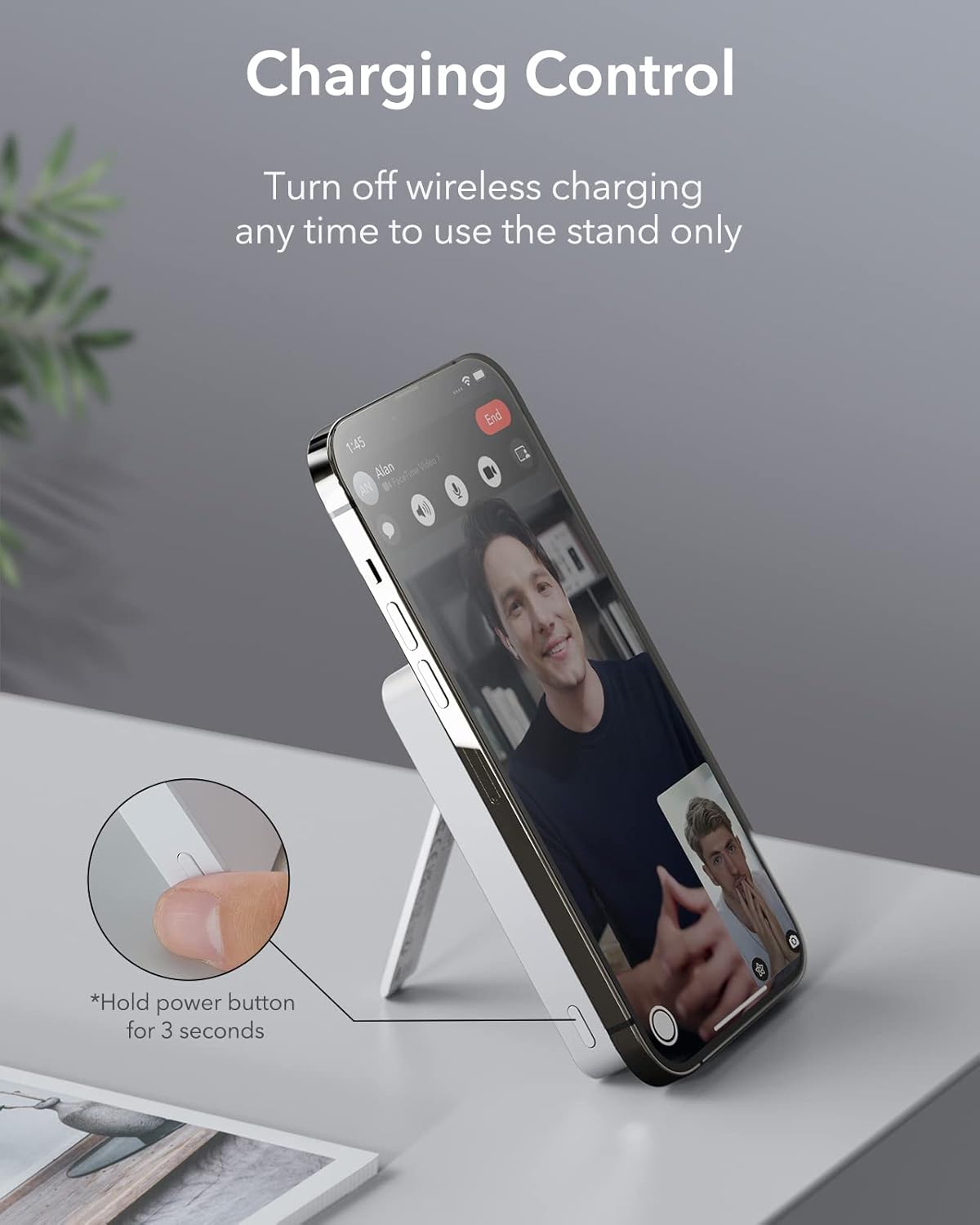
- To use the kickstand without wireless charging, press and hold the power button for 3 seconds to turn off wireless charging.

Video: ESR Battery Pack with MagSafe and Stand Features
This video demonstrates the functionality of the integrated kickstand and the magnetic attachment of the power bank to a smartphone.
Maitinimo mygtuko funkcijos
- Vienas paspaudimas: Check the remaining battery level (LED indicators will light up).
- Paspauskite ir palaikykite (3 sekundes): Turn wireless charging on or off. This is useful if you only want to use the kickstand without charging.
Suderinamumas
The ESR HaloLock 5,000mAh Mini Kickstand Wireless Power Bank is designed for optimal compatibility with:
- iPhone 12 series and newer (including iPhone 15, 14, 13, 12 models).
- Official MagSafe cases.
- ESR HaloLock cases.
- Devices using an ESR HaloLock Universal Ring.
Pastaba: This power bank may not provide a secure magnetic attachment or optimal charging performance with non-magnetic cases.
Specifikacijos
| Funkcija | Detalė |
|---|---|
| Modelio numeris | 2G504 |
| Baterijos talpa | 5000 milijonųamp Valandos (mAh) |
| Belaidžio įkrovimo išvestis | Iki 7.5W |
| Wired Output (USB Type C) | Iki 12W |
| Wired Input (USB Type C) | Up to 18W (for fast charging the power bank) |
| Gaminio matmenys | 3.9 x 2.52 x 0.67 colio |
| Prekės svoris | 5.5 uncijos |
| Ypatingos savybės | Adjustable Kickstand, Magnetic, Portable Charger, Wireless Charging |
Priežiūra
- Laikykite išorinę bateriją atokiau nuo vandens, ugnies ir aukštos temperatūros.
- Stenkitės, kad prietaisas nenumestų ar nepatirtų stipraus smūgio.
- Nuvalykite paviršių minkštu, sausu skudurėliu. Nenaudokite stiprių cheminių medžiagų ar abrazyvinių medžiagų.
- Kai nenaudojate, laikykite vėsioje, sausoje vietoje.
Trikčių šalinimas
Įrenginys neįkraunamas belaidžiu būdu
- Ensure your iPhone is MagSafe compatible (iPhone 12 series or newer) or has a MagSafe-compatible case.
- Check if the power bank is sufficiently charged. Press the power button once to see the LED indicators.
- Ensure the power bank's wireless charging is active (blue LED should be on). If not, press and hold the power button for 3 seconds to activate it.
- Remove any foreign objects between the power bank and your iPhone.
Lėtas įkrovimas
- Wireless charging is generally slower than wired charging. For faster charging, use the USB-C port with a cable.
- Ensure you are using a compatible power adapter for charging the power bank itself (e.g., an 18W or higher USB-C PD adapter for optimal input speed).
Garantija ir palaikymas
ESR offers an upgraded 24-month warranty for this product. To register your product and gain exclusive access to newly launched products, please refer to the QR code or instructions provided in the packaging.
For further assistance or technical support, please visit the official ESR websvetainėje arba susisiekite su jų klientų aptarnavimo tarnyba.