Įvadas
Ačiū, kad pirkoteasing the Ysametp Mini Projector M10. This portable video projector is designed to provide a high-quality home theater experience with its 1080P Full HD support and 10000 Lux LED light source. It features dual built-in stereo speakers with an SRS sound system for immersive audio. Its compact size and multi-connection capabilities make it ideal for various entertainment and presentation needs. Please read this manual thoroughly before operating the projector to ensure proper use and maintenance.
Saugos informacija
Norėdami užtikrinti saugų projektoriaus naudojimą ir pailginti jo tarnavimo laiką, laikykitės šių saugos priemonių:
- Neužblokuokite ventiliacijos angų. Užtikrinkite pakankamą oro cirkuliaciją aplink projektorių, kad jis neperkaistų.
- Saugokite projektorių nuo lietaus ar drėgmės, kad išvengtumėte elektros smūgio ar gaisro.
- Neatidarykite projektoriaus casing. Visus techninės priežiūros darbus patikėkite kvalifikuotiems techninės priežiūros darbuotojams.
- Naudokite tik prie projektorijaus pridėtą maitinimo adapterį.
- Padėkite projektorių ant stabilaus, lygaus paviršiaus, kad jis nenukristų.
- Venkite tiesioginio projektoriaus objektyvo patekimo į akis, kai...amp yra įjungtas.
- Atjunkite projektorių nuo maitinimo lizdo žaibuojant arba kai jis ilgą laiką nenaudojamas.
Pakuotės turinys
Išpakuodami, patikrinkite pakuotės turinį:
- 1 x Ysametp Mini Projector M10
- 1x HDMI laidas
- 1 x 3-in-1 AV Line
- 1 x maitinimo laidas
- 1 x trikojis
- 1 x Drawstring Backpack
- 1 x nuotolinio valdymo pultas (baterijos neįeina)
- 1 x Vartotojo vadovas

Produktas baigtasview
Familiarize yourself with the projector's components and connection ports.

Įvesties / išvesties prievadai:
- HDMI prievadas: Connect to devices like TV sticks, laptops, gaming consoles.
- USB prievadas: Prijunkite USB atmintines, kad galėtumėte atkurti medijos failus.
- TF kortelės lizdas: Įdėkite TF korteles medijos atkūrimui.
- VGA prievadas: Connect to computers or laptops.
- AV prievadas: Connect to older devices like DVD players using the 3-in-1 AV cable.
- 3.5 mm garso lizdas: Prijunkite išorines ausines arba garsiakalbius.
Sąranka
1. Išdėstymas ir ekrano dydis
Position the projector on a flat, stable surface. The projection size can range from 32 inches to 200 inches, with an optimal projection distance between 3.6 feet and 16.4 feet.

2. Maitinimo prijungimas
Connect the supplied power cord to the projector's power input and then plug it into a power outlet.
3. Fokusavimo ir trapecijos koregavimas
After powering on, adjust the focus and keystone knobs located on top of the projector to achieve a clear and rectangular image. The focus ring adjusts image sharpness, while the keystone correction corrects trapezoidal distortion if the projector is not perfectly perpendicular to the screen.
Naudojimo instrukcijos
1. Įjungimas/Išjungimas
- Įjungti: Paspauskite maitinimo mygtuką ant projektoriaus arba nuotolinio valdymo pulto.
- Išjungti: Press the power button again. The projector will go through a shutdown sequence.
2. Įvesties šaltinio pasirinkimas
Use the "Source" button on the remote control or the projector's control panel to select the desired input source (HDMI, USB, TF, VGA, AV).
3. Prietaisų prijungimas
- HDMI: Connect an HDMI cable from your device (e.g., TV Stick, laptop, game console) to the projector's HDMI port.
- USB/TF kortelė: Insert a USB drive or TF card into the respective port. The projector will automatically detect the media or prompt you to select it.
- VGA: Connect a VGA cable from your PC/laptop to the projector's VGA port.
- APIE: Use the provided 3-in-1 AV cable to connect to devices with AV output.
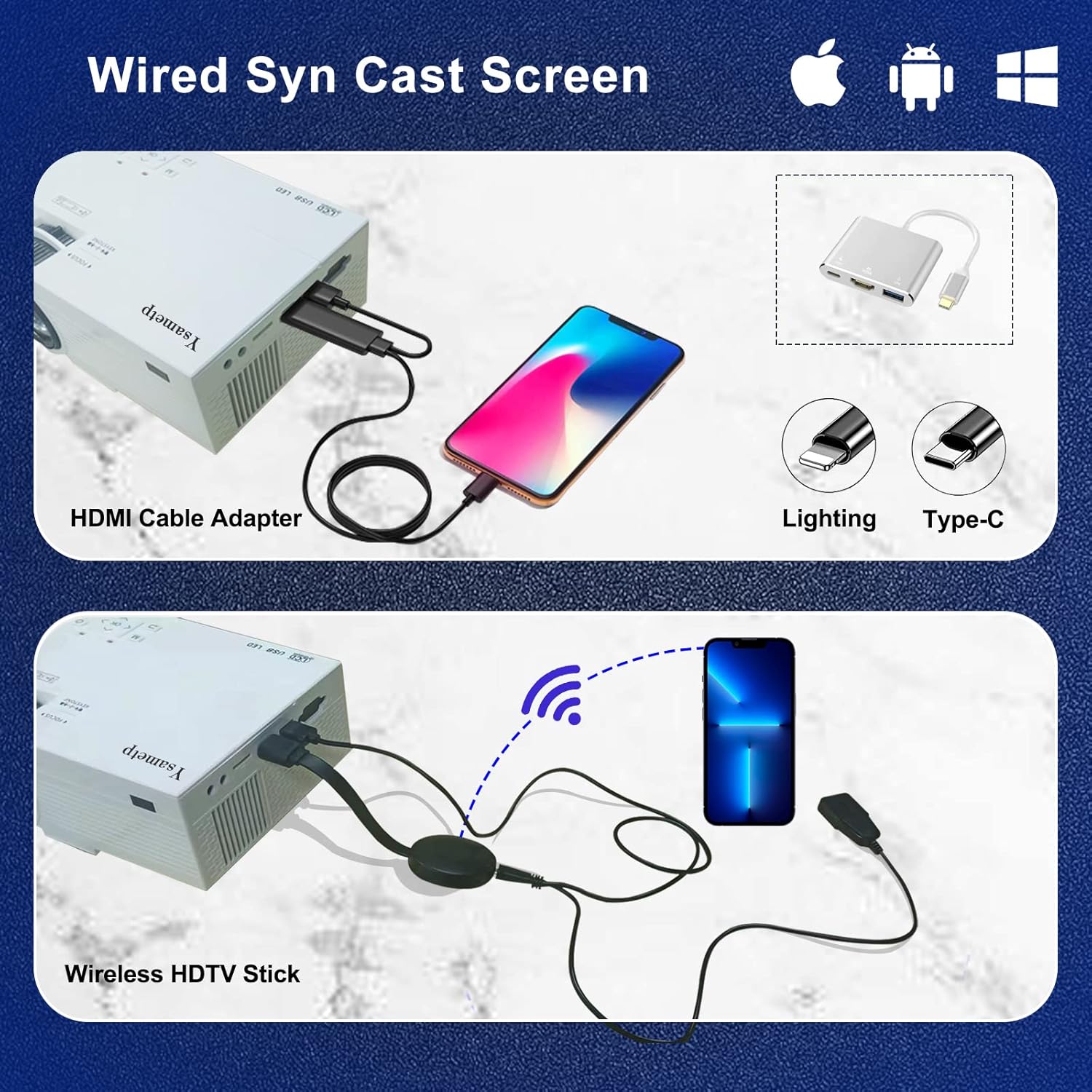
4. Wired Screen Mirroring (for Smartphones)
To mirror your smartphone screen, you will need an HDMI adapter (e.g., Lightning to HDMI for iPhone, USB-C to HDMI for Android) or a Miracast dongle/TV stick (like Roku, Fire TV Stick).

5. Garso išvestis
The projector has dual built-in stereo speakers. For external audio, connect headphones or external speakers to the 3.5mm audio jack.

Priežiūra
1. Valymas
- Objektyvas: Naudokite minkštą, nepūkuotą šluostę, specialiai skirtą optiniams lęšiams. Nenaudokite abrazyvinių valiklių.
- Casing: Wipe the projector's exterior with a soft, dry cloth. Do not use liquid or aerosol cleaners.
- Vėdinimas: Regularly check and clean the ventilation openings to prevent dust buildup, which can affect cooling performance.
2. Sandėliavimas
When not in use, store the projector in a cool, dry place, away from direct sunlight and extreme temperatures. Use the provided drawstring backpack for protection during storage or transport.
3. LED Lifespan
The built-in LED light source is designed to support up to 55,000 hours of use, providing long-lasting performance.
Trikčių šalinimas
| Problema | Galima priežastis / sprendimas |
|---|---|
| Ekrane nėra vaizdo. |
|
| Vaizdas neryškus. |
|
| Vaizdas yra trapecijos formos. |
|
| Nėra garso. |
|
| Nuotolinio valdymo pultas neveikia. |
|
Specifikacijos
| Funkcija | Detalė |
|---|---|
| Prekės ženklas | Ysametp |
| Modelis | M10 |
| Ekrano technologija | LCD |
| Gimtoji raiška | 1920 x 1080 Pixels (Full HD Supported) |
| Vaizdo ryškumas | 11000 liuksų |
| Vaizdo kontrasto santykis | 10000:1 |
| Krašto santykis | 4:3 |
| Projekcijos dydis | 32–200 colio |
| Projekcijos atstumas | 3.6–16.4 pėdų |
| LED tarnavimo laikas | 55,000 valandos |
| Triukšmo lygis | 31 dB |
| Vattage | 60 vatų |
| Techninės įrangos sąsaja | VGA, USB, HDMI, 3.5mm Audio, TF Card |
| Matmenys (I x P x A) | 23.88 x 15.49 x 8.13 cm |
| Svoris | 975.22 g (apie 2.15 svaro) |
Garantija ir palaikymas
Ysametp provides a 3 metų gaminio garantija for the Mini Projector M10.
If you encounter any problems or have questions regarding your projector, please do not hesitate to contact our customer support. Refer to the contact information provided on the product packaging or the official Ysametp webpagalbos svetainę.


