Įvadas
This manual provides comprehensive instructions for the operation, maintenance, and troubleshooting of your MONODEAL Portable CD Player (Model MD-602). Please read this manual thoroughly before using the device to ensure proper functionality and to maximize your listening experience.

Image: The MONODEAL Portable CD Player shown with included earphones, USB-C charging cable, and AUX cable.
Pakuotės turinys
Patikrinkite, ar pakuotėje yra visi reikalingi daiktai:
- 1 x MONODEAL Portable CD Player (MD-602)
- 1 x 3.5–3.5 mm AUX kabelis
- 1 x USB į Type-C įkrovimo laidas
- 1 x Vartotojo vadovas
- 1x ausinės

Image: A visual representation of the MONODEAL CD player and its included accessories: dual AUX cable, USB-C charging cable, wired earphones, and the user manual.
Produktas baigtasviewKomponentai ir valdikliai
Familiarize yourself with the various parts and controls of your CD player:
Vaizdas: priekis view of the MONODEAL Portable CD Player, highlighting the central control panel with playback buttons (Play/Pause, Skip, Stop), Bluetooth button, Program/FM button, A-B Repeat button, and the LED display.
- Skystųjų kristalų ekranas: Rodo takelio numerį, laiką, režimą ir baterijos būseną.
- Paleidimo / pauzės mygtukas (▶⏸): Pradeda arba pristabdo CD atkūrimą.
- Stabdymo mygtukas (■): Sustabdo CD grojimą.
- Previous/Next Track Buttons (◀◀ / ▶▶): Skips to the previous or next track. Hold to fast forward/rewind.
- Bluetooth Button (Ⓑ): Įjungia „Bluetooth“ susiejimo režimą.
- PROG/FM Button: Used for programming tracks or switching to FM transmitter mode.
- AB mygtukas: Activates A-B repeat function.
- EQ mygtukas: Cycles through equalizer sound effects.
- Garsumo valdymas: Rotary dial on the side to adjust volume.
- Maitinimo jungiklis (ON/OFF): Slides to turn the device on or off.
- DC 5V įvestis: Prietaiso įkrovimui.
- Ausinių lizdai (x2): Two 3.5mm audio output jacks for wired headphones.
- Laikymo jungiklis: Locks all buttons to prevent accidental operation.

Vaizdas: Stambus planas view of the side of the CD player, clearly showing the two 3.5mm headphone output jacks, allowing two users to listen simultaneously.
Sąranka
1. Įrenginio įkrovimas
The MONODEAL MD-602 has a built-in 2000mAh rechargeable battery. Before first use, or when the battery is low, charge the device using the provided USB to Type-C charging cable.
- Connect the Type-C end of the cable to the DC 5V input port on the CD player.
- Connect the USB-A end of the cable to a USB power adapter (not included), a computer USB port, or a car charger.
- The charging indicator light will illuminate during charging and turn off when fully charged. A full charge typically takes 3-4 hours and provides up to 10 hours of playback.
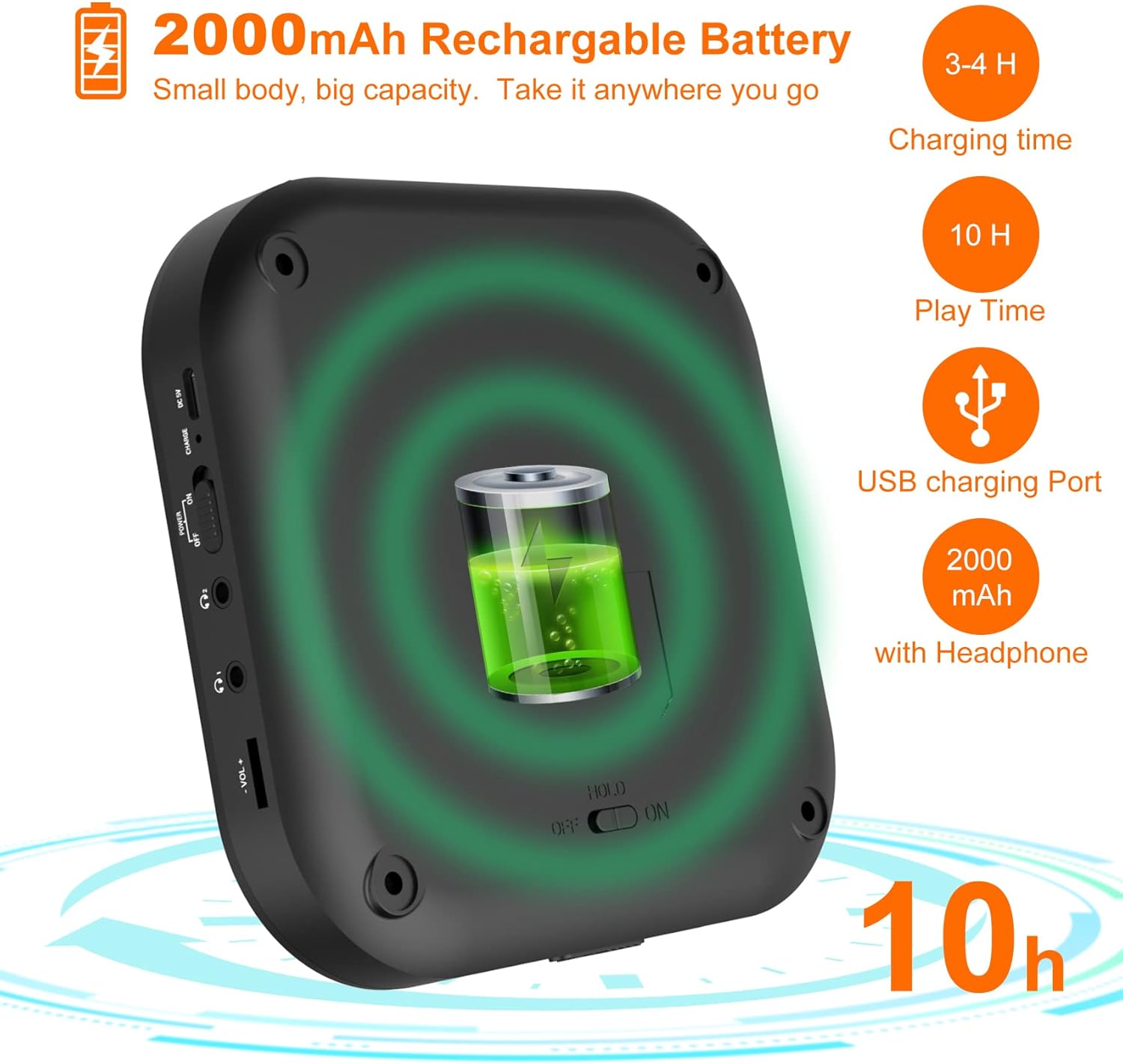
Image: A diagram illustrating the 2000mAh rechargeable battery capacity, showing a charging time of 3-4 hours and a playback time of 10 hours.
2. Kompaktinio disko įdėjimas
- Gently slide the CD compartment door open.
- Place the CD onto the spindle with the label side facing up. Ensure the CD is securely seated.
- Close the CD compartment door firmly until it clicks.
The player supports CD, CD-R, CD-RW, MP3, and HDCD disc formats.
3. Įjungimas/išjungimas
Stumkite GALIA switch to the "ON" position to turn on the CD player. Slide it to "OFF" to power down the device.
Naudojimo instrukcijos
1. Basic CD Playback
- After inserting a CD and powering on, the player will automatically begin reading the disc and start playback.
- Paspauskite Leisti / Pauzė (▶⏸) button to pause playback. Press it again to resume.
- Paspauskite Stop (■) mygtuką sustabdyti atkūrimą.
- Paspauskite Previous/Next Track (◀◀ / ▶▶) praleisti takelius.
- Laikykis Previous/Next Track (◀◀ / ▶▶) , kad persuktumėte takelį į priekį arba atgal.
- Adjust volume using the rotary dial on the side.
2. Play Modes and Sound Effects

Image: A visual guide to the 5 available play modes (Play in order, Repeat a track, Repeat all, A-B repeat, Shuffle) and 5 sound effects (BBS, Pop, Jazz, Rock, Classic).
- Pakartojimo funkcija: Paspauskite REŽIMAS button repeatedly to cycle through play modes:
- Repeat 1 (repeats current track)
- Repeat All (repeats entire disc)
- Shuffle (plays tracks in random order)
- Intro (plays first 10 seconds of each track)
- Normal Play (plays tracks in order)
- AB kartojimas: Paspauskite AB button once to set the start point (A). Press it again to set the end point (B). The player will repeatedly play the section between A and B. Press AB a third time to cancel.
- Ekvalaizeris (EQ): Paspauskite EQ button to cycle through different sound effects: BBS, Pop, Jazz, Rock, Classic.
- Gyvenimo aprašymo funkcija: The player will automatically resume playback from where it was last stopped when powered on again.
3. „Bluetooth“ ryšys
The MD-602 can connect to Bluetooth headphones or speakers (it cannot connect to car Bluetooth systems).
Video: An instructional video demonstrating how to connect the MONODEAL MD-602 CD player to Bluetooth devices.

Image: A step-by-step visual guide detailing the five steps required to successfully connect Bluetooth headphones or speakers to the CD player.
- Turn on your Bluetooth headphone/speaker and ensure its Bluetooth function is activated and in pairing mode.
- Paspauskite Bluetooth (Ⓑ) button on the CD player. If Bluetooth is off, press the Play button to turn it on.
- Select the "BT Search" option and press the Play (▶⏸) button. The player will start searching for nearby Bluetooth devices.
- Paspauskite Play (▶⏸) button to select the name of your device from the list. The blinking Bluetooth icon on the screen indicates searching; a solid icon indicates a successful connection.
- Po sėkmingo suporavimo paspauskite Bluetooth (Ⓑ) button to return to the play interface.
Pastaba: To avoid interference, ensure other paired Bluetooth devices (like cell phones) have their Bluetooth function turned off when connecting new devices to the CD player.
4. FM Transmitter Function (for Car Use)
The MD-602 features a built-in FM transmitter to play CDs through your car's FM radio.

Image: A visual guide demonstrating two methods to connect the CD player to a car audio system: via AUX connection and via FM transmission, showing the FM frequency 87.5MHz.
- Leisdami kompaktinį diską paspauskite PROG/FM button. The FM transmitter frequency will appear on the display.
- Paspauskite PROG/FM button again to cycle through the available FM frequencies: 87.5, 88.5, 93.6, 103, 107.1 MHz, and OFF. Select a frequency you prefer.
- Tune your car's FM radio to the exact same frequency selected on the CD player.
- You can now listen to your CD through your car's speakers.
5. AUX jungtis
Use the provided 3.5mm AUX cable to connect the CD player to external speakers or a car audio system with an AUX input.
- Prijunkite vieną 3.5 mm AUX kabelio galą prie CD grotuvo AUX išvesties prievado.
- Connect the other end to the AUX input port on your external speaker or car audio system.
- Ensure your external device is set to AUX input mode.
Priežiūra
- Valymas: Use a soft, dry cloth to clean the exterior of the CD player. For the lens, use a specialized CD lens cleaning kit. Do not use abrasive cleaners or solvents.
- Saugykla: Store the device in a cool, dry place away from direct sunlight, high temperatures, and humidity.
- Disko priežiūra: Kompaktinius diskus imkite už kraštų. Kad užtikrintumėte optimalų atkūrimą, laikykite juos švarius ir nesubraižytus.
- Akumuliatoriaus priežiūra: For long-term storage, charge the battery to about 50% every few months to prolong its lifespan.
Trikčių šalinimas
| Problema | Galima priežastis / sprendimas |
|---|---|
| Grotuvas neįsijungia. |
|
| Nėra garso ar iškreipto garso. |
|
| CD praleidžia arba negroja. |
|
| Bluetooth ryšio problemos. |
|
Specifikacijos
| Funkcija | Detalė |
|---|---|
| Gaminio matmenys | 2 x 5.5 x 5.5 colio |
| Prekės svoris | 1.09 svaro |
| Modelio numeris | MD-602 |
| Baterijos | 1 Lithium Ion battery required (built-in 2000mAh) |
| Ryšio technologija | AUX, Bluetooth, FM Transmitter |
| Ypatingos savybės | Anti-Skip Protection, Wireless, Portable, Built-in Stereo Speakers, Dual Headphone Jacks, Resume Function, A-B Repeat |
| Palaikomi disko formatai | CD, CD-R, CD-RW, MP3, HDCD |
Garantija ir palaikymas
MONODEAL products are designed for reliability and performance. For warranty information and technical support, please refer to the contact details provided with your product packaging or visit the official MONODEAL websvetainę.
For common inquiries, please refer to the troubleshooting section of this manual.


