1. Įvadas
This manual provides comprehensive instructions for the setup, operation, and maintenance of your REACHER Small Digital Rainbow LED Alarm Clock, Model N188C-Black. Please read this manual thoroughly to ensure proper use and to maximize the functionality of your device.
2. Produktas baigtasview
Pagrindinės funkcijos:
- Large, colorful LED numbers for clear visibility day or night.
- Compact design (5.6" x 2.9" x 1.9") suitable for various spaces.
- Full range 0-100% brightness dimmer slider for personalized display intensity.
- Adjustable alarm volume from 30dB to 85dB.
- Easy-to-use snooze function by pressing any part of the top surface.
- Maitinimas iš lizdo su pridedamu nuolatinės srovės adapteriu.
- Battery backup (2x AAA batteries, not included) to retain time and alarm settings during power outages.
Kas yra dėžutėje:
- Mažas spalvingas LED žadintuvas
- USB kabelis
- Maitinimo adapteris
- Vartotojo vadovas

2.1 pav.: priekis view of the REACHER Small Digital Rainbow LED Alarm Clock.

Figure 2.2: The alarm clock's compact size, shown held in a hand.
3. Sąranka
3.1 Maitinimo jungtis
- Connect the provided USB cable to the DC 5V port on the back of the alarm clock.
- Plug the other end of the USB cable into the included power adapter.
- Insert the power adapter into a standard electrical outlet. The clock display will illuminate.
3.2 Battery Backup Installation (Optional)
For battery backup functionality, which retains time and alarm settings during a power outage (display will be off to conserve power):
- Raskite baterijų skyrių laikrodžio apačioje.
- Atidarykite akumuliatoriaus skyriaus dangtelį.
- Insert two (2) AAA batteries (not included), ensuring correct polarity (+/-).
- Saugiai uždarykite akumuliatoriaus skyriaus dangtelį.
4. Naudojimo instrukcijos

Figure 4.1: Rear controls of the alarm clock.
4.1 Laiko nustatymas
- Paspauskite ir palaikykite LAIKO NUSTATYMAS button located on the back of the clock. The hour digits will begin to flash.
- Naudokite + or - mygtukais nustatykite valandas. Jei naudojate 12 valandų formatą, atkreipkite dėmesį į PM indikatorių.
- Paspauskite LAIKO NUSTATYMAS dar kartą paspauskite mygtuką, kad patvirtintumėte valandas ir pereitumėte prie minučių nustatymo. Minučių skaitmenys mirksės.
- Naudokite + or - mygtukai minutėms reguliuoti.
- Paspauskite LAIKO NUSTATYMAS mygtuką dar kartą, kad išsaugotumėte laiko nustatymą.
4.2 Signalizacijos nustatymas
- Paspauskite ir palaikykite ALARM SET button on the back of the clock. The alarm hour digits will begin to flash, and an alarm icon will appear on the display.
- Naudokite + or - mygtukai žadintuvo valandoms reguliuoti.
- Paspauskite ALARM SET button again to confirm the alarm hour and move to alarm minute adjustment. The alarm minute digits will flash.
- Naudokite + or - mygtukai, skirti žadintuvo minutėms reguliuoti.
- Paspauskite ALARM SET mygtuką dar kartą, kad išsaugotumėte žadintuvo nustatymą.
4.3 Turning Alarm On/Off
Trumpai paspauskite ALARM ON / OFF button on the back of the clock to toggle the alarm function. The alarm icon on the display indicates if the alarm is active.
4.4 Ekrano ryškumo reguliavimas
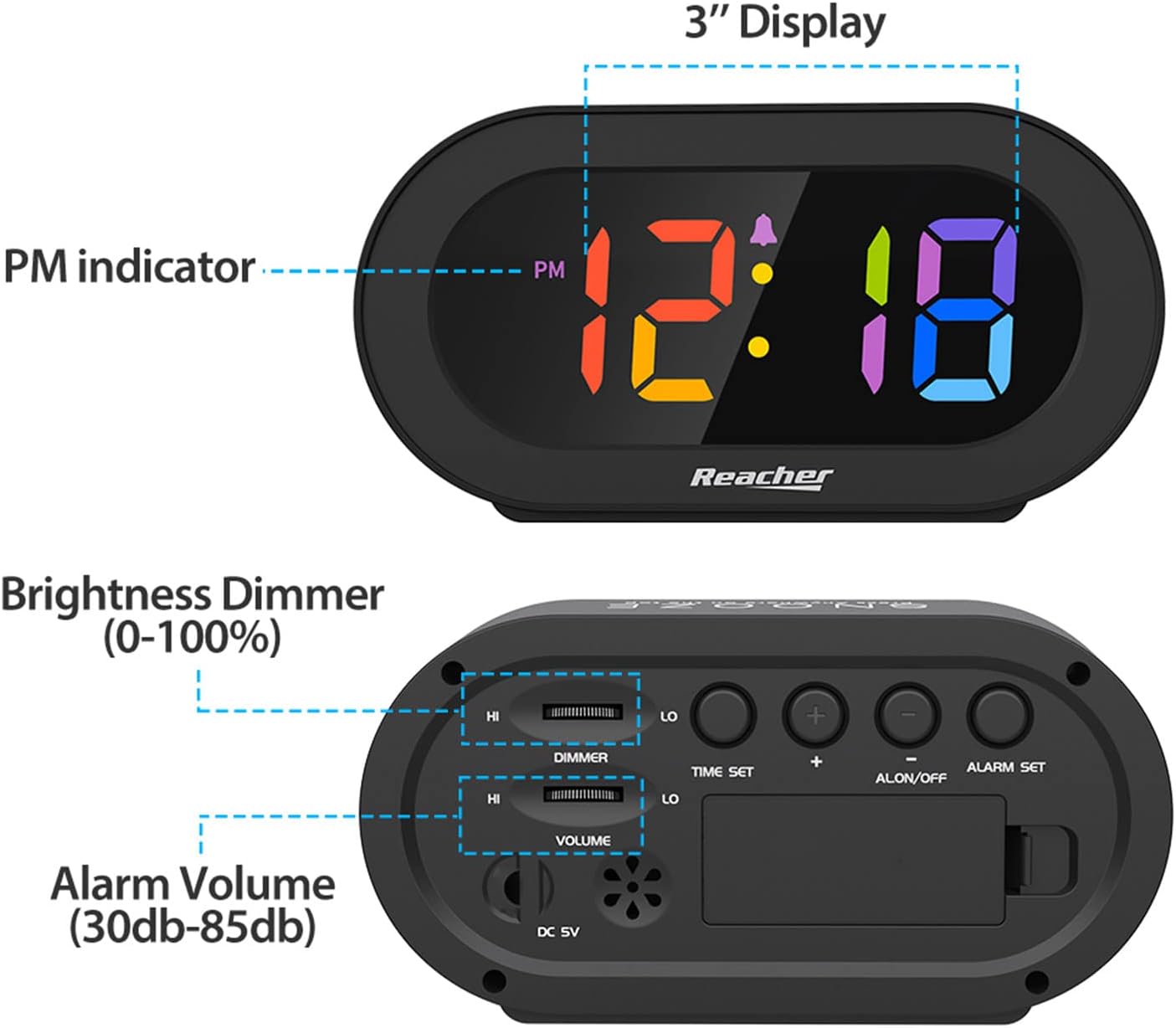
Figure 4.2: Dimmer slider control.
Naudokite REŽIMAS slider located on the back of the clock to adjust the display brightness from 0% (off) to 100% (maximum brightness). Slide towards 'HI' for brighter, and 'LO' for dimmer.
4.5 Signalo garsumo reguliavimas

Figure 4.3: Volume slider control.
Naudokite TOMAS slider located on the back of the clock to adjust the alarm sound level from 30dB (low) to 85dB (high). Slide towards 'HI' for louder, and 'LO' for quieter.
4.6 Snausti funkcija
When the alarm sounds, press any part of the top surface of the clock to activate the snooze function. The alarm will temporarily pause and sound again after a set interval (typically 9 minutes).
4.7 Signalizacijos išjungimas
To stop the alarm completely after it sounds (not just snooze), press the ALARM ON / OFF button on the back of the clock. The alarm icon will disappear from the display.
5. Priežiūra
To maintain your alarm clock in optimal condition:
- Laikrodžio paviršių nuvalykite minkštu, sausu skudurėliu.
- Venkite naudoti abrazyvinius valiklius ar tirpiklius, nes jie gali pažeisti apdailą.
- Keep the device away from excessive moisture, direct sunlight, and extreme temperatures.
- If using battery backup, replace AAA batteries annually or if the clock frequently experiences power outages.
6. Problemų sprendimas
| Problema | Galima priežastis | Sprendimas |
|---|---|---|
| Laikrodžio ekranas išjungtas arba pritemdytas. | No power, dimmer set to 0%, or battery backup active during power outage. | Ensure power adapter is securely plugged in. Adjust the DIMMER slider. If on battery backup, the display is intentionally off; it will return when main power is restored. |
| Signalizacija neskamba. | Alarm is not set, alarm is turned off, or volume is too low. | Verify alarm time is set correctly. Ensure the alarm icon is visible on the display (alarm is ON). Adjust the VOLUME slider to an audible level. |
| Laiko / žadintuvo nustatymai prarandami išjungus maitinimątage. | No battery backup installed or batteries are depleted. | Install two fresh AAA batteries for battery backup. |
| Mygtukai nereaguoja. | Laikinas programinės įrangos triktis. | Unplug the power adapter, remove backup batteries (if installed), wait 30 seconds, then reconnect power. |
7. Specifikacijos
- Modelis: N188C-Black
- Ekrano tipas: Digital LED (Rainbow Digits)
- Gaminio matmenys: 5.6 colio (plotis) x 2.9 colio (aukštis) x 1.9 colio (gylis)
- Maitinimo šaltinis: Laidinis elektrinis (pridedamas nuolatinės srovės 5 V adapteris)
- Baterijos atsarginė kopija: 2 x AAA baterijos (į komplektą neįeina)
- Medžiaga: Akrilnitrilo butadieno stirenas (ABS), akrilas
- Prekės svoris: 5.5 uncijos
- Kambario tipas: Bedroom, Bedside, Desk, Shelf
8. Garantija ir palaikymas
REACHER is committed to providing high-quality products and excellent customer service. While specific warranty periods may vary by region, we strive to address any product-related concerns promptly.
For technical support, warranty inquiries, or any questions regarding your REACHER Small Digital Rainbow LED Alarm Clock, please contact our customer service team:
- El. paštas: customer@reachershop.com
Please provide your model number (N188C-Black) and a detailed description of the issue when contacting support.


