1. Įvadas
Thank you for choosing the GRIFEMA GD1003-2 Smart WiFi-Bluetooth E27 RGB LED Bulbs. These smart bulbs offer versatile lighting options, including 16 million colors, adjustable white light (2700K-6500K), and smart control via Wi-Fi and Bluetooth. This manual provides essential information for safe installation, setup, operation, and maintenance of your smart bulbs.

1.1 vaizdas: Baigtaview of GRIFEMA Smart LED Bulb features.
2. Produktas baigtasview
The GRIFEMA GD1003-2 is a smart LED bulb designed for modern lighting needs. It features an E27 base, 10W power consumption, and an 80W incandescent equivalent brightness. Key functionalities include:
- Dvigubas ryšys: Supports both Wi-Fi (2.4GHz) and Bluetooth for flexible control.
- Visas spalvų spektras: 16 million RGB colors and adjustable white light from 2700K (warm white) to 6500K (cool white).
- Pritemdomas: Ryškumą galima reguliuoti nuo 1% iki 100%.
- Išmanusis valdymas: Compatible with Amazon Alexa and Google Home for voice control, and controllable via a mobile application.
- Išplėstinės funkcijos: Includes group control, scene modes, timer settings, and music synchronization.

Image 2.1: GRIFEMA Smart LED Bulb with key specifications and dimensions.
3. Saugos informacija
Please read and follow these safety instructions carefully before installing and using the bulbs:
- Ensure the power is turned off before installation or removal to prevent electric shock.
- Do not use in fully enclosed fixtures as this may shorten the bulb's lifespan.
- Not suitable for dimmers other than those controlled by the smart application.
- Saugokite lemputę nuo tiesioginio vandens poveikio ar itin didelės drėgmės.
- Neardykite ir nemodifikuokite lemputės.
- Laikyti vaikams nepasiekiamoje vietoje.
4. Sąranka
4.1 Fizinis įrengimas
- Turn off the power to the light fixture at the main switch.
- Carefully screw the GRIFEMA GD1003-2 smart bulb into a standard E27 socket.
- Turn the power back on. The bulb should flash, indicating it is in pairing mode. If not, turn it off and on three times to reset.
4.2 Programėlės atsisiuntimas ir paskyros sukūrimas
- Scan the QR code on the product packaging or search for the recommended smart home app (e.g., 'SurpLife' or 'Smart Life') in your mobile app store (iOS or Android).
- Atsisiųskite ir įdiekite programą.
- Atidarykite programėlę ir užregistruokite naują paskyrą arba prisijunkite, jei jau turite.
4.3 Pairing the Bulb (Wi-Fi & Bluetooth)
The bulbs support dual Wi-Fi and Bluetooth connectivity for easy pairing.
- Įsitikinkite, kad jūsų mobiliajame įrenginyje įjungti „Bluetooth“ ir „Wi-Fi“.
- Open the smart home app. The app should automatically detect the new device in pairing mode.
- Follow the on-screen instructions to add the device. You will need to select your 2.4GHz Wi-Fi network and enter its password.
- Once connected, the bulb will stop flashing and appear in your device list within the app.

Image 4.1: Smart bulb compatibility and app interface for color selection.
5. Naudojimo instrukcijos
5.1 Basic On/Off and Brightness Adjustment
From the app, select the bulb you wish to control. You can toggle it on/off and adjust its brightness using the slider.

Image 5.1: Adjusting color temperature for different ambiances.
5.2 Color Selection (RGB & CCT)
- RGB spalva: Use the color wheel in the app to select from 16 million colors.
- Balta šviesa (CCT): Adjust the white light temperature from warm (2700K) to cool (6500K) to suit your preference.
- Camera Color Selection: Some apps allow you to use your phone's camera to pick a color from your surroundings and apply it to the bulb.
5.3 scenos režimai
The app provides various pre-set scene modes (e.g., Reading, Party, Relax) that combine specific colors and brightness levels. You can also create and customize your own scenes.

5.2 pav.: pvz.amples of different lighting ambiances in various rooms.
5.4 Grupės valdymas
You can group multiple GRIFEMA smart bulbs together in the app to control them simultaneously. This allows you to change the color, brightness, or scene for an entire room or area with a single command.

Image 5.3: App interface demonstrating group control of multiple bulbs.
5.5 Laikmačio funkcija
Set schedules for your bulbs to turn on or off at specific times. This is useful for daily routines, security, or to help you fall asleep and wake up naturally.
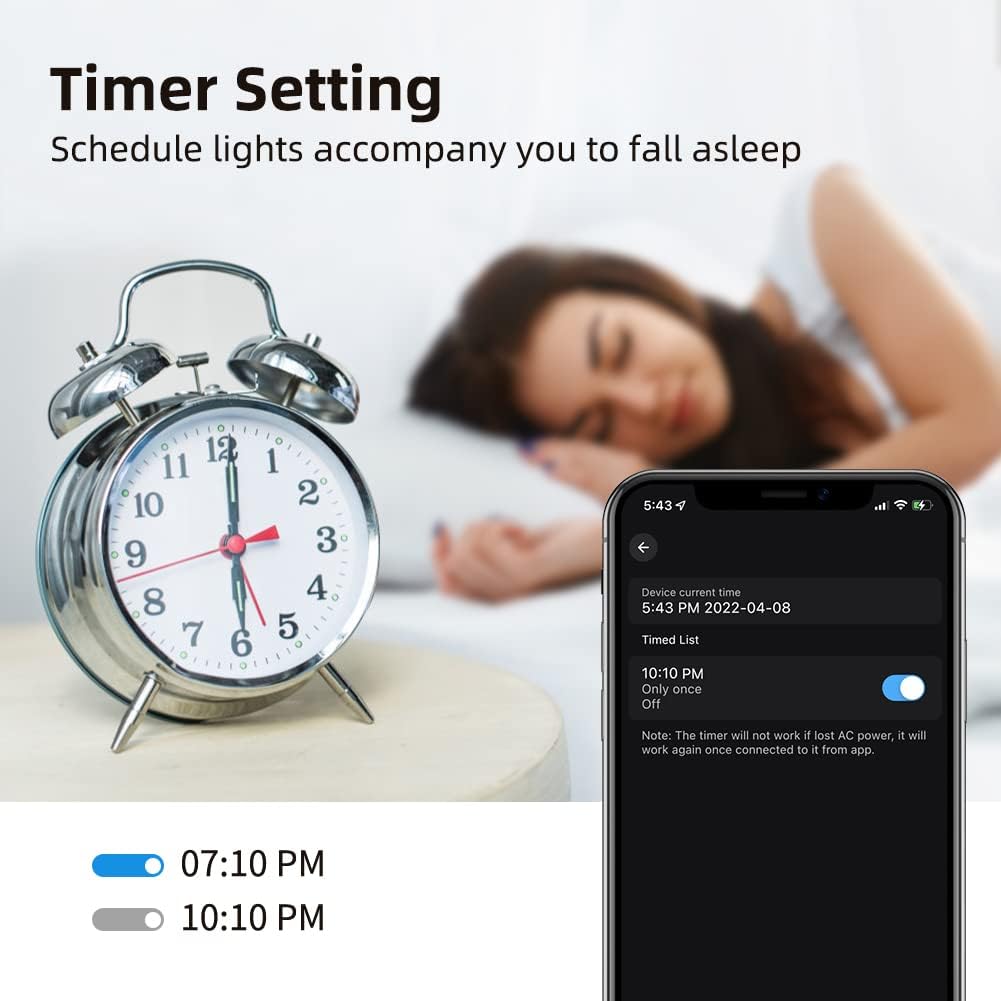
Image 5.4: Setting a timer for the smart bulb via the mobile app.
5.6 Music Sync / Microphone Mode
Activate the music sync feature in the app to make your lights change color and intensity in rhythm with music playing from your phone's microphone. This creates a dynamic atmosphere for parties or entertainment.
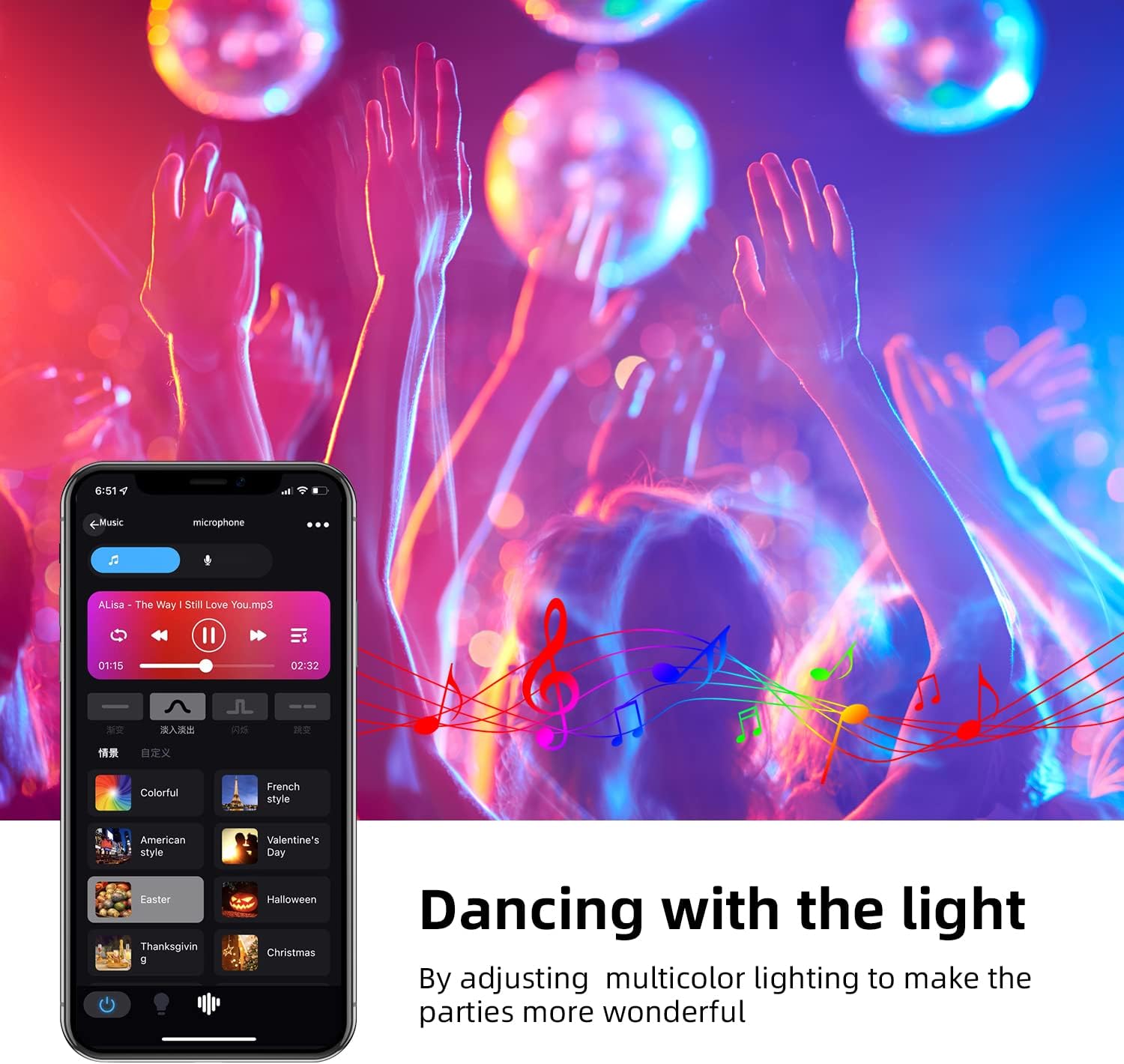
Image 5.5: Lights synchronizing with music in a party setting.

Image 5.6: Microphone mode interface for music synchronization.
5.7 Voice Control (Amazon Alexa / Google Home)
To enable voice control, link your smart home app account with Amazon Alexa or Google Home:
- Atidarykite „Alexa“ arba „Google Home“ programėlę.
- Eikite į „Įgūdžiai ir žaidimai“ („Alexa“) arba „Veikia su „Google“ („Google Home“).
- Ieškokite the smart home app you are using (e.g., 'SurpLife' or 'Smart Life').
- Enable the skill/service and link your account using your app credentials.
- Discover devices. Once discovered, you can use voice commands like:
- „Alexa, įjunk šviesą svetainėje.“
- „Ei, „Google“, nustatyk miegamojo apšvietimą į mėlyną.“
- „Alexa, pritemdyk virtuvės šviesą iki 50 %.“

Image 5.7: Controlling smart bulbs via app and voice commands with Alexa and Google Home.
6. Problemų sprendimas
- Bulb not connecting to Wi-Fi:
– Įsitikinkite, kad jūsų „Wi-Fi“ tinklas yra 2.4 GHz dažnio. 5 GHz tinklai nepalaikomi.
- Check if the bulb is flashing rapidly (pairing mode). If not, power cycle it three times (on-off-on-off-on) to reset.
- Verify your Wi-Fi password is correct.
- Move the bulb closer to your Wi-Fi router during setup.
- Ensure your phone's Bluetooth is on during initial setup. - Balso valdymas neveikia:
- Confirm the smart home app is linked correctly to Alexa/Google Home.
- Ensure the bulb is named clearly in the app (e.g., "Living Room Light").
- Patikrinkite interneto ryšį. - Bulb unresponsive:
- Check the power supply to the light fixture.
- Try turning the bulb off and on from the wall switch.
- If issues persist, try re-pairing the bulb. - Color is not accurate:
- Įsitikinkite, kad programėlė atnaujinta į naujausią versiją.
- Some colors may appear differently depending on the surrounding environment and wall color.
7. Priežiūra
To ensure optimal performance and longevity of your GRIFEMA smart bulbs:
- Lemputę valykite minkštu, sausu skudurėliu. Nenaudokite skystų valiklių ar aerozolių.
- Avoid operating the bulb in environments with extreme temperatures or high humidity.
- Do not expose the bulb to direct sunlight for extended periods.
8. Specifikacijos
| Specifikacija | Vertė |
|---|---|
| Prekės ženklas | GRIFEMA |
| Modelio numeris | GD1003-2 |
| Gamintojas | Ibergrif Griferias, SL |
| Gaminio matmenys (I x P x A) | 6 x 6 x 11.8 cm |
| Prekės svoris | 130 g |
| Prekių skaičius | 2 |
| Spalva | RGB + 2700K-6500K |
| Forma | Kriaušė (A19) |
| Lemputės tipas | LED |
| Cap Type / Bulb Base | E27 |
| Šviesos srautas | 800 lm |
| Vattage | 10 W |
| Kaitrinis ekvivalentas | 80 vatų |
| Spalvos temperatūra | 2700–6500 tūkst |
| Spalvų perteikimo indeksas (CRI) | 80 |
| Vidutinė gyvenimo trukmė | 20000 valandų |
| ttage | 240 voltų |
| Ypatingos savybės | Color Changing, Dimmable, Wi-Fi, Bluetooth, Voice Control |
| Belaidis ryšys | 2.4 GHz Wi-Fi |

Image 8.1: EU Energy Label for the GRIFEMA Smart LED Bulb. For more details, refer to the EPREL duomenų bazė.

Image 8.2: Indication of the bulb's average lifespan.
9. Garantija ir palaikymas
GRIFEMA products come with a standard manufacturer's warranty. Please refer to the warranty information provided at the time of purchase or contact GRIFEMA customer support for details.
For technical assistance, troubleshooting, or any questions regarding your GRIFEMA GD1003-2 smart bulbs, please visit the official GRIFEMA websvetainėje arba susisiekite su jų klientų aptarnavimo skyriumi. Kontaktinę informaciją paprastai galite rasti ant produkto pakuotės arba oficialiame prekės ženklo dokumente. websvetainę.
Palaikymas internetu: GRIFEMA Store on Amazon


