1. Įvadas
Ačiū, kad pirkoteasing the WISCENT WTB-779 Micro Hi-Fi Stereo System. This manual provides essential information for the safe and efficient operation of your new audio system. Please read it thoroughly before use and retain it for future reference.
The WISCENT WTB-779 is a versatile audio system featuring a CD/DVD player, Bluetooth connectivity, FM radio, USB and SD card playback, AUX input, and a microphone port. It is designed to deliver clear audio in a compact form factor.
2. Saugos informacija
Kad išvengtumėte elektros smūgio, gaisro ar įrenginio sugadinimo, laikykitės šių saugos priemonių:
- Nelaikykite šio prietaiso nuo lietaus ar drėgmės.
- Neužblokuokite jokių ventiliacijos angų. Užtikrinkite pakankamai vietos aplink įrenginį tinkamam oro cirkuliavimui.
- Nestatykite įrenginio šalia šilumos šaltinių, tokių kaip radiatoriai, šildytuvai, viryklės ar kiti prietaisai (įskaitant ampkeltuvai), kurie gamina šilumą.
- Saugokite maitinimo laidą, kad ant jo neužeitų ar nesuspaustų, ypač prie kištukų, patogių lizdų ir toje vietoje, kur jie išeina iš aparato.
- Naudokite tik gamintojo nurodytus priedus/priedus.
- Atjunkite šį įrenginį žaibuojant arba kai nenaudojate ilgą laiką.
- Visus techninės priežiūros darbus patikėkite kvalifikuotam techninės priežiūros personalui. Techninė priežiūra reikalinga, kai aparatas buvo kaip nors pažeistas, pvz., pažeistas maitinimo laidas arba kištukas, į aparatą išsiliejo skystis ar įkrito daiktai, aparatas buvo paveiktas lietaus ar drėgmės, neveikia normaliai. , arba buvo numestas.
3. Pakuotės turinys
Carefully unpack your WISCENT WTB-779 Micro Hi-Fi Stereo System and check that all items are present and in good condition. If any items are missing or damaged, please contact your retailer.
- 1 x WISCENT WTB-779 Compact Micro Hi-Fi System (Main Unit and Speakers)
- 1 x nuotolinio valdymo pultas (baterijos neįeina)
- 1 x 3.5 mm AUX kabelis
- 1 x RCA kabelis
- 1 x Naudotojo vadovas (šis dokumentas)

Figure 3.1: Package contents of the WISCENT WTB-779 Micro Hi-Fi Stereo System.
4. Produktas baigtasview
4.1 Priekinio skydelio valdikliai ir jungtys

Figure 4.1: Front panel layout and controls of the WISCENT WTB-779.
- Maitinimo mygtukas: Įjungia arba išjungia įrenginį.
- Režimo mygtukas: Cycles through input sources (CD/DVD, Bluetooth, FM, AUX, USB, SD).
- Garsumo rankenėlė: Reguliuoja pagrindinį garsumo lygį.
- Stop mygtukas: Sustabdo atkūrimą.
- Previous/Channel- Button: Skips to the previous track/chapter or tunes down FM radio frequency.
- Nutildymo mygtukas: Nutildo arba įjungia garso išvestį.
- Play/Pause/Search Button: Plays or pauses playback; initiates search function in some modes.
- Next/Channel+ Button: Skips to the next track/chapter or tunes up FM radio frequency.
- Atidarymo / uždarymo mygtukas: Atidaro arba uždaro disko dėklą.
- Disko dėklas: For inserting CDs or DVDs.
- Mikrofono įvestis: 3.5mm jack for connecting an external microphone.
- Ausinių lizdas: 3.5 mm lizdas ausinėms prijungti.
- USB prievadas: Skirta USB atmintinėms prijungti medijos atkūrimui.
- SD kortelės lizdas: For inserting SD cards for media playback (located on the side or rear, not visible in this image).
4.2 Galinio skydelio jungtys
The rear panel typically includes connections for speakers, FM antenna, and RCA audio/video output for TV connection.
5. Sąranka
5.1 Garsiakalbių prijungimas
Connect the speaker wires from the main unit to the corresponding speaker terminals on each speaker. Ensure correct polarity (positive to positive, negative to negative) for optimal sound quality.
5.2 Prijungimas prie elektros tinklo
Plug the power cord into a standard AC power outlet. The unit is designed for wired electrical power.
5.3 Connecting to a TV (Optional)
Į view DVDs, connect the RCA cable (included) from the 'Video Out' and 'Audio Out' ports on the rear of the main unit to the corresponding 'Video In' and 'Audio In' ports on your television.
5.4 FM antenos prijungimas
Extend the telescopic FM antenna for better radio reception. For improved signal, you may connect an external FM antenna to the designated port on the rear of the unit.

Figure 5.1: WISCENT WTB-779 main unit and speakers.
6. Naudojimo instrukcijos
6.1 Maitinimo įjungimas/išjungimas
Paspauskite GALIA mygtuką priekiniame skydelyje arba nuotolinio valdymo pulte, kad įjungtumėte arba išjungtumėte įrenginį.
6.2 Režimo pasirinkimas
Paspauskite REŽIMAS button on the front panel or remote control to cycle through available input sources: CD/DVD, Bluetooth (BT), FM Radio, AUX, USB, and SD.
6.3 CD/DVD atkūrimas
- Paspauskite ATIDARYTI/UŽDARYTI mygtuką, kad atidarytumėte disko dėklą.
- Place a CD or DVD disc gently into the tray with the label side facing up.
- Paspauskite ATIDARYTI/UŽDARYTI mygtuką dar kartą, kad uždarytumėte dėklą.
- The unit will automatically detect the disc and begin playback. If not, press the PALEISTI / PAUZĖ mygtuką.
- Naudokite PREVIOUS/CHANNEL- ir NEXT/CHANNEL+ mygtukai, skirti praleisti takelius / skyrius.
- Supported disc formats include CD, CD-R, CD-RW, MP3-CD, WMA, DVD, SVCD, VCD, JPEG, and Kodak Picture CD. Blu-ray discs are not supported.
- The DVD player is region-free, compatible with zones 1, 2, 3, 4, 5, and 6.
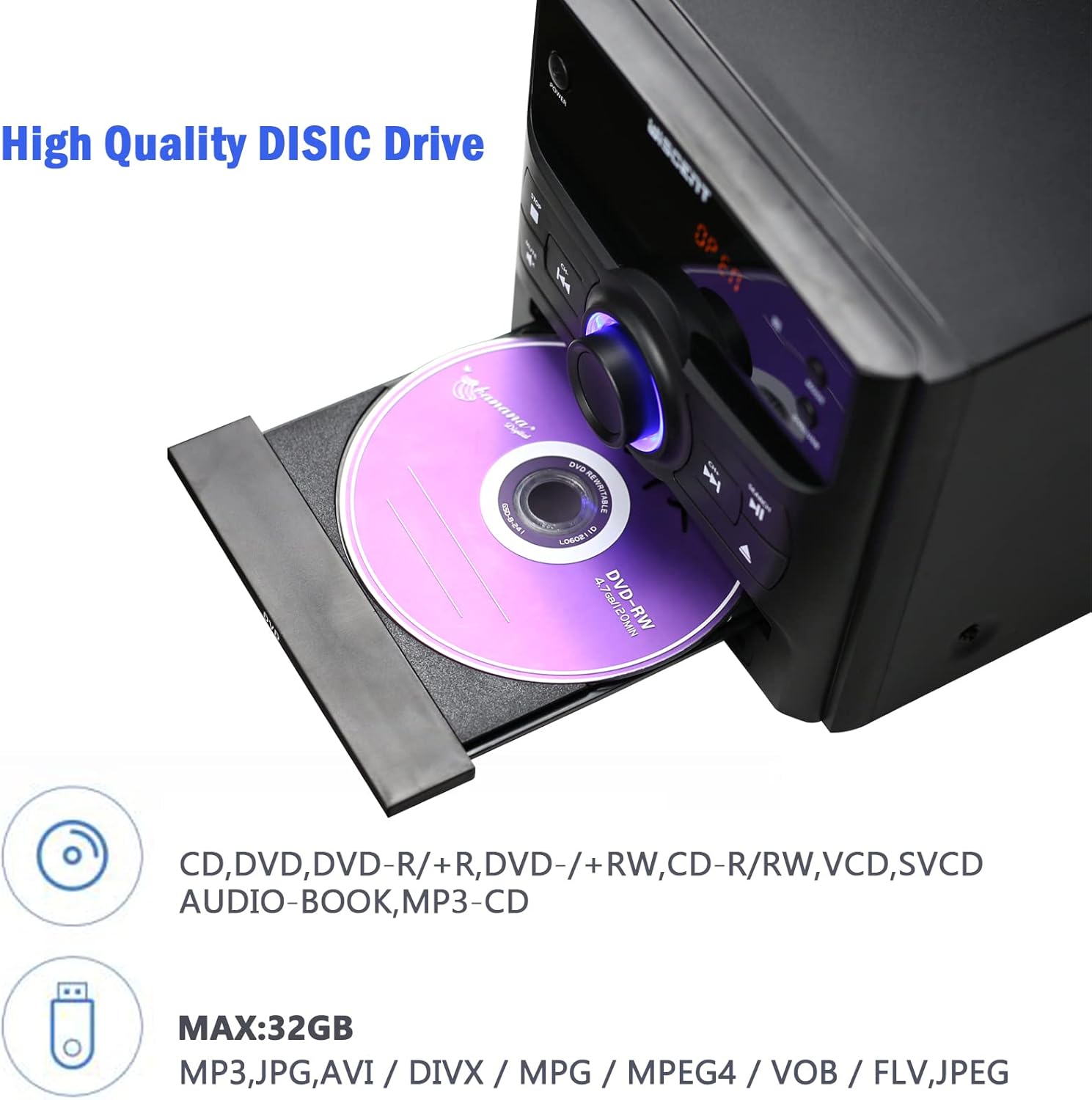
Figure 6.1: Inserting a disc into the WISCENT WTB-779.
6.4 Bluetooth veikimas
- Paspauskite REŽIMAS button until 'BT' or 'Bluetooth' appears on the display. The unit will enter pairing mode.
- Savo „Bluetooth“ įrenginyje (pvz., išmaniajame telefone, planšetiniame kompiuteryje) įjunkite „Bluetooth“ ir ieškokite galimų įrenginių.
- Select 'WISCENT WTB-779' (or similar name) from the list to pair.
- Once paired, you can play audio from your device through the stereo system.
6.5 FM radijas
- Paspauskite REŽIMAS mygtuką, kol ekrane pasirodys „FM“.
- Ištieskite teleskopinę anteną, kad gautumėte geriausią signalą.
- Naudokite PREVIOUS/CHANNEL- ir NEXT/CHANNEL+ mygtukais, kad rankiniu būdu nustatytumėte stotį.
- To auto-scan and save stations, refer to the specific instructions in the full manual (if available) or experiment with holding down the play/pause button. The unit supports 20 programmable preset stations.
6.6 USB/SD atkūrimas
- Įkiškite USB atmintinę į USB prievadą arba SD kortelę į SD kortelės lizdą.
- Paspauskite REŽIMAS button until 'USB' or 'SD' appears on the display.
- Įrenginys automatiškai aptiks ir pradės leisti suderinamą garso įrašą files (MP3, WMA).
- Palaikoma file systems are FAT16/32, with a maximum capacity of 32GB.
6.7 AUX įvestis
Connect an external audio device (e.g., smartphone, MP3 player) to the AUX IN jack using the provided 3.5mm AUX cable. Select 'AUX' mode to play audio from the connected device.
6.8 Mikrofono įvestis
Connect a microphone to the MIC input jack for karaoke or voice amplification. Adjust the microphone volume separately if available, or use the main volume control.
6.9 Ausinių išvestis
Plug headphones into the earphone jack for private listening. The main speakers will be muted automatically.
6.10 Nuotolinis valdymas
The included remote control provides full functionality for operating the WISCENT WTB-779 from a distance. Insert two AAA batteries (not included) into the remote control before use. Point the remote control directly at the main unit's sensor.
7. Priežiūra
7.1 Įrenginio valymas
Wipe the unit with a soft, dry cloth. Do not use abrasive cleaners, waxes, or solvents as they may damage the finish. Ensure the unit is unplugged before cleaning.
7.2 Diskų priežiūra
Handle discs by their edges. Keep discs clean and free of scratches. Store discs in their cases when not in use to prevent dust and damage.
8. Problemų sprendimas
If you encounter issues with your WISCENT WTB-779, please refer to the following common problems and solutions:
| Problema | Galima priežastis | Sprendimas |
|---|---|---|
| Nėra galios | Neprijungtas maitinimo laidas; sugedęs maitinimo lizdas. | Įsitikinkite, kad maitinimo laidas yra tvirtai prijungtas. Išbandykite kitą maitinimo lizdą. |
| Nėra garso | Volume too low; Mute activated; incorrect input mode; speakers not connected. | Increase volume. Deactivate Mute. Select correct input mode. Check speaker connections. |
| Diskas negrojamas | Disc inserted incorrectly; disc dirty or scratched; unsupported disc format. | Re-insert disc correctly. Clean or replace disc. Ensure disc format is supported (not Blu-ray). |
| „Bluetooth“ susiejimo sutrikimas | Unit not in pairing mode; device too far; Bluetooth disabled on device. | Įsitikinkite, kad įrenginys veikia BT režimu. Perkelkite įrenginį arčiau. Įjunkite „Bluetooth“ savo įrenginyje. |
| Prastas FM priėmimas | Antena neišskleista; silpnas signalas. | Extend the telescopic antenna fully. Try repositioning the unit or connecting an external antenna. |
| Nuotolinio valdymo pultas neveikia | Baterijos išsikrovė arba įdėtos neteisingai; kliūtis tarp nuotolinio valdymo pulto ir įrenginio. | Replace batteries. Ensure correct polarity. Remove any obstructions. Point remote directly at the unit. |
Jei problema išlieka ir išbandžius šiuos sprendimus, susisiekite su klientų aptarnavimo tarnyba.
9. Specifikacijos
| Funkcija | Specifikacija |
|---|---|
| Modelis | WTB-779 |
| Prekės ženklas | WISCENT |
| Išėjimo vattage | 30 vatų |
| Garso išvesties režimas | Stereo |
| Ryšio technologija | Bluetooth, USB |
| Palaikomi disko formatai | CD, CD-R, CD-RW, MP3, WMA, DVD, SVCD, VCD, JPEG, Kodak Picture CD (No Blu-ray) |
| DVD Region Compatibility | Region-free (1, 2, 3, 4, 5, 6 zones) |
| USB/SD Support | Up to 32GB, FAT16/32 file sistema |
| FM radijo išankstiniai nustatymai | 20 stočių |
| Maitinimo šaltinis | Su laidu elektra |
| Prekės svoris | 4.73 kilogramo |
| Gaminio matmenys | 56 x 31.4 x 21.2 cm |
10. Garantija ir palaikymas
The WISCENT WTB-779 Micro Hi-Fi Stereo System comes with a 36 mėnesių garantija from the date of purchase. This warranty covers manufacturing defects and ensures lifetime technical support.

10.1 pav.: Garantijos informacija.
For warranty claims, technical assistance, or any product-related inquiries, please contact WISCENT customer support through your purchase platform or the official WISCENT websvetainę.