1. Įvadas
This manual provides essential information for the safe and efficient use of your Black Shark 5 Pro gaming smartphone. Please read this guide thoroughly before operating the device to ensure optimal performance and longevity. Keep this manual for future reference.
2. Įrenginys baigtasview
Familiarize yourself with the physical components of your Black Shark 5 Pro.
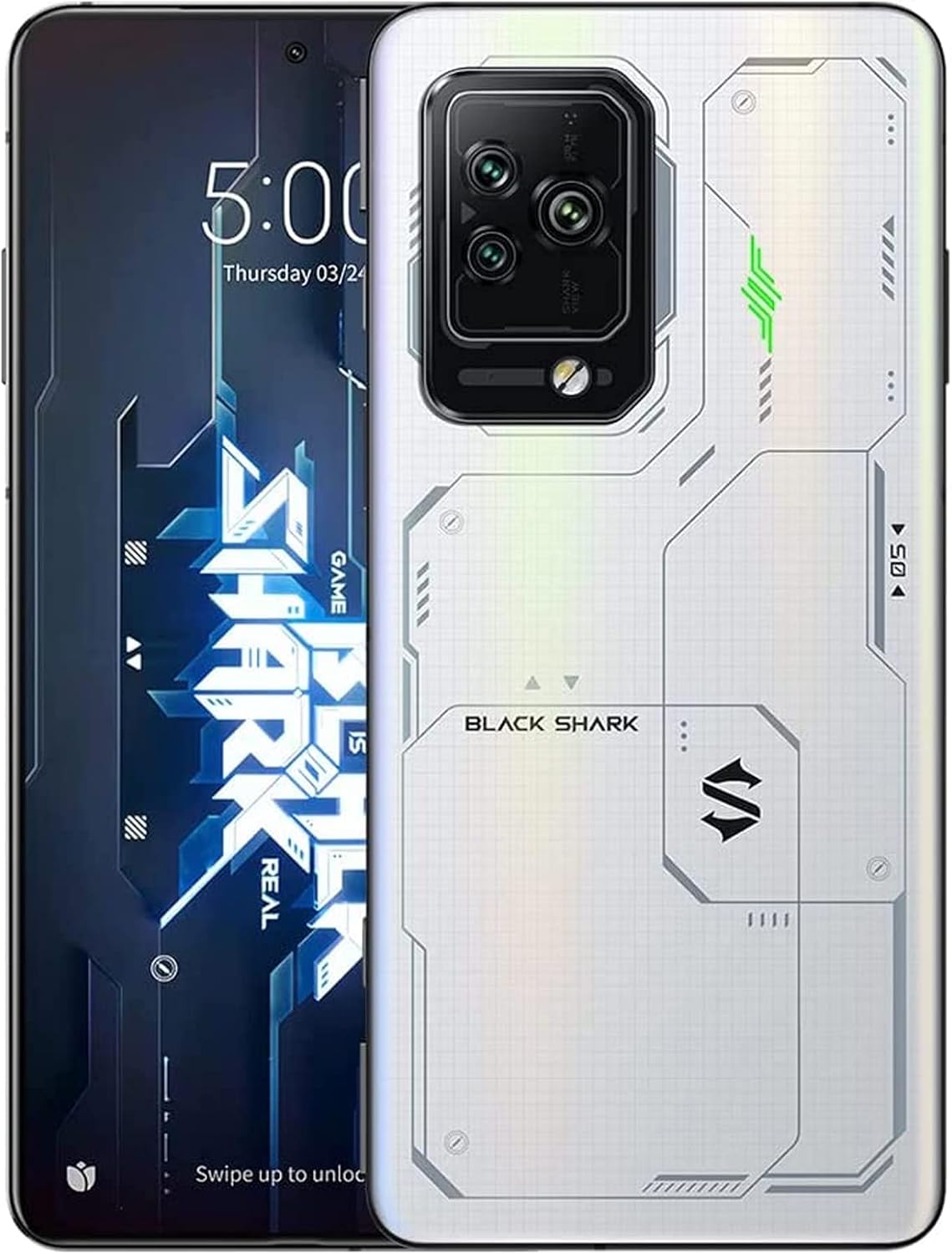
Figure 2.1: Black Shark 5 Pro Front and Rear View. This image displays the smartphone from both the front, highlighting its display, and the back, showcasing the camera array and the distinctive white design.
2.1 Fiziniai komponentai
- Ekranas: Front screen for interaction and content viewing.
- Galinio vaizdo kameros modulis: Located on the back, housing multiple camera lenses and flash.
- Maitinimo mygtukas: Typically on the side, used to power on/off and lock/unlock the screen.
- Garsumo mygtukai: Located on the side, for adjusting audio levels.
- Magnetic Pop-Up Triggers: Retractable shoulder buttons for enhanced gaming control.
- USB-C prievadas: Įkrovimui ir duomenų perdavimui.
- SIM kortelės dėklas: Slot for inserting SIM cards.
3. Sąranka
3.1 Išpakavimas ir pirminė apžiūra
Atsargiai išimkite visus daiktus iš pakuotės. Patikrinkite, ar yra šie komponentai:
- Black Shark 5 Pro Smartphone
- USB-C kabelis
- Maitinimo adapteris (120 W)
- SIM išstūmimo įrankis
- Greito paleidimo vadovas (jei pridėtas)
Inspect the device for any visible damage. If any components are missing or damaged, contact customer support.
3.2 SIM kortelės montavimas
- Suraskite SIM kortelės dėklą įrenginio šone.
- Įkiškite SIM kortelės išstūmimo įrankį į mažą skylutę šalia dėklo ir švelniai paspauskite, kol dėklas iššoks.
- Įdėkite nano-SIM kortelę (-es) į dėklą auksiniais kontaktais žemyn.
- Atsargiai įstatykite dėklą atgal į įrenginį, kol jis spragtelėdamas užsifiksuos.
3.3 Pradinis įjungimas ir sąranka
- Press and hold the Power button until the Black Shark logo appears.
- Vykdykite ekrane pateikiamus nurodymus, kad atliktumėte pradinę sąranką, įskaitant kalbos pasirinkimą, „Wi-Fi“ ryšį, „Google“ paskyros sąranką ir saugos nustatymus.
3.4 Įrenginio įkrovimas
The Black Shark 5 Pro supports 120W Hyper Charge technology for rapid charging.

Figure 3.1: 120W Hyper Charge. This image illustrates the rapid charging capability of the Black Shark 5 Pro, indicating a full charge can be achieved in approximately 15 minutes.
- Connect the USB-C cable to the phone's charging port and the other end to the 120W power adapter.
- Įkiškite maitinimo adapterį į sieninį lizdą.
- The device can reach a full charge in approximately 15 minutes using Ultimate Mode or 24 minutes in Even Mode.
- Use only the official Black Shark 120W charger and cable for optimal charging speed and safety.
4. Naudojimo instrukcijos
4.1 Ekrano funkcijos
The Black Shark 5 Pro features a 6.67-inch OLED E4 display designed for gaming and multimedia.

Figure 4.1: 144Hz E-Sports Display. This image highlights the key features of the Black Shark 5 Pro's display, including its 144Hz refresh rate, 10-bit color depth, and HDR 10+ support.
- Atnaujinimo dažnis: Supports up to 144Hz for smooth visuals. Adjust in Display Settings.
- Palieskite Samplingo kaina: 720Hz for highly responsive touch input, crucial for gaming.
- Spalvos tikslumas: 10-bit color depth, DCI-P3 color gamut, and HDR 10+ for vivid and accurate colors.
- Akių priežiūra: SGS eyecare protection is integrated to reduce eye strain.
4.2 Magnetic Pop-Up Triggers
The device includes physical shoulder triggers for enhanced gaming control.
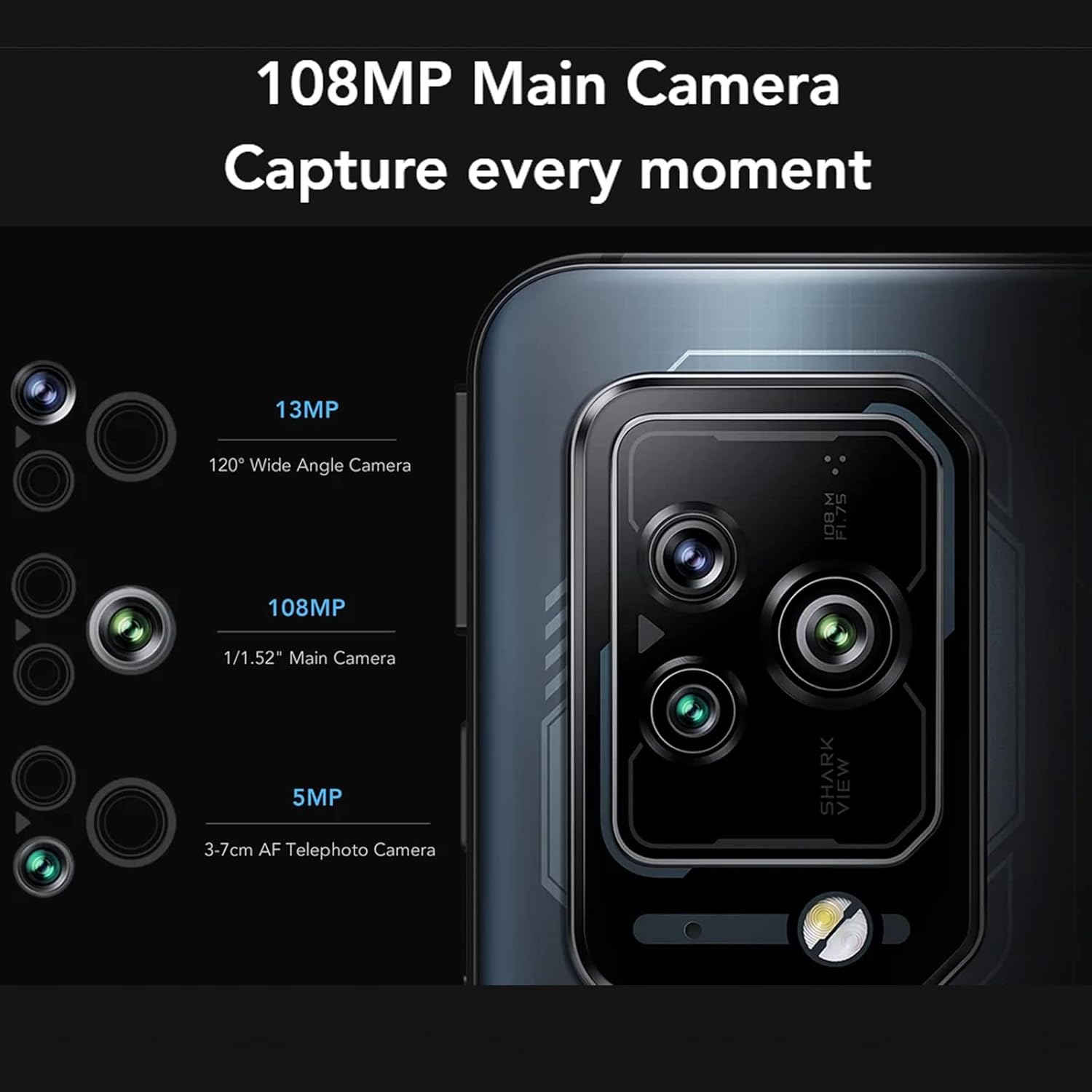
Figure 4.2: Magnetic Pop-Up Triggers. This image displays the side of the Black Shark 5 Pro, highlighting the physical switches used to activate the retractable shoulder triggers.
- Aktyvinimas: Flick the side-mounted switches to extend or retract the triggers.
- Tinkinimas: Triggers can be mapped to in-game actions or customized for other functions like flashlight activation or screenshots via the device settings.
4.3 Kameros veikimas
The Black Shark 5 Pro is equipped with a versatile camera system.
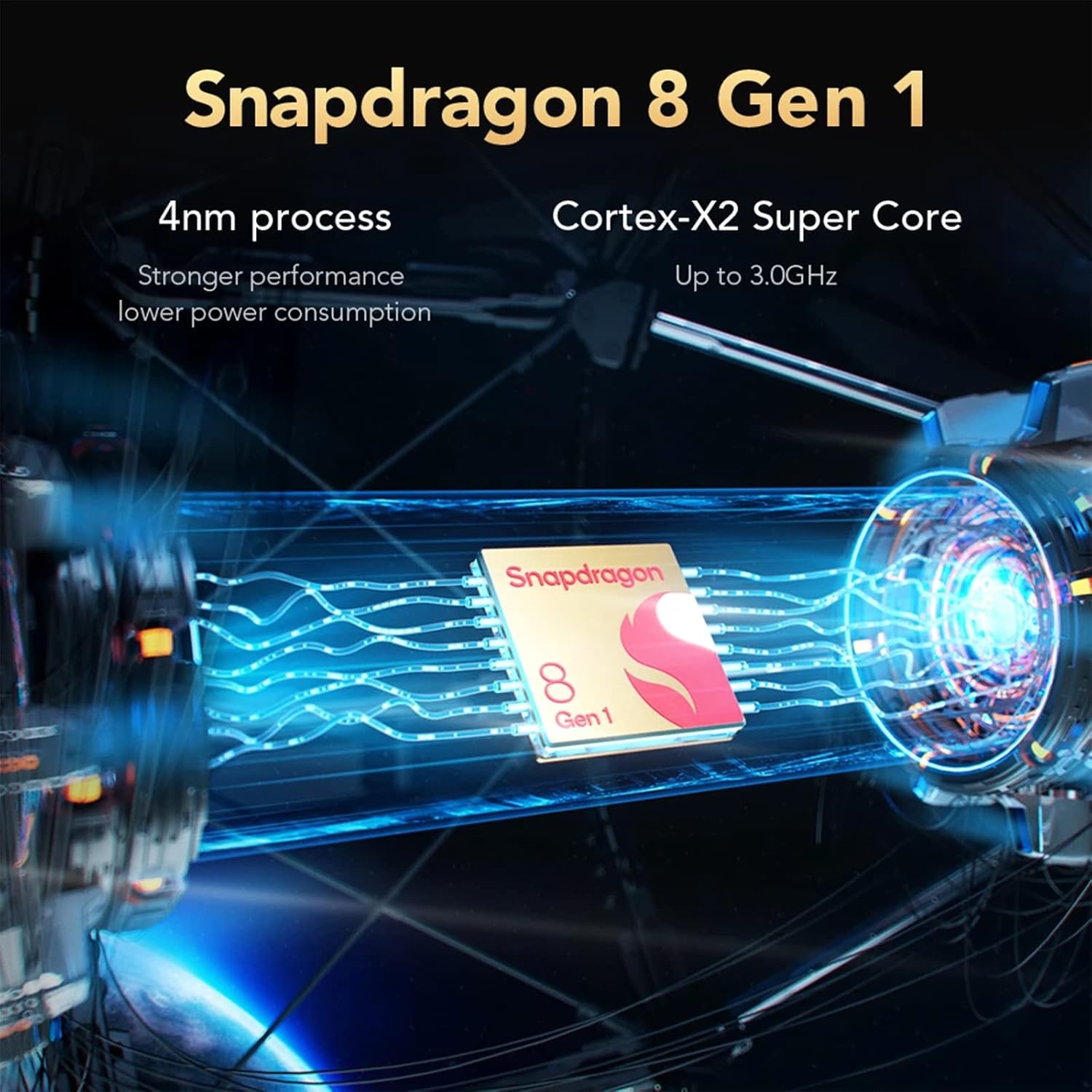
Figure 4.3: Camera Module. This image details the Black Shark 5 Pro's triple camera setup, including a 108MP main sensor, a 13MP 120° wide-angle lens, and a 5MP 3-7cm AF telephoto macro lens.
- Pagrindinė kamera: 108 MP jutiklis didelės raiškos nuotraukoms.
- Plataus kampo kamera: 13MP 120° lens for capturing broader scenes.
- Teleobjektyvo kamera: 5MP 3-7cm AF lens for close-up and detailed shots.
- Atidarykite programėlę „Kamera“ iš pagrindinio ekrano arba programėlių stalčiaus.
- Select desired modes (Photo, Video, Portrait, Pro, etc.) and tap the shutter button to capture.
4.4 Našumas ir aušinimas
The device is powered by a high-performance processor and advanced cooling system.

Figure 4.4: Snapdragon 8 Gen 1. This image illustrates the Snapdragon 8 Gen 1 processor, emphasizing its 4nm process technology and Cortex-X2 Super Core for powerful performance.
- Procesorius: Snapdragon 8 Gen 1 5G mobile platform for fast processing and graphics.
- Atmintis ir saugojimas: 12GB LPDDR5 RAM and 256GB UFS 3.1 storage ensure smooth multitasking and quick app loading.
- Aušinimo sistema: Anti-gravity Dual VC Liquid Cooling with a combined area of 5320mm² helps maintain stable performance during intensive use by efficiently dissipating heat.
5. Priežiūra
5.1 Prietaiso valymas
- Ekraną ir korpusą nuvalykite minkštu, nepūkuotu audiniu.
- Venkite naudoti stiprias chemines medžiagas, abrazyvines medžiagas ar aerozolinius purškalus.
- Saugokite prietaisą nuo per didelės drėgmės.
5.2 Programinės įrangos naujiniai
Reguliariai tikrinkite, ar yra programinės įrangos atnaujinimų, ir juos įdiekite, kad užtikrintumėte optimalų našumą, saugumą ir prieigą prie naujų funkcijų.
- Eikite į Nustatymai > Apie telefoną > Sistemos atnaujinimas , kad patikrintumėte, ar yra galimų atnaujinimų.
- Prieš pradėdami naujinimą, įsitikinkite, kad jūsų įrenginyje yra pakankamai akumuliatoriaus įkrovos ir stabilus interneto ryšys.
5.3 Saugojimo valdymas
To maintain device performance, periodically manage your storage.
- Ištrinkite nereikalingus files, programėlės ir medija.
- Atsarginėms kopijoms kurti naudokite debesies saugyklos paslaugas.
- Check storage usage in Nustatymai > Saugykla.
6. Problemų sprendimas
This section addresses common issues you might encounter with your Black Shark 5 Pro.
6.1 Įrenginys neįsijungia
- Įsitikinkite, kad akumuliatorius įkrautas. Prijunkite įrenginį prie įkroviklio bent 15 minučių.
- Paspauskite ir palaikykite maitinimo mygtuką 10–15 sekundžių, kad priverstumėte paleisti iš naujo.
6.2 Įkrovimo problemos
- Verify that the charger and USB-C cable are securely connected to both the device and the power outlet.
- Use the original Black Shark 120W charger and cable.
- Išbandykite kitą maitinimo lizdą.
- Patikrinkite, ar įkrovimo prievade nėra šiukšlių ar pažeidimų.
6.3 Našumo sulėtėjimas
- Uždarykite nenaudojamas fonines programas.
- Clear cache data from apps and system settings.
- Įsitikinkite, kad yra pakankamai vietos daiktams laikyti.
- Periodiškai paleiskite įrenginį iš naujo.
6.4 Tinklo ryšio problemos
- „Wi-Fi“: Perkraukite maršrutizatorių. Pamirškite ir vėl prijunkite prie „Wi-Fi“ tinklo telefone.
- Mobilus duomenys: Ensure your SIM card is properly installed and your mobile data plan is active. Check network settings.
- Bluetooth: Įsitikinkite, kad abu įrenginiai veikia susiejimo režimu ir yra diapazone.
6.5 Gamyklinių parametrų atkūrimas (kraštutinė priemonė)
Jei problemos išlieka, gamyklinių parametrų atkūrimas gali jas išspręsti. Įspėjimas: tai ištrins visus jūsų įrenginyje esančius duomenis. Prieš tęsdami sukurkite svarbių duomenų atsarginę kopiją.
- Eikite į Nustatymai > Sistema > Atstatyti parinktys > Ištrinti visus duomenis (atkurti gamyklinius).
- Vykdykite ekrane pateikiamus nurodymus, kad patvirtintumėte atstatymą.
7. Specifikacijos
Key technical specifications for the Black Shark 5 Pro smartphone.
| Funkcija | Detalė |
|---|---|
| Modelio pavadinimas | Black Shark 5 Pro (SHARK KTUS-H0) |
| Procesorius | „Qualcomm Snapdragon 8“ 1 kartos (4 nm) |
| RAM | 12 GB LPDDR5 |
| Vidinė saugykla | 256 GB UFS 3.1 |
| Ekranas | 6.67" OLED E4, 144Hz Refresh Rate, 720Hz Touch Sampling Rate, 10-bit Color, HDR 10+ |
| Galinė kamera | 108MP Main, 13MP Ultra-Wide, 5MP Telephoto Macro |
| Baterijos talpa | 4650 mAh (ličio polimeras) |
| Įkrovimas | 120W Hyper Charge |
| Operacinė sistema | Android (versija gali skirtis) |
| Ryšys | 5G, „Wi-Fi“, „Bluetooth“ |
| Matmenys | 19.3 x 15.2 x 6.2 cm (Package); 730 g (Package) |
| Ypatingos savybės | Magnetic Pop-Up Triggers, Anti-gravity Dual VC Liquid Cooling |
8. Saugos informacija
- Baterijos sauga: Do not attempt to replace the battery yourself. Use only authorized service centers. Avoid exposing the battery to extreme temperatures or direct sunlight.
- Atsparumas vandeniui: Šis įrenginys yra nėra atsparus vandeniui. Avoid exposure to liquids. Liquid damage is not covered under warranty.
- Darbinė temperatūra: Naudokite įrenginį rekomenduojamame temperatūros diapazone (paprastai nuo 0 °C iki 35 °C).
- Šalinimas: Atsakingai utilizuokite įrenginį ir jo bateriją laikydamiesi vietinių taisyklių. Neišmeskite į buitines atliekas.
- Vairavimo sauga: Nesinaudokite telefonu vairuodami. Visada teikite pirmenybę eismo saugumui.
9. Garantija ir palaikymas
For warranty information, please refer to the warranty card included with your product or visit the official Black Shark website. For technical support, troubleshooting assistance, or service inquiries, please contact Black Shark customer service through their official channels.
Pastaba: garantijos sąlygos ir nuostatos gali skirtis priklausomai nuo regiono.