Įvadas
This manual provides essential information for the safe and efficient operation of your Crosley Montero Portable Rechargeable Bluetooth Speaker. Please read this manual thoroughly before using the device and retain it for future reference.
Saugos informacija
- Saugokite garsiakalbį nuo vandens ar per didelės drėgmės. Šis gaminys nėra atsparus vandeniui.
- Nestatykite garsiakalbio šalia šilumos šaltinių, tokių kaip radiatoriai, šildytuvai, viryklės ar kiti prietaisai (įskaitant ampkeltuvai), kurie gamina šilumą.
- Naudokite tik gamintojo nurodytus priedus/priedus.
- Atjunkite šį įrenginį žaibuojant arba kai nenaudojate ilgą laiką.
- Visą techninę priežiūrą patikėkite kvalifikuotam aptarnavimo personalui. Techninė priežiūra reikalinga, kai aparatas yra bet kokiu būdu pažeistas.
Kas yra dėžutėje
- Crosley Montero Portable Rechargeable Bluetooth Speaker
- „Micro-USB“ laidas
- 3.5 mm Aux In kabelis
Produktas baigtasview
The Crosley Montero speaker features a classic design with modern connectivity options. It includes controls for mode selection, track navigation, and volume adjustment on the top panel. The rear panel houses the input/output ports.
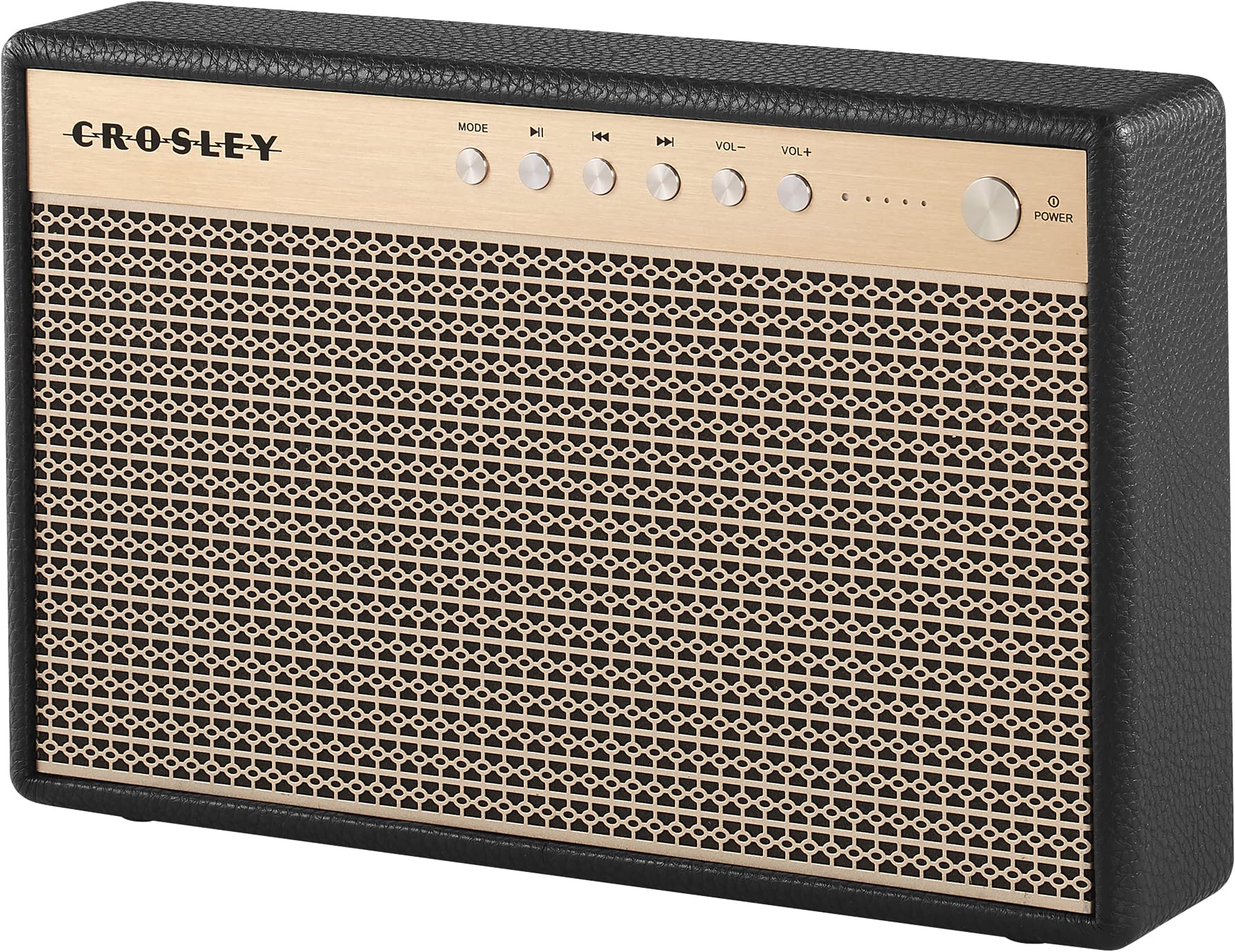
1 paveikslas: Priekyje view of the Crosley Montero speaker, showing the speaker grille and control panel.

2 paveikslas: Galinis view of the Crosley Montero speaker, highlighting the AUX input, USB OTG (input port), Phone Charging (output: 5V 1A), and DC 5V power input ports.
Sąranka
Garsiakalbio įkrovimas
Before initial use, fully charge the speaker using the provided Micro-USB cable. Connect the Micro-USB cable to the DC 5V port on the rear of the speaker and the other end to a compatible USB power adapter (not included). The charging indicator lights will illuminate during charging and turn off when fully charged.
Maitinimo įjungimas/išjungimas
- To power on: Press and hold the Power button on the control panel.
- To power off: Press and hold the Power button. The speaker must be disconnected from external power before shutting off.
Naudojimo instrukcijos
"Bluetooth" poravimas
- Power on the speaker. The Bluetooth indicator light will flash, indicating it is in pairing mode.
- Įrenginyje su „Bluetooth“ funkcija (išmaniajame telefone, planšetiniame kompiuteryje ir kt.) įjunkite „Bluetooth“ ir ieškokite galimų įrenginių.
- Select "Crosley Montero" from the list of devices.
- Once paired, the Bluetooth indicator light on the speaker will remain solid. You can now stream audio from your device.
Pagalbinis įėjimas
To connect a device via the auxiliary input:
- Connect one end of the 3.5mm Aux In cable to the AUX port on the rear of the speaker.
- Kitą laido galą prijunkite prie išorinio įrenginio ausinių lizdo arba garso išvesties.
- Press the "MODE" button on the speaker's control panel until the AUX mode is selected.
- Sureguliuokite garsumą tiek garsiakalbyje, tiek išoriniame įrenginyje.
USB telefono įkrovimas
The speaker features a USB port for charging external devices. Connect your phone's USB charging cable to the "Phone Charging (Output: 5V 1A)" port on the rear of the speaker. This feature allows you to charge your phone while the speaker is in use or on standby.
Pagrindiniai valdikliai
- MODE: Paspauskite, norėdami perjungti „Bluetooth“ ir AUX įvesties režimus.
- Leisti / pristabdyti: Press to play or pause audio during Bluetooth playback.
- Ankstesnis takelis: Press to go to the beginning of the current track or the previous track during Bluetooth playback.
- Kitas takelis: Press to skip to the next track during Bluetooth playback.
- VOL-: Paspauskite norėdami sumažinti garsumą.
- VOL+: Paspauskite norėdami padidinti garsumą.
„1“ vaizdo įrašas: An official video demonstrating the features and operation of the Crosley Montero Portable Rechargeable Bluetooth Speaker.
„2“ vaizdo įrašas: A concise official video showcasing the Crosley Montero Portable Rechargeable Bluetooth Speaker.
Priežiūra
- Clean the speaker with a soft, dry cloth. Do not use liquid cleaners or aerosol sprays.
- Keep the speaker away from dust and direct sunlight.
- Kai garsiakalbio ilgesnį laiką nenaudojate, laikykite jį vėsioje, sausoje vietoje.
Trikčių šalinimas
| Problema | Sprendimas |
|---|---|
| Garsiakalbis neįsijungia. | Ensure the speaker is charged. Connect it to a power source using the Micro-USB cable. |
| Nėra garso iš garsiakalbio. | Check volume levels on both the speaker and the connected device. Ensure the correct mode (Bluetooth/AUX) is selected. |
| „Bluetooth“ įrenginio nepavyksta susieti. | Ensure the speaker is in pairing mode (flashing Bluetooth indicator). Turn off and on Bluetooth on your device. Move the device closer to the speaker. |
| Phone not charging via USB. | Verify the USB cable is securely connected to the "Phone Charging" port and your phone. Ensure the speaker has sufficient battery charge. |
Specifikacijos

3 paveikslas: Overall dimensions of the Crosley Montero speaker: 10.25" W x 6.5" H x 2.25" D.
- Modelio pavadinimas: Montero
- Garsiakalbio tipas: Nešiojamasis garsiakalbis
- Ryšio technologija: Bluetooth, USB
- Belaidžio ryšio technologija: Bluetooth
- Didžiausia garsiakalbio išėjimo galia: 30 vatų
- Dažnio atsakas: 18 KHz
- Maitinimo šaltinis: Maitinamas su baterijomis (pridedama 1 ličio jonų baterija)
- Gaminio matmenys: 10.25 "D x 6.5" P x 2.25" A
- Prekės svoris: 2.8 Pounds (approximately 2.76 pounds)
- Medžiaga: Plastikiniai
- Įtraukti komponentai: Speaker, Micro-USB Cable, 3.5mm Aux In Cable
Garantija ir palaikymas
This Crosley product comes with a limited warranty. For specific warranty details, please refer to the warranty card included with your purchase or visit the official Crosley website. For technical support or customer service, please contact Crosley's USA-based customer support.


