1. Produktas baigtasview
The CIRYCASE Flexible Mini Tripod is a versatile accessory designed for smartphones, cameras, and GoPro devices. It features flexible legs, a 360° rotatable ball head, and includes a wireless Bluetooth remote control for convenient photo and video capture. Its compact and lightweight design makes it suitable for various shooting scenarios, from stable desktop use to wrapping around objects for unique angles.

Image 1.1: The CIRYCASE Flexible Mini Tripod with a smartphone and Bluetooth remote.
2. Pakuotės turinys
Patikrinkite, ar jūsų siuntinyje yra visi toliau išvardyti daiktai:
- 1 × Smartphone Tripod
- 1 × Bluetooth Remote Control
- 1 × Phone Clip
- 1 × Vartotojo vadovas
3. Sąrankos vadovas
3.1 Įrenginio prijungimas
- Išmaniesiems telefonams: Screw the phone clip onto the 1/4" screw thread on the tripod's ball head. Ensure it is securely tightened. Insert your smartphone into the clip, ensuring it is held firmly.
- For Cameras/GoPro: Directly screw your camera or GoPro onto the 1/4" screw thread on the tripod's ball head. Ensure it is securely tightened.
3.2 Adjusting the Tripod
The flexible legs allow for various configurations:
- Standard Tripod: Extend the legs to form a stable base on flat surfaces.
- Wrap-Around: Bend the flexible legs to wrap around objects such as poles, branches, or fences for unique mounting options.
- Handheld/Selfie Stick: Keep the legs together to use the tripod as a comfortable handle for handheld shooting or as a short selfie stick.

Image 3.1: The flexible legs allow for versatile mounting options.
4. Naudojimo instrukcijos
4.1 Bluetooth Remote Control Pairing
Follow these steps to pair the Bluetooth remote control with your smartphone:
- Locate the ON-OFF button on the Bluetooth remote control and slide it to the "ON" position. A blue indicator light will start flashing. If the blue light flashes slowly, the remote is in pairing mode.
- Išmaniajame telefone atidarykite „Bluetooth“ nustatymus.
- Ieškokite available devices and select "AB Shutter3" from the list.
- Once connected, the indicator light on the remote will turn off, indicating successful pairing.
The remote allows you to take photos or record videos from up to 10 meters (33 feet) away, reducing camera shake.

Image 4.1: Bluetooth remote control pairing steps.
4.2 Adjusting Shooting Angles
The tripod features a 360° rotatable metal ball head. Loosen the locking knob to adjust your device to any desired angle, including horizontal and vertical orientations. Tighten the knob to secure the position firmly.

Image 4.2: The tripod's adjustable head allows for 90-degree and 360-degree rotation.
5. Suderinamumas
The CIRYCASE Flexible Mini Tripod offers broad compatibility with various devices:
- Išmanieji telefonai: Compatible with mobile phones with a width of 2.16" - 3.38" (5.49 - 8.59 cm). This includes models such as iPhone 14 Pro Max/14 Pro/14 Plus/13 Pro Max/13/12/11/XS Max/XR/XS/X/SE/8 Plus/7, Samsung Galaxy S22 Ultra/S21+/S22, Huawei, Xiaomi, LG, HTC, SONY, and more.
- Kameros: Features a built-in 1/4" screw thread, making it compatible with DSLR cameras, sports cameras (like GoPro), and digital cameras.
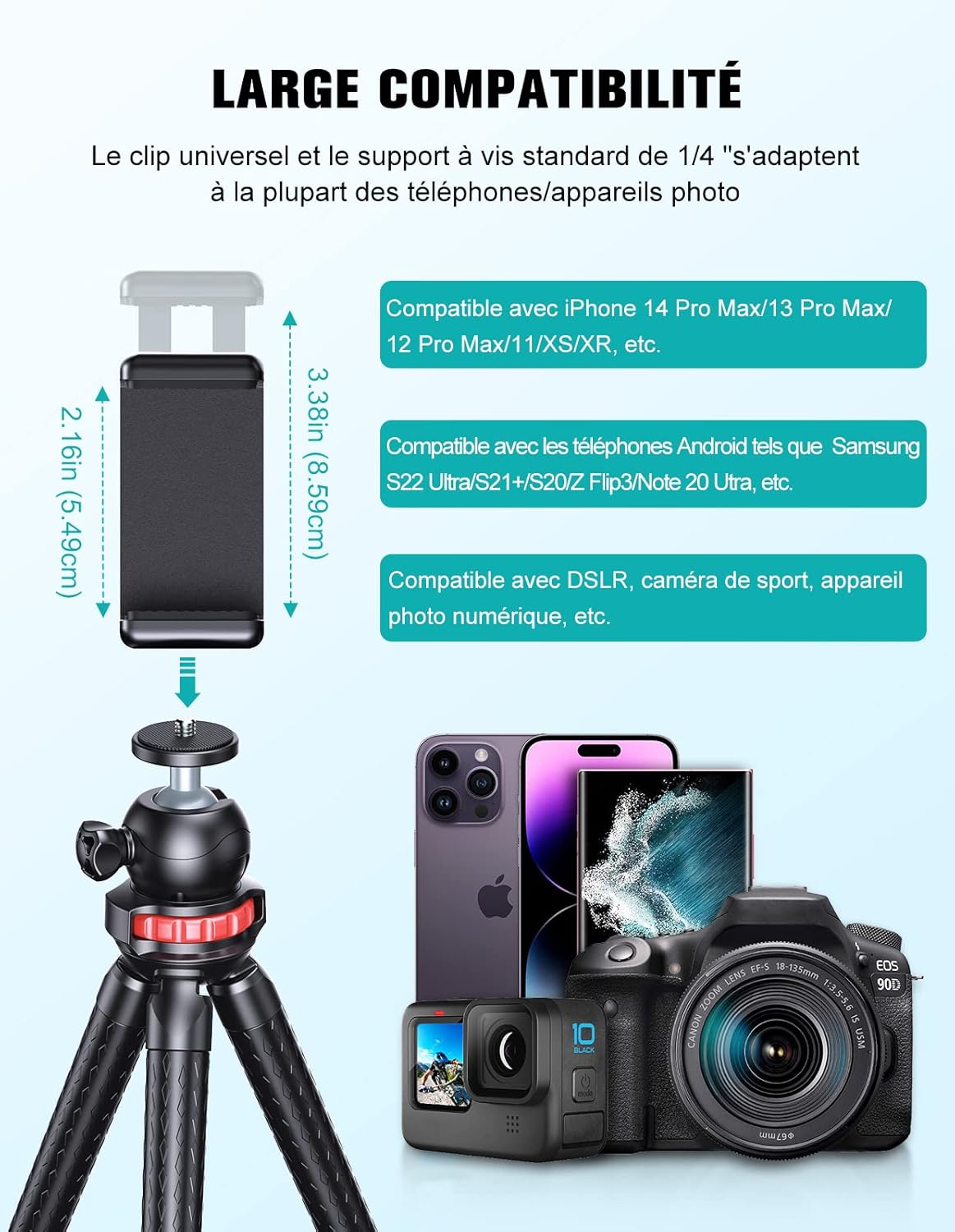
Image 5.1: Universal compatibility with smartphones and cameras.
6. Priežiūra
To ensure the longevity and optimal performance of your CIRYCASE Flexible Mini Tripod, follow these maintenance guidelines:
- Valymas: Wipe the tripod with a soft, dry cloth to remove dust and dirt. For stubborn marks, use a slightly damp šluoste ir kruopščiai nusausinkite. Venkite stiprių cheminių medžiagų ar abrazyvinių valiklių.
- Saugykla: Trikojį laikykite vėsioje, sausoje vietoje, toliau nuo tiesioginių saulės spindulių ir ekstremalių temperatūrų.
- Tvarkymas: While the legs are flexible, avoid excessive force or bending them beyond their natural range to prevent damage to the internal structure.
- Vandens ekspozicija: The tripod is not waterproof. Avoid exposing it to water or high humidity.
7. Problemų sprendimas
If you encounter any issues with your CIRYCASE Flexible Mini Tripod, please refer to the following common problems and solutions:
| Problema | Galima priežastis | Sprendimas |
|---|---|---|
| „Bluetooth“ nuotolinio valdymo pultas nesusijungia. |
|
|
| Trikojis nestabilus. |
|
|
| Phone clip not holding device securely. |
|
|
8. Specifikacijos
| Funkcija | Detalė |
|---|---|
| Modelis | Tripod 30Q |
| Prekės ženklas | CIRYCASE |
| Spalva | Juoda |
| Medžiaga | High-quality aluminum alloy, high-density rubber |
| Prekės svoris | 361 gramų |
| Gaminio matmenys (I x P x A) | 20 x 10.2 x 4.6 cm |
| Minimalus Aukštis | 15 centimetras |
| Maksimalus aukštis | 152 Centimeters (when used as selfie stick/extended) |
| Trikojo galvutės tipas | Ball Head (360° Rotatable) |
| „Bluetooth“ nuotolinio valdymo pultas | Iki 10 metrų (33 pėdų) |
| Phone Clip Width Range | 2.16–3.38 colių (5.49–8.59 cm) |
| Baterijos sudėtis (nuotolinio valdymo pultas) | Ličio jonų (1 komplekte) |
| Atsparumas vandeniui | Neatsparus vandeniui |
9. Garantija ir palaikymas
CIRYCASE products are designed for durability and performance. For any warranty claims or technical support, please contact CIRYCASE customer service through the retailer where the product was purchased or refer to the contact information provided on the product packaging or official CIRYCASE websvetainę.
Prašome išsaugoti pirkimo įrodymą garantijos tikslais.


