Keychron Q10 laidinė pasirinktinė mechaninė klaviatūra vartotojo vadovas
Model: Q10 | Brand: Keychron
1. Įvadas
The Keychron Q10 is a premium 75% Alice layout mechanical keyboard designed for ergonomic comfort and extensive customization. Featuring a split, curved frame, it aims to reduce wrist strain during prolonged use. This manual provides detailed instructions for setting up, operating, customizing, and maintaining your Keychron Q10 keyboard.

Image 1.1: Keychron Q10 Alice Layout Mechanical Keyboard with an example Gateron G Pro Blue Switch.
2. Pakuotės turinys
Please verify that all items listed below are included in your Keychron Q10 package:
- 1x Fully Assembled Keyboard (including Aluminum case, PCB, Steel Plate, Sound Absorbing Foam, 14x Gaskets, 5 sets Stabilizers, 1 set Keycaps (Double-Shot PBT), 1 set Switches (Gateron G Pro), 1x Acoustic Tape)
- 1x C tipo–C tipo kabelis
- 1x A tipo–C tipo adapteris
- 1x jungiklio traukiklis
- 1x raktų dangtelio traukiklis
- 1x Atsuktuvas
- 1x šešiabriaunis raktas

Image 2.1: Visual representation of the Keychron Q10 keyboard and its included accessories.
3. Sąranka
- Išpakuokite klaviatūrą: Carefully remove the Keychron Q10 keyboard and all accessories from its packaging.
- Prijunkite kabelį: Use the provided Type-C to Type-C cable to connect the keyboard to your computer. If your computer only has Type-A ports, use the included Type-A to Type-C adapter.
- Operacinės sistemos suderinamumas: The Keychron Q10 is compatible with Mac, Windows, and Linux operating systems. No additional drivers are typically required for basic functionality.
- Pradinis bandymas: Open a text editor or word processor and test typing on the keyboard to ensure all keys are functioning correctly.
4. Klaviatūros valdymas
4.1 Pagrindinis spausdinimas
The Keychron Q10 functions as a standard mechanical keyboard. Its 75% Alice layout provides an ergonomic split design for comfortable typing. Familiarize yourself with the key placement, especially the split spacebar and modified bottom row.
4.2 Programuojama rankenėlė
The integrated programmable knob offers quick access to various functions. By default, it often controls volume (rotate) and mute (press). Its functions can be customized extensively using the QMK/VIA software.

Image 4.1: The programmable knob, typically used for volume control and muting audio.
4.3 RGB apšvietimas
The keyboard features 22+ RGB backlight effects. These can be cycled through using specific key combinations (refer to the keyboard's default keymap or QMK/VIA software for details). The south-facing RGB lighting ensures compatibility with various keycap profiles.
5. Pritaikymas
The Keychron Q10 is designed for deep customization, allowing users to tailor the keyboard to their specific needs.
5.1 QMK/VIA programuojamumas
The keyboard fully supports QMK (Quantum Mechanical Keyboard) firmware and VIA software. This allows you to remap any key, create custom macros, and adjust lighting effects across multiple layers without needing to flash new firmware. The VIA configurator is a web-based tool for easy customization.

Image 5.1: The VIA web-based configurator for customizing keymaps and macros.
5.2 Karštuoju būdu keičiami jungikliai
The Q10 features a hot-swappable PCB, allowing you to change mechanical switches without soldering. It is compatible with most MX-style 3-pin and 5-pin switches. This enables users to experiment with different switch types to find their preferred typing feel.
- Jungiklių nuėmimas: Pateiktu jungiklio traukikliu atsargiai suimkite viršutinį ir apatinį jungiklio spaustukus ir patraukite jį tiesiai aukštyn.
- Jungiklių diegimas: Suderinkite naujo jungiklio kaiščius su spausdintinės plokštės skylėmis. Švelniai paspauskite jungiklį žemyn, kol jis spragtelės ir užsifiksuos. Įsitikinkite, kad kaiščiai nėra sulenkti.

Image 5.2: A keycap removed, revealing the hot-swappable switch socket.
5.3 Klavišų dangteliai
The keyboard comes with OSA Profile Double-Shot PBT Keycaps, known for their durability and comfortable feel. These can also be replaced with other MX-compatible keycap sets.
- Klaviatūros dangtelių nuėmimas: Švelniai patraukite klavišų dangtelius tiesiai į viršų, naudodami pateiktą klavišų dangtelių traukiklį.
- Klaviatūros dangtelių diegimas: Align the keycap stem with the switch stem and press down firmly until it is seated.
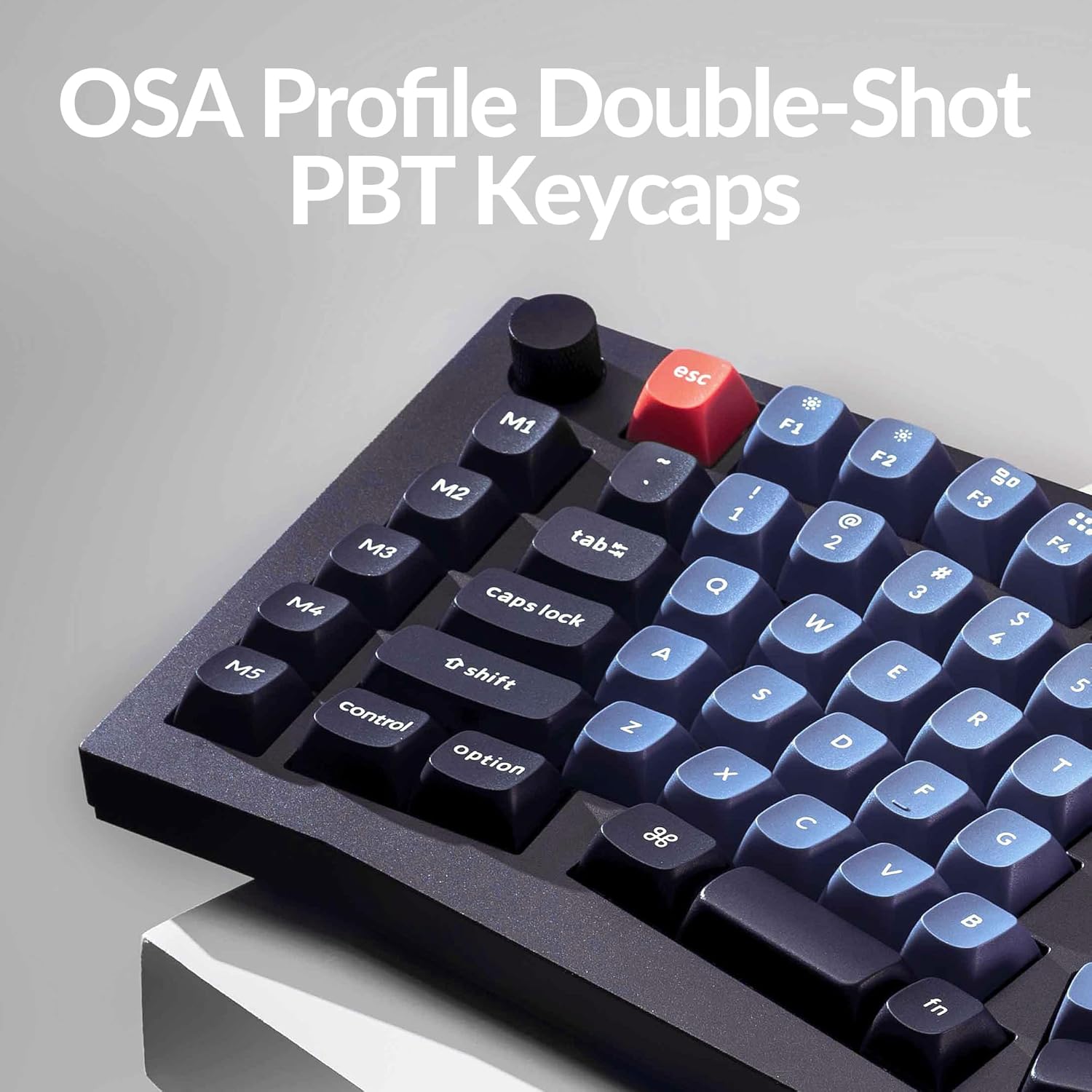
Image 5.3: The OSA Profile Double-Shot PBT Keycaps on the Keychron Q10.
6. Priežiūra
6.1 Klaviatūros valymas
Reguliarus valymas padeda išlaikyti klaviatūros veikimą ir išvaizdą.
- Prieš valydami atjunkite klaviatūrą nuo kompiuterio.
- Dulkėms ir šiukšlėms pašalinti tarp klaviatūros dangtelių naudokite suslėgto oro balionėlį.
- For stubborn dirt, remove keycaps using the keycap puller and clean the exposed switches and plate with a soft brush or a damp cloth (ensure it's not dripping wet).
- Wipe keycaps with a mild cleaning solution on a cloth, then dry thoroughly.
6.2 Double Gasket Design
The keyboard features an innovative double-gasket design with silicone pads to minimize sound resonance and improve typing acoustics. This design requires no special maintenance from the user.

Image 6.1: Cross-section diagram showing the double-gasket structure for enhanced typing sound.
7. Problemų sprendimas
If you encounter issues with your Keychron Q10 keyboard, try the following troubleshooting steps:
- Klaviatūra nereaguoja: Ensure the USB-C cable is securely connected to both the keyboard and your computer. Try a different USB port or cable.
- Neveikia tam tikri klavišai: If a single key is not functioning, it might be a faulty switch. Since the keyboard is hot-swappable, try replacing the switch with a known working one. Ensure the switch pins are straight before insertion.
- RGB foninio apšvietimo problemos: Check if the backlight is enabled. If using VIA, ensure the lighting settings are correctly configured.
- Tinkinimas netaikomas: Ensure you have saved and applied changes within the VIA software. Sometimes, restarting the VIA application or reconnecting the keyboard can resolve this.
- Programinės įrangos atkūrimas: If issues persist, a firmware reset might be necessary. Refer to the official Keychron website for specific instructions on how to reset or reflash the Q10 firmware.
For further assistance, please visit the official Keychron support page or contact their customer service.
8. Specifikacijos
| Funkcija | Detalė |
|---|---|
| Prekės ženklas | Keychron |
| Modelis | Q10 |
| Išdėstymas | 75% Alice Layout |
| Ryšys | Laidinis (USB-C) |
| Jungiklio tipas | Gateron G Pro Blue (Hot-swappable) |
| Klaviatūros | Double-Shot PBT (OSA Profile) |
| Korpuso Medžiaga | Full CNC Aluminum |
| Foninis apšvietimas | 22+ RGB Effects (South-facing) |
| Programuojamumas | QMK/VIA palaikymas |
| Ypatingos savybės | Programmable Knob, Double Gasket Design |
| Suderinami įrenginiai | PC (Mac, Windows, Linux) |
| Prekės svoris | 7.1 svaro |
| Pakuotės matmenys | 16.26 x 8.27 x 2.87 colio |

Image 8.1: The Keychron Q10 keyboard, highlighting its robust full CNC aluminum body.
9. Garantija ir palaikymas
Keychron products typically come with a limited warranty. For detailed warranty information, terms, and conditions, please refer to the official Keychron websvetainėje arba garantijos kortelėje, pridėtoje prie jūsų gaminio.
For technical support, troubleshooting assistance, or any product-related inquiries, please visit the Keychron support page or contact their customer service team directly. You can usually find contact information on the official Keychron websvetainė: www.keychron.com


