1. Įvadas
This manual provides comprehensive instructions for the Naxa NDS-6501 Portable Dual 6.5-inch Bluetooth Speaker. Please read this manual thoroughly before operating the device to ensure proper use and to maximize your experience. Keep this manual for future reference.
2. Pakuotės turinys
Patikrinkite, ar pakuotėje yra visi toliau išvardyti daiktai:
- Naxa NDS-6501 Portable Bluetooth Speaker
- Laidinis mikrofonas
- USB įkrovimo laidas
- Vartotojo vadovas (šis dokumentas)
3. Produkto ypatybės
The Naxa NDS-6501 speaker offers a range of functionalities designed for portable audio entertainment:
- Dual 6.5-inch full-frequency speakers for clear audio output.
- „Bluetooth“ ryšys belaidžiam garso transliavimui iš suderinamų įrenginių.
- Integrated multi-color flame lights with various lighting effects.
- True Wireless Stereo (TWS) function for connecting two NDS-6501 speakers wirelessly.
- Wired microphone input for vocal use.
- Built-in FM radio tuner for local station access.
- USB port and MicroSD/TF card slot for playing audio files from external storage.
- Auxiliary (3.5mm) input for wired audio connections.
- Rechargeable battery providing up to 2 hours of playback time.
4. Valdikliai ir prievadai
The speaker features various controls and input/output ports. A typical layout includes a power button, volume controls, mode selection, playback controls (play/pause, skip tracks), microphone input, USB port, MicroSD card slot, auxiliary input, and a charging port. Refer to the diagram below for specific locations.
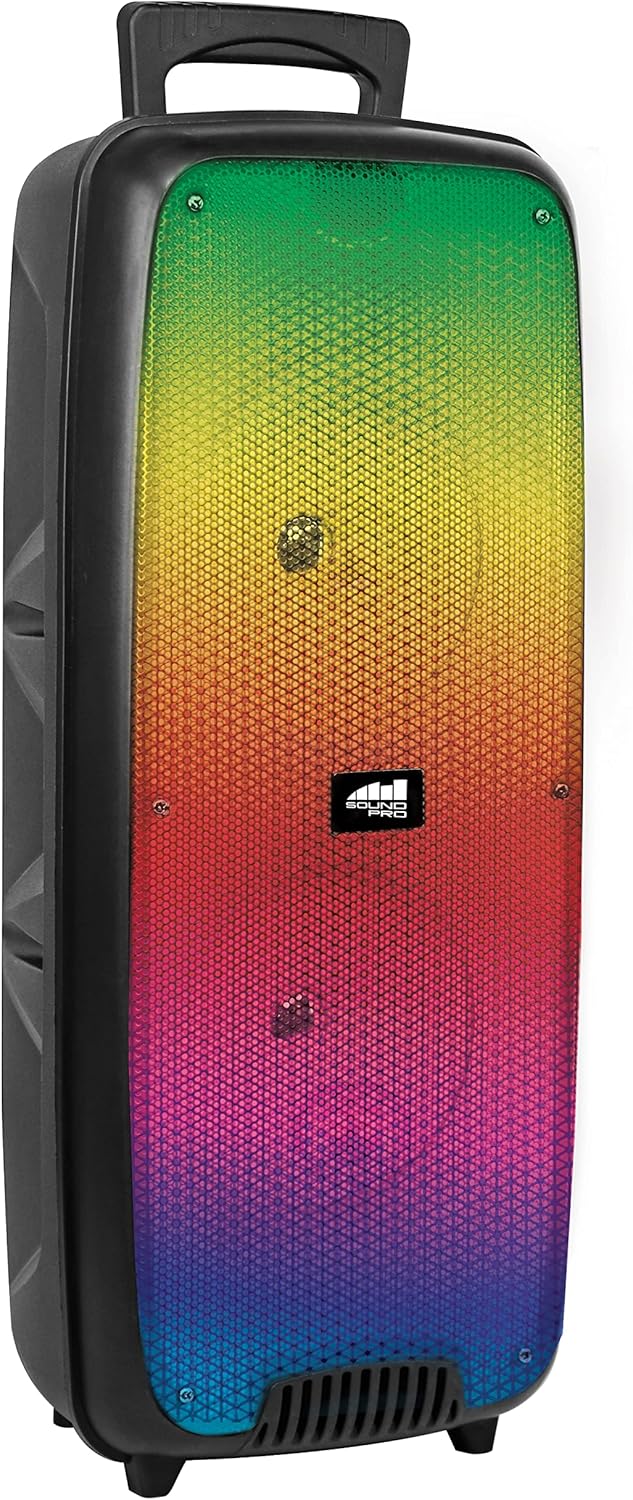
4.1 paveikslas: Priekyje view of the Naxa NDS-6501 speaker, showcasing the dual 6.5-inch drivers and multi-color flame lights.

4.2 paveikslas: Šoninė view of the Naxa NDS-6501 speaker, illustrating its portable design with an integrated handle.
5. Sąranka
5.1 Garsiakalbio įkrovimas
- Prijunkite pridedamą USB įkrovimo laidą prie garsiakalbio įkrovimo prievado.
- Kitą USB laido galą prijunkite prie suderinamo USB maitinimo adapterio (nepridedamas) arba kompiuterio USB prievado.
- Įkrovimo metu šviečia įkrovimo indikatoriaus lemputė, paprastai raudona.
- Once fully charged, the indicator light will change color or turn off (refer to specific LED behavior in your product). A full charge provides approximately 2 hours of playback.
5.2 Įjungimas / išjungimas
- To power on: Press and hold the Power button for a few seconds until the speaker activates.
- Norėdami išjungti: dar kartą paspauskite ir palaikykite nuspaudę maitinimo mygtuką, kol garsiakalbis išsijungs.
6. Naudojimo instrukcijos
6.1 Bluetooth poravimas
- Ensure the speaker is powered on and in Bluetooth mode. If not, press the Mode button to switch to Bluetooth. The speaker will indicate it is ready for pairing (e.g., a flashing LED or an audible prompt).
- „Bluetooth“ palaikančioje įrangoje (išmaniajame telefone, planšetiniame kompiuteryje ir kt.) eikite į „Bluetooth“ nustatymus.
- Ieškokite available devices. You should see "NDS-6501" or a similar name in the list.
- Select "NDS-6501" to initiate pairing.
- Once successfully paired, the speaker will provide an audible confirmation, and the Bluetooth indicator light will become solid.
6.2 Tikrojo belaidžio stereo (TWS) susiejimas
The TWS function allows you to connect two NDS-6501 speakers for a stereo sound experience.

6.1 paveikslas: Illustration of the True Wireless Stereo (TWS) function, enabling two speakers to connect wirelessly from a single Bluetooth source.
- Ensure both NDS-6501 speakers are powered on and in Bluetooth mode, but not yet paired to any device.
- On one of the speakers (this will be the primary speaker), press and hold the TWS button (or a designated pairing button) for a few seconds.
- The primary speaker will search for the secondary speaker. Once connected, both speakers will provide an audible confirmation.
- Now, pair your Bluetooth device to the primary speaker as described in Section 6.1. Audio will play through both speakers in stereo.
6.3 FM radijo veikimas
- Norėdami perjungti į FM radijo režimą, paspauskite režimo mygtuką.
- Paspauskite mygtuką „Groti / pristabdyti“, kad automatiškai nuskaitytumėte ir išsaugotumėte galimas FM stotis.
- Norėdami naršyti tarp išsaugotų stočių, naudokite mygtukus „Ankstesnis / Kitas takelis“.
6.4 USB/MicroSD Playback
- Insert a USB flash drive or a MicroSD/TF card (with audio files) į atitinkamą prievadą.
- The speaker should automatically switch to USB or MicroSD mode and begin playing audio. If not, press the Mode button to select the correct input.
- Use the playback controls (Play/Pause, Previous/Next) to manage your music.
6.5 Mikrofono naudojimas
- Connect the wired microphone to the microphone input jack on the speaker.
- Adjust the microphone volume control (if available) on the speaker to your desired level.
- The microphone audio will be mixed with any music playing through the speaker.
6.6 apšvietimo efektai
- The speaker features integrated multi-color flame lights.
- Press the Light button (if available) to cycle through different lighting modes or to turn the lights on/off.
- The lights may synchronize with the music playback.
7. Priežiūra
- Valymas: Garsiakalbio išorę valykite minkšta, sausa šluoste. Nenaudokite abrazyvinių valiklių, vaško ar tirpiklių.
- Saugykla: Kai garsiakalbio nenaudojate ilgesnį laiką, laikykite jį vėsioje, sausoje vietoje, toliau nuo tiesioginių saulės spindulių ir ekstremalių temperatūrų.
- Akumuliatoriaus priežiūra: Norėdami pailginti baterijos veikimo laiką, venkite dažnai visiškai ją iškrauti. Reguliariai įkraukite garsiakalbį, net jei jo nenaudojate.
- Vandens ekspozicija: Šis garsiakalbis nėra atsparus vandeniui. Saugokite jį nuo vandens ar per didelės drėgmės.
8. Problemų sprendimas
| Problema | Galima priežastis | Sprendimas |
|---|---|---|
| Garsiakalbis neįsijungia. | Baterija išsikrovusi. | Įkraukite garsiakalbį naudodami pateiktą USB laidą. |
| Iš garsiakalbio nėra garso. | Volume is too low; incorrect input mode; device not paired. | Increase volume; press Mode button to select correct input; re-pair Bluetooth device. |
| „Bluetooth“ įrenginys neranda garsiakalbio. | Garsiakalbis neįjungtas susiejimo režimu; įrenginys per toli; trukdžiai. | Ensure speaker is in Bluetooth pairing mode; move device closer; avoid obstacles. |
| TWS susiejimas nepavyko. | Garsiakalbiai jau susieti su įrenginiu; per toli vienas nuo kito. | Ensure both speakers are unpaired from other devices; place speakers within 33 feet of each other. |
| Mikrofonas neveikia. | Microphone not fully plugged in; microphone volume low. | Ensure microphone is securely connected; adjust microphone volume. |
9. Specifikacijos
| Funkcija | Specifikacija |
|---|---|
| Modelio numeris | NDS-6501 |
| Garsiakalbio dydis | Dvigubas 6.5 colio |
| Ryšio technologija | Bluetooth, USB, MicroSD, Aux (3.5mm) |
| Garso įvestis | Laidinis mikrofonas |
| Garso išvesties režimas | Stereo |
| Didžiausia išėjimo galia | 3 vatų |
| Pranešėjas Amplifikacijos tipas | Aktyvus |
| Baterijos tipas | Ličio jonų (įkraunamas, pridedamas) |
| Vidutinis akumuliatoriaus veikimo laikas | Iki 2 valandų |
| Gaminio matmenys (I x P x A) | 24.13 x 19.05 x 57.91 cm (9.5 x 7.5 x 22.8 colio) |
| Prekės svoris | 2.81 kg (6.2 svaro) |
| Spalva | Juoda |
| UPC | 840005017555 |
10. Garantija ir palaikymas
Dėl garantijos informacijos arba techninės pagalbos žr. prie gaminio pridėtą garantinę kortelę arba apsilankykite oficialioje „Naxa Electronics“ svetainėje. websvetainėje. Išsaugokite pirkimo kvitą kaip pirkimo įrodymą bet kokiems garantiniams prašymams.


