1. Įvadas
This manual provides essential information for the safe and efficient assembly, operation, and maintenance of your Tempur-Pedic TP7000 Mesh Back Fabric Task Chair. Please read all instructions carefully before use and retain this manual for future reference.
2. Saugos informacija
- Didžiausia svorio talpa: This chair is designed to support a maximum weight of 250 pounds (113 kg). Exceeding this limit may cause damage to the chair or personal injury.
- Numatytas naudojimas: This chair is intended for office and task use. Do not use it for purposes other than its intended design.
- Surinkimas: Ensure all components are securely fastened before using the chair. Periodically check all bolts and screws for tightness.
- Stabilumas: Avoid standing on the chair or using it as a step stool. Do not lean excessively to one side or the back, as this may cause the chair to tip over.
- Vaikai: Keep children away from the chair during assembly. Do not allow children to play on or around the chair.
3. Pakuotės turinys
Prieš pradėdami surinkimą, patikrinkite, ar yra visos dalys ir ar jos nepažeistos. Jei trūksta kokių nors dalių arba jos pažeistos, netęskite surinkimo. Dėl pagalbos kreipkitės į klientų aptarnavimo tarnybą.
- Chair Back (Mesh)
- Chair Seat (Fabric with Tempur Material)
- Porankiai (2)
- Chair Base (5-star with casters)
- Dujų kėlimo cilindras
- Mechanizmo plokštė
- Aparatūros rinkinys (varžtai, poveržlės, šešiabriaunis raktas)
4. Sąranka ir surinkimas
Follow these steps to assemble your Tempur-Pedic TP7000 Task Chair. It is recommended to assemble the chair on a soft, non-abrasive surface to prevent damage.
- Pritvirtinkite ratukus prie pagrindo: Įkiškite penkis ratukus į skylutes kiekvienos kėdės pagrindo kojos gale. Tvirtai spauskite, kol jie užsifiksuos.
- Įdėkite dujų keltuvą: Įstatykite dujų kėlimo cilindrą į surinkto kėdės pagrindo centrinę angą.
- Mechanizmo plokštės pritvirtinimas prie sėdynės: Align the mechanism plate with the pre-drilled holes on the underside of the chair seat. Secure it using the provided screws and Allen wrench. Ensure the front of the mechanism faces the front of the seat.
- Pritvirtinkite porankius prie sėdynės: Attach the armrests to the sides of the chair seat using the designated screws. Do not fully tighten yet.
- Attach Backrest to Seat/Mechanism: Align the backrest with the mounting points on the mechanism plate or seat. Secure with screws. Once the backrest is attached, fully tighten all armrest screws.
- Prijunkite sėdynės mazgą prie dujinio keltuvo: Atsargiai uždėkite surinktą sėdynę ir atlošą ant dujinio keltuvo cilindro, užtikrindami, kad smailėjantis dujinio keltuvo galas tvirtai įstatytų į mechanizmo plokštę.


5. Naudojimo instrukcijos (reguliavimas)
Your Tempur-Pedic TP7000 chair offers several adjustments to customize your seating experience for optimal comfort and support.
- Sėdynės aukščio reguliavimas: Norėdami pakelti sėdynę, pakelkite svirtį, esančią po dešine sėdynės puse, tuo pačiu metu nusileisdami nuo kėdės. Norėdami nuleisti sėdynę, sėdėdami pakelkite svirtį. Atleiskite svirtį norimame aukštyje.
- Porankio aukščio reguliavimas: Press the button on the side of each armrest and move the armrest up or down to your preferred height. Release the button to lock it in place.
- Pakreipimo užrakinimas / atrakinimas: The chair features a single reclining position. To allow the chair to recline, pull the lever (usually the same as the height adjustment lever, or a separate one) outwards. To lock the chair in an upright position, push the lever inwards.
- Pakreipimo įtempimo reguliavimas: Rotate the round knob located under the front of the seat to adjust the tension of the recline. Turn clockwise to increase tension (making it harder to recline) and counter-clockwise to decrease tension (making it easier to recline).
6. Priežiūra
Tinkama priežiūra prailgins jūsų kėdės tarnavimo laiką ir išvaizdą.
- Valymas: The fabric seat and mesh back should be spot cleaned only. Use a mild detergent and a damp cloth. Do not saturate the fabric. Test any cleaning solution on an inconspicuous area first.
- Patikra: Periodically inspect all bolts, screws, and connections to ensure they are tight. Retighten as necessary.
- Ratukai: Kad ratukai judėtų sklandžiai, laikykite juos be plaukų ir šiukšlių.
- Venkite stiprių cheminių medžiagų: Do not use abrasive cleaners, solvents, or strong detergents, as these can damage the chair's materials.
7. Problemų sprendimas
Jei kyla problemų dėl kėdės, žr. šias dažniausiai pasitaikančias problemas ir sprendimus:
- Kėdė įgrimba arba nestovi pakeltas:
Sprendimas: The gas lift cylinder may be faulty. Contact customer support for a replacement. - Kėdės girgždesys:
Sprendimas: Check all screws and bolts and tighten them. A small amount of silicone lubricant can be applied to moving parts if the squeaking persists. - Ratukai rieda nelygiai:
Sprendimas: Remove any hair or debris wrapped around the caster wheels. Clean the wheels with a damp audinys. - Kėdė neatsilenkia:
Sprendimas: Ensure the tilt lock lever is disengaged (pulled outwards). Adjust the tilt tension knob counter-clockwise to reduce tension.
8. Specifikacijos
| Funkcija | Detalė |
|---|---|
| Prekės ženklas | Tempur-Pedic |
| Modelis | TP7000 |
| Spalva | Cobalt (Seat), Black (Mesh Back) |
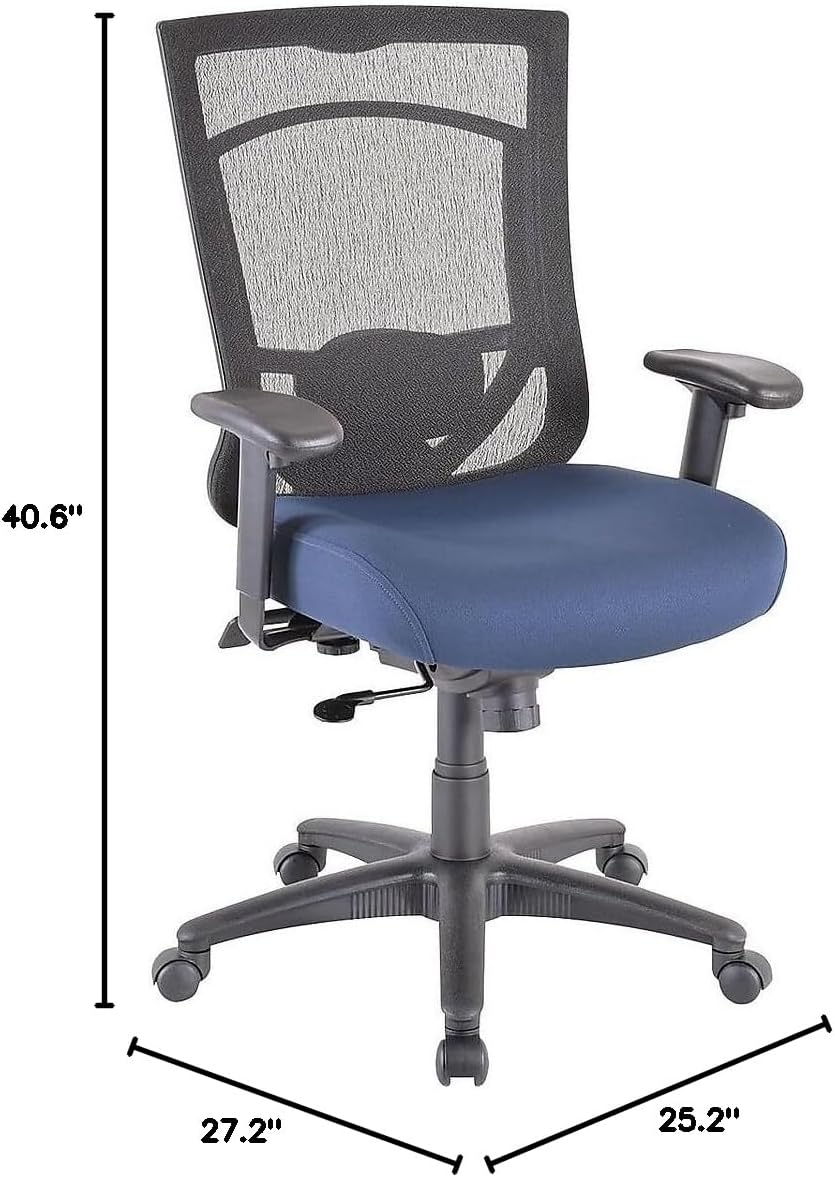
| Bendri matmenys (A x P x G) | 40.6-44.1" x 27.2" x 25.2" |
| Sėdynės matmenys (P x G) | 20.9" x 20.1" |
| Back Dimensions (W x H) | 20.9" x 22.4" |
| Didžiausio svorio rekomendacija | 250 svarai (113 kg) |
| Medžiaga | Mesh Back, Fabric Seat with Authentic Tempur Material |
| Ypatingos savybės | Adjustable Height, Adjustable Armrests, Tilt Lock, Tilt Tension |
| Produkto priežiūros instrukcijos | Taškinis valymas |
| Rekomenduojamas dienos vartojimas | 8-10 valandas |
9. Garantija ir palaikymas
Your Tempur-Pedic TP7000 Mesh Back Fabric Task Chair is backed by a Visą gyvenimą trunkanti ribota garantija. This warranty covers defects in materials and workmanship under normal use. Specific terms and conditions apply.
For warranty claims, technical support, or to order replacement parts, please contact Tempur-Pedic customer service. Refer to your purchase documentation or the official Tempur-Pedic websvetainę, kurioje rasite naujausią kontaktinę informaciją.
When contacting support, please have your model number (TP7000) and proof of purchase readily available.


