1. Įvadas
Thank you for choosing the COMAOGO T002-W Mini Projector. This manual provides essential information for setting up, operating, and maintaining your projector to ensure optimal performance and longevity. The T002-W is a versatile projector featuring 9500 Lumens brightness, 1080P support, 5G WiFi, and Bluetooth 5.1 connectivity, designed for an immersive viewpatirtis iki 220 colių.
2. Pakuotės turinys
Patikrinkite pakuotę, ar joje yra šie daiktai:
- 1 x COMAOGO T002-W Mini Projector
- 1x nuotolinio valdymo pultas
- 1x maitinimo laidas
- 1x HDMI laidas
- 1 x AV kabelis
- 1 x Vartotojo vadovas
3. Produktas baigtasview
Susipažinkite su projektoriaus komponentais ir sąsajomis.

Image: COMAOGO T002-W Projector with 5G and 2.4G WiFi capabilities, showing wireless screen synchronization with a tablet and smartphone.
The projector features various ports for connectivity, including HDMI, USB, VGA, AV, and a TF card slot, along with a 3.5mm audio output. It also supports dual-band 5G and 2.4G WiFi for stable wireless connections and Bluetooth 5.1 for audio devices.

Image: COMAOGO T002-W Projector connected to various devices including a laptop, game console, and streaming stick, highlighting its multiple input ports (AV, HDMI, USB, TF, VGA).
4. Sąranka
4.1 Įdėjimas
Position the projector on a stable, flat surface or mount it on a tripod. Ensure there are no obstructions to the ventilation vents. For optimal viewing, the projection distance should be between 1.5 meters and 5.5 meters, yielding a screen size from 45 inches to 220 inches.
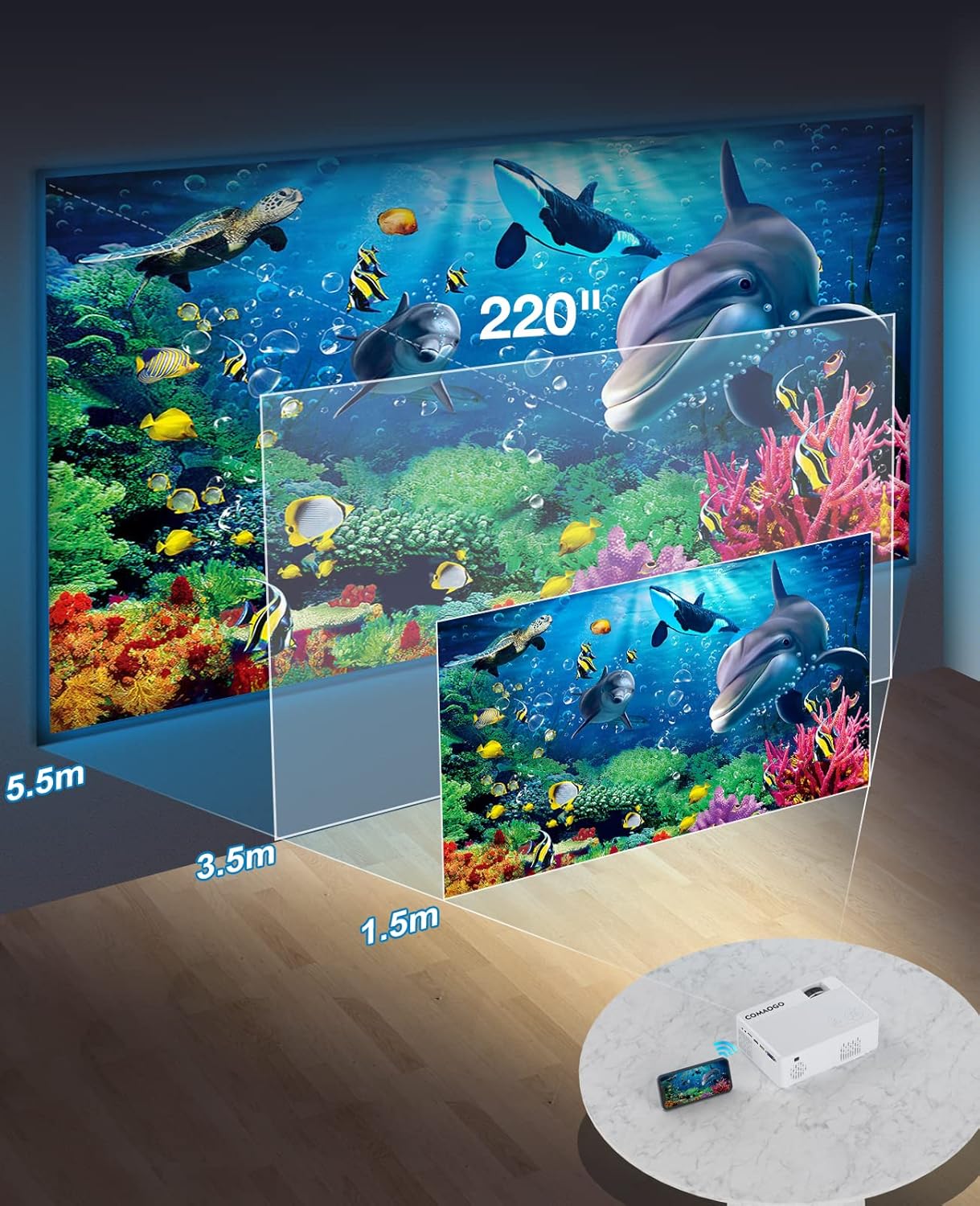
Image: Diagram illustrating the projection distances (1.5m to 5.5m) and corresponding screen sizes (45 to 220 inches) for the COMAOGO T002-W Projector.
4.2 Maitinimo jungtis
Connect the power cable to the projector's power input and then plug it into a power outlet (AC 220V).
4.3 Fokusavimas ir trapecijos korekcija
To achieve a clear and rectangular image:
- Fokuso reguliavimas: Rotate the focus ring on the projector lens until the image appears sharp.
- Keystone korekcija: Adjust the keystone correction dial (if available, or via menu settings) to correct trapezoidal distortion, ensuring the image is rectangular. The projector supports ±15° keystone correction.

Image: Illustration of keystone correction and focus adjustment for the COMAOGO T002-W Projector, showing how to achieve a clear, rectangular image.
5. Naudojimo instrukcijos
5.1 Maitinimo įjungimas/išjungimas
- Maitinimas: Paspauskite maitinimo mygtuką ant projektoriaus arba nuotolinio valdymo pulto.
- Išjungti: Norėdami išjungti projektorių, dar kartą paspauskite maitinimo mygtuką.
5.2 Įvesties šaltinio pasirinkimas
Use the "Source" button on the remote control or the projector's control panel to select the desired input source (e.g., HDMI, USB, VGA, AV).
5.3 Wireless Connectivity (WiFi)
The projector supports dual-band 5G and 2.4G WiFi for stable screen mirroring.
- Navigate to the WiFi settings on the projector's menu.
- Select your desired WiFi network (5G for faster, more stable connection; 2.4G for longer range and better penetration).
- Norėdami prisijungti, įveskite slaptažodį.
- For screen mirroring, select the appropriate option (e.g., "iOS Cast" or "Android Cast") on the projector and follow the on-screen instructions to connect your smartphone or tablet.
5.4 „Bluetooth“ ryšys
Connect external Bluetooth audio devices like speakers or headphones.

Image: COMAOGO T002-W Projector demonstrating Bluetooth 5.1 connection with a speaker and headphones.
- Eikite į „Bluetooth“ nustatymus projektoriaus meniu.
- Įsitikinkite, kad jūsų „Bluetooth“ įrenginys veikia susiejimo režimu.
- Pasirinkite įrenginį iš sąrašo, kad jį susietumėte.
- Note: The projector's Bluetooth function is for connecting output devices (speakers, headphones) only.
5.5 Laidinės jungtys
Prijunkite įvairius įrenginius naudodami turimus prievadus:
- HDMI: Connect laptops, PCs, game consoles (Xbox), TV sticks (Roku, Chromecast), DVD players.
- USB: Leisti mediją filetiesiai iš USB diskų.
- VGA: Prijunkite senesnius kompiuterius ar nešiojamuosius kompiuterius.
- APIE: Connect legacy video devices.
- TF kortelė: Insert a TF card to play media files.
- Important: Copyright-protected content from services like Netflix or Disney+ is not directly supported via screen mirroring. For these services, use an HDMI connection with a compatible adapter (e.g., Lightning Digital AV Adapter for iOS devices) or a streaming stick.
6. Priežiūra
6.1 Objektyvo valymas
Use a soft, lint-free cloth or lens cleaning paper to gently wipe the projector lens. Avoid using abrasive materials or harsh chemicals that could damage the lens coating.
6.2 Aušinimo sistema
The projector features an updated cooling system designed to reduce noise and maintain optimal operating temperature. Ensure the ventilation vents are clear of dust and obstructions to prevent overheating. Regular cleaning of the vents with a soft brush or compressed air is recommended.
7. Problemų sprendimas
Jei kyla problemų dėl projektoriaus, žr. šiuos dažniausiai pasitaikančius sprendimus:
- Nefotografuoti:
- Patikrinkite maitinimo jungtį ir įsitikinkite, kad projektorius įjungtas.
- Verify the input source selection matches your connected device.
- Ensure all cables (HDMI, VGA, etc.) are securely connected.
- Sureguliuokite fokusavimą ir trapecinių iškraipymų korekciją.
- Nėra garso:
- Adjust the projector's volume.
- Jei naudojate išorinius garsiakalbius, įsitikinkite, kad jie tinkamai prijungti ir įjungti.
- Check Bluetooth connection for external audio devices.
- Ensure the audio output from your source device is enabled.
- WiFi/Screen Mirroring Issues:
- Įsitikinkite, kad ir projektorius, ir jūsų įrenginys prijungti prie to paties „Wi-Fi“ tinklo.
- Check for strong WiFi signal.
- Restart both the projector and your source device.
- For Android devices, ensure "Wireless Projection" or "Screen Mirroring" is enabled. For iOS, use "Screen Mirroring" from Control Center.
- Vaizdas neryškus:
- Sureguliuokite fokusavimo žiedą ant objektyvo.
- Įsitikinkite, kad projekcijos atstumas neviršija rekomenduojamo diapazono.
- Vaizdas yra trapecijos formos:
- Adjust the keystone correction dial or setting.
For further assistance or software updates, please contact COMAOGO customer support.
8. Specifikacijos
| Funkcija | Specifikacija |
|---|---|
| Prekės ženklas | KOMAOGO |
| Modelis | T002-W |
| Ryškumas | 9500 liumenų (220 ANSI) |
| Kontrasto santykis | 6000:1 |
| Gimtoji raiška | 1280 x 720 |
| Palaikoma rezoliucija | 1080P |
| Projekcijos dydis | 45 colio – 220 colio |
| Projekcijos atstumas | 1.5–5.5 m |
| Keystone Korekcija | ±15° |
| „WiFi“ ryšys | Dual-band (5G + 2.4G) |
| Bluetooth | Bluetooth 5.1 |
| Techninės įrangos sąsaja | 3.5mm Audio, TF Card, USB 2.0, VGA, HDMI |
| Integruotas garsiakalbis | Taip |
| Triukšmo lygis | 45 decibelų |
| Energijos suvartojimas | 48 vatų |
| Matmenys | 20.32 x 15.24 x 7.62 cm |
| Svoris | 1 kilogramai |
9. Oficialus produkto vaizdo įrašas
Watch this video for a visual guide on the COMAOGO T002-W Mini Projector's features and operation.
Video: An official product video demonstrating the features and usage of the COMAOGO T002-W Mini Projector, including connectivity and display capabilities.
10. Garantija ir palaikymas
The COMAOGO T002-W Mini Projector comes with a standard manufacturer's warranty. For warranty claims, technical support, or inquiries regarding software updates, please contact COMAOGO customer service through the retailer where you purchased the product or visit the official COMAOGO websvetainę.
SOFTWARE UPDATES can be provided; please contact us if needed.


