1. Įvadas
Ačiū, kad pirkoteasing the TOPTRO Projector TR81. This projector is designed to provide a high-quality visual experience with its Full HD 1080P native resolution, 4K support, and advanced features like Bluetooth 5.0 and 4D keystone correction. This manual provides essential information for setting up, operating, maintaining, and troubleshooting your projector to ensure optimal performance and longevity.
2. Saugos instrukcijos
- Neužblokuokite ventiliacijos angų. Užtikrinkite pakankamai vietos aplink projektorių tinkamam oro cirkuliavimui.
- Nežiūrėkite tiesiai į projektoriaus objektyvą, kai lamp įjungtas, nes ryški šviesa gali pažeisti akis.
- Naudokite tik prie projektorijaus pridėtą maitinimo adapterį.
- Nestatykite projektoriaus tiesioginiuose saulės spinduliuose, šalia šilumos šaltinių arba aplinkoje, kurioje yra daug dulkių ar daug drėgmės.
- Nebandykite patys ardyti ar taisyti projektoriaus. Visus techninės priežiūros darbus patikėkite kvalifikuotiems specialistams.
- Projektorių laikykite atokiau nuo vandens ar kitų skysčių.
3. Pakuotės turinys
Pažymėkite langelį prie šių elementų:
- TOPTRO Projector TR81
- Maitinimo kabelis
- HDMI kabelis
- AV kabelis
- Nuotolinio valdymo pultas
- Vartotojo vadovas
4. Produktas baigtasview
The TOPTRO TR81 projector features a sleek design with intuitive controls and multiple connectivity options. Below is an overview of its main components.
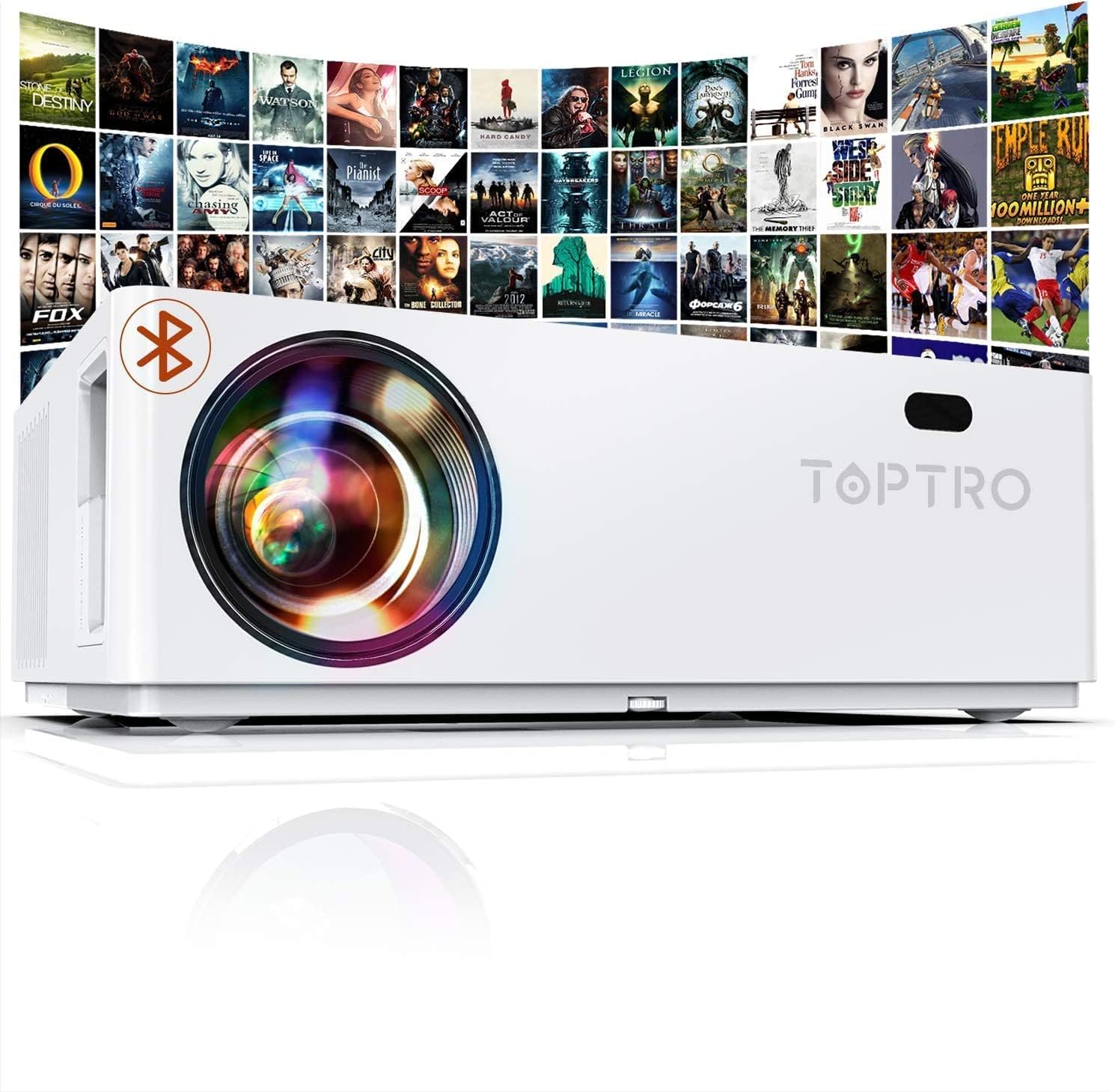
Priekyje view of the TOPTRO Projector TR81, showcasing the lens and overall design.
4.1. Komponentai ir valdikliai
- Objektyvas: Projektuoja vaizdą ekrane.
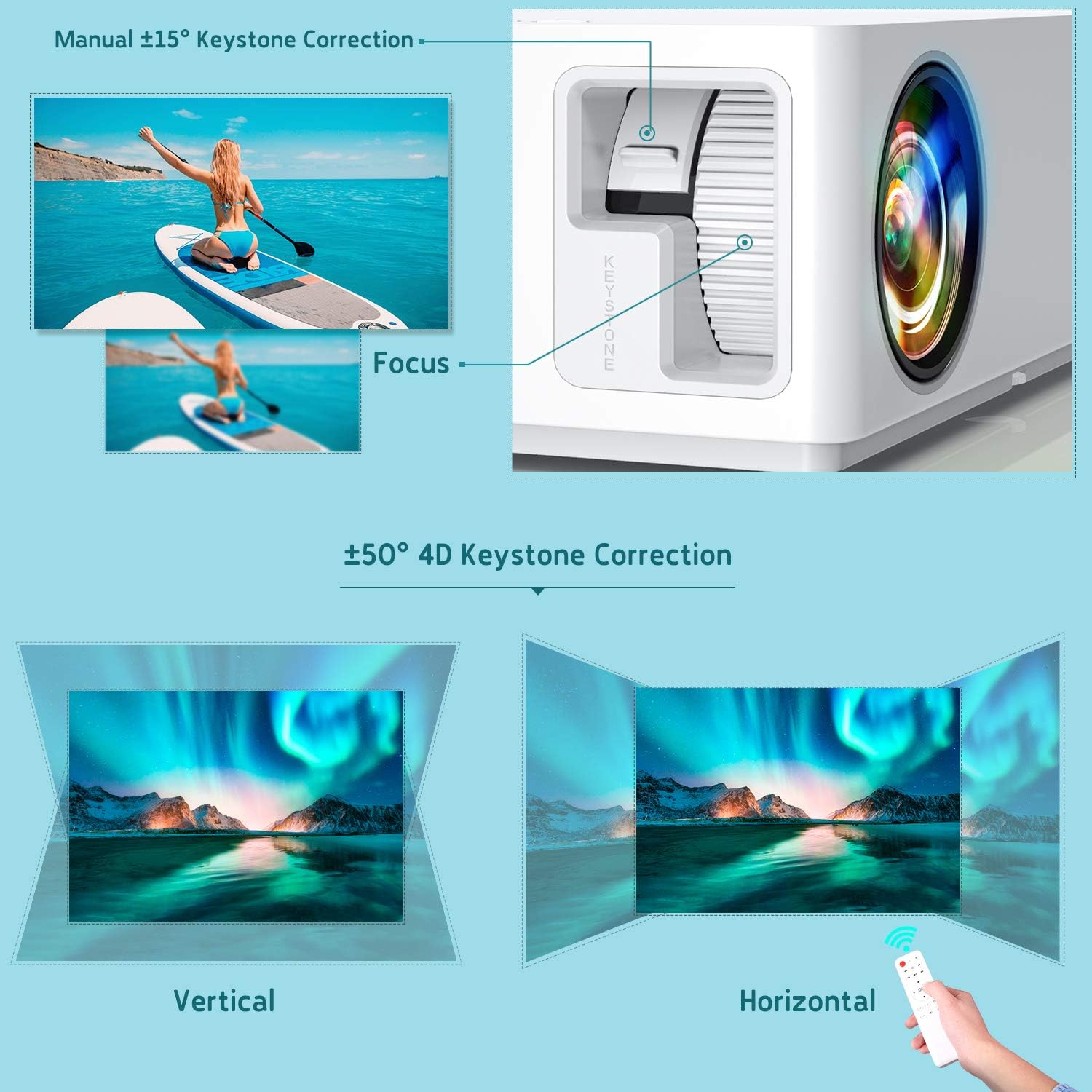
- Fokusavimo žiedas: Reguliuojamas projektuojamo vaizdo aiškumas.
- Trapecijos korekcijos ratukas: Manually corrects vertical image distortion.
- Valdymo skydelis: Buttons for power, menu navigation, and source selection.
- Vėdinimo angos: Šilumos išsklaidymui.
- Įvesties prievadai: HDMI, VGA, AV, USB, 3.5mm Audio Jack.
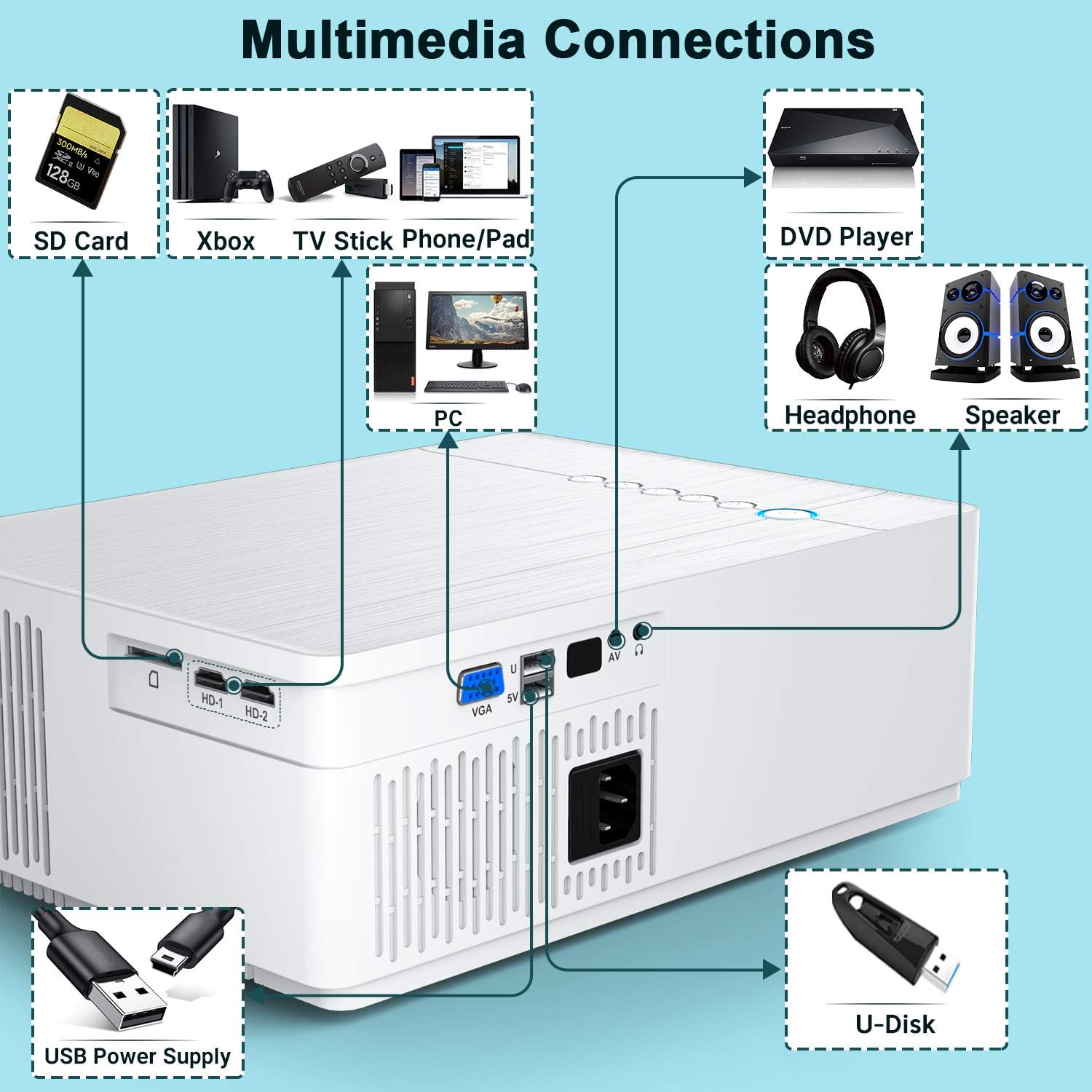
Išsamus view of the multimedia connection ports on the TOPTRO Projector TR81, including HDMI, VGA, AV, USB, and audio out.
5. Sąranka
5.1. Įdėjimas
Place the projector on a stable, flat surface or mount it to the ceiling. Ensure the projector is positioned directly in front of the projection surface (screen or wall) for the best image quality. The projector can produce ultra-high definition images up to 350 inches, suitable for a 30ft viewdiapazonas.

Illustration of the TOPTRO Projector TR81 projecting a large 350-inch image, demonstrating its capability for giant projection sizes.
5.2. Maitinimo prijungimas
- Prijunkite maitinimo laidą prie projektoriaus maitinimo įvesties.
- Kitą maitinimo laido galą įkiškite į elektros lizdą.
- Paspauskite projektoriaus arba nuotolinio valdymo pulto maitinimo mygtuką, kad jį įjungtumėte.
5.3. Fokusavimo ir trapecijos koregavimas
Įjungę, sureguliuokite vaizdo aiškumą ir formą:
- Fokusas: Sukite fokusavimo žiedą aplink objektyvą, kol vaizdas taps ryškus ir aiškus.
- Keystone korekcija: The projector features 4D ±50° keystone correction. Use the keystone dial or the remote control to adjust the image shape until it forms a perfect rectangle. This is particularly useful for ceiling-mounted setups. The X/Y ZOOM function allows direct reduction of the projection size.

Diagram illustrating the manual focus and ±50° 4D keystone correction capabilities of the TOPTRO Projector TR81, showing how to achieve a rectangular image from various angles.
6. Naudojimo instrukcijos
6.1. Pagrindinė operacija
- Maitinimo įjungimas/išjungimas: Paspauskite projektoriaus arba nuotolinio valdymo pulto maitinimo mygtuką.
- Šaltinio pasirinkimas: Use the 'Source' button on the remote or projector to select the desired input (HDMI1, HDMI2, VGA, AV, USB).
- Meniu naršymas: Use the arrow keys and 'OK' button on the remote to navigate through the on-screen menu.
6.2. Nustatymų reguliavimas
Access the projector's menu to adjust various display and audio settings:
- Vaizdo režimas: Select from preset modes (e.g., Standard, Dynamic, Movie) or customize brightness, contrast, color, and sharpness. The projector offers 9000 lumens brightness and a 10000:1 ultra-high contrast ratio for vivid images.
- Kraštinių santykis: Pasirinkite 16:9, 4:3 arba automatinį režimą.
- Garso režimas: Adjust audio settings or connect external speakers via Bluetooth.
Comparison image showing the difference in brightness between the TOPTRO TR81 (7000LM) and another projector (5000LM), highlighting the superior brightness and clarity of the TR81.
7. Ryšys
The TOPTRO TR81 projector offers a wide range of connectivity options for various devices.
7.1. Laidinės jungtys
The projector features HDMI, VGA, AV, and USB ports. These can be used to connect devices such as:
- Laptops/PCs
- DVD grotuvai
- Gaming Consoles (PS4, Xbox)
- TV dėžutės
- USB drives for media playback
Diagram illustrating various multimedia connections available on the TOPTRO Projector TR81, including SD Card, Xbox, TV Stick, Phone/Pad, PC, DVD Player, Headphones, Speaker, USB Power Supply, and U-Disk.
7.2. Wireless Connections (Bluetooth)
The built-in Bluetooth 5.0 chip allows you to connect the projector to external Bluetooth speakers or headphones for enhanced audio without distortion.
- Go to the projector's settings menu.
- Pasirinkite „Bluetooth“ ir įjunkite jį.
- Įjunkite „Bluetooth“ įrenginį (garsiakalbį / ausines) susiejimo režimą.
- Select your device from the list on the projector's screen to connect.

Image demonstrating the TOPTRO Projector TR81's Bluetooth 5.0 support, showing it wirelessly connected to an external speaker for an enhanced audio experience.
7.3. Streaming Devices
Easily connect streaming devices like Fire TV Stick or Chromecast to enjoy your favorite content from various platforms.
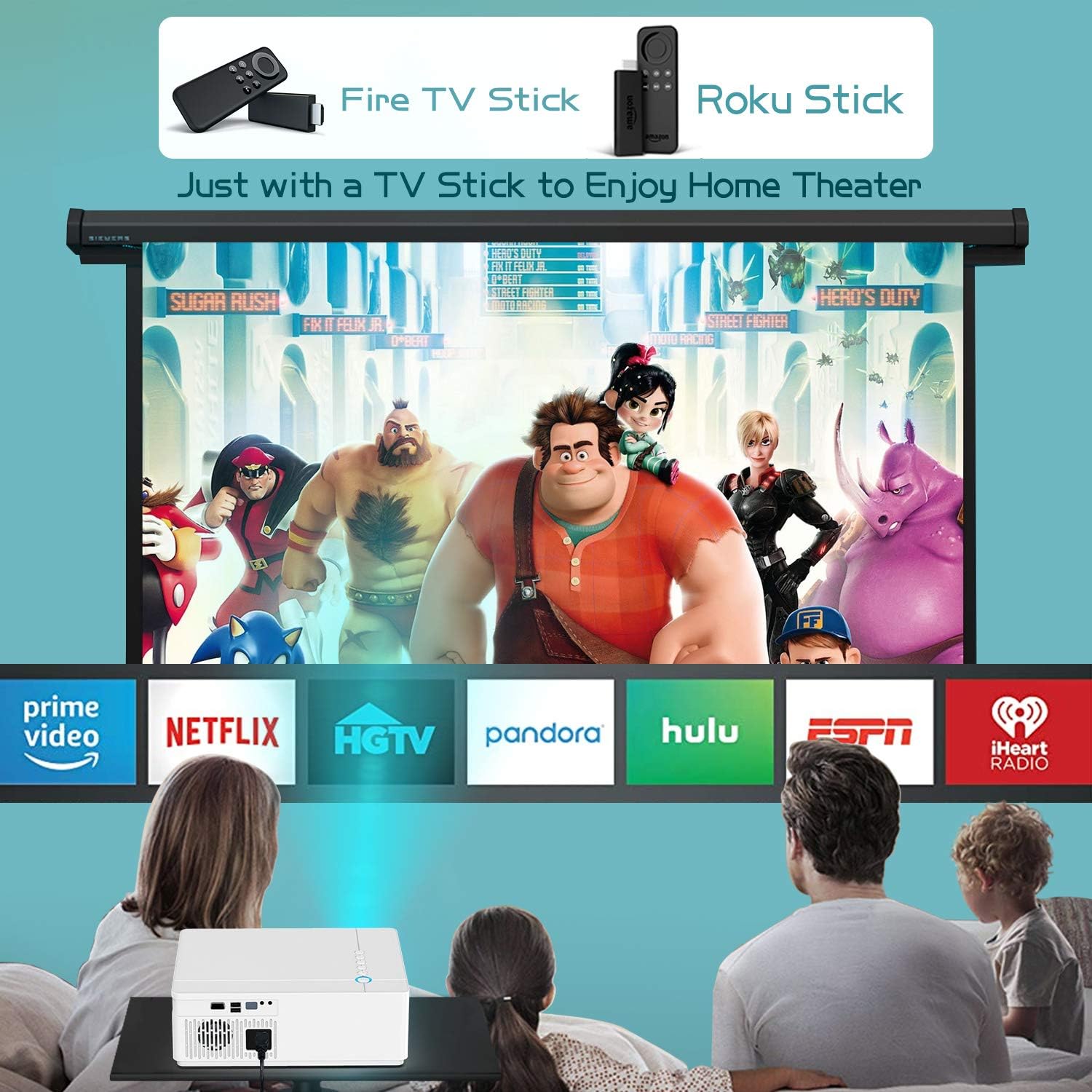
Image showing the TOPTRO Projector TR81 connected to a Fire TV Stick and Roku Stick, enabling access to various streaming services for a home theater experience.
8. Priežiūra
Proper maintenance ensures the longevity and performance of your TOPTRO Projector TR81.
- Objektyvo valymas: Use a soft, lint-free cloth specifically designed for optical lenses to gently wipe the projector lens. Do not use abrasive cleaners.
- Ventiliacijos valymas: Reguliariai valykite ventiliacijos angas, kad nesikauptų dulkės, kurios gali turėti įtakos aušinimui ir veikimui. Naudokite minkštą šepetėlį arba suslėgtą orą.
- Lamp Gyvenimas: The projector utilizes the latest patented technology, providing an impressive lamp life of 150,000 hours. No regular lamp Įprastai naudojant, pakeitimas paprastai reikalingas.
- Saugykla: Kai projektorius ilgesnį laiką nenaudojamas, jį laikykite vėsioje, sausoje ir nuo dulkių apsaugotoje vietoje.
9. Problemų sprendimas
Jei kyla problemų dėl projektoriaus, žr. šias dažniausiai pasitaikančias problemas ir sprendimus:
| Problema | Galima priežastis | Sprendimas |
|---|---|---|
| Ekrane nėra vaizdo | Atsilaisvinęs maitinimo laidas; Neteisingas įvesties šaltinis; Įrenginys netinkamai prijungtas. | Check power connection; Select correct input source; Reconnect HDMI/VGA cable. |
| Neryškus vaizdas | Nefokusuota; neteisingas trapecijos koregavimas. | Adjust focus ring; Use 4D keystone correction. |
| Nėra garso | Per mažas garsumas; Nutildytas garsas; Išorinis garso įrenginys neprijungtas / nesuporuotas. | Increase volume; Unmute; Check Bluetooth connection or 3.5mm audio cable. |
| Nuotolinio valdymo pultas neveikia | Baterijos išsikrovusios/išsikrovusios; kliūtis tarp nuotolinio valdymo pulto ir projektoriaus. | Replace batteries; Remove obstructions; Point remote directly at projector's IR receiver. |
| Perkaitimas | Užblokuota ventiliacija. | Ensure clear space around vents; Clean vents if dusty. |
10. Specifikacijos
Key technical specifications for the TOPTRO Projector TR81:
| Funkcija | Specifikacija |
|---|---|
| Prekės ženklas | TOPTRO |
| Modelio numeris | TR81 |
| Gimtoji raiška | 1920 x 1080P Full HD |
| Palaikoma rezoliucija | Iki 4 tūkst |
| Ryškumas | 9000 liumenų |
| Kontrasto santykis | 10000:1 |
| Keystone Korekcija | 4D ±50° |
| Ryšio technologija | USB, HDMI, VGA, AV, 3.5mm Audio Jack, Bluetooth 5.0 |
| Lamp Gyvenimas | 150,000 valandų |
| Gaminio matmenys | 23 x 10.9 x 30.9 cm |
| Prekės svoris | 2.7 kg |
| Vattage | 10 vatų |
11. Garantija ir palaikymas
TOPTRO projectors come with a lifetime warranty and lifetime professional technical support. If you encounter any problems with the product or require assistance, please contact TOPTRO customer service through the official channels or the retailer where you purchased the product. Please have your model number (TR81) and purchase details ready when contacting support.


