1. Įvadas
Ačiū, kad pirkoteasing the DXQ K-1028E Universal Air Conditioner Remote Control. This remote is designed to provide convenient and comprehensive control over a wide range of air conditioning units. Its simple structure, large LCD display, and intelligent features make it an ideal replacement or secondary remote for your AC.
Pagrindinės funkcijos:
- Visuotinis suderinamumas: Controls over 1000 different global air conditioner brands.
- Lengvas nustatymas: Features a one-button setting for quick configuration.
- Didelis LCD ekranas: Provides clear visibility of settings and status.
- Ilgas valdymo atstumas: Effective range of approximately 8 to 10 meters.
- Humanizuotas dizainas: Includes built-in clock, ON/OFF timer, and night light functions.
- Mažas energijos suvartojimas: Efficient operation for extended battery life.

Image 1.1: Front and angled view of the DXQ K-1028E Universal AC Remote Control.

Image 1.2: The universal remote control demonstrating compatibility with various air conditioning units.
2. Sąranka
2.1 Akumuliatoriaus įdėjimas
Nuotolinio valdymo pultui reikalingos dvi (2) AAA baterijos (nepridedamos). Norėdami jas įdėti, atlikite šiuos veiksmus:
- Atidarykite nuotolinio valdymo pulto gale esantį baterijų skyriaus dangtį.
- Įdėkite dvi AAA tipo baterijas, užtikrindami teisingą poliškumą (+ ir -), kaip nurodyta skyrelio viduje.
- Saugiai uždarykite akumuliatoriaus skyriaus dangtelį.

Image 2.1: Illustration of battery installation in the remote control.
2.2 Code Setting (Pairing with AC Unit)
There are two methods to set up the remote control with your air conditioner:
Method 1: Manual Code Input
- Turn on your air conditioner manually.
- Refer to the "Applicable Brand and Code List" (Image 2.2) to find the 3-digit code(s) for your AC brand.
- Paspauskite ir palaikykite NUSTATYTI button on the remote control until the 3-digit code on the LCD display starts flashing.
- Naudokite Temperatūra + or Temperatūra - buttons to adjust the code until your brand's code appears.
- Once the correct code is displayed, press the OK button to confirm. The code will stop flashing.
- Test the remote control by pressing the ĮJUNGTA/IŠJUNGTA button. If the AC unit responds, the setup is complete. If not, try the next code for your brand or proceed to Method 2.
Method 2: Automatic Code Search
- Ensure your air conditioner is turned on manually.
- Point the remote control towards the AC unit.
- Paspauskite ir palaikykite NUSTATYTI button for approximately 6 seconds until the 3-digit code on the LCD display starts flashing and automatically cycles through codes.
- Observe your AC unit. When the AC unit responds (e.g., turns off, changes mode, or makes a sound), immediately release the NUSTATYTI mygtuką.
- Paspauskite OK mygtuką kodui patvirtinti.
- Test the remote control by pressing various function buttons. If the AC unit responds correctly, the setup is complete. If not, repeat the automatic search process.
Pastaba: For some popular brands, the remote may work directly after battery installation without needing to set a code.

Image 2.2: Applicable Brand and Code List for the K-1028E remote.
3. Naudojimo instrukcijos
3.1 Nuotolinio valdymo pulto išdėstymas ir funkcijos
Familiarize yourself with the buttons and display on your K-1028E remote control:
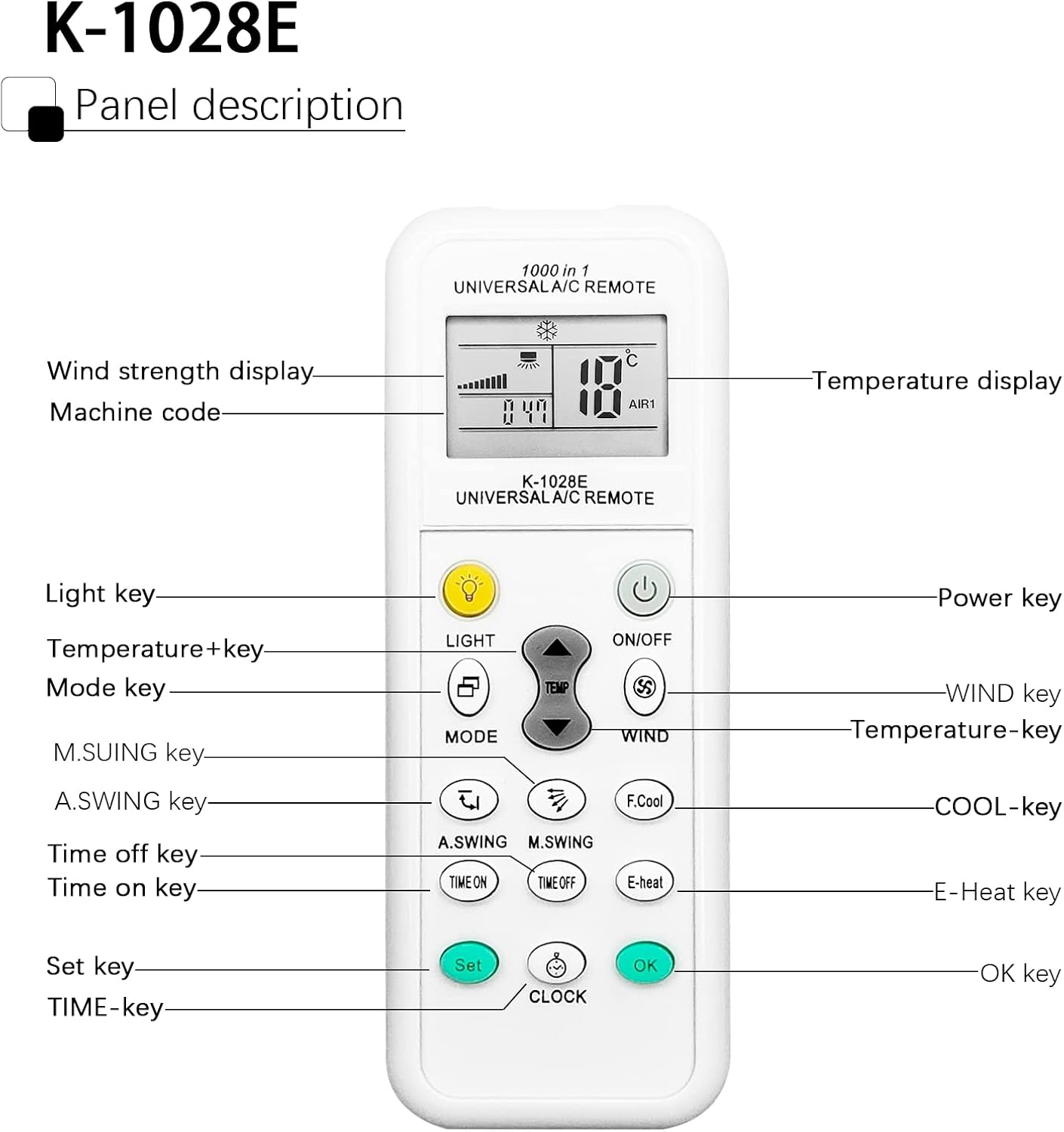
Image 3.1: Panel Description of the K-1028E Universal AC Remote.
- LCD ekranas: Shows temperature, mode, fan speed, timer status, and machine code.
- ŠVIESOS raktas: Activates the built-in night light function.
- ĮJUNGIMO/IŠJUNGIMO mygtukas: Powers the AC unit on or off.
- MODE klavišas: Perjungia veikimo režimus (pvz., vėsinimas, šildymas, ventiliatorius, džiovinimas, automatinis).
- TEMP + / TEMP - Keys: Reguliuoja temperatūros nustatymą.
- WIND Key: Reguliuoja ventiliatoriaus greitį (automatinis, mažas, vidutinis, didelis).
- A.SWING / M.SWING Keys: Controls the vertical (A.SWING) and horizontal (M.SWING) swing of the air deflector.
- F.Cool Key: Activates the fast cool mode (if supported by AC).
- E-Heat Key: Activates the electric heat mode (if supported by AC).
- TIME ON / TIME OFF Keys: Sets the automatic power-on or power-off timer.
- LAIKRODŽIO klavišas: Nustato dabartinį laiką.
- SET raktas: Used for code setting (as described in Section 2.2).
- Gerai klavišas: Patvirtina nustatymus.
3.2 Pagrindinės operacijos
- Maitinimo įjungimas/išjungimas: Paspauskite ĮJUNGTA/IŠJUNGTA mygtuką.
- Pasirinkite režimą: Paspauskite REŽIMAS button repeatedly to cycle through available modes (e.g., Cool, Heat, Fan, Dry, Auto). The selected mode will be displayed on the LCD.
- Reguliuoti temperatūrą: Naudokite TEMP + or TEMP - mygtukus norimai temperatūrai nustatyti.
- Sureguliuokite ventiliatoriaus greitį: Paspauskite VĖJAS button to cycle through fan speed options.
- Control Airflow Direction: Naudokite A.SWING ir M.SWING buttons to adjust the louver direction.

Image 3.2: Remote control effective distance and available operating modes.
3.3 Laikmačio funkcijos
The remote control allows you to set a timer for the AC unit to automatically turn on or off.
- Dabartinio laiko nustatymas: Paspauskite LAIKRODIS button. The time display will flash. Use TEMP + or TEMP - , kad sureguliuotumėte valandas, tada paspauskite LAIKRODIS again to adjust minutes. Press OK patvirtinti.
- Setting ON Timer: Paspauskite LAIKAS ĮJUNGTAS button. The time display will flash. Use TEMP + or TEMP - to set the desired power-on time. Press OK patvirtinti.
- Setting OFF Timer: Paspauskite LAIKAS BAIGĖSI button. The time display will flash. Use TEMP + or TEMP - to set the desired power-off time. Press OK patvirtinti.
- Canceling Timer: Paspauskite atitinkamą LAIKAS ĮJUNGTAS or LAIKAS BAIGĖSI button again, then press OK.

Image 3.3: The remote's time switch function for automated operation.
4. Priežiūra
4.1 Akumuliatoriaus keitimas
Kai nuotolinio valdymo pulto ekranas pritemsta arba pultas nereaguoja, laikas pakeisti baterijas. Atlikite 2.1 skyriuje nurodytus baterijų įdėjimo veiksmus.
- Visada pakeiskite abi baterijas tuo pačiu metu.
- Nemaišykite senų ir naujų baterijų arba skirtingų tipų baterijų.
- Jei nuotolinio valdymo pultas nebus naudojamas ilgesnį laiką, išimkite baterijas, kad išvengtumėte pratekėjimo.
- Naudotas baterijas išmeskite atsakingai pagal vietines taisykles.
4.2 Valymas
Nuotolinio valdymo pultui valyti naudokite minkštą, sausą šluostę. Nenaudokite skystų valiklių, purškiklių ar abrazyvinių medžiagų, nes jos gali pažeisti nuotolinio valdymo pulto paviršių ar vidinius komponentus.
5. Problemų sprendimas
| Problema | Galima priežastis | Sprendimas |
|---|---|---|
| Remote does not work or AC does not respond. | Incorrect code setting; Dead or weak batteries; Obstruction between remote and AC unit; Remote not pointed correctly. | Re-perform code setting (Section 2.2); Replace batteries; Remove any obstructions; Ensure remote is pointed directly at the AC unit's receiver. |
| Limited control distance. | Weak batteries; Obstruction; Interference. | Replace batteries; Ensure clear line of sight to AC unit; Avoid strong light sources or other infrared devices. |
| Kai kurios funkcijos neveikia. | AC unit does not support the function; Incorrect code. | Not all AC units support every function (e.g., F.Cool, E-Heat). Verify if your AC unit has this feature. Try another code for your brand (if available). |
| LCD ekranas yra blankus arba tuščias. | Senka baterija. | Pakeiskite baterijas. |
6. Specifikacijos
| Funkcija | Specifikacija |
|---|---|
| Prekės ženklas | DXQ |
| Modelio numeris | K-1028E |
| Spalva | Baltas |
| Ryšio technologija | Infraraudonųjų spindulių |
| Suderinami įrenginiai | Oro kondicionierius |
| Didžiausias diapazonas | 10 metrų (apie 33 pėdas) |
| Mygtukų skaičius | 20 |
| Maitinimo šaltinis | 2 x AAA baterijos (į komplektą neįeina) |
| Prekės svoris | 30 gramų |
7. Garantija ir palaikymas
7.1 Informacija apie garantiją
Specific warranty information for this product is not available in the provided documentation. Please refer to the seller or manufacturer's websvetainėje rasite informacijos apie garantiją ir sąlygas.
7.2 Pagalba klientams
If you encounter any issues or have questions not covered in this manual, please contact the seller or manufacturer's customer support. Keep your purchase receipt or order details handy for faster service.


