1. Įvadas
Thank you for choosing the ErGear 63" x 55" Dual Motor L-Shaped Standing Desk. This manual provides essential information for the safe assembly, operation, and maintenance of your new electric height-adjustable desk. Please read these instructions carefully before use and retain them for future reference.

Image 1.1: The ErGear 63" x 55" L-Shaped Standing Desk, showcasing its spacious design and electric height adjustment feature.
2. Saugos informacija
Norėdami užtikrinti saugų darbą ir išvengti žalos, laikykitės šių saugos nurodymų:
- Prieš naudodami įsitikinkite, kad visi komponentai yra tvirtai pritvirtinti.
- Reguliuojant aukštį, laikykite vaikus ir naminius gyvūnus atokiau nuo stalo.
- Neperkraukite stalo. Informaciją apie maksimalų svorį rasite specifikacijose.
- Venkite pilti skysčius tiesiai ant valdymo skydelio arba šalia elektrinių komponentų.
- Prieš valydami ar atlikdami techninę priežiūrą, atjunkite maitinimą.
- Šis stalas skirtas naudoti tik patalpose.

Image 2.1: The desk is certified safe, meeting US federal and state air standards for low VOC emissions, and complies with FCC and UL safety standards.
3. Pakuotės turinys
The ErGear 63" L-Shaped Electric Standing Desk package includes all necessary components for assembly. Please verify that all parts are present and undamaged before beginning assembly.
- Desktop sections (multiple pieces for L-shape)
- Leg columns with dual motors
- Foot pads/bases
- Valdymo skydelis
- Maitinimo adapteris ir laidai
- Surinkimo detalės (varžtai, veržlės, įrankiai)
- Naudojimo instrukcija
4. Sąranka ir surinkimas
Assembly of the ErGear L-Shaped Standing Desk requires two people. A screwdriver is recommended for assembly. For detailed step-by-step instructions, please refer to the comprehensive PDF installation manual available online or included with your product.
4.1 Surinkimo parinktys
The L-shaped desktop can be assembled with the longer section on either the left or right side, allowing you to customize the desk to fit your space and preference.
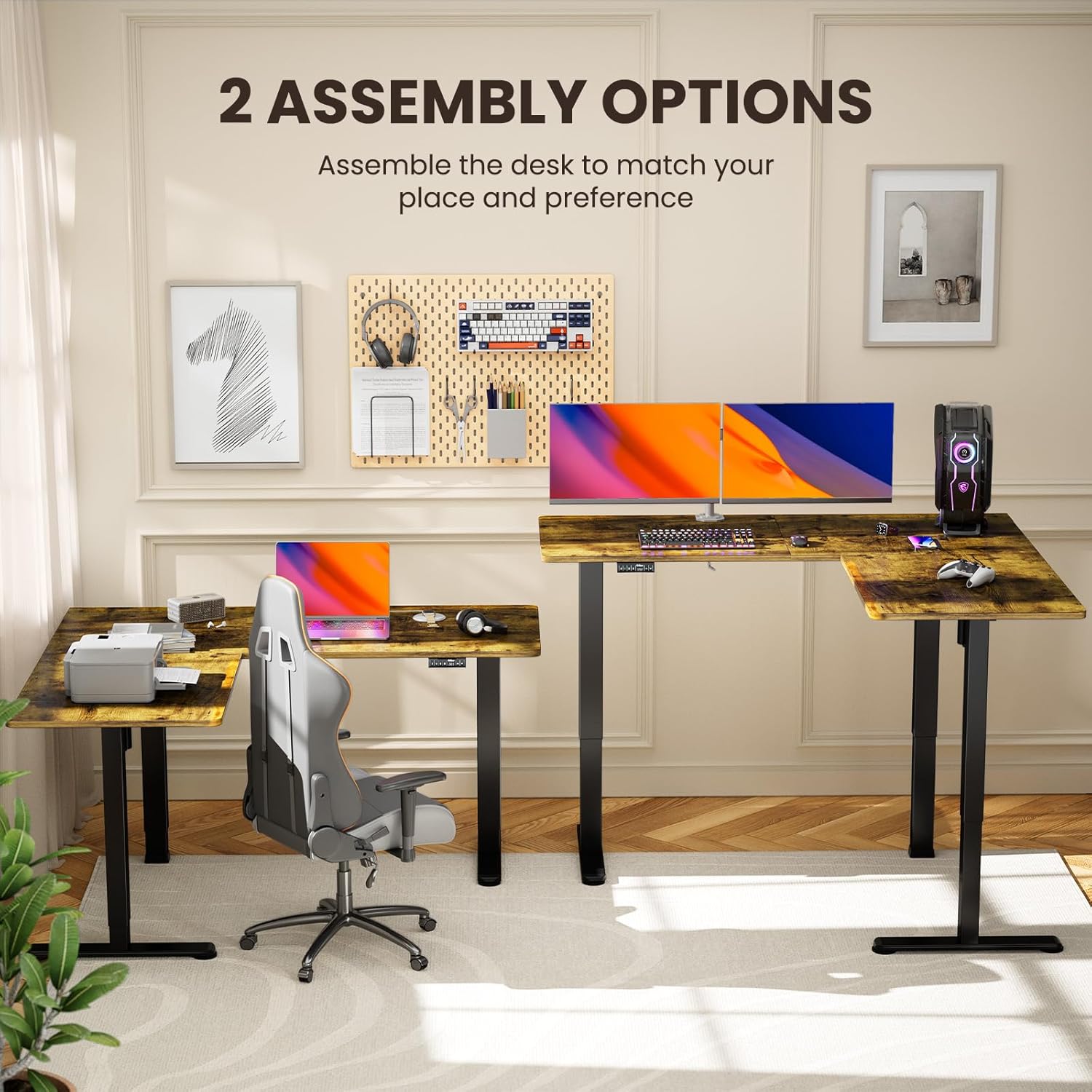
Image 4.1: Illustration of the two possible configurations for the L-shaped desktop, allowing for left or right-hand setup.

4.2 pav.: Viršutinė dalis view demonstrating the flexibility of assembling the desk with the longer section on either side.
4.2 General Assembly Steps (Refer to PDF for details)
- Išpakuokite visus komponentus ir patikrinkite juos pagal dalių sąrašą.
- Attach the lifting columns to the desktop sections.
- Secure the foot pads to the lifting columns.
- Connect the motor cables and control panel to the main control box.
- Plug in the power adapter and perform initial calibration as per the detailed manual.
5. Naudojimo instrukcijos
Your ErGear standing desk features a dual-motor system for smooth and quiet height adjustments, along with a control panel for easy operation and memory presets.
5.1 Aukščio reguliavimas
Use the up and down arrow buttons on the control panel to adjust the desk height. The desk can be adjusted from 28.35 inches to 46.46 inches.

Image 5.1: The desk in a standing position, demonstrating the electric height adjustment feature for ergonomic use.
5.2 Atminties išankstinės nuostatos
The control panel allows you to save custom sit and stand height settings for quick transitions. Consult your detailed manual for specific instructions on setting and recalling memory positions.
5.3 Dual Motor System
The desk is equipped with dual motors for faster, smoother, and quieter operation. This system ensures stable and reliable long-term performance.

5.2 pav.: Vidinis view highlighting the dual motor mechanism responsible for the desk's smooth and efficient height adjustment.

Image 5.3: The quiet operation of the desk allows for an undisturbed work environment, as demonstrated by a sleeping cat.
6. Priežiūra
Regular maintenance helps prolong the life and performance of your desk.
- Valymas: Nuvalykite darbastalį ir rėmą minkšta, d šluosteamp skudurėliu. Venkite stiprių cheminių medžiagų ar abrazyvinių valiklių.
- Kabelių valdymas: Periodically check and organize cables to prevent entanglement or damage during height adjustments.
- Tvirtinimo detalės: Occasionally check all screws and bolts to ensure they remain tight.
7. Problemų sprendimas
Jei kyla problemų dėl stalo, žr. šiuos dažniausiai pasitaikančius sprendimus:
| Problema | Galima priežastis | Sprendimas |
|---|---|---|
| Stalas nejuda | Power cable disconnected, overload, motor error | Check power connections. Reduce weight on desk. Refer to manual for error code interpretation and reset procedures. |
| Netolygus aukščio reguliavimas | Obstruction, calibration issue | Ensure no obstructions. Perform a reset/calibration as per the detailed manual. |
| Unusual noise during adjustment | Loose fasteners, obstruction | Check all fasteners for tightness. Remove any objects that may be interfering with the lifting columns. |
If the problem persists, please contact ErGear customer support.
8. Specifikacijos
Key technical details for your ErGear L-Shaped Standing Desk:
- Modelio numeris: EGESD8V
- Gaminio matmenys: 55 "D x 63" P x 28.35" A
- Minimalus aukštis: 28.35 colių
- Maksimalus aukštis: 46.46 colių
- Rekomendacija dėl didžiausios masės: 220 svaro
- Pagrindinė medžiaga: Anglies plienas
- Populiariausias medžiagos tipas: Wood (Laminated)
- Varikliai: Dviejų variklių sistema
- Surinkimas: Būtinas (rekomenduojama 2 žmonėms)
- Garantija: 5 metų garantija

Image 8.1: Detailed dimensions of the ErGear L-Shaped Standing Desk, including the adjustable height range.

Image 8.2: The desk's robust lifting system is tested to support up to 220 lbs, ensuring dependable performance.
9. Garantija ir palaikymas
ErGear provides a 5-year warranty for this product, covering parts and labor. For warranty claims, technical assistance, or further inquiries, please visit the official ErGear store or contact customer support.
ErGear Store: Apsilankykite „ErGear“ parduotuvėje „Amazon“ svetainėje
Montavimo vadovas (PDF): For a detailed installation guide, please refer to the official PDF document: Atsisiųskite PDF vadovą


