1. Produktas baigtasview
The PENO XK-W2001 is an electronic socket thermostat designed for automatic temperature control. It features a digital display for clear temperature readings and easy setting adjustments. This device is suitable for various applications requiring precise temperature regulation, such as aquaculture, greenhouse environments, or home brewing.
Pakuotės turinys:
- 1 x PENO XK-W2001 Temperature Controller
Pagrindiniai komponentai:
Familiarize yourself with the main parts of your temperature controller:
- Skaitmeninis ekranas: Shows current and set temperatures.
- SET mygtukas: Naudojamas temperatūros nustatymo režimui įjungti.
- Aukštyn/žemyn mygtukai: Adjust temperature values.
- Output Indicator (OUT): Illuminates when the controlled device is active.
- Temperatūros zondas: Matuoja aplinkos temperatūrą.
- Maitinimo kištukas: Connects the controller to a power outlet.
- Controlled Device Socket: Where the heating or cooling device is plugged in.

1 pav.: priekis view of the PENO XK-W2001 Electronic Socket Thermostat, showing the digital display, control buttons, and output socket.

Figure 2: Close-up of the digital display and control buttons (SET, Up, Down) on the PENO XK-W2001, indicating temperature measurement accuracy.
2. Saugos informacija
Prieš naudodami šį gaminį, perskaitykite ir supraskite visas saugos instrukcijas. Nesilaikant šių instrukcijų, gali kilti elektros smūgis, gaisras arba sunkūs sužalojimai.
- Do not immerse the controller unit in water or expose it to excessive moisture. The temperature probe is waterproof, but the main unit is not.
- Užtikrinkite maitinimo šaltinio ttage atitinka įrenginio reikalavimus (110–220 V).
- Do not exceed the maximum output power of 1500W (10A).
- Prietaisą laikykite vaikams nepasiekiamoje vietoje.
- Neardykite ir nemodifikuokite įrenginio. Visus techninės priežiūros darbus patikėkite kvalifikuotiems darbuotojams.
- Užtikrinkite tinkamą vėdinimą aplink įrenginį.
- Prieš valydami ar atlikdami bet kokią techninę priežiūrą, atjunkite įrenginį nuo elektros lizdo.
3. Gaminio specifikacijos
| Funkcija | Specifikacija |
|---|---|
| Modelis | XK-W2001 |
| Valdymo tipas | Intelligent Temperature Control Regulator |
| Temperatūros diapazonas | -50°C iki 110°C |
| Temperatūros matavimo klaida | 0.1°C |
| Išėjimo galia | 1500 W (maks.) |
| Dabartinis pajėgumas | Maksimali 10A |
| Įvesties tomastage | 110–220 V (JAV kištukas) |
| Medžiaga | ABS and PCB |
| Prekės svoris | 4.2 uncijos |
| Pakuotės matmenys | 6.3 x 3.15 x 1.18 colio |
4. Sąrankos instrukcijos
Follow these steps to set up your PENO XK-W2001 temperature controller:
- Prijunkite temperatūros zondą: Insert the metal tip of the temperature probe into the environment where you wish to measure and control the temperature. Ensure the probe cable is securely connected to the controller.
- Plug in the Controlled Device: Connect your heating or cooling device (e.g., heater, fan) into the output socket of the temperature controller. Ensure the device's power consumption does not exceed 1500W (10A).
- Prijunkite prie maitinimo: Plug the temperature controller's power plug into a standard 110-220V US wall outlet. The digital display will illuminate, showing the current measured temperature.

Figure 3: The PENO XK-W2001 controller showing its integrated temperature probe and power cord, ready for connection.
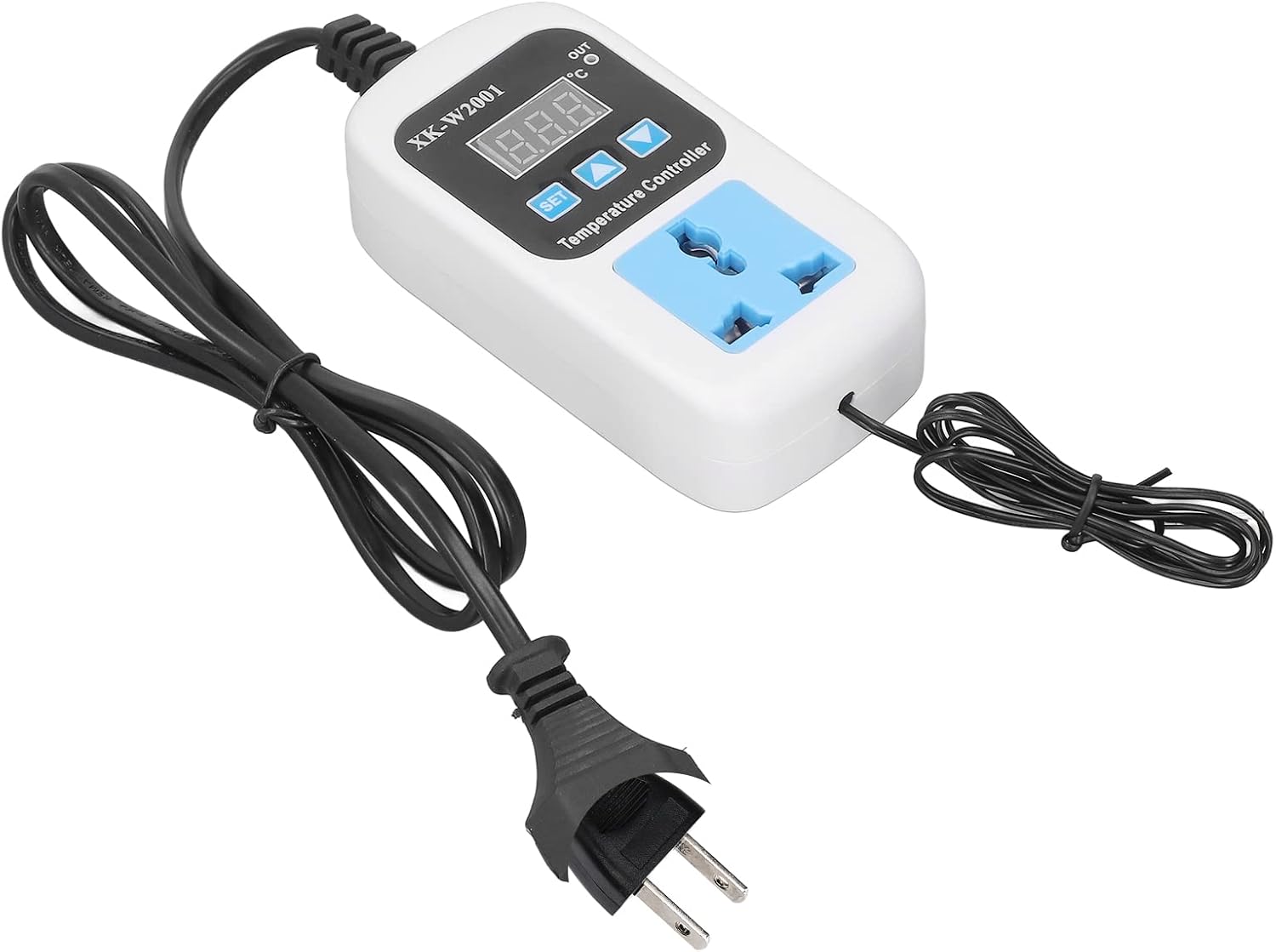
Figure 4: The PENO XK-W2001 temperature controller plugged into a wall outlet, indicating it is powered on.
5. Naudojimo instrukcijos
The PENO XK-W2001 allows for precise temperature control. The display shows the current temperature measured by the probe. The 'OUT' indicator light will illuminate when the connected device is actively heating or cooling to reach the set temperature.
Norimos temperatūros nustatymas:
- Paspauskite NUSTATYTI button once. The digital display will start flashing, indicating it is in setting mode.
- Naudokite Aukštyn (▲) ir Žemyn (▼) mygtukai norimai temperatūros vertei reguliuoti.
- Once the desired temperature is set, press the NUSTATYTI button again to confirm and exit the setting mode. The display will return to showing the current measured temperature.
The controller will now automatically activate or deactivate the connected device to maintain the temperature around your set point. The device supports both Celsius and Fahrenheit readings, which can typically be toggled through a long press of the SET button or a combination of buttons (refer to on-device markings if available for specific instructions).

Figure 5: The PENO XK-W2001 operating in a greenhouse, demonstrating its intelligent temperature control capabilities and digital display.
6. Priežiūra
Proper maintenance ensures the longevity and accurate operation of your temperature controller.
- Valymas: Disconnect the device from power before cleaning. Use a soft, dry cloth to wipe the exterior of the controller. Do not use abrasive cleaners or solvents.
- Zondų priežiūra: Periodically inspect the temperature probe for any damage or buildup. Clean the probe gently if necessary, ensuring it remains free of debris that could affect readings.
- Saugykla: When not in use for extended periods, store the controller in a cool, dry place, away from direct sunlight and extreme temperatures.
7. Problemų sprendimas
If you encounter issues with your PENO XK-W2001, refer to the following common problems and solutions:
| Problema | Galima priežastis | Sprendimas |
|---|---|---|
| Ekranas išjungtas | Nėra maitinimo | Check if the controller is properly plugged into a live power outlet. Verify the outlet is functional. |
| Temperatūros rodmenys netikslūs | Probe is damaged or improperly placed | Ensure the probe is fully inserted and positioned correctly in the measurement area. Inspect the probe for visible damage. |
| Connected device not turning on/off | Set temperature not reached; device malfunction; controller malfunction | Verify the set temperature is appropriate. Check if the connected device is working independently. Ensure the controller's output indicator (OUT) illuminates when it should be active. |
| Display shows 'HHH' or 'LLL' | Temperature probe error (out of range or disconnected) | Check the temperature probe connection. Ensure the measured temperature is within the -50°C to 110°C range. |
8. Garantija ir palaikymas
PENO products are manufactured to high-quality standards. For information regarding warranty coverage, technical support, or service, please refer to the documentation provided at the time of purchase or contact your retailer. Keep your purchase receipt as proof of purchase.


