Įvadas
This manual provides detailed instructions for the Powerwave Switch Wireless Controller. Learn how to set up, operate, maintain, and troubleshoot your controller to enhance your gaming experience on Nintendo Switch, PC, Android, and iOS devices.

Priekyje view of the Powerwave Switch Wireless Controller, showcasing its Star White design with blue grips and red shoulder buttons. The controller features standard button layouts including A, B, X, Y buttons, a D-pad, and dual analog sticks.
Produkto savybės
- Belaidis Bluetooth ryšys: Enjoy seamless gaming without cables.
- 3-Speed Dual-Motor Vibration: Experience immersive feedback with adjustable vibration intensity.
- Judesių valdikliai: Enhance gameplay with precise motion sensing capabilities.
- Kelių platformų suderinamumas: Works wirelessly with Nintendo Switch, PC, Android, and iOS 13 and above.
- 4 Programmable Macro Buttons: Customize complex inputs and activate them with a single button press.
- Turbo režimas: Enable rapid-fire commands for quick actions in games.
- 8-Colour Rotating LED Lighting Effect: Adds a vibrant visual element to your gaming setup.

Visual representation of the controller's key features, including Wireless Bluetooth, 3-Speed Dual-Motor, PC/Android/iOS13 compatibility, 8-Colour Rotating LED, and Programmable Macro Buttons.
Sąrankos vadovas
1. Pradinis įkrovimas
Before first use, fully charge the controller using the provided USB-C cable. Connect the cable to the controller's USB-C port and the other end to a USB power source (e.g., Nintendo Switch dock, PC, or USB wall adapter). The LED indicators will show charging status.
2. Susiejimas su „Nintendo Switch“
- „Nintendo Switch“ HOME meniu pasirinkite Valdikliai, tada Pakeiskite rankeną / tvarką.
- On the Powerwave controller, press and hold the HOME mygtukas (house icon) for 3-5 seconds until the LED indicators start flashing rapidly.
- Suporavus, atitinkamas(-i) žaidėjo šviesos diodas(-iai) ant valdiklio ims šviesti nuolat.
3. Pairing with PC, Android, or iOS (Bluetooth)
- Ensure Bluetooth is enabled on your device (PC, Android phone/tablet, iOS device).
- On the Powerwave controller, press and hold the HOME mygtukas 3–5 sekundes, kol LED indikatoriai pradės greitai mirksėti.
- On your device, search for new Bluetooth devices. Select "Powerwave Controller" (or similar) from the list to pair.
- Once connected, the LED indicators on the controller will stop flashing and remain solid.
Naudojimo instrukcijos
Pagrindiniai valdikliai
The Powerwave Switch Wireless Controller features standard button layouts for intuitive gameplay. Refer to your game's specific control scheme for optimal use.
Programmable Macro Buttons (M1, M2, M3, M4)
The controller includes four programmable macro buttons on the back (M1, M2, M3, M4) for executing complex command sequences with a single press.
- Įėjimas į programavimo režimą: Paspauskite ir palaikykite Makro mygtukas (usually a small button near the M buttons) until the indicator light flashes.
- Recording Macro: Press the desired M button (M1-M4) you wish to program. Then, input the sequence of buttons you want to record (e.g., A, B, X, Y, L, R, ZL, ZR, D-pad directions, analog stick movements).
- Išėjimas iš programavimo režimo: Paspauskite Makro mygtukas again to save the macro and exit programming mode. The indicator light will stop flashing.
- Using Macro: Simply press the programmed M button during gameplay to execute the recorded sequence.
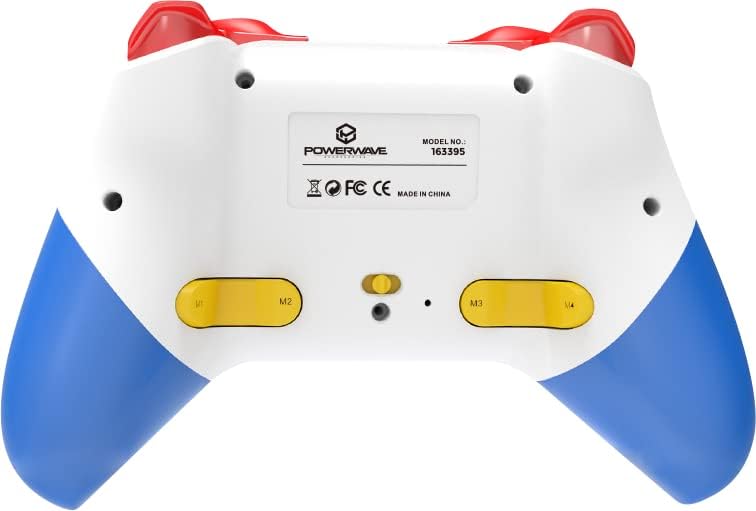
Galinis view of the Powerwave Switch Wireless Controller, highlighting the M1, M2, M3, and M4 programmable macro buttons, along with the model number and regulatory markings.
Turbo režimas
Turbo mode allows a button to be pressed repeatedly as long as it is held down, providing a rapid-fire function.
- Turbo aktyvinimas: Paspauskite ir palaikykite Turbo mygtukas (usually marked 'T') and then press the desired action button (e.g., A, B, X, Y, L, R, ZL, ZR). The button will now be in Turbo mode.
- Turbo greičio reguliavimas: Laikydami Turbo mygtukas, move the Right Analog Stick Up or Down to cycle through different turbo speeds (slow, medium, fast).
- Turbo išjungimas: To remove Turbo from a specific button, press and hold the Turbo mygtukas and then press the same action button again. To clear all Turbo settings, press and hold the Turbo mygtukas 5 sekundes.
Vibracijos reguliavimas
The controller features 3-speed dual-motor vibration. To adjust vibration intensity, press and hold the Vibracijos mygtukas (if available, or a combination like Turbo + D-pad Up/Down) to cycle through intensities (Off, Low, Medium, High).
LED apšvietimo efektai
The 8-colour rotating LED lighting effect can be toggled or adjusted. Refer to the specific button combination for your controller model, often involving a dedicated LED button or a combination with the Turbo button.
Priežiūra
- Valymas: Valdiklį nuvalykite minkšta, sausa šluoste. Jei nešvarumai sunkiai įveikiami, šiek tiek nuvalykite.ampNuvalykite šluostę vandeniu. Nenaudokite stiprių cheminių medžiagų ar abrazyvinių valiklių.
- Saugykla: Laikykite valdiklį vėsioje, sausoje vietoje, apsaugotoje nuo tiesioginių saulės spindulių ir ekstremalių temperatūrų.
- Akumuliatoriaus priežiūra: Norėdami pailginti baterijos veikimo laiką, venkite dažnai visiškai iškrauti valdiklį. Reguliariai jį įkraukite, net jei ilgesnį laiką nenaudojate.
- Venkite lašų: Saugokite valdiklį nuo fizinių smūgių ir kritimų, kurie gali pažeisti vidinius komponentus.
Trikčių šalinimas
| Problema | Galimas sprendimas |
|---|---|
| Valdiklis neįsijungia. | Ensure the controller is fully charged. Connect it to a power source and allow it to charge for at least 30 minutes before attempting to turn it on again. |
| Controller fails to pair with device. |
|
| Įvesties delsa arba ryšio atjungimas žaidimo metu. |
|
| Mygtukai arba analoginės vairalazdės nereaguoja. |
|
Specifikacijos
- Modelio numeris: 163395
- Gaminio matmenys: 15 x 6 x 10 cm
- Svoris: 212 gramų
- Ryšys: Belaidis Bluetooth
- Suderinamumas: Nintendo Switch, Nintendo Switch Lite, Nintendo Switch OLED, PC, Android, iOS 13+
- Savybės: 3-Speed Dual-Motor Vibration, Motion Controls, 4 Programmable Macro Buttons, Turbo Mode, 8-Colour Rotating LED Lighting Effect
- Unsupported Functions (Nintendo Switch): HD Rumble, NFC, IR Camera
Garantija ir palaikymas
For warranty information and technical support, please refer to the official Powerwave websvetainėje arba susisiekite su jų klientų aptarnavimo tarnyba. Išsaugokite pirkimo įrodymą, jei prireiktų garantijos.
Powerwave Official Websvetainė: www.powerwave.com.au


