Įvadas
Thank you for choosing the FANTECH MAXFIT61 Frost Wireless Mechanical Keyboard. This compact 61-key keyboard offers versatile connectivity options, customizable RGB lighting, and hot-swappable switches for a personalized typing and gaming experience. This manual provides detailed instructions for setup, operation, maintenance, and troubleshooting to ensure optimal performance.

Image: The FANTECH MAXFIT61 Frost Wireless Mechanical Keyboard, showcasing its 5-pin hot-swappable design, 3 connection modes (Bluetooth, 2.4GHz, USB-C), RGB lighting, and switch options (Red and Blue).
Sąranka
Kas yra dėžutėje
- FANTECH MAXFIT61 Frost Wireless Mechanical Keyboard
- Klaviatūros traukiklis
- Jungiklio traukiklis
- C tipo USB įkrovimo laidas
- USB imtuvas (2.4 GHz belaidžiam ryšiui)
- Instrukcijų vadovas

Image: A visual representation of the items included in the product packaging, such as the keyboard, cables, and tools.
Ryšio režimai
The MAXFIT61 Frost Wireless keyboard supports three connection modes:
- Bluetooth 5.0 (BT5.0): For wireless connection to up to three devices.
- 2.4 GHz belaidis ryšys: Utilizes the included USB receiver for a stable, low-latency wireless connection.
- USB C tipo laidinis: Connect directly via the USB-C cable for a wired connection and charging.
To switch between modes, use the dedicated switch on the keyboard or specific key combinations as detailed in the operating instructions.
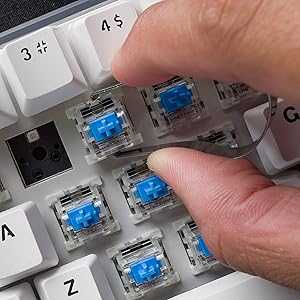
Image: A visual comparison showing the keyboard operating in wireless (Bluetooth/2.4GHz) mode and wired mode, highlighting the flexibility of connection options.

Vaizdas: Stambus planas view of the detachable USB Type-C cable connected to the keyboard, emphasizing its portability and ease of management.
Naudojimo instrukcijos
Pagrindinės funkcijos
- Maitinimo įjungimas/išjungimas: Use the switch located on the keyboard's side or bottom.
- Režimo perjungimas: Refer to the specific key combinations or physical switch for changing between Bluetooth, 2.4GHz, and wired modes.
- Pairing (Bluetooth): Activate Bluetooth mode, then search for 'MAXFIT61' on your device and pair.
- 2.4 GHz ryšys: Insert the USB receiver into your computer. The keyboard should connect automatically.
Magic FN Key
The 'Fn' key provides access to various multimedia functions, lighting controls, and custom macros. Pressing Fn + CAPS allows quick access to multimedia keys, home key, and custom functions.

Image: A close-up of the 'Caps' and 'Shift' keys, indicating the functionality of the 'Magic FN Key' for accessing additional commands.
RGB apšvietimo pritaikymas
The keyboard features 15 built-in brilliant backlight effects. You can cycle through these effects using specific Fn key combinations. For advanced customization, including per-key RGB lighting, macros, and function key remapping, download and install the FANTECH MAXFIT61 software from the official FANTECH websvetainę.

Image: A screenshot of the FANTECH MAXFIT61 software, demonstrating the interface for adjusting RGB lighting modes and creating custom key assignments.
Priežiūra
Valymas
To clean your keyboard, disconnect it from your computer. Use a soft, dry cloth to wipe the surface. For deeper cleaning, you may carefully remove keycaps using the provided keycap puller and use compressed air to clear debris from underneath.
Karštai keičiami jungikliai
The MAXFIT61 features hot-swappable sockets, allowing you to change switches without soldering. It supports most 5-pin/3-pin mechanical switches from brands like Gateron, Cherry, and Kailh.
- Klaviatūros dangtelių nuėmimas: Švelniai pakelkite klavišų dangtelius tiesiai į viršų naudodami klavišų dangtelių traukiklį.
- Jungiklių nuėmimas: Use the switch puller to grip the top and bottom clips of the switch and pull it straight out.
- Jungiklių diegimas: Align the pins of the new switch with the holes on the PCB. Press firmly until the switch clicks into place. Ensure pins are not bent.
- Klaviatūros dangtelių diegimas: Align the keycap with the switch stem and press down gently.
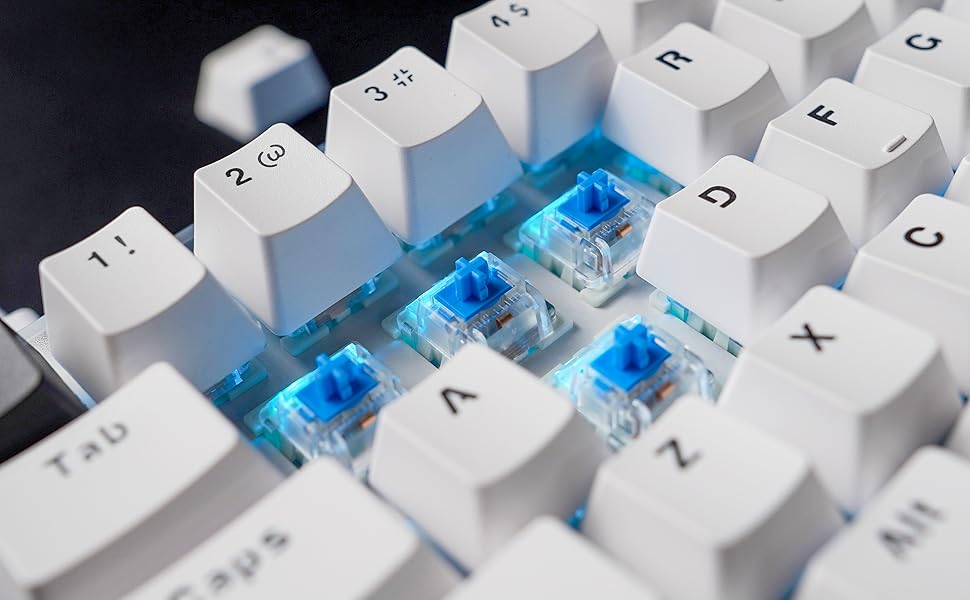
Image: A close-up showing mechanical switches being removed from the keyboard's PCB using a switch puller, demonstrating the hot-swappable feature.

Image: An exploded diagram illustrating the internal components of the keyboard, including keycaps, plate, switches, sound-proofing foam, PCB, and bottom case.
Trikčių šalinimas
- Klaviatūra nereaguoja:
- Įsitikinkite, kad klaviatūra įkrauta arba prijungta per USB-C.
- Check the connection mode (Bluetooth, 2.4GHz, Wired) and ensure it matches your device.
- Jei naudojate 2.4 GHz dažnį, įsitikinkite, kad USB imtuvas tinkamai prijungtas.
- For Bluetooth, ensure it's paired correctly and your device's Bluetooth is enabled.
- RGB apšvietimas neveikia / yra netinkamas:
- Įsitikinkite, kad klaviatūra įjungta.
- Cycle through built-in effects using Fn key combinations.
- If using custom settings, verify them in the FANTECH software.
- Neregistruojami raktai:
- If a specific key is not working, carefully remove the keycap and switch to check for debris or bent pins. Reinstall or replace the switch if necessary.
- Ensure the keyboard firmware is up to date (check FANTECH websvetainė).
- Connectivity Issues (Lag/Disconnections):
- Sumažinkite atstumą tarp klaviatūros ir imtuvo / įrenginio.
- Venkite trukdžių, kylančių iš kitų belaidžių įrenginių.
- Įsitikinkite, kad klaviatūra yra visiškai įkrauta.
- Pabandykite laidinį ryšį, kad atmestumėte belaidžio ryšio problemas.
Specifikacijos
| Funkcija | Detalė |
|---|---|
| Produkto pavadinimas | MAXFIT61 FROST BELAIDĖS MK857 |
| Raktų skaičius | 61 raktai |
| Jungiklio tipas | Mechanical (Hot-swappable) |
| Ryšio technologija | BT5.0, 2.4GHz Wireless, USB Type-C Wired |
| Anti-Ghosting | Visi raktai |
| Klaviatūros apšvietimas | RGB |
| Matmenys (I x P x A) | 294 mm x 103 mm x 42 mm (13.5 x 5.63 x 1.85 colio) |
| Svoris | 566 g (1.37 svaro) |
| Baterija | 1 ličio polimero baterija (pridedama) |
| Suderinami įrenginiai | Kompiuteris („Windows“) |

Image: A table outlining the characteristics of Outemu Red and Blue switches, including actuation force, pre-travel, travel distance, behavior, and sound level.
Garantija ir palaikymas
FANTECH products come with a limited warranty. For detailed warranty information, technical support, or service inquiries, please visit the official FANTECH websvetainėje arba susisiekite tiesiogiai su jų klientų aptarnavimo tarnyba. Išsaugokite pirkimo įrodymą garantiniams reikalavimams.


