Įvadas
Ačiū, kad pirkoteasing the Edifier MF200 USB Powered Multimedia Bluetooth Soundbar. This manual provides detailed instructions for setting up, operating, and maintaining your new soundbar. Please read this manual thoroughly before use to ensure proper functionality and to maximize your listening experience.

1 pav.: priekis view of the Edifier MF200 Soundbar, showcasing its sleek design and integrated controls on the right side.
Pakuotės turinys
Patikrinkite siuntos turinį, kad įsitikintumėte, jog yra visi reikalingi daiktai:
- Edifier MF200 Soundbar
- Nešiojimo maišelis
- USB-C į USB-C laidas
- Vartotojo vadovas (šis dokumentas)
Sąranka
Follow these steps to set up your Edifier MF200 Soundbar:
- Vieta: Place the soundbar on a stable, flat surface, such as a desk or shelf, preferably in front of your monitor or TV for optimal sound projection.
- Maitinimo jungtis: Connect the provided USB-C to USB-C cable to the USB-C port on the back of the soundbar. Connect the other end to a USB power source (e.g., computer USB port, USB wall adapter 5V 1A). The soundbar will power on automatically.
- Garso jungtis:
- Bluetooth: The soundbar will enter Bluetooth pairing mode automatically upon first power-on. The indicator light will flash.
- AUX įvestis: For wired connection, connect an audio device (e.g., MP3 player, laptop) to the 3.5mm AUX input port on the soundbar using a 3.5mm audio cable (not included).
- USB garsas: Connect the soundbar to your computer via the USB-C cable for digital audio playback.

2 pav.: galinis view of the Edifier MF200 Soundbar, showing the USB-C power/audio input and the 3.5mm AUX input port.
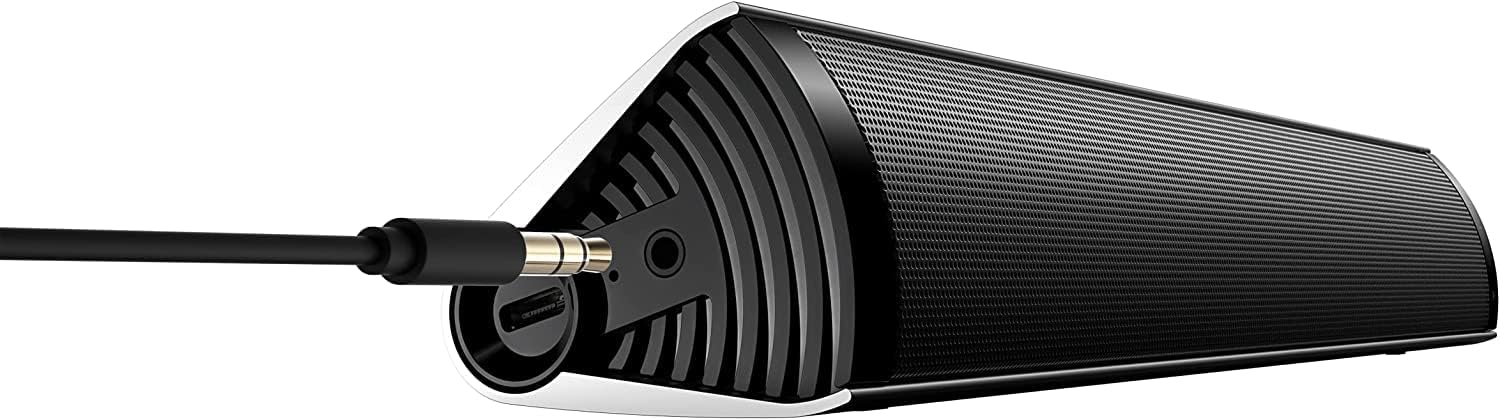
Figure 3: The Edifier MF200 Soundbar with a 3.5mm AUX cable connected to its input port, demonstrating a wired audio connection.
Naudojimo instrukcijos
The Edifier MF200 features intuitive controls for easy operation.
Kontroliuojaview

Figure 4: A hand demonstrating the touch control functionality on the Edifier MF200, highlighting the multi-function knob.
- Power Button (Top Left): Paspauskite ir palaikykite, kad įjungtumėte/išjungtumėte.
- Garsumo padidinimas (+): Paspauskite norėdami padidinti garsumą.
- Sumažinti garsumą (-): Paspauskite, kad sumažintumėte garsumą.
- Multi-function Knob (Right Side):
- Paspauskite: Play/Pause (in Bluetooth mode), Answer/End Call.
- Paspauskite ir palaikykite: Enter Bluetooth pairing mode (when not connected), Reject Call.
- Pasukti: Sureguliuokite garsumą.
- Previous Track (|<): Press to go to the previous track (in Bluetooth mode).
- Next Track (>|): Press to go to the next track (in Bluetooth mode).
"Bluetooth" poravimas
- Ensure the soundbar is powered on. The indicator light on the multi-function knob will flash blue, indicating it's in pairing mode.
- Savo įrenginyje (išmaniajame telefone, planšetiniame kompiuteryje, kompiuteryje) įjunkite „Bluetooth“ ir ieškokite naujų įrenginių.
- Select "EDIFIER MF200" from the list of available devices.
- Once paired, the indicator light will turn solid blue. You can now play audio through the soundbar.
- To disconnect or pair with a new device, press and hold the multi-function knob until the indicator light flashes again.
AUX įvesties režimas
When a 3.5mm audio cable is connected to the AUX input, the soundbar will automatically switch to AUX mode. Disconnect the AUX cable to return to Bluetooth or USB audio mode.
USB garso režimas
Connect the soundbar to your computer via the USB-C cable. The computer should recognize the MF200 as an audio output device. Select it from your computer's sound settings.
Baterija ir įkrovimas
The Edifier MF200 features a built-in rechargeable battery for portable use.
- Baterijos veikimo laikas: The soundbar provides up to 10 hours of music playtime on a full charge.
- Įkrovimas: Connect the soundbar to a USB power source using the provided USB-C cable. The indicator light will show charging status (e.g., red for charging, off or green for fully charged, depending on model specifics).
- Senka baterija: When the battery is low, the indicator light may flash or change color to alert you.

Figure 5: Visual representation of the Edifier MF200's battery life, indicating up to 10 hours of music playback on a single charge.
Priežiūra
To ensure the longevity and optimal performance of your Edifier MF200 Soundbar, follow these maintenance guidelines:
- Valymas: Use a soft, dry cloth to wipe the surface of the soundbar. Do not use liquid cleaners, aerosols, or abrasive solvents.
- Saugykla: When not in use for extended periods, store the soundbar in a cool, dry place, away from direct sunlight and extreme temperatures. Use the provided carry pouch for protection.
- Venkite drėgmės: Keep the soundbar away from water and high humidity. It is not waterproof.
- Elkitės atsargiai: Saugokite garso juostą nuo kritimo ir stiprių smūgių.
Trikčių šalinimas
If you encounter any issues with your Edifier MF200 Soundbar, please refer to the following common problems and solutions:
| Problema | Galima priežastis / sprendimas |
|---|---|
| Nėra galios |
|
| Nėra garso |
|
| Bluetooth connection unstable or unable to pair |
|
| Garso iškraipymas |
|
Specifikacijos
Detailed technical specifications for the Edifier MF200 Soundbar:

Figure 6: A detailed list of technical specifications for the Edifier MF200 Soundbar, including input types, Bluetooth version, driver units, and dimensions.
| Funkcija | Detalė |
|---|---|
| Modelio pavadinimas | MF200 |
| Įvesties tipai | Bluetooth / USB-C sound card / 3.5mm AUX |
| Bluetooth versija | 5.0 |
| Vairuotojų blokai | 36mm full-range × 2 |
| Dažnio atsakas | 100Hz-20KHz |
| Išėjimo galia | 4W+4W (RMS) |
| Signalo ir triukšmo koeficientas | ≥85dB (A) |
| Triukšmo lygis | ≤25 dB (A) |
| Baterijos talpa | 2200 mAh |
| „Bluetooth“ grojimo laikas | 10 valandos |
| Maitinimo įvestis | DC 5V 1A |
| Produkto matmenys (P × A × G) | 293mm × 45mm × 53mm (11.54"D x 1.77"W x 2.09"H) |
| Grynasis svoris | 0.5 kg (1.1 svaro) |
| Ryšio technologija | Bluetooth, USB |
| Garsiakalbio tipas | Aukštų dažnių garsiakalbis |
| Erdvinio garso kanalo konfigūracija | 2.1 |
Garantija ir palaikymas
The Edifier MF200 Soundbar comes with a limited warranty. For detailed warranty terms and conditions, please refer to the warranty card included in your package or visit the official Edifier websvetainę.
For technical support, troubleshooting assistance, or service inquiries, please contact Edifier customer support through their official websvetainėje arba kontaktinę informaciją, pateiktą jūsų produkto dokumentuose.
Internetiniai ištekliai: www.edifier.com


