1. Įvadas
Thank you for choosing the BYINTEK P19 Mini 3D DLP Projector. This portable device offers a high-quality viewing experience with its advanced DLP technology, Android 9.0 operating system, and built-in battery. This manual provides essential information for setting up, operating, and maintaining your projector to ensure optimal performance and longevity.

The BYINTEK P19 Mini Projector in an operational setting, demonstrating its ability to project clear images for entertainment.
2. Saugos informacija
- Prieš naudodami projektorių, perskaitykite visas instrukcijas.
- Neužblokuokite ventiliacijos angų. Užtikrinkite pakankamą oro srautą aplink projektorių.
- Naudokite tik su prietaisu pateiktą maitinimo adapterį.
- Avoid direct exposure to the projector lens light, as it can be harmful to the eyes.
- Projektorių saugokite nuo vandens, drėgmės ir ekstremalių temperatūrų.
- Nebandykite patys ardyti ar taisyti projektoriaus. Dėl pagalbos kreipkitės į klientų aptarnavimo tarnybą.
3. Pakuotės turinys
Išpakuodami patikrinkite pakuotės turinį, kad įsitikintumėte, jog yra visi reikalingi daiktai:
- 1 x BYINTEK P19 Projector
- 1 x IR nuotolinio valdymo pultas
- 1 x Maitinimo adapteris (12 V / 2 A nuolatinė srovė)
- 1 x USB Charging Cable (supports ≥ DC 5V 3A input)
- 1 x Vartotojo vadovas
- 1 x saugojimo krepšys

The standard package includes the P19 projector, a storage bag, user manual, remote control, USB charging cable, and a DC 12V/2A power adapter.
4. Produktas baigtasview
4.1 Projektoriaus komponentai

The BYINTEK P19 Mini Projector, a compact device capable of projecting large images, shown here displaying a high-definition movie.
4.2 Prievadai ir jungtys

The projector's connectivity options, including USB 3.0, HD-in, DC-in, and Audio-out, supporting connections to devices like PS4, U Disk, GamePad, Mouse, HD DVD/Network HD player, Smartphone/tablet/laptop, Desktop Computer, and external Speakers.
- Fokusas: Manual focus adjustment wheel.
- Klaviatūra: Valdymo mygtukai viršutiniame skydelyje.
- IR imtuvas: Nuotolinio valdymo signalams.
- USB 3.0: Skirta USB atmintinėms ar kitiems periferiniams įrenginiams prijungti.
- DC-in (12V 2A): Maitinimo įvesties prievadas.
- HD-in: HDMI input for external video sources.
- Audio-out: 3.5mm jack for external speakers or headphones.
5. Pagrindinės savybės
- Mini DLP Projector: Advanced DLP technology for clear and vibrant images.
- Integruota baterija: 7800 mAh rechargeable lithium battery providing 1.5 to 2.5 hours of operation.
- Android 9.0 OS: Integrated smart operating system with pre-installed media apps and Play Store access.
- Belaidis ekranas: Supports screen mirroring for smartphones, tablets, and PCs.
- Hi-Fi Stereo Speaker: Dual 3W speakers for integrated audio.
- 6D Keystone korekcija: Auto/Manual vertical and corner keystone adjustments.
- 3D palaikymas: DLP-Link 3D compatibility for immersive viewing.
- Ryšys: 2.4G/5G dual-band Wi-Fi, USB, and HDMI inputs.
- Rezoliucija: Native 1280x720, supports up to 4K input.
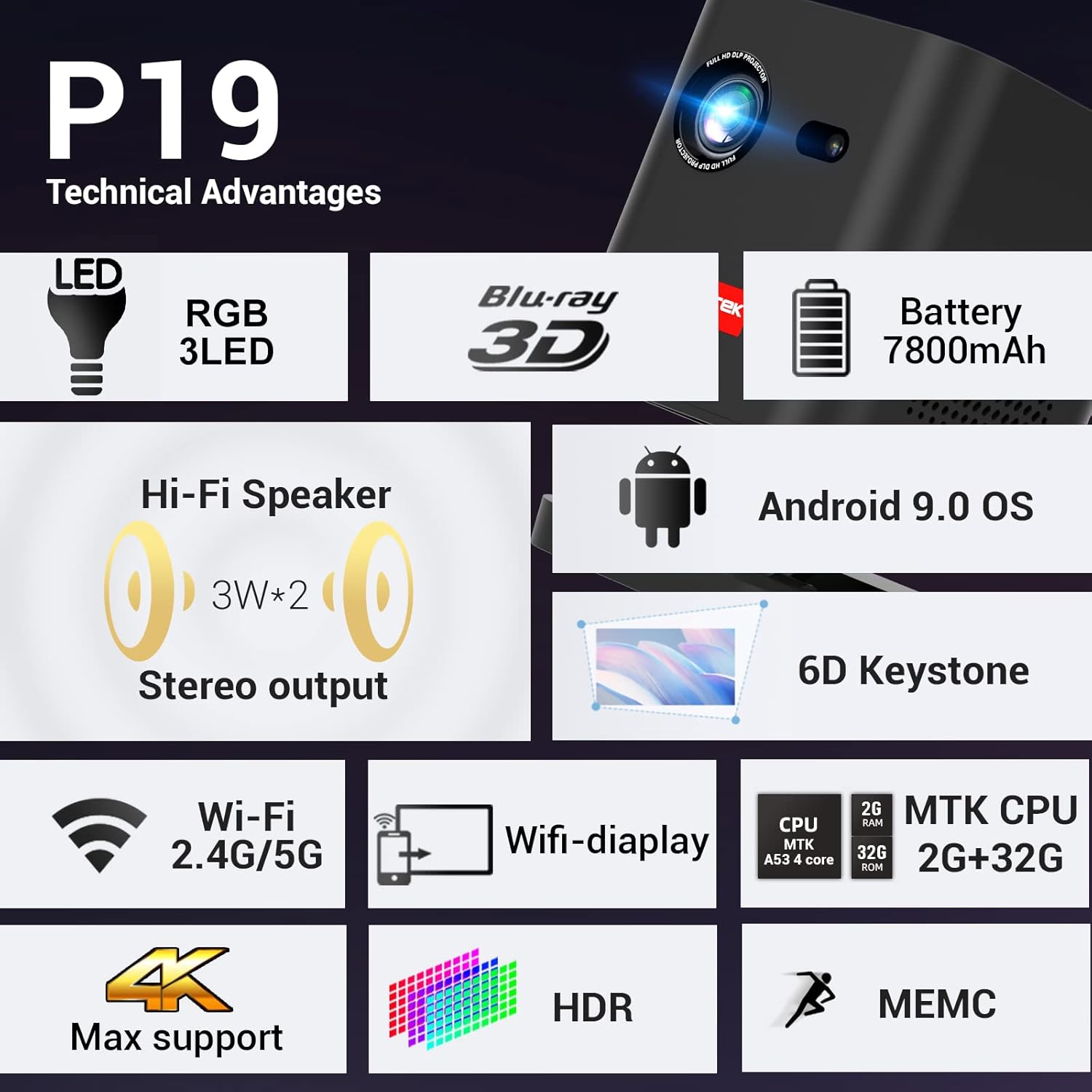
A summary of the P19's technical features, including RGB 3LED, 7800mAh battery, Android 9.0 OS, 6D Keystone, 2.4G/5G Wi-Fi, 4K Max support, HDR, and MEMC.
6. Sąranka
6.1 Įjungimas / išjungimas
- Connect the power adapter to the DC-in port of the projector and then to a power outlet.
- Norėdami įjungti, paspauskite ir palaikykite nuspaudę projektoriaus arba nuotolinio valdymo pulto maitinimo mygtuką.
- To turn off, press and hold the power button again until the projector shuts down.
6.2 Įdėjimas
The BYINTEK P19 is designed for flexible placement, supporting both tabletop and tripod mount configurations. Ensure the projector is placed on a stable surface or securely mounted.
The projector's portability and long battery life make it ideal for outdoor entertainment, as shown by friends watching a movie under the stars.
6.3 Fokuso reguliavimas
Rotate the focus adjustment wheel located on the side of the projector until the projected image appears sharp and clear on the screen.
6.4 Keystone koregavimas
The P19 features 6D Keystone correction to adjust image distortion. This includes:
- Auto/Manual Vertical Keystone: Corrects vertical distortion when the projector is tilted up or down.
- Manual Corner Keystone: Allows adjustment of each corner of the image independently to achieve a perfect rectangular shape.
Access these settings through the projector's menu system.

The 6D Keystone correction system allows for both manual corner and auto/manual vertical adjustments to achieve a perfectly rectangular image from various projection angles.

Visual representation of the projector's keystone correction, showing how it can rectify distorted images caused by angled projection.
7. Naudojimo instrukcijos
7.1 Android 9.0 OS Navigation
The BYINTEK P19 runs on Android 9.0 OS, providing a smart TV-like experience. Use the remote control to navigate the interface:
- Krypties mygtukai: Move cursor or selection.
- Gerai mygtukas: Patvirtinkite pasirinkimą.
- Atgal mygtukas: Grįžti į ankstesnį ekraną.
- Namų mygtukas: Go to the main home screen.
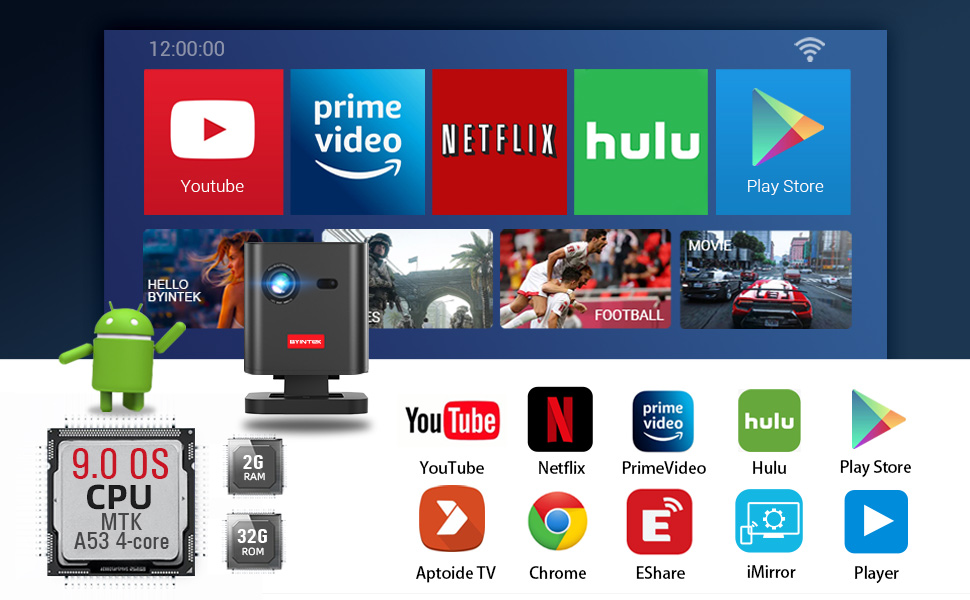
Pre-installed apps include YouTube, Netflix, Prime Video, and Hulu. You can download more applications from the Play Store.

The projector's Android 9.0 OS comes pre-loaded with popular apps and allows access to the Play Store for additional downloads, enhancing its smart capabilities.
7.2 Wireless Display (Screen Mirroring)
The projector supports wireless display functionality, allowing you to mirror content from your smartphone, tablet, or PC. Refer to the projector's on-screen instructions or the EShare app for detailed setup.
7.3 Išorinių įrenginių prijungimas
Use the available ports to connect various devices:
- HDMI (HD-in): Connect devices like PCs, PS4, Fire TV Stick, or Blu-ray DVD players.
- USB 3.0: Plug in USB drives for media playback, or connect a mouse/gamepad.
- Audio-out: Norėdami pagerinti garsą, prijunkite išorinius garsiakalbius arba ausines.
7.4 Garso išvestis
The P19 is equipped with powerful dual 3W Hi-Fi stereo speakers for a complete audio-visual experience. For private listening or higher fidelity, connect external audio devices via the Audio-out port.

The projector features dual 3W Hi-Fi stereo speakers, providing integrated audio for an enhanced viewpatirtį.
7.5 3D funkcionalumas
The projector supports DLP-Link 3D, allowing you to watch 3D content from compatible sources (e.g., Blu-ray 3D) using active shutter 3D glasses. Ensure your 3D content is in SBS (Side-by-Side) or TNB (Top-and-Bottom) format.

An illustration of the projector's DLP-Link 3D capability, allowing users to experience immersive 3D content from sources like Blu-ray 3D.
8. Priežiūra
- Objektyvo valymas: Naudokite minkštą, nepūkuotą šluostę, specialiai skirtą optiniams lęšiams. Nenaudokite abrazyvinių valiklių ar šluosčių.
- C valymasasing: Projektoriaus išorę nuvalykite minkšta, sausa šluoste. Įsisenėjusioms dėmėms šiek tiek nuvalykite.amp galima naudoti šluostę, po to – sausą.
- Saugykla: When not in use for extended periods, store the projector in a cool, dry place, preferably in its original packaging or a protective bag, away from dust and direct sunlight.
- Vėdinimas: Reguliariai tikrinkite, ar ventiliacijos angos yra švarios nuo dulkių ir šiukšlių, kad išvengtumėte perkaitimo.
9. Problemų sprendimas
- No Image / Dim Image:
- Ensure the projector is powered on and connected correctly.
- Adjust the focus wheel for clarity.
- Check the input source selection.
- Ensure the room is sufficiently dark for optimal brightness.
- Iškraipytas vaizdas:
- Use the keystone correction settings (vertical and corner) to adjust the image shape.
- Įsitikinkite, kad projektorius yra pastatytas kuo statmeniau ekranui.
- Nėra interneto ryšio:
- Patikrinkite, ar jūsų „Wi-Fi“ tinklas aktyvus ir veikia.
- Check Wi-Fi settings on the projector to ensure it's connected to the correct network.
- Paleiskite projektorių ir „Wi-Fi“ maršrutizatorių iš naujo.
- 3D Playback Issues:
- Ensure your 3D content is in a compatible format (SBS or TNB).
- Verify your 3D glasses are charged and properly synced with the projector.
- Check the 3D settings in the projector's menu.
- Nuotolinio valdymo pultas neveikia:
- Pakeiskite nuotolinio valdymo pulto baterijas.
- Įsitikinkite, kad tarp nuotolinio valdymo pulto ir projektoriaus IR imtuvo nėra jokių kliūčių.
10. Specifikacijos
| Funkcija | Specifikacija |
|---|---|
| Prekės ženklas | BYINTEK |
| Modelis | 19 p |
| Ekrano technologija | DLP |
| Gimtoji raiška | 1280 x 720 |
| Maksimali palaikoma skiriamoji geba | 3840 x 2160 (4K) |
| Vaizdo kontrasto santykis | 2500:1 |
| Operacinė sistema | Android 9.0 OS |
| RAM | 2GB DDR3 |
| ROM | 32 GB eMMC |
| Wi-Fi | 2.4G/5G dviejų dažnių |
| Baterija | 7800 mAh (1.5 to 2.5 hours battery life) |
| Garsiakalbiai | Dviguba 3 W „Hi-Fi“ stereo sistema |
| Keystone Korekcija | 6D (Auto/Manual Vertical, Manual Corner) |
| Ryšys | USB, HDMI, „Wi-Fi“ |
| Suderinami įrenginiai | PC, PS4, Fire TV Stick, Blu-ray DVD, U-disk, Air Mouse, Gamepad |
| ttage | 12 voltų |
| Vattage | 82 vatų |
| Prekės svoris | 1 kg 400 g |
| Pakuotės matmenys | 26.6 x 21.2 x 16.4 cm |
11. Garantija ir palaikymas
The BYINTEK P19 Mini 3D DLP Projector comes with a 1 metų garantija nuo įsigijimo datos, apimanti gamybos defektus.
Dėl techninės pagalbos, garantinių pretenzijų ar kitų klausimų susisiekite:
- Gamintojas: BYINTEK
- Telefono numeris: +91 8885241706
- El. paštas: care@justshop24x7.com
Please have your purchase receipt and product model number (P19) ready when contacting support.


