1. Įvadas
This manual provides detailed instructions for the setup, operation, and maintenance of your FoMaKo PTZ NDI Camera System. This comprehensive bundle includes one KC608 Pro PTZ Controller and three KN30A PTZ Cameras, designed for professional live streaming and video production environments such as event centers, conference facilities, churches, and educational institutions. The system offers high-quality video output with advanced features like 30x optical zoom and AI auto-tracking.
2. Produktas baigtasview ir Pagrindinės funkcijos
The FoMaKo PTZ NDI Camera System is engineered to deliver professional-grade video for various applications. Below is an overview of the components and their primary features.
2.1 Sistemos komponentai
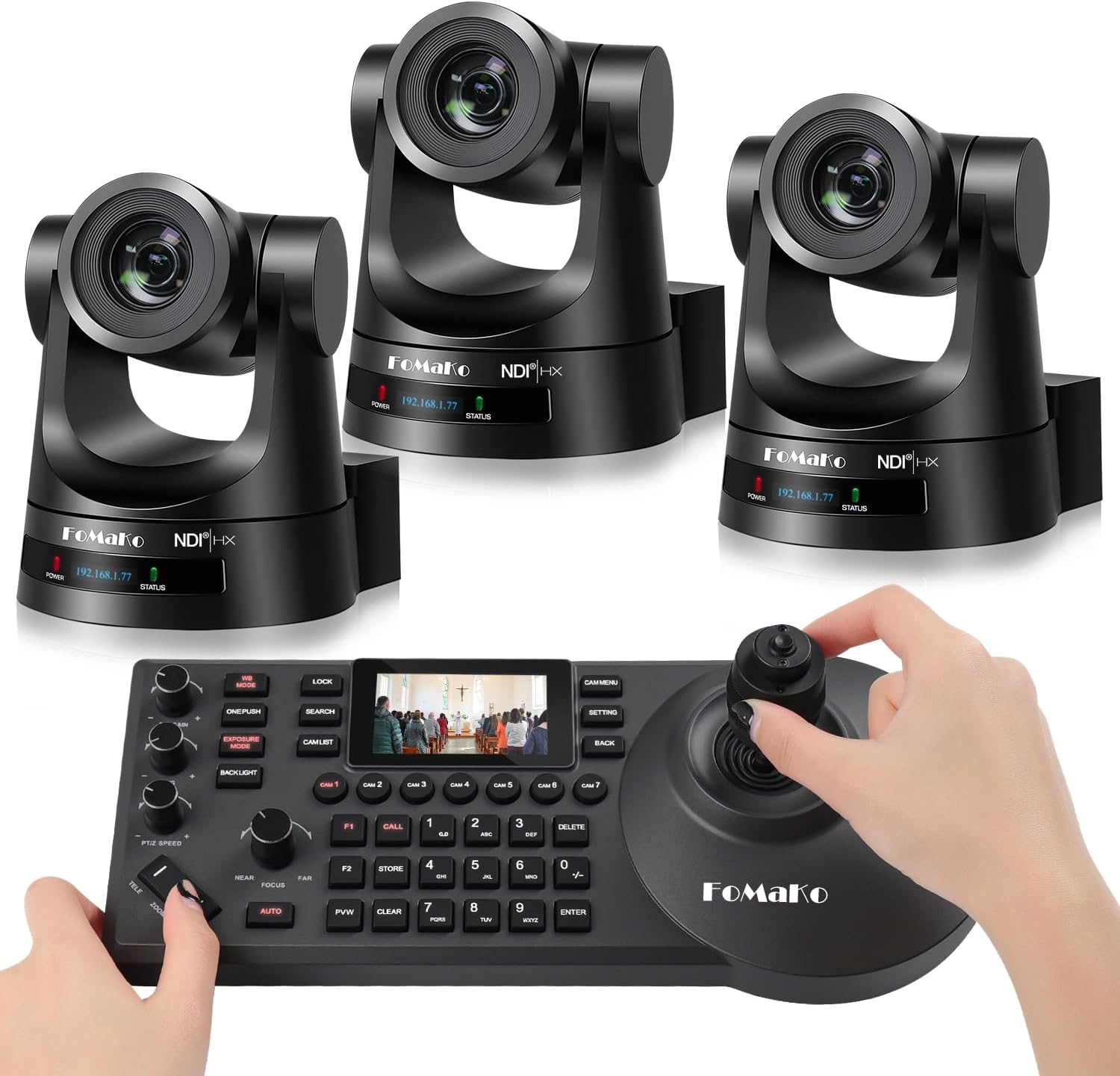
Image: The FoMaKo PTZ NDI Camera System bundle, showing three PTZ cameras and one PTZ controller.
- FoMaKo KC608 Pro PTZ Controller: A dedicated hardware controller with a 4D joystick and a 3-inch LCD screen for precise camera control.
- FoMaKo KN30A PTZ Cameras (x3): High-performance PTZ cameras with 30x optical zoom, capable of 1080p 60FPS video output.
2.2 Camera Features (KN30A)
- Vaizdo įrašo išvestis: 3G-SDI, HDMI, IP, NDI, USB3.0 for versatile connectivity.
- Optinis priartinimas: 30x optical zoom for capturing distant subjects with clarity.
- NDI Certified: Official NDI 6 & NDI HX3 certification by Newtek ensures stable, high-quality video over network with low bandwidth optimization.
- Automatinis sekimas su dirbtiniu intelektu: Features Gen 3 AI auto-tracking algorithms for smooth and stable subject tracking.
- PoE palaikymas: Power over Ethernet simplifies installation with a single cable for power and data.
- Suderinamumas: Compatible with popular live streaming software including vMix, OBS, Propresenter, StreamYards, Streamlabs, Wirecast, and Zoom, across Mac and Windows PC platforms.

Image: A FoMaKo PTZ camera demonstrating its 30X optical zoom capability, showing a wide shot and a zoomed-in view of a speaker in a church.

Image: Banner indicating the camera's Official NDI HX3 Certification.

Image: A FoMaKo PTZ camera demonstrating AI auto-tracking in an educational setting, highlighting the tracking box around a person.

Image: A FoMaKo PTZ camera positioned in front of a monitor displaying live streaming software interfaces, with logos of compatible platforms like vMix, OBS Studio, Wirecast, YouTube, Twitch, and Facebook Live.
2.3 Controller Features (KC608 Pro)
- 4D valdymo svirtis: Provides intuitive control over pan, tilt, and zoom functions.
- 3 colio LCD ekranas: Displays real-time preview and system parameters for efficient monitoring.
- Adjustable PTZ Speed: Dedicated controls for fine-tuning pan, tilt, and zoom speeds.
- Multiple Protocols: Supports VISCA, PELCO-P, and PELCO-D protocols.
- Ryšys: RS232, RS422, RS485, and Ethernet IP connections for flexible integration.

Image: A close-up of the 4D joystick on the FoMaKo PTZ controller, illustrating its multi-directional movement.

Image: The 3-inch LCD screen on the FoMaKo PTZ controller, showing two preview modes: a pre-monitoring screen and system parameters.
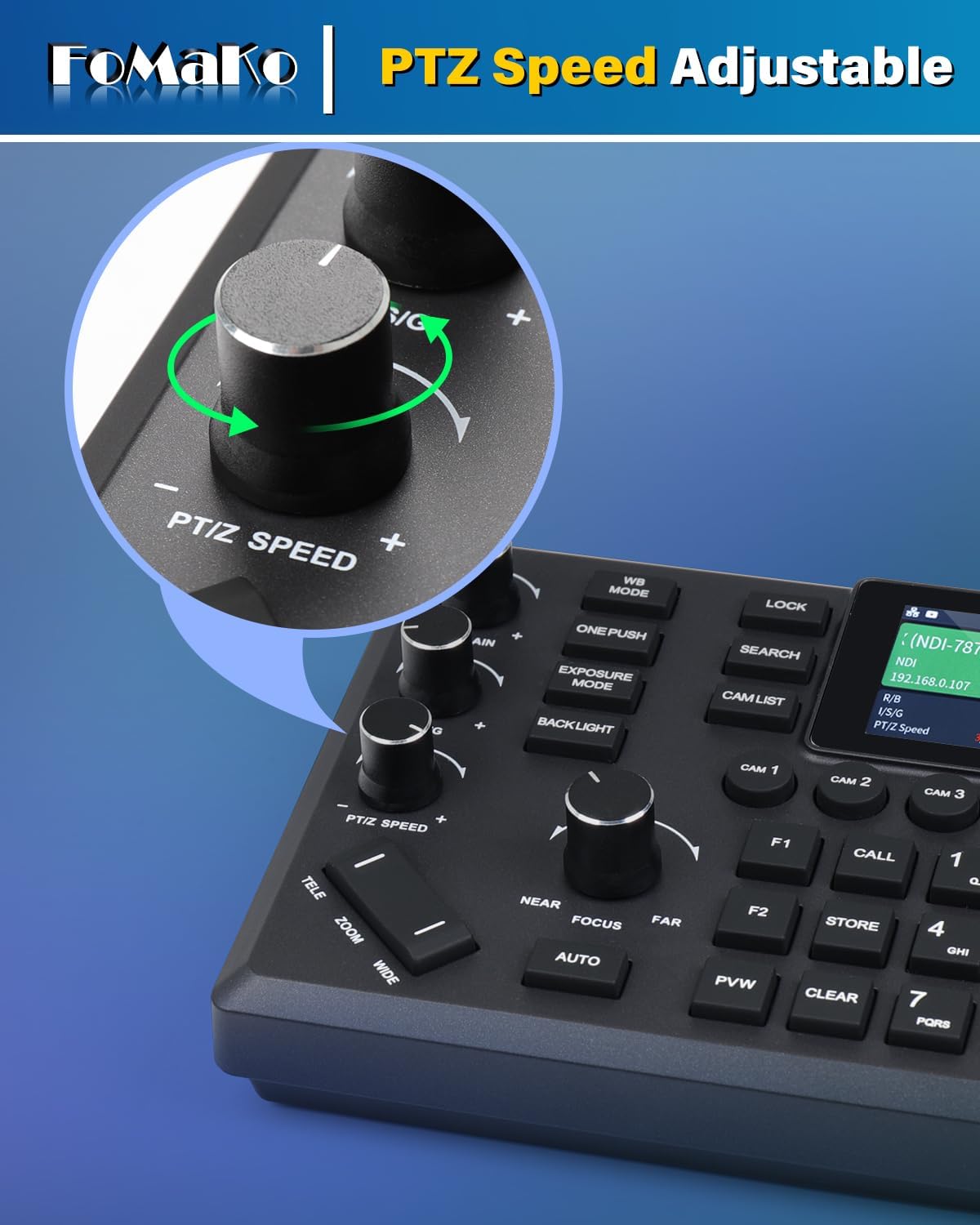
Image: A close-up of the PTZ Speed adjustment knob on the FoMaKo PTZ controller.
3. Sąranka
Proper setup is crucial for optimal performance of your FoMaKo PTZ NDI Camera System. Follow these steps to get started.
3.1 Išpakavimas ir patikrinimas
- Atsargiai išpakuokite visus komponentus iš dėžutės.
- Verify that all items listed in the 'What's in the Box' section are present: 1x KC608 Pro PTZ Controller, 3x KN30A PTZ Cameras.
- Inspect all components for any signs of physical damage. Contact customer support immediately if any damage is found.
3.2 Camera Installation (KN30A)
The KN30A cameras can be mounted on a wall or ceiling. Ensure the mounting surface is sturdy enough to support the camera's weight. PoE (Power over Ethernet) simplifies cabling by delivering both power and data through a single Ethernet cable.
- Montavimas: Securely attach the camera to your desired location using appropriate mounting hardware (not included).
- Jungtys: Connect an Ethernet cable from the camera's LAN port to a PoE-enabled network switch or injector.
- Vaizdo įrašo išvestis: Connect HDMI or 3G-SDI cables from the camera to your video mixer, capture card, or display as needed.
- USB 3.0: For direct connection to a computer for streaming or capture.

Image: The rear panel of a FoMaKo PTZ camera, showing various input/output ports including 3G-SDI, HDMI, USB3.0, LAN (PoE), RS232, RS422, and DC12V power.
3.3 Controller Connection (KC608 Pro)
The KC608 Pro controller connects to your network to control the cameras via IP.
- Connect the KC608 Pro controller to your network using an Ethernet cable. Ensure it is on the same network as your PTZ cameras.
- Įjunkite valdiklį.
- Refer to the controller's on-screen menu to discover and add your KN30A cameras to the control system. This typically involves scanning the network for NDI or IP cameras and assigning them to specific camera buttons on the controller.
3.4 Sistemos schema

Image: A diagram illustrating a typical live streaming setup with FoMaKo PTZ cameras, an IP PTZ camera controller, a router/switch (PoE), a video mixer/switcher, and a computer for live streaming to platforms like YouTube and Facebook Live.
4. Naudojimo instrukcijos
This section details the basic and advanced operations of your FoMaKo PTZ NDI Camera System.
4.1 Pagrindinis kameros valdymas
Use the KC608 Pro controller to manipulate the cameras.

Image: A user operating the FoMaKo PTZ controller with a 4D joystick, showing a multi-screen live production setup in the background.
- Kameros pasirinkimas: Press the corresponding camera button (e.g., CAM 1, CAM 2) on the controller to select the camera you wish to control.
- Stumti / pakreipti: Use the 4D joystick to pan (horizontal movement) and tilt (vertical movement) the selected camera.
- Mastelio keitimas: Use the zoom rocker (TELE/WIDE) to zoom in or out.
- Fokusas: Adjust focus using the NEAR/FAR buttons or enable AUTO focus.
- PTZ Speed: Rotate the PTZ SPEED knob to adjust the responsiveness of the pan, tilt, and zoom movements.
4.2 Išplėstinės funkcijos
- Išankstiniai nustatymai: Store and recall specific camera positions (pan, tilt, zoom, focus) using the numbered preset buttons (0-9) and STORE/CALL functions.
- Automatinis sekimas su dirbtiniu intelektu: Activate the AI auto-tracking feature through the controller's menu or dedicated button to automatically follow a designated subject.
- IP adreso konfigūracija: The controller allows you to change the IP address settings of the cameras via its menu.
- Ekspozicija ir baltos spalvos balansas: Adjust exposure modes (e.g., auto, manual) and white balance settings for optimal image quality in different lighting conditions.

Image: A graphic displaying network settings (DHCP, IP Address, Subnet Mask, Gateway) and PTZ parameters (Speed by zoom, Zoom speed, ImageFreezing, Acc Curve, Preset speed, Ptz speed, Preset Lock) that can be adjusted via the camera's menu.
5. Priežiūra
Regular maintenance ensures the longevity and optimal performance of your FoMaKo PTZ NDI Camera System.
- Valymas: Use a soft, dry cloth to clean the camera lenses and controller surfaces. For stubborn dirt, a slightly damp cloth with mild, non-abrasive cleaner can be used, ensuring no liquid enters the device.
- Firmware atnaujinimai: Periodically check the FoMaKo official website for firmware updates. Keeping your devices updated ensures access to the latest features and performance improvements. Follow the provided instructions carefully when performing updates.
- Kabelių valdymas: Ensure all cables are neatly organized and secured to prevent accidental disconnections or damage. Avoid bending cables sharply.
- Aplinkos sąlygos: Operate and store the system in a clean, dry environment within the specified temperature and humidity ranges to prevent damage.
6. Problemų sprendimas
Šiame skyriuje aptariamos dažniausiai pasitaikančios problemos, su kuriomis galite susidurti, ir pateikiami sprendimai.
| Problema | Galima priežastis | Sprendimas |
|---|---|---|
| No video output from camera. | Loose cable connection, incorrect input selection on display, power issue. | Check HDMI/SDI/USB cables. Ensure camera is powered on. Verify correct input selected on monitor/mixer. |
| Controller cannot connect to camera. | Network issue, incorrect IP settings, camera not powered on. | Ensure controller and camera are on the same network. Verify camera IP address and controller settings. Restart both devices. |
| PTZ movements are jerky or unresponsive. | PTZ speed setting too low, network latency, physical obstruction. | Adjust PTZ speed on the controller. Check network stability. Ensure no physical obstructions to camera movement. |
| AI Auto-Tracking not working. | Feature not enabled, poor lighting, subject too far/small. | Ensure AI tracking is enabled in camera settings. Optimize lighting conditions. Ensure subject is within optimal range and size for tracking. |
7. Specifikacijos
Detailed technical specifications for the FoMaKo PTZ NDI Camera System.
| Funkcija | Detalė |
|---|---|
| Prekės ženklas | „FoMaKo“ |
| Modelis | KC608 Pro (Controller) + KN30A (Camera) |
| Optinis priartinimas | 30x |
| Vaizdo įrašymo raiška | 1080p |
| Nuotraukų jutiklių technologija | CMOS |
| Ryšio technologija | Ethernet, HDMI, 3G-SDI, USB3.0, RS232, RS422, RS485 |
| Palaikomas garso formatas | AAC, MP3 |
| Vaizdo įrašymo formatas | MP4 |
| „Flash“ atminties tipas | SD (for firmware/settings, not for video recording) |
| Ypatinga funkcija | Low Light, AI Auto-Tracking, PoE Support, NDI 6 & NDI HX3 Certified |
| Kilmės šalis | Kinija |
8. Garantija ir palaikymas
FoMaKo is committed to providing excellent customer service and support for your product.

Image: A graphic illustrating FoMaKo's customer support, highlighting 24-hour response time, 3-year limited warranty, 30-day money-back guarantee, and lifetime customer technical support.
- 3 metų ribota garantija: Your FoMaKo PTZ NDI Camera System is covered by a 3-year limited warranty from the date of purchase. This warranty covers manufacturing defects and ensures product reliability.
- 30 dienų pinigų grąžinimo garantija: Enjoy a 30-day no-questions-asked money-back guarantee for a risk-free purchase.
- Free Online Training: Access free online training resources to help you get started and maximize your system's potential.
- 24/7 Expert Assistance: FoMaKo provides 24/7 expert assistance with responses typically within 37 hours. Please include your Order ID when contacting support.
- Lifetime Customer Technical Support: Benefit from lifetime technical support for your product. Remote assistance can be provided if necessary for setup and troubleshooting.
For support inquiries, please refer to the contact information provided with your product packaging or visit the official FoMaKo websvetainę.


