1. Įvadas
This manual provides detailed instructions for the proper use and maintenance of your Obbug Bluetooth Headset, Model YYK-530. Please read this manual thoroughly before using the product to ensure optimal performance and longevity.
2. Pakuotės turinys
Patikrinkite, ar pakuotėje yra visi reikalingi daiktai:
- 1 x Obbug Bluetooth Headset
- 1x įkrovimo dėklas
- 1 x USB Type-C įkrovimo laidas
- 1 x Ear Hat (replacement ear tip)
- 1 x Vartotojo vadovas
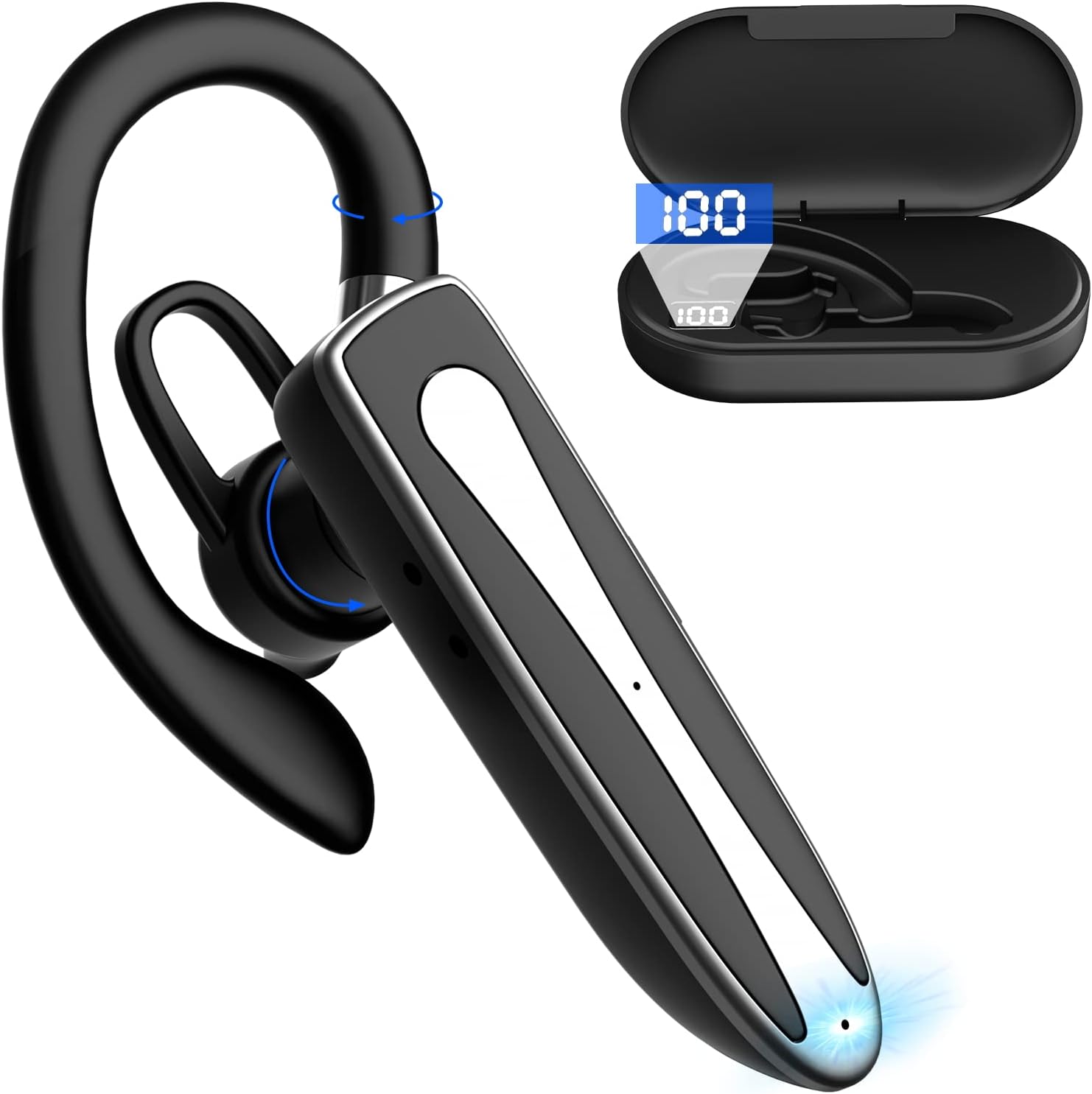
Image 2.1: Obbug Bluetooth Headset YYK-530 and its charging case.
3. Produkto ypatybės
- Bluetooth 5.1 technologija: Provides stable connection and clear audio.
- Pailgintas akumuliatoriaus veikimo laikas: Iki 80 valandų nepertraukiamo naudojimo su įkrovimo dėklu.
- Patogus ir reguliuojamas dizainas: Flexible earhook and rotatable boom mic for left or right ear wear.
- CVC8.0 Noise Reduction: Pagerina skambučių aiškumą sumažindamas foninį triukšmą.
- Platus suderinamumas: Connects with most Bluetooth-enabled devices including smartphones, tablets, and computers.
- Skambinimas laisvų rankų įranga: Integrated microphone for convenient communication.

Image 3.1: Illustration of CVC8.0 Noise Reduction for clear audio.
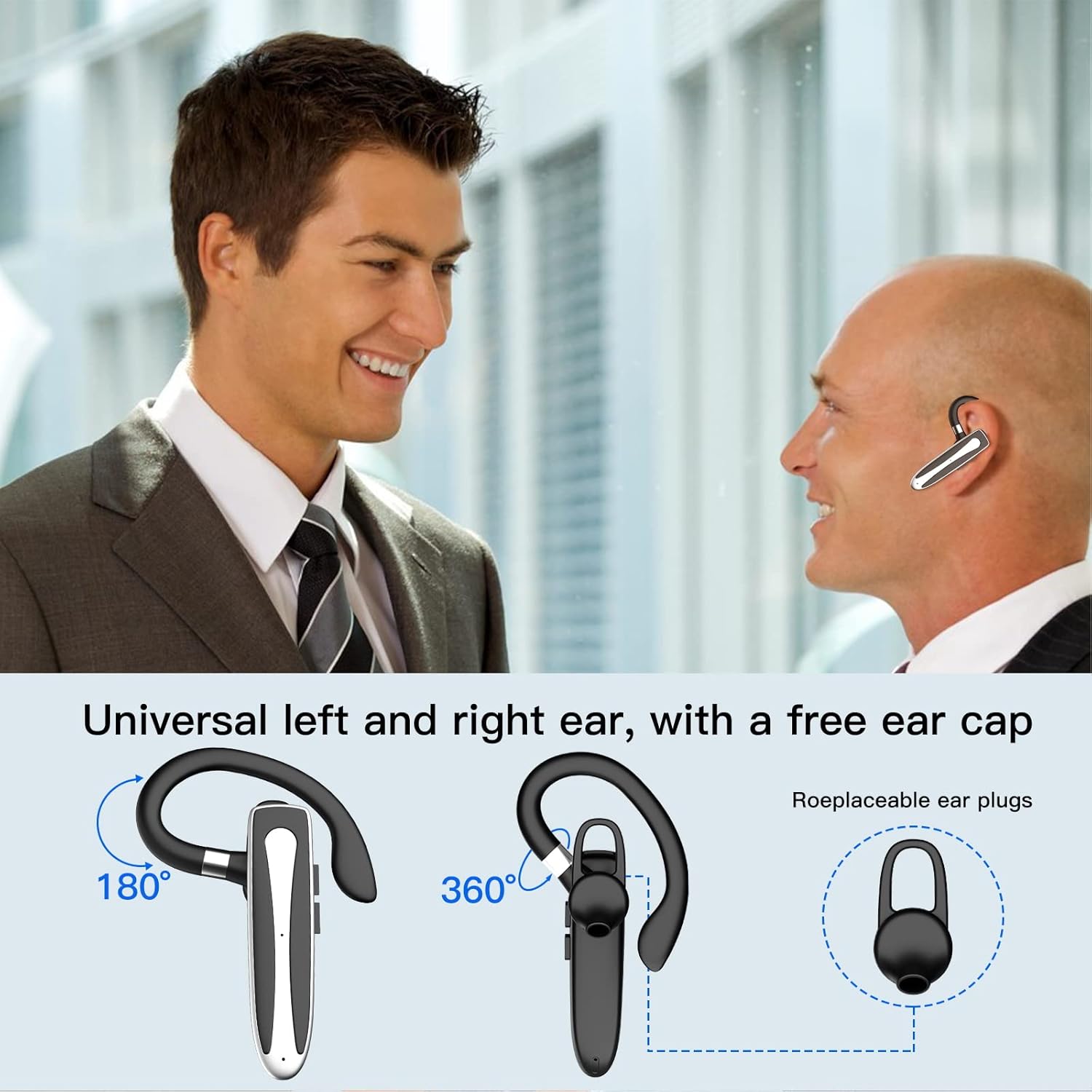
Image 3.2: Diagram illustrating the dual microphone noise reduction processing.
4. Sąranka
4.1 Ausinių ir dėklo įkrovimas
Before first use, fully charge the headset and its charging case.
- Place the headset into the charging case.
- Prijunkite USB C tipo laidą prie dėklo įkrovimo prievado ir prie maitinimo šaltinio (pvz., USB sieninio adapterio, kompiuterio USB prievado).
- The charging indicator on the case will show charging status. A full charge typically takes 1.5 hours.

Image 4.1: The Type-C charging port on the charging case.

Image 4.2: Battery life and charging time information for the headset and case.
4.2 Susiejimas su įrenginiu
The headset uses Bluetooth 5.1 for wireless connection.
- Maitinimas: Take the headset out of the charging case, or press and hold the Multi-function Button until the indicator light flashes blue and red, indicating pairing mode.
- Suaktyvinkite „Bluetooth“: Savo įrenginyje (išmaniajame telefone, planšetiniame kompiuteryje ir kt.) eikite į „Bluetooth“ nustatymus ir įjunkite „Bluetooth“.
- Pasirinkite įrenginį: In the list of available devices, select "YYK-530".
- Patvirtinkite ryšį: Once connected, the headset indicator light will flash blue slowly, and your device will show "Connected".

Image 4.3: Illustration of optimal Bluetooth connection distance (within 10 meters).
4.3 Connecting to Two Devices Simultaneously
The headset supports connecting to two Bluetooth devices at the same time.
- Connect the headset to the first device (e.g., Phone A) as described in Section 4.2.
- Turn off Bluetooth on the first device. The headset will re-enter pairing mode.
- Connect the headset to the second device (e.g., Phone B) as described in Section 4.2.
- Turn on Bluetooth on the first device. The headset should automatically reconnect to both devices.
You can now answer calls or play music from either connected device.

Image 4.4: Step-by-step guide for connecting the headset to two devices.
4.4 Ausinių dėvėjimas
The headset is designed for comfortable wear on either the left or right ear.
- The earhook can rotate 360° vertically and 360° horizontally to fit your preferred angle.
- The retractable earhook can be adjusted to fit the shape of your ear.

Image 4.5: The headset's adjustable design for left or right ear wearing.
5. Naudojimo instrukcijos
5.1 Maitinimo įjungimas/išjungimas
- Maitinimas: Take the headset out of the charging case, or press and hold the Multi-function Button for approximately 3 seconds until the indicator light flashes blue.
- Išjungti: Place the headset back into the charging case, or press and hold the Multi-function Button for approximately 5 seconds until the indicator light flashes red and then turns off.
5.2 Skambučių valdymas
- Atsiliepti / Baigti skambutį: Vieną kartą paspauskite daugiafunkcį mygtuką.
- Atmesti skambutį: Paspauskite ir palaikykite daugiafunkcį mygtuką maždaug 2 sekundes.
- Perrink paskutinį numerį: Dukart paspauskite daugiafunkcį mygtuką.
5.3 Muzikos atkūrimas
- Leisti / pristabdyti: Vieną kartą paspauskite daugiafunkcį mygtuką.
- Kitas takelis: Paspauskite ir palaikykite garsumo didinimo mygtuką.
- Ankstesnis takelis: Paspauskite ir palaikykite garsumo mažinimo mygtuką.
5.4 Garsumo valdymas
- Padidinti garsumą: Paspauskite garsumo didinimo mygtuką.
- Sumažinti garsumą: Paspauskite garsumo mažinimo mygtuką.
5.5 Balso asistento aktyvinimas
Activate your device's voice assistant (Siri, Google Assistant) directly from the headset.
- Suaktyvinti „Voice Assistant“: Tris kartus paspauskite daugiafunkcį mygtuką.

Image 5.1: The headset supports activation of Siri and Google Assistant.
6. Priežiūra
- Clean the headset and charging case regularly with a soft, dry cloth.
- Venkite įrenginio sąlyčio su ekstremaliomis temperatūromis, drėgme ar ėsdinančiomis medžiagomis.
- Kai nenaudojate, laikykite ausines įkrovimo dėkle, kad apsaugotumėte jas ir išlaikytumėte įkrautas.
- Nebandykite patys išardyti ar taisyti įrenginio. Kreipkitės pagalbos į klientų aptarnavimo tarnybą.
7. Problemų sprendimas
7.1 Ausinės neįsijungia
- Ensure the headset is fully charged. Place it in the charging case and connect the case to a power source.
- Press and hold the Multi-function Button for 3-5 seconds to power on.
7.2 Nepavyksta susieti su įrenginiu
- Ensure the headset is in pairing mode (indicator flashes blue and red).
- Išjunkite „Bluetooth“ savo įrenginyje ir vėl jį įjunkite.
- Ensure the headset is within 10 meters of your device and there are no significant obstacles.
- Išvalykite „Bluetooth“ susiejimo sąrašą savo įrenginyje ir bandykite susieti dar kartą.
7.3 Nėra garso arba prasta garso kokybė
- Sureguliuokite garsumą ir ausinėse, ir prijungtame įrenginyje.
- Įsitikinkite, kad ausinės tinkamai prijungtos prie jūsų įrenginio.
- Move closer to your device to ensure you are within Bluetooth range.
- Patikrinkite, ar nėra trukdžių iš kitų belaidžių įrenginių.
8. Specifikacijos
| Funkcija | Specifikacija |
|---|---|
| Modelio pavadinimas | YYK-530 |
| Prekės ženklas | Obbugas |
| Ryšio technologija | Belaidis ryšys („Bluetooth“) |
| Bluetooth versija | 5.1 |
| Bluetooth diapazonas | Iki 10 metrų (33 pėdų) |
| Triukšmo valdymas | Sound Isolation (CVC8.0 Noise Reduction) |
| Ausinės forma | Ausies kabliukas |
| Baterijos veikimo laikas (ausinės) | 5 valandos (apytiksliai) |
| Baterijos veikimo laikas (su įkrovimo dėklu) | Up to 80 Hours (approx.) |
| Įkrovimo laikas | 1.5 valandų |
| Įkrovimo prievadas | C tipo USB |
| Atsparumo vandeniui lygis | Atsparus vandeniui |
| Prekės svoris | 4.9 uncijos (0.14 kilogramo) |
| Dažnių diapazonas | 20Hz - 20,000Hz |
| Suderinami įrenginiai | Cellphones, Desktops, Laptops, Telephones |

Image 8.1: The headset is compatible with a wide range of Bluetooth-enabled devices.
9. Garantija ir klientų aptarnavimas
The Obbug Bluetooth Headset comes with a 1-month replacement warranty.
For any questions, issues, or support needs, please contact our customer service. We offer 24-hour customer service to assist you.
Konkrečius kontaktinius duomenis rasite pirkimo dokumentuose.


