SSK SC211

SSK SC211 11-in-1 USB-C Laptop Docking Station User Manual

Model: SC211 | Brand: SSK

1. Įvadas

The SSK SC211 11-in-1 USB-C Laptop Docking Station is a versatile multiport adapter designed to expand the connectivity of your USB-C enabled laptop, tablet, or smartphone. It integrates multiple essential ports into a single compact device, enhancing productivity and simplifying your workspace.

2. Produkto ypatybės

This docking station provides 11 ports for comprehensive connectivity:

SSK 11-in-1 USB C Hub with all ports labeled

1 pav. Baigtaview of the SSK SC211 11-in-1 USB-C Docking Station with all ports clearly labeled, including PD 3.0, USB 2.0, HDMI1 (4K@60Hz), HDMI2 (4K@30Hz), RJ45 Ethernet, SD/TF Card, 2x USB 3.0, 3.5mm Audio, and VGA (1080P@60Hz).

3. Sąrankos vadovas

  1. Prijungti prie pagrindinio įrenginio: Plug the integrated USB-C cable from the docking station into the USB-C port of your laptop, tablet, or smartphone. Ensure your device's USB-C port supports "Display Port Alternate Mode" for video output functionality.
  2. Maitinimo jungtis (nebūtina, bet rekomenduojama): For stable performance and charging, connect your device's original power adapter or a compatible USB-C PD charger (up to 100W) to the docking station's USB-C PD port.
  3. Prijunkite išorinius ekranus:
    • For HDMI displays, connect HDMI cables from your monitors to the HDMI1 and/or HDMI2 ports on the docking station.
    • VGA ekranams prijunkite monitorių VGA kabeliu prie doko VGA prievado.
  4. Prijunkite išorinius įrenginius:
    • Plug USB devices (e.g., external hard drives, flash drives) into the USB 3.0 ports.
    • Connect wireless mouse/keyboard receivers to the USB 2.0 port.
    • Insert SD or TF cards into the respective card reader slots.
    • Laidiniam internetui prijunkite Ethernet kabelį prie RJ-45 prievado.
    • Connect headphones or speakers to the 3.5mm audio port.
  5. Driver Installation (Mac OS Specific): For Mac OS, due to its MST (Multi-Stream Transport) display limitations, installing DisplayLink drivers may be required to achieve extended display functionality across multiple distinct displays. Refer to the DisplayLink website for the latest drivers and installation instructions. For Windows, it is generally plug-and-play.

Video 1: A demonstration of connecting a docking station to a laptop and external monitors, showcasing its multi-display capabilities and various port connections.

4. Naudojimo instrukcijos

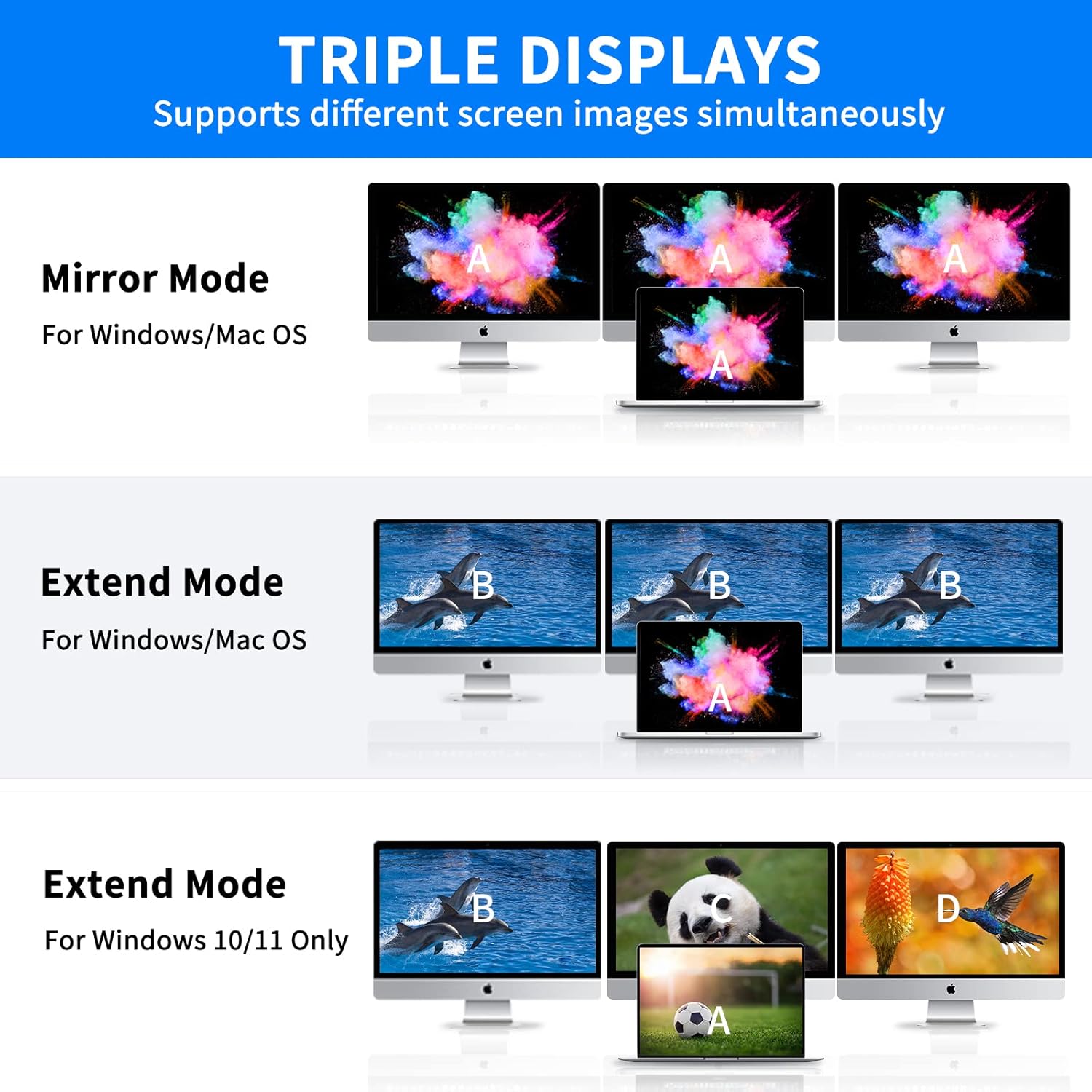
4.1 Ekrano režimai

Prijungimo stotelė palaiko įvairias ekrano konfigūracijas, priklausomai nuo jūsų operacinės sistemos:

Note on VGA: When the VGA port is connected, the maximum resolution for each monitor will be limited to 1920x1080@60Hz.

Diagram showing triple display modes for Windows and Mac OS

Figure 2: Visual representation of Mirror Mode and Extend Mode for both Windows and Mac OS, illustrating how screens are duplicated or extended.

4.2 Duomenų perdavimas

Utilize the USB 3.0 ports for rapid data transfer with compatible devices. The SD and TF card readers also offer fast data access for memory cards.

Laptop connected to docking station with USB drives and SD card for data transfer

Figure 3: Illustration of the docking station facilitating super-fast data transfer via USB 3.0 ports and SD/TF card readers, connected to a laptop.

4.3 Maitinimo tiekimas

The 100W PD3.0 port allows you to charge your Type-C laptop or other compatible devices while using the docking station. This port is for power input only and does not support data transfer.

Laptop charging via docking station's PD3.0 port

Figure 4: The docking station connected to a laptop and a power adapter, demonstrating its PD3.0 Power Delivery feature for fast charging.

5. Suderinamumas

The SSK SC211 docking station is compatible with a wide range of devices and operating systems that feature a USB-C port supporting "Display Port Alternate Mode" for video output. This includes, but is not limited to:

Svarbu: To enable HDMI and VGA functions, your laptop or phone's USB-C port must support "Display Port Alternate Mode" video output.

Docking station with various OS logos indicating compatibility

Figure 5: The SSK SC211 docking station shown with logos of compatible operating systems, highlighting its broad compatibility.

6. Techninės specifikacijos

FunkcijaSpecifikacija
Modelio numerisSC211
Matmenys5 x 3 x 1 colio
Svoris5.1 uncijos
HDMI 1 išvestisIki 4K@60Hz
HDMI 2 išvestisIki 4K@30Hz
VGA išvestisUp to 1920x1080@60Hz
USB 3.0 prievadai2 ports, 5Gbps data transfer
USB 2.0 prievadas1 port, for low-bandwidth peripherals
USB-C PD prievadasIki 100 W galios tiekimas (tik įvestis)
Ethernet prievadas1000Mbps Gigabit RJ-45
Kortelių skaitytuvaiSD and TF (Micro SD), up to 80MB/s, simultaneous use
Garso prievadas3.5mm (Mic and Audio)
MedžiagaAliuminio lydinys casing

7. Problemų sprendimas

8. Priežiūra ir priežiūra

9. Garantija ir palaikymas

SSK products come with a standard manufacturer's warranty. For detailed warranty information, technical support, or service inquiries, please refer to the official SSK websvetainėje arba susisiekite su jų klientų aptarnavimo skyriumi. Išsaugokite pirkimo įrodymą garantiniams reikalavimams.

Susiję dokumentai - SC211

Preview SSK SC211 Type-C All-in-One Adapter Product Manual
Comprehensive user manual for the SSK SC211 Type-C All-in-One Adapter, detailing its specifications, interfaces, connection diagrams, and frequently asked questions. This adapter expands connectivity for laptops and other Type-C devices.
Preview SSK SC302 C tipo daugiafunkcinės įkrovimo stotelės naudotojo vadovas
SSK SC302 C tipo daugiafunkcinės įkrovimo stotelės naudotojo vadovas. Šiame vadove pateikiama išsami informacija apie gaminio aprašymą, prijungimo schemas, technines specifikacijas ir dažnai užduodamus klausimus. Adapteris palaiko 4K / 60 Hz skiriamąją gebą per HDMI ir 100 W maitinimo šaltinį (PD) greitąjį įkrovimą, suderinamas su įvairiomis sistemomis, įskaitant „Windows“, „macOS“, „Android“ ir „Linux“.
Preview SSK-DK100 dviejų lizdų HDD prijungimo stoties naudotojo vadovas
Dviejų skyrių standžiųjų diskų prijungimo stoties SSK-DK100 naudotojo vadovas, kuriame išsamiai aprašomos jos funkcijos, specifikacijos, diegimas, mobilus standžiųjų diskų režimas ir klonavimo neprisijungus galimybės.
Preview SSK DK108 dviejų skyrių HDD prijungimo stoties naudotojo vadovas
SSK DK108 dviejų lizdų HDD prijungimo stoties naudotojo vadovas. Sužinokite apie jos funkcijas, kaip ją naudoti mobiliojo kietojo disko ir šakotuvo režimuose ir raskite dažniausiai pasitaikančių problemų sprendimus. Palaiko 2.5/3.5 colio SATA HDD/SSD diskus su USB 3.0 jungtimi.
Preview SSK Portable SSD: Usage Tips, Performance, and Compatibility Guide
Get the most out of your SSK Portable SSD with this comprehensive FAQ and usage guide. Learn about capacity differences, speed factors, heat management, safe disconnection, iPhone 15 compatibility, encryption, and Thunderbolt performance.
Preview SSK SD450 Portable Solid State Drive User Manual
Comprehensive user manual for the SSK SD450 Portable Solid State Drive. This guide provides detailed instructions for connecting, using, and safely disconnecting the external SSD with Windows, macOS, iPhone, iPad, and Android devices. Learn about file management and optimal performance for your SSK SD450.