Įvadas
Thank you for choosing the Sharp Big Bang Alarm Clock. This manual provides detailed instructions to help you set up, operate, and maintain your new alarm clock. Please read this manual thoroughly before use and retain it for future reference.
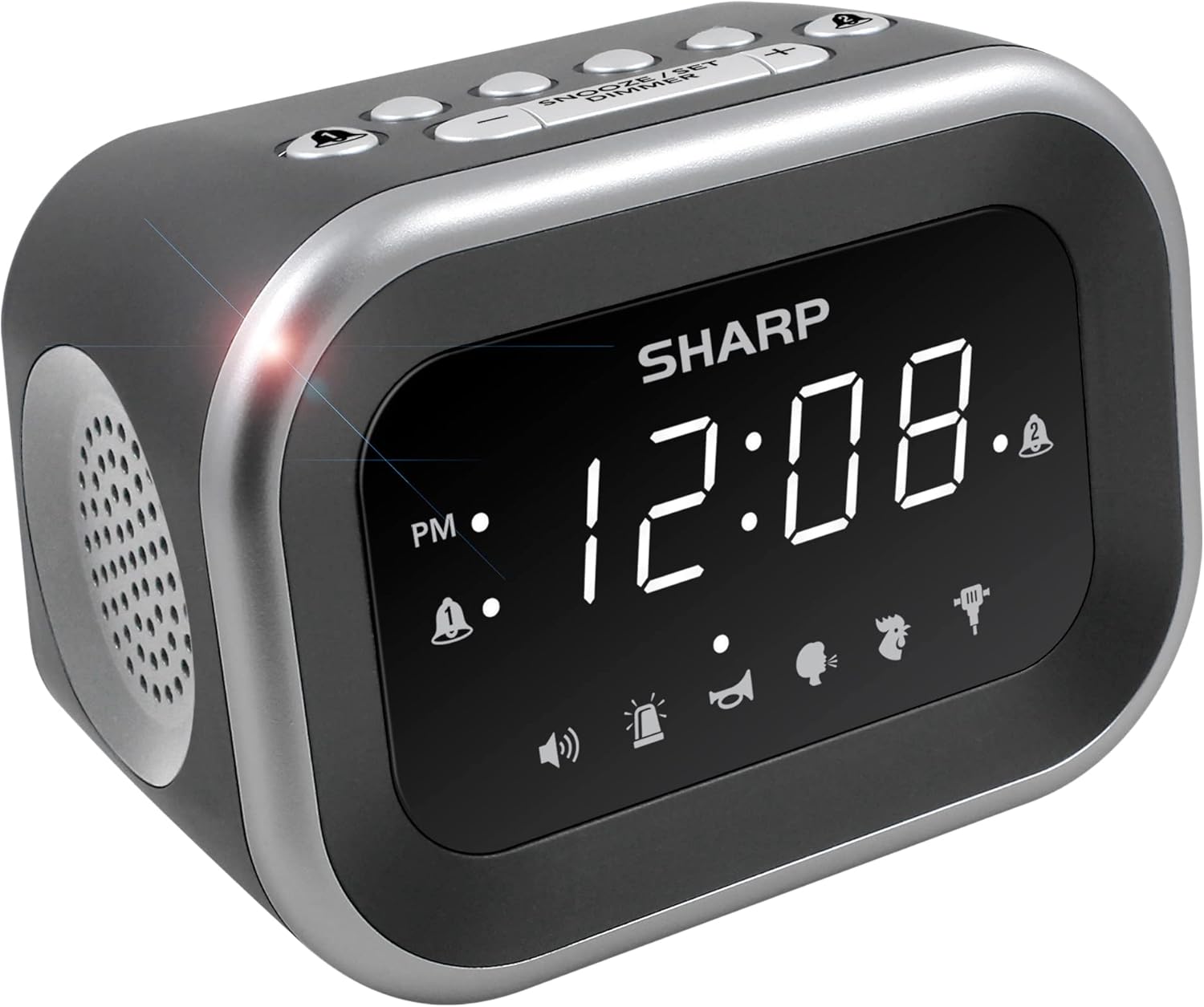
Vaizdas: priekis view of the Sharp Big Bang Alarm Clock, showing the digital display and speaker grille.
Saugos informacija
- Nelaikykite įrenginio ekstremaliose temperatūrose, tiesioginiuose saulės spinduliuose ar didelėje drėgmėje.
- Laikykite įrenginį atokiau nuo vandens ar kitų skysčių.
- Naudokite tik nurodytą maitinimo adapterį.
- Nebandykite ardyti ar modifikuoti įrenginio.
- Laikyti vaikams nepasiekiamoje vietoje.
Pakuotės turinys
- Sharp Big Bang Alarm Clock
- Kintamos srovės adapteris
- Vartotojo vadovas (šis dokumentas)
Produktas baigtasview
Familiarize yourself with the various components and controls of your alarm clock.
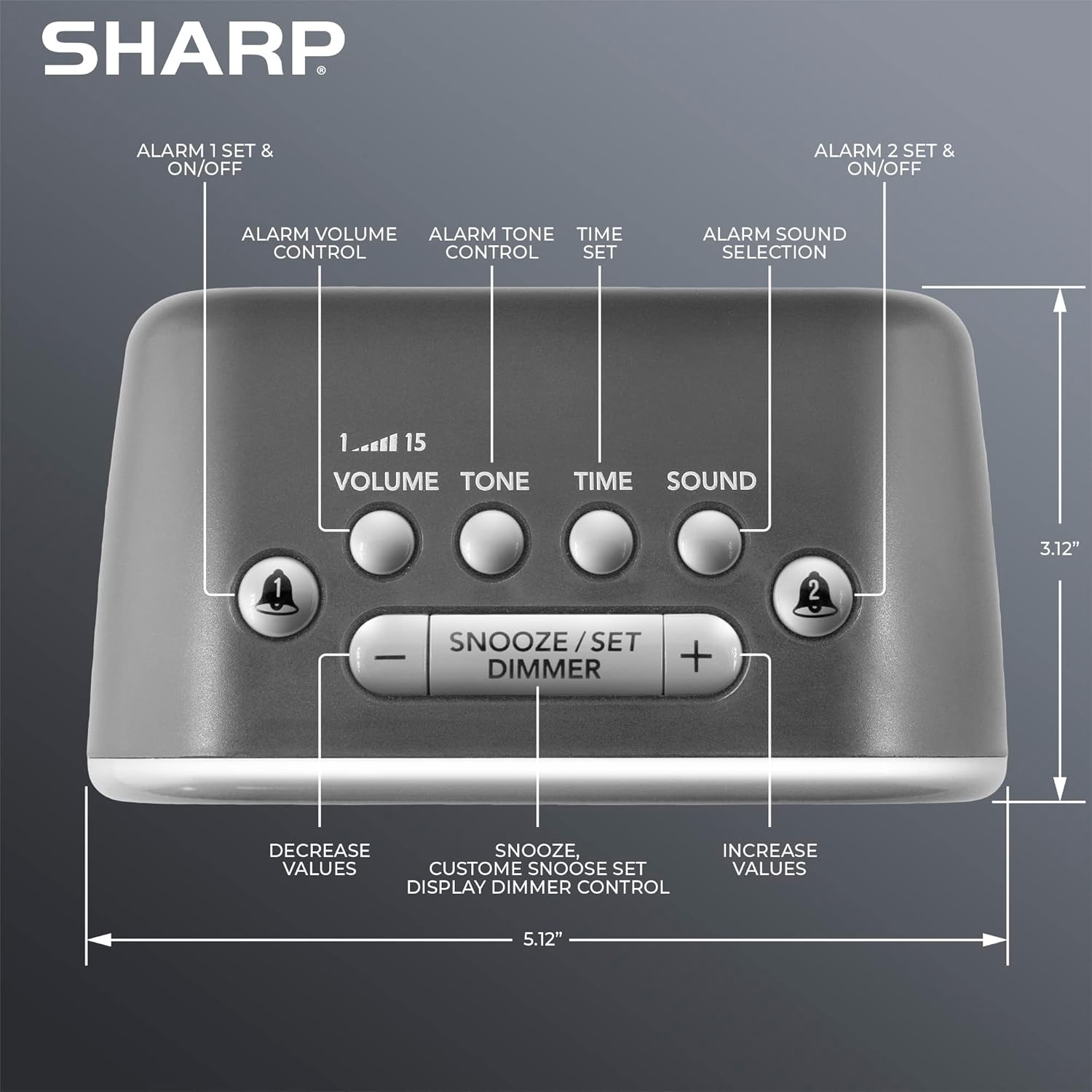
Vaizdas: Viršus view of the alarm clock, highlighting buttons for Alarm 1, Alarm 2, Volume, Tone, Time, Sound, Snooze/Set/Dimmer, and +/- controls.
- Ekranas: Large white LED display for time and settings.
- 1 ir 2 žadintuvo mygtukai: Activate/deactivate and set individual alarms.
- Garsumo mygtukas: Adjusts alarm volume (levels 1-15).
- Tono mygtukas: Adjusts alarm tone.
- Laiko mygtukas: Used for setting the current time.
- Garso mygtukas: Selects one of the six alarm sounds.
- Snooze/Set/Dimmer Button: Activates snooze, confirms settings, and adjusts display brightness.
- +/- mygtukai: Adjust values for time, volume, tone, and snooze duration.
Sąranka
1. Maitinimo prijungimas
- Plug the AC power adapter into the DC IN jack on the back of the alarm clock.
- Plug the other end of the adapter into a standard 110V/120V household wall outlet.
- Ekranas užsidegs, rodydamas, kad maitinimas prijungtas.
2. Baterijos atsarginės kopijos įrengimas
The alarm clock requires 2 x AAA batteries (not included) for battery backup. This feature stores your time and alarm settings during a power interruption. The display will not be lit during battery backup mode.
- Atidarykite baterijų skyriaus dangtelį, esantį įrenginio apačioje.
- Įdėkite 2 naujas AAA baterijas, laikydamiesi teisingo poliškumo (+ ir -).
- Saugiai uždarykite akumuliatoriaus skyriaus dangtelį.

Image: The alarm clock positioned on a nightstand, ready for use.
Naudojimo instrukcijos
1. Dabartinio laiko nustatymas
- Paspauskite ir palaikykite LAIKAS mygtuką, kol pradės mirksėti valandų skaitmenys.
- Naudokite + or - mygtukais nustatykite valandas. Atkreipkite dėmesį į PM indikatorių.
- Paspauskite LAIKAS dar kartą paspauskite mygtuką , kad patvirtintumėte valandas, ir pradės mirksėti minučių skaitmenys.
- Naudokite + or - mygtukai minutėms reguliuoti.
- Paspauskite LAIKAS dar kartą, kad išsaugotumėte laiko nustatymą.
2. Žadintuvų nustatymas (1 ir 2 žadintuvai)
This clock features two independent alarms.
- Paspauskite ir palaikykite 1 pavojaus signalas or 2 pavojaus signalas mygtuką, kol pradės mirksėti žadintuvo valandų skaitmenys.
- Naudokite + or - mygtukais nustatykite žadintuvo valandas. Stebėkite PM indikatorių.
- Paspauskite atitinkamą SIGNALAS dar kartą paspauskite mygtuką , kad patvirtintumėte valandas, ir pradės mirksėti minučių skaitmenys.
- Naudokite + or - mygtukai, skirti žadintuvo minutėms reguliuoti.
- Paspauskite SIGNALAS button once more to save the alarm time. The alarm indicator (bell icon) for the set alarm will appear on the display.
- To activate or deactivate an alarm, simply press the 1 pavojaus signalas or 2 pavojaus signalas button briefly. The bell icon indicates if the alarm is active.
3. Selecting Alarm Sounds
The clock offers 6 distinct alarm sounds: Rooster, Bugle, Nagging Mom, Jackhammer, Siren, and Beep.

Image: Visual representation of the six available alarm sounds.
- With an alarm set, press the GARSAS button. The current sound icon will flash.
- Naudokite + or - mygtukus, kad perjungtumėte galimus garsus.
- Paspauskite GARSAS mygtuką dar kartą, kad patvirtintumėte pasirinkimą.
4. Adjusting Alarm Volume and Tone
You can customize the volume (up to 115dB) and tone of your chosen alarm sound.

Image: Decibel reference scale illustrating the loudness of the alarm clock compared to common sounds.
- Paspauskite TOMAS button. The current volume level (1-15) will flash.
- Naudokite + or - mygtukai garsumui reguliuoti.
- Paspauskite TOMAS mygtuką dar kartą, kad patvirtintumėte.
- Paspauskite TONAS button. The current tone setting will flash.
- Naudokite + or - buttons to adjust the tone.
- Paspauskite TONAS mygtuką dar kartą, kad patvirtintumėte.
5. Snaudimo funkcija
Kai suskamba žadintuvas, paspauskite didelį SNOOZE/SET/DIMMER button on top of the clock to temporarily silence the alarm. The default snooze time is 9 minutes.
Customizing Snooze Duration:
- While the alarm is sounding, press and hold the SNOOZE/SET/DIMMER button until the snooze time flashes.
- Naudokite + or - buttons to set your desired snooze duration (1-59 minutes).
- Paspauskite SNOOZE/SET/DIMMER button again to save the custom snooze time.
6. Ekrano pritemdymo valdymas
The display has 3 brightness levels (Off, Low, High).
- Trumpai paspauskite SNOOZE/SET/DIMMER button (when the alarm is not sounding) to cycle through the brightness levels: High > Low > Off.

Vaizdas: Viršview of key features including display, volume, sounds, and controls.
Priežiūra
Valymas
- Unplug the alarm clock from the power outlet before cleaning.
- Išorinius paviršius nuvalykite minkštu, sausu skudurėliu.
- Nenaudokite abrazyvinių valiklių, vaško ar tirpiklių.
Baterijos keitimas
- Jei laikrodis praranda laiko arba žadintuvo nustatymus elektros energijos tiekimo nutraukimo metutage, the AAA backup batteries may need replacement.
- Follow the battery installation steps in the Setup section to replace the batteries.
Trikčių šalinimas
| Problema | Galima priežastis | Sprendimas |
|---|---|---|
| Žadintuvas neskamba arba yra per tylus. | Alarm is not activated; Volume is too low; Incorrect sound selected. | Ensure the alarm bell icon is displayed. Adjust the volume using the VOLUME button. Verify the selected alarm sound. |
| Display is off during a power outage. | Battery backup only retains settings, not display power. | This is normal operation. The display will relight when power is restored. Ensure backup batteries are fresh to retain settings. |
| Time or alarm settings are lost. | Power interruption and/or dead backup batteries. | Replace the 2 x AAA backup batteries. Reset the time and alarm settings. |
| Mygtukai nereaguoja. | Laikinas programinės įrangos triktis. | Unplug the unit from the power outlet for a few minutes, then plug it back in. |
Specifikacijos
- Prekinis ženklas: Aštrus
- Modelis: B0BDPQNVMR
- Maitinimo šaltinis: Laidinis elektrinis (suderinamas su 110 V / 120 V)
- Baterijos atsarginė kopija: 2 x AAA baterijos (į komplektą neįeina)
- Signalizacijos garsumas: Iki 115dB
- Signalizacijos garsai: 6 (Rooster, Bugle, Nagging Mom, Jackhammer, Siren, Beep)
- Ekranas: White LED with 3-level dimmer (High, Low, Off)
- Matmenys (apytiksliai): 5.12 colio (plotis) x 3.12 colio (aukštis) x 3.55 colio (gylis)
- Svoris: 12.5 uncijos
- Medžiaga: Akrilnitrilo butadieno stirenas (ABS)
- UPC: 049353008608
Garantija ir palaikymas
For warranty information and customer support, please refer to the documentation provided at the time of purchase or contact Sharp customer service directly. You can also visit the official Sharp store for more information:


