1. Įvadas
This manual provides essential information for the proper setup, operation, and maintenance of your Sharp 32FG6EA 32-inch HD Android TV. The Sharp 32FG6EA offers a wide range of connection options and features the Android TV operating system, providing a modern and intuitive television experience. It functions as an all-in-one entertainment hub, integrating Google Assistant for a smarter viewing experience. Users can quickly access entertainment, control smart devices, and obtain on-screen information using voice commands.
2. Saugos informacija
Prieš naudodami televizorių, atidžiai perskaitykite visas saugos instrukcijas. Išsaugokite šį vadovą ateičiai.
- Maitinimas: Įsitikinkite, kad televizorius prijungtas prie maitinimo šaltinio su tinkamu garsumutage. Neperkraukite maitinimo lizdų.
- Vėdinimas: Neužblokuokite ventiliacijos angų. Palikite pakankamai vietos aplink televizorių tinkamam oro cirkuliavimui ir neperkaitimui.
- Vanduo ir drėgmė: Do not expose the TV to rain, moisture, or excessive humidity. Avoid placing objects filled with liquids on or near the TV.
- Valymas: Prieš valydami atjunkite televizorių nuo elektros tinklo. Naudokite minkštą, sausą šluostę. Nenaudokite skystų valiklių ar aerozolinių purškalų.
- Vieta: Place the TV on a stable, level surface. If wall-mounting, ensure the mount is securely installed and can support the TV's weight.
- Aptarnavimas: Nebandykite patys taisyti televizoriaus. Visus techninės priežiūros darbus patikėkite kvalifikuotiems techninės priežiūros specialistams.
3. Pakuotės turinys
Patikrinkite, ar pakuotėje yra visi daiktai:
- Sharp 32FG6EA 32-inch HD Android TV
- Nuotolinio valdymo pultas (su 2 AAA baterijomis)
- Stand Type Base
- Instrukcijų vadovas
- Maitinimo kabelis
4. Sąranka
4.1 Išpakavimas
Atsargiai išimkite televizorių ir visus priedus iš pakuotės. Išsaugokite pakuotės medžiagas būsimam transportavimui ar techninei priežiūrai.
4.2 Stovo tvirtinimas
If you are not wall-mounting the TV, attach the included stand base:
- Padėkite televizorių ekranu žemyn ant minkšto, lygaus paviršiaus, kad nepažeistumėte.
- Sulygiuokite stovo pagrindą su tvirtinimo angomis televizoriaus apačioje.
- Pritvirtinkite stovą pridėtais varžtais. Įsitikinkite, kad stovas tvirtai pritvirtintas.
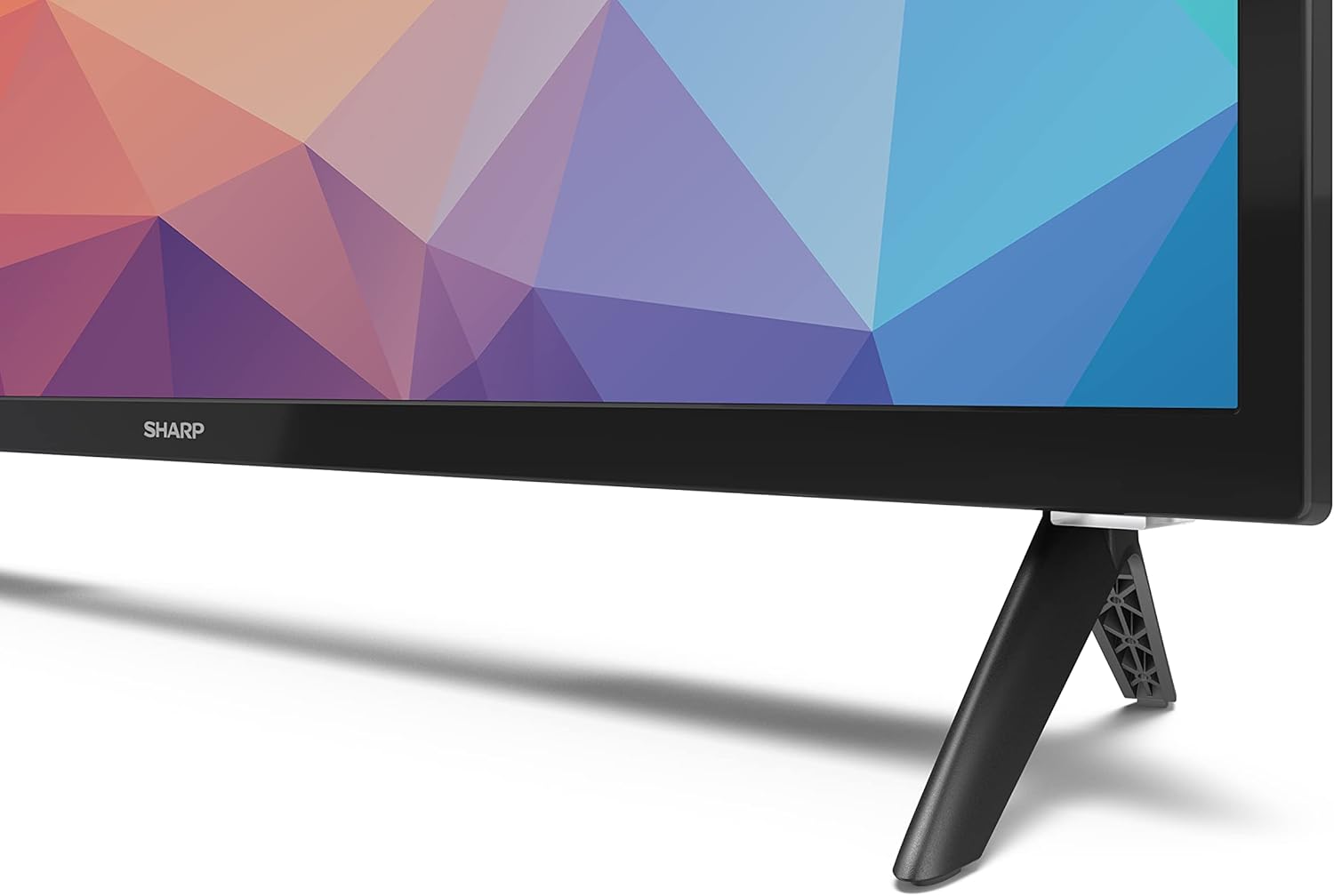
Image: Close-up of the TV stand attachment.
4.3 Tvirtinimas prie sienos
The Sharp 32FG6EA supports VESA wall mounts with dimensions of 75 x 75 mm. Wall mount hardware is not included. Follow the instructions provided with your wall mount kit.
4.4 Išorinių įrenginių prijungimas
Your TV features multiple ports for connecting various devices:
- HDMI: Connect Blu-ray players, game consoles, or set-top boxes to the 2 HDMI ports.
- USB: Connect USB storage devices for media playback to the 2 USB ports.
- Antena / kabelis: Prijunkite anteną arba kabelinės televizijos šaltinį transliavimo kanalams.
- Ethernet: Laidiniam interneto ryšiui.
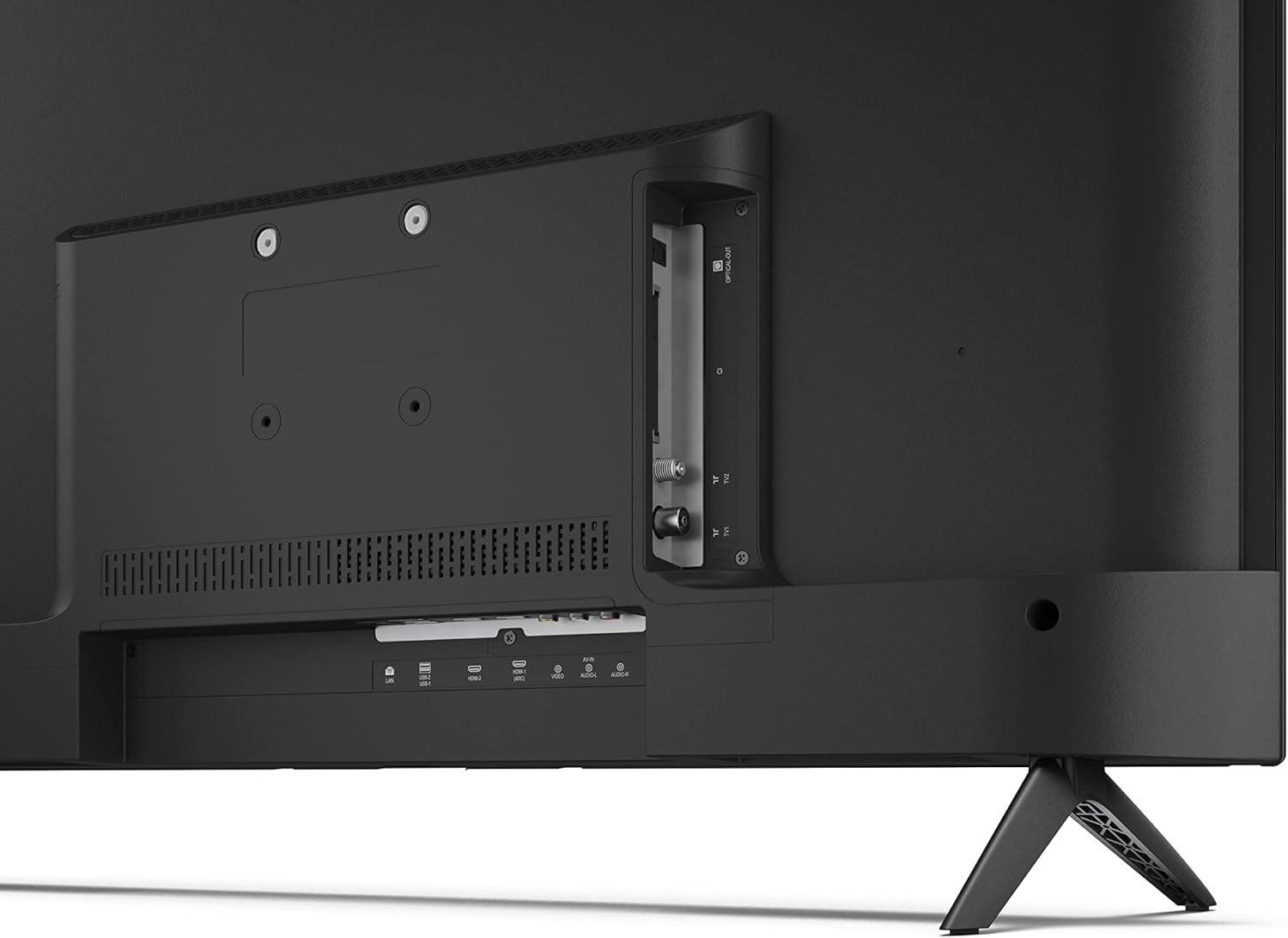
Vaizdas: Galinis view of the TV with connection ports.
4.5 Maitinimo jungtis
After connecting all necessary devices, plug the power cable into the TV and then into a wall outlet.
4.6 Pradinio nustatymo vedlys
Pirmą kartą įjungus televizorių, bus atliekami pradiniai nustatymai. Tai apima:
- Kalbos pasirinkimas.
- Tinklo ryšys („Wi-Fi“ arba eterneto).
- Google account sign-in (required for full Android TV features).
- Kanalų nuskaitymas.
5. Operacinis
5.1 Nuotolinio valdymo pultasview
The included remote control allows you to navigate the TV's features. Insert the 2 AAA batteries into the remote control before use.
- Maitinimo mygtukas: Įjungia arba išjungia televizorių.
- Krypties valdikliai (D-Pad) ir mygtukas „OK“: Naršyti meniu ir patvirtinti pasirinkimus.
- Atgal mygtukas: Grįžta į ankstesnį ekraną.
- Namų mygtukas: Atidaromas „Android TV“ pagrindinis ekranas.
- Garsumo didinimas / sumažinimas: Reguliuoja garso garsumą.
- Kanalas aukštyn/žemyn: Keičia televizijos kanalus.
- „Google“ asistento mygtukas: Įjungia balso valdymą.
- Programėlės spartieji mygtukai: Dedicated buttons for popular streaming services like Netflix, Prime Video, and YouTube.
5.2 „Android TV“ sąsajos naršymas
The Android TV home screen provides access to your installed apps, recommended content, and settings. Use the directional pad on your remote to navigate through the interface.
5.3 „Google“ padėjėjas
Press the Google Assistant button on your remote and speak into the microphone to:
- Ieškokite movies, shows, or information.
- Valdykite išmaniuosius namų įrenginius.
- Atidaryti programas.
- Koreguokite televizoriaus nustatymus.
5.4 Įtaisytasis „Chromecast“.
The TV includes Chromecast built-in, allowing you to cast content from compatible apps on your smartphone, tablet, or computer directly to the TV screen.
5.5 „Bluetooth“ ryšys
Connect Bluetooth devices such as headphones or speakers to your TV for a personalized audio experience. Navigate to the TV's settings menu to pair new Bluetooth devices.
5.6 Garso nustatymai
The TV supports Dolby Audio with 2 x 6 W RMS speakers. You can adjust audio settings, including sound modes and equalizer, through the TV's settings menu.
6. Priežiūra
6.1 Televizoriaus valymas
Norėdami išvalyti televizoriaus ekraną ir korpusą:
- Ištraukite maitinimo laidą iš sieninio lizdo.
- Use a soft, lint-free cloth to gently wipe the screen and surfaces.
- Įsisenėjusioms dėmėms šiek tiek pamirkykiteampNuvalykite šluostę vandeniu arba specializuotu ekrano valikliu (purkškite ant šluostės, o ne tiesiai ant ekrano).
- Nenaudokite abrazyvinių valiklių, vaško ar tirpiklių.
6.2 Programinės įrangos naujiniai
Jūsų „Android TV“ gali periodiškai gauti programinės įrangos atnaujinimus, siekiant pagerinti našumą ir pridėti naujų funkcijų. Įsitikinkite, kad jūsų televizorius prijungtas prie interneto, kad gautumėte šiuos atnaujinimus. Galite rankiniu būdu patikrinti, ar yra atnaujinimų, televizoriaus nustatymų meniu.
7. Problemų sprendimas
Jei kyla problemų dėl televizoriaus, žr. toliau pateiktas dažniausiai pasitaikančias problemas ir sprendimus:
- Nėra galios: Įsitikinkite, kad maitinimo laidas yra tvirtai prijungtas ir prie televizoriaus, ir prie veikiančio sieninio lizdo. Išbandykite kitą lizdą.
- Nėra vaizdo / garso: Check that the correct input source is selected. Verify all cables (HDMI, antenna) are properly connected.
- Nuotolinio valdymo pultas neveikia: Patikrinkite baterijas ir įsitikinkite, kad jos įdėtos teisingai. Nukreipkite nuotolinio valdymo pultą tiesiai į televizoriaus IR jutiklį.
- Prasta vaizdo kokybė: Check antenna/cable connections. Adjust picture settings in the TV menu. For streaming content, ensure a stable internet connection.
- Nėra interneto ryšio: Verify Wi-Fi password or Ethernet cable connection. Restart your router and the TV.
- Neveikiančios programėlės: Įsitikinkite, kad televizoriaus programinė įranga yra atnaujinta. Pabandykite išvalyti programėlės talpyklą arba iš naujo įdiegti programėlę.
If problems persist, consult the Sharp support websvetainėje arba susisiekite su klientų aptarnavimo tarnyba.
8. Specifikacijos
| Funkcija | Specifikacija |
|---|---|
| Modelio numeris | 32FG6EA |
| Prekės ženklas | Aštrus |
| Ekrano dydis | 32 colių (81 cm įstrižainė) |
| Ekrano technologija | LED |
| Rezoliucija | 720p (1366 x 768 pikselių) |
| Krašto santykis | 16:9 |
| Atnaujinimo dažnis | 50 Hz |
| Operacinė sistema | Android TV 11 |
| Ypatingos savybės | Android TV, Google Assistant, Chromecast built-in |
| Garso išvestis | 2 x 6 W RMS, Dolby Audio |
| HDMI prievadai | 2 |
| USB prievadai | 2 |
| Ryšys | Wi-Fi, Bluetooth, Ethernet |
| VESA sieninis laikiklis | 75 x 75 mm |
| Matmenys su stovu (P x A x G) | 731 x 486 x 177 mm |
| Matmenys be stovo (P x A x G) | 731 x 433 x 68 mm |
| Gaminio matmenys (D x P x A) | 16 x 73 x 46.4 cm (approximate, with stand) |
| Svoris | 3.9 kg |
| Energijos vartojimo efektyvumo klasė | E |

Image: TV dimensions diagram.

Image: Energy Label. For more details, visit EPREL duomenų bazė.
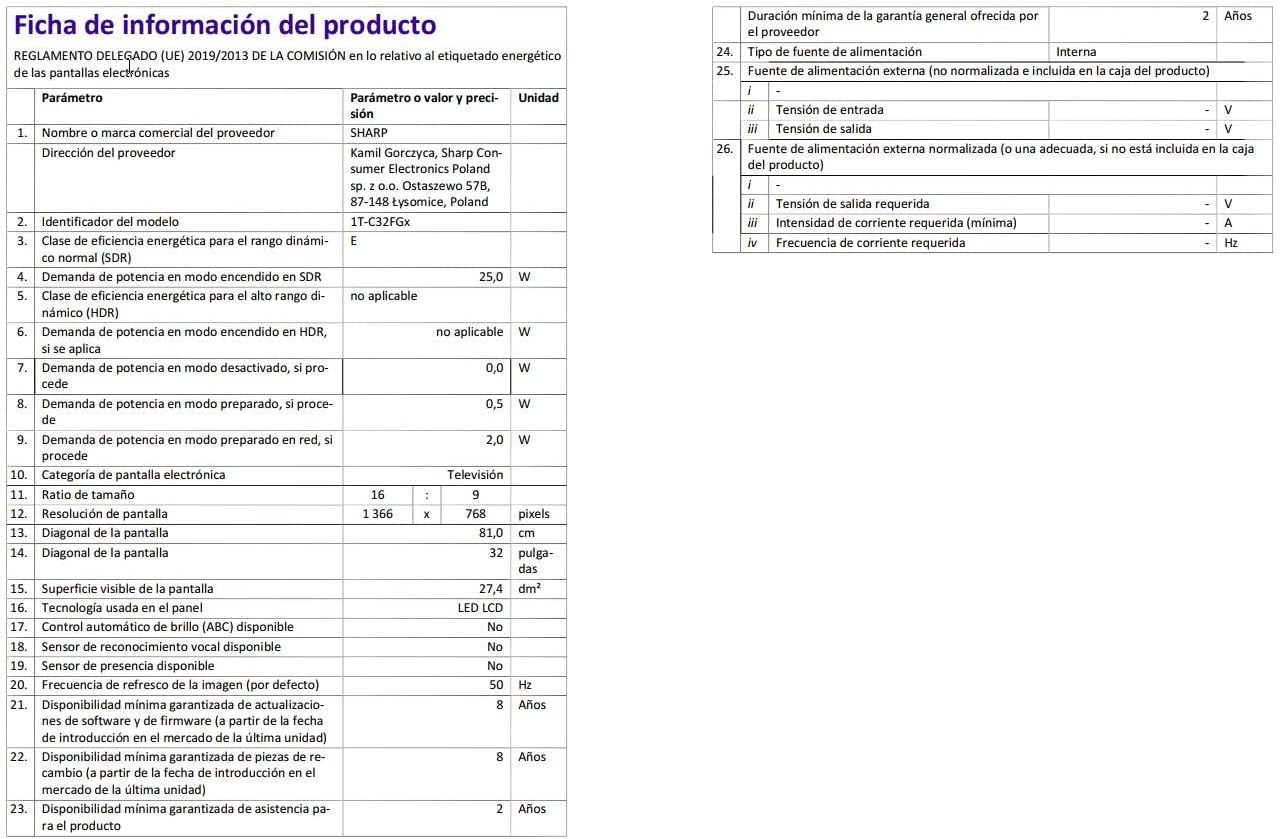
Image: Detailed product information sheet.
9. Garantija ir palaikymas
The Sharp 32FG6EA television comes with a minimum general warranty duration of 2 years from the provider.
For technical support, warranty claims, or further assistance, please refer to the contact information provided with your purchase documentation or visit the official Sharp support websvetainė jūsų regionui.


