1. Produktas baigtasview
The SP CONNECT Universal Phone Clamp SPC+ is designed to securely hold your smartphone, allowing you to utilize your preferred phone case while still benefiting from the convenience of quick attachment and removal from various mounts. This clamp is compatible with all smartphones ranging from 2.3 to 3.3 inches (58 to 85 mm) in width. It features a screw adjustment system for precise width setting, which locks into place once the dial is pushed. The interior of the clamp is lined with rubber to prevent scratches on your smartphone and to ensure it remains stable without sliding.
Please note that a separate mount (for bicycle, car, or motorcycle) is required and must be purchased independently to use this product.

The Universal Phone Clamp SPC+ securely holding a smartphone.

Demonstration of holding the clamp with a smartphone.
2. Sąranka ir diegimas
2.1 Adjusting the Clamp Plotis
- Locate the screw adjustment dial on the side of the Universal Phone Clamp.
- Rotate the dial to open the clamp jaws wider than your smartphone's width.
- Atsargiai įdėkite išmanųjį telefoną į dėkląamp, užtikrindami, kad jis būtų centre.
- Rotate the dial in the opposite direction to tighten the clamp jaws until they firmly grip your smartphone. Ensure the phone is snug but not overly compressed.
- Once the desired width is achieved and the phone is secure, push the dial inwards to lock the adjustment. This prevents accidental loosening.

Reguliuojant klamp width using the screw dial.
2.2 Attaching to a Mount (Mount Sold Separately)
The Universal Phone Clamp is designed to integrate with various SP CONNECT mounting solutions (e.g., bike mounts, car mounts, motorcycle mounts). These mounts feature a compatible SPC+ interface.
- Align the SPC+ interface on the back of the Universal Phone Clamp with the corresponding receiver on your SP CONNECT mount.
- Įdėkite clamp into the mount and rotate it 90 degrees clockwise until you hear a distinct click. This indicates that the clamp is securely locked onto the mount.
- To remove, rotate the clamp 90 degrees counter-clockwise and pull it away from the mount.
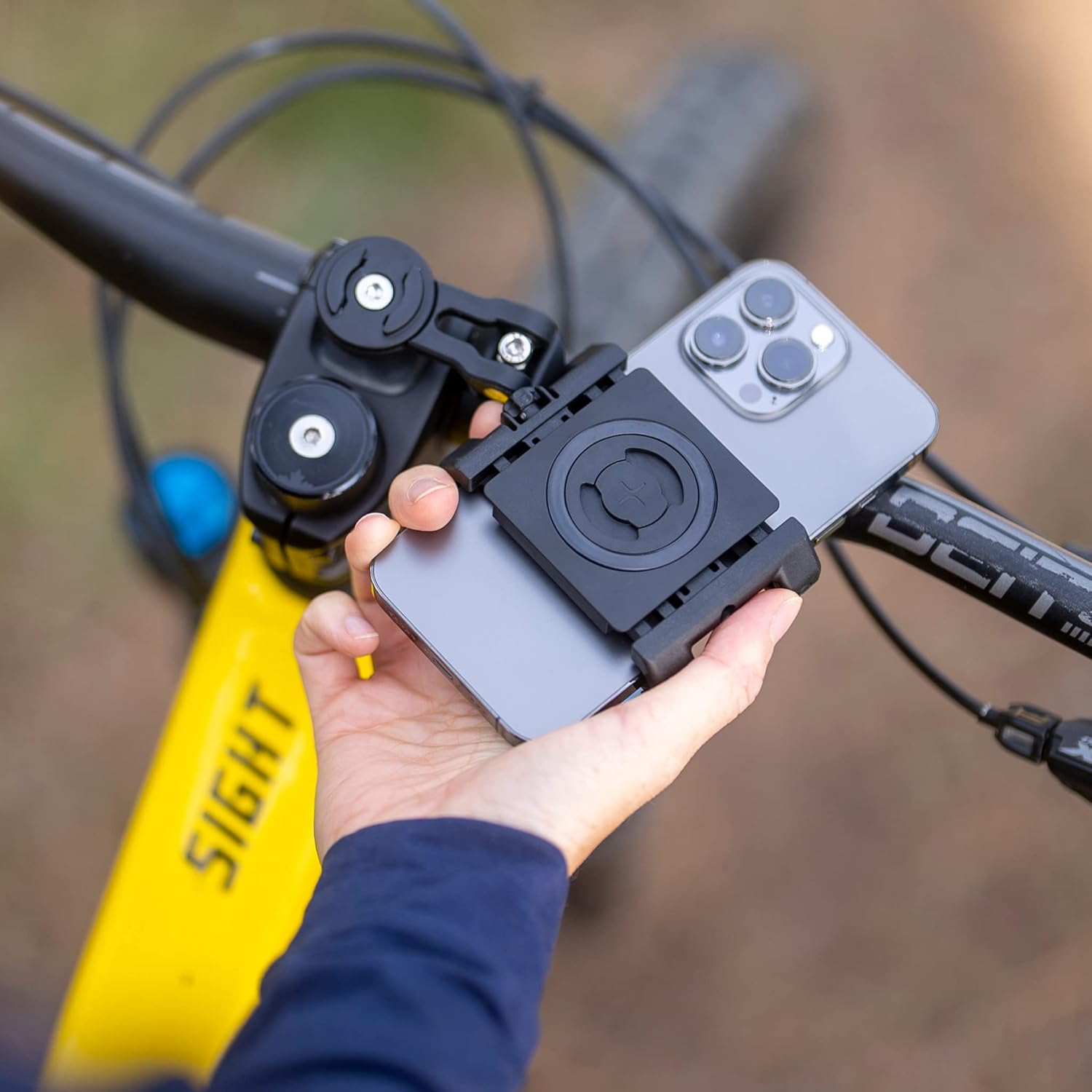
Attaching the phone clamp to a bicycle handlebar mount.
3. Naudojimo instrukcijos
Once the Universal Phone Clamp is securely attached to your chosen SP CONNECT mount, your smartphone is ready for use. The robust design ensures stability during various activities.
- Saugus laikymas: The rubberized interior and screw adjustment system provide a firm grip on your smartphone, minimizing movement even on uneven terrain.
- Greita prieiga: The one-touch attachment and removal mechanism allows for rapid mounting and dismounting of your phone.
- Universalumas: Klamp can be used with various SP CONNECT mounts, adapting to different activities such as cycling, motorcycling, or even as a stand.

Using the smartphone while mounted on a bicycle.

Telefonas klamp can also be used with compatible helmet mounts.
4. Priežiūra
To ensure the longevity and optimal performance of your SP CONNECT Universal Phone Clamp SPC+, follow these simple maintenance guidelines:
- Valymas: Nuvalykite clamp reguliariai su minkštu, damp cloth to remove dust and dirt. Avoid using abrasive cleaners or solvents, as these can damage the material.
- Patikra: Periodiškai apžiūrėkite klamp for any signs of wear, such as cracks in the plastic, damage to the rubber pads, or issues with the screw adjustment mechanism.
- Saugykla: When not in use, store the clamp in a clean, dry place away from direct sunlight and extreme temperatures.
5. Problemų sprendimas
- Phone does not fit in the clamp:
Ensure your smartphone's width is within the compatible range of 2.3 to 3.3 inches (58 to 85 mm). If you are using a thick phone case, it might exceed the maximum width. Try removing the case or consider a thinner one. - Phone feels loose or slides:
Make sure the screw adjustment dial is tightened sufficiently and then pushed in to lock the setting. Verify that the internal rubber pads are intact and clean, providing adequate grip. - Clamp does not securely attach to the mount:
Ensure you are using an SP CONNECT mount with the SPC+ interface. Confirm that the clamp is fully inserted and rotated 90 degrees clockwise until a click is heard, indicating it is locked. Avoid forcing the attachment. - Difficulty removing the clamp from the mount:
Ensure you are rotating the clamp 90 degrees counter-clockwise before attempting to pull it off the mount. Do not twist or pull excessively without proper rotation.
6. Specifikacijos
| Funkcija | Detalė |
|---|---|
| Prekės ženklas | SP CONNECT |
| Modelio numeris | 52637 |
| Medžiaga | Guma |
| Spalva | Juoda |
| Prekės matmenys (I x P x A) | 4.3 x 3.9 x 1.5 colio |
| Prekės svoris | 2.82 uncijos (80 gramų) |
| Suderinamas telefono plotis | 2.3–3.3 colių (58–85 mm) |
| Ypatingos savybės | Atsparus įbrėžimams |
7. Garantija ir palaikymas
For information regarding product warranty, returns, or technical support, please refer to the official SP CONNECT websvetainėje arba susisiekite su pardavėju tiesiogiai. Išsaugokite pirkimo įrodymą, jei prireiktų pateikti garantinį ieškinį.
You can visit the official SP CONNECT store on Amazon for more information and contact options: SP CONNECT Amazon Store


