1. Įvadas
This manual provides detailed instructions for the assembly, operation, and maintenance of your VIVO STAND-TV22B Aluminum Mobile TV Cart. This heavy-duty stand is designed to securely hold screens from 32 to 100 inches, weighing up to 220 lbs, with VESA patterns ranging from 200x200mm to 1000x600mm. It features mobile casters, a sturdy middle shelf, and tilt/height adjustment for optimal viewing.
2. Saugos informacija
WARNING: Read and understand all instructions before use. Failure to follow these instructions may result in serious injury or damage.
- Prieš surinkdami įsitikinkite, kad visi komponentai yra ir nepažeisti.
- Neviršykite maksimalaus svorio pajėgumo – 220 kg (100 svarų).
- Do not exceed the maximum screen size of 100 inches.
- Verify VESA compatibility (200x200mm to 1000x600mm) with your television.
- Assemble the unit on a flat, stable surface.
- Use appropriate tools and tighten all fasteners securely.
- Always lock the casters when the cart is stationary to prevent accidental movement.
- Exercise caution when moving the cart, especially on uneven surfaces or with a TV mounted.
- Surinkimo ir naudojimo metu laikykite vaikus ir naminius gyvūnus atokiau nuo vežimėlio.
- Šiame produkte yra cheminių medžiagų, kurios, kaip žinoma Kalifornijos valstijoje, sukelia vėžį, apsigimimus ar kitokią reprodukcinę žalą (65 pasiūlymo įspėjimas).
3. Pakuotės turinys
Please verify that all parts are included in your package. If any parts are missing or damaged, contact VIVO customer support.
- Base frame with 4 locking casters
- Vertical support columns (2)
- TV mounting plate
- TV mounting brackets (2)
- Vidurinė lentyna
- Top shelf (for webcam/camera)
- Kabelių tvarkymo dangteliai
- Assembly hardware (screws, washers, nuts, Allen wrench, open-end wrench)
4. Specifikacijos
| Prekės ženklas | VIVO |
| Modelio numeris | STANDAS-TV22B |
| Medžiaga | Aliuminis, Plienas |
| Spalva | Juoda |
| Ekrano dydžio suderinamumas | 32–100 colio |
| Svorio talpa | Iki 220 svarų (100 kg) |
| VESA suderinamumas | 200x200mm iki 1000x600mm |
| Aukščio reguliavimas | 48" to 68" (center of screen) |
| Pakreipimo kampas | +5° iki -10° |
| Gaminio matmenys | 45" x 27.5" x 94" (L x W x H, top shelf to floor) |
| Prekės svoris | 70.4 svaro |
Note: All measurements are approximate.
5. Sąranka ir surinkimas
Follow these steps carefully to assemble your VIVO Mobile TV Cart. It is recommended to have assistance during certain steps, especially when mounting the television.
Surinkimo vaizdo vadovas
Vaizdo įrašo aprašymas: This official VIVO assembly video provides a visual guide for setting up the mobile TV cart. While the video references model STAND-TV22S, the assembly process is highly similar to the STAND-TV22B. It demonstrates each step from unboxing to final TV mounting, covering assembling the base, columns, shelves, and attaching the TV.
Žingsnis po žingsnio surinkimo instrukcijos
1 veiksmas: surinkite pagrindą
Attach the four locking casters to the base frame using the provided hardware. Ensure they are securely tightened with the open-end wrench.

Vaizdo aprašymas: Iš arti view of the sturdy base of the VIVO mobile TV cart, highlighting one of the quad locking casters. The caster is black with a metal bracket, designed for stability and mobility.
Step 2: Extend the Vertical Support Columns
Carefully extend the inner sections of the vertical support columns. Secure them in the extended position using the provided pins or locking mechanisms.
Step 3: Attach Columns to Base and Handles
Secure the two extended vertical support columns to the assembled base using the designated screws and the Allen wrench. Attach the decorative handles to the top of the columns.
Vaizdo aprašymas: The VIVO mobile TV cart with a large television mounted, positioned in a modern office setting. The dual vertical support columns are visible, extending from the base to the TV mounting plate.
Step 4: Install TV Mounting Plate
Attach the horizontal TV mounting plate to the top of the vertical support columns. Use the provided screws and ensure it is level and securely fastened.
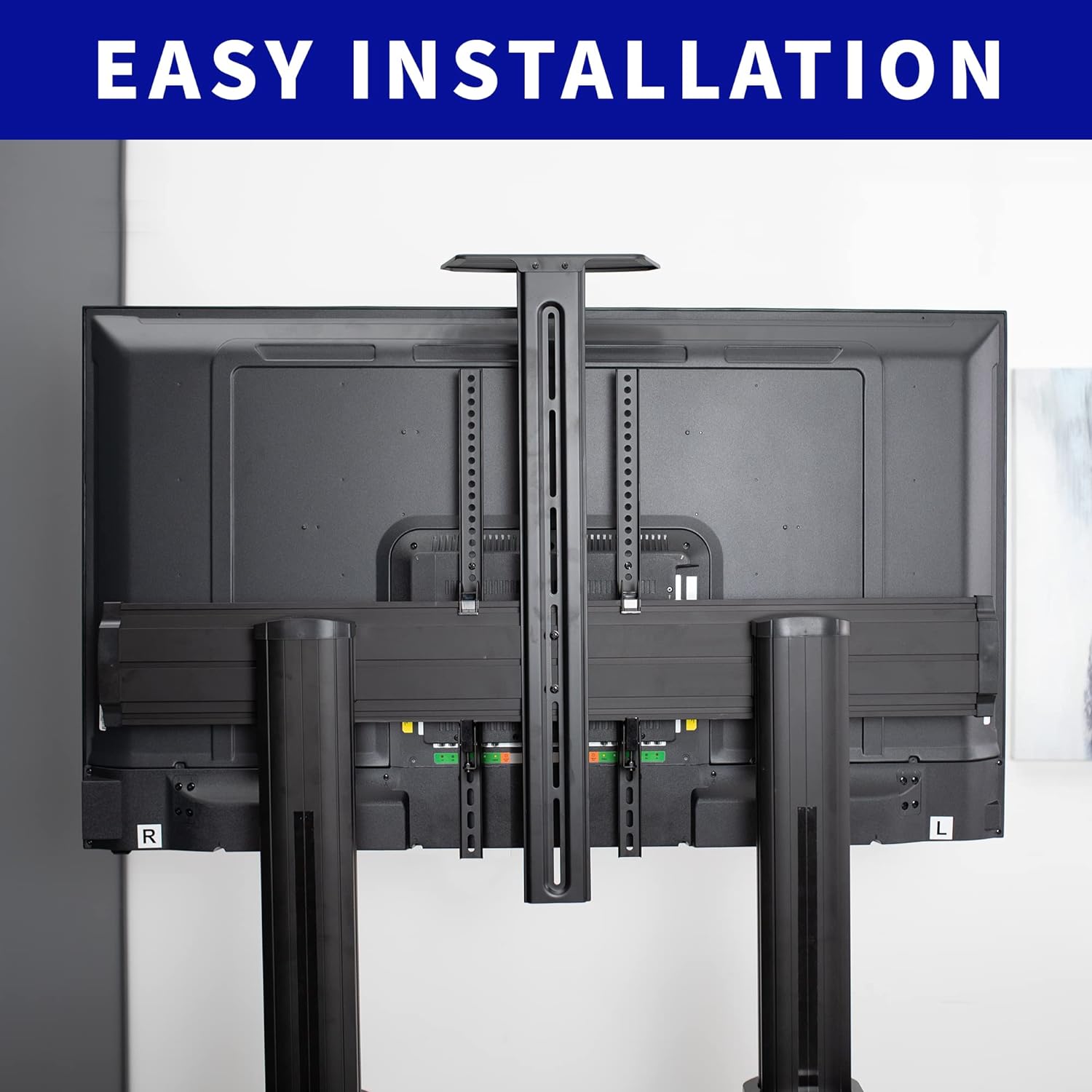
Vaizdo aprašymas: Užpakalinė view of a television mounted on the VIVO TV cart, showcasing the horizontal mounting plate and the vertical brackets attached to the TV. This illustrates the "Easy Installation" feature.
Step 5: Secure Columns to the Base (Covers)
Place the plastic covers over the base connections of the vertical columns and secure them with the appropriate fasteners to complete the base assembly.
Step 6: Attach Middle Shelf (DVD Tray)
Attach the middle shelf to the desired height on the vertical columns using the provided hardware. This shelf is suitable for laptops, DVD players, or streaming devices.

Vaizdo aprašymas: The VIVO mobile TV cart in an office setting, displaying a laptop on its adjustable middle shelf and a webcam on the top shelf, demonstrating its utility for presentations or video conferencing.
Step 7: Install the Television
Carefully attach the TV mounting brackets to the back of your television using the appropriate VESA screws and spacers from the hardware kit. Refer to your TV's manual for specific VESA hole patterns. With assistance, lift your television and hook the attached mounting brackets onto the horizontal mounting plate. Secure the TV to the plate using the safety screws or locking mechanisms provided.
8 veiksmas: pritvirtinkite viršutinę lentyną
The smaller top shelf can be installed above the TV for a webcam or camera, securing it with the provided hardware.
9 veiksmas: kabelių valdymas
Utilize the integrated cable management system within the vertical columns to route and conceal cables for a clean and organized appearance.
6. Naudojimo instrukcijos
Krepšelio perkėlimas
To move the TV cart, unlock all four casters by flipping their locking levers. Carefully push the cart to your desired location. Once positioned, lock all casters to ensure stability.
Aukščio reguliavimas
The TV cart allows for height adjustment from 48" to 68" (center of screen). To adjust, loosen the locking mechanisms on the vertical columns, carefully raise or lower the TV to the desired height, and then securely tighten the locking mechanisms. It is recommended to remove the TV before significant height adjustments for safety.

Vaizdo aprašymas: A pusė view of the VIVO mobile TV cart with a television, illustrating the telescoping height adjustment feature and the tilt range of +5° to -10° for optimal viewkampų.
Pasvirimo reguliavimas
The TV mounting brackets allow for a tilt range of +5° to -10°. Loosen the tilt adjustment knobs on the side of the TV brackets, adjust the screen to your preferred angle, and then tighten the knobs to secure the position.
7. Priežiūra
- Reguliariai tikrinkite visus varžtus ir tvirtinimo detales, kad įsitikintumėte, jog jie yra tvirtai priveržti.
- Clean the cart surfaces with a soft, damp audinys. Venkite abrazyvinių valiklių.
- Inspect casters periodically for smooth operation and clean any debris.
- Ensure cables routed through the management system are not pinched or strained.
8. Problemų sprendimas
| Problema | Galima priežastis | Sprendimas |
|---|---|---|
| Vežimėlis nestabilus arba svyruoja. | Loose fasteners; uneven floor; overloaded. | Check and tighten all screws. Move to a level surface. Ensure TV weight is within limits. |
| Difficulty moving the cart. | Casters are locked; debris in casters. | Unlock all casters. Clean any debris from the wheels. |
| Televizorius nėra lygus. | Mounting plate or brackets are uneven. | Adjust the TV mounting brackets or re-level the horizontal mounting plate. |
| Laidai matomi arba netvarkingi. | Nenaudojamas kabelių valdymas. | Route cables through the integrated cable management system in the vertical columns. |
9. Garantija ir palaikymas
VIVO products are designed for quality and durability. For specific warranty information, please refer to the product packaging or the official VIVO website. If you encounter any issues or require assistance, please contact VIVO customer support.
- Klientų aptarnavimas: VIVO offers customer support for product inquiries and assistance.
- Grąžinimai: Šiam produktui taikomas lengvas 30 dienų grąžinimas.
- Apsaugos planai: Extended protection plans (2-Year, 3-Year) may be available for purchase.
For the most up-to-date information, visit the official VIVO store or contact their support directly.


