1. Įvadas
Ačiū, kad pirkoteasing the Thomson Soundbar System. This manual provides essential information for setting up, operating, and maintaining your soundbar, subwoofer, and wireless microphones. Please read these instructions carefully before use and retain them for future reference.

Image 1.1: Thomson Soundbar System components including the soundbar, subwoofer, two wireless microphones, and remote control.
2. Pakuotės turinys
Patikrinkite, ar pakuotėje yra visi toliau išvardyti daiktai:
- Soundbar (1 unit)
- Žemųjų dažnių garsiakalbis (1 vnt.)
- Nuotolinio valdymo pultas (1 vnt.)
- Belaidžiai mikrofonai (2 vnt.)
- Maitinimo adapteris (1 vnt.)
- Audio Cable (1 unit)
- Coaxial Cable (1 unit)
- Optical Fiber Cable (1 unit)
- Wall Mounting Kit (includes padlocks, gel column, screws)
- Vartotojo vadovas (šis dokumentas)
3. Produktas baigtasview
3.1 „Soundbar“
The soundbar features four built-in full-frequency speakers with sound guide enhancement holes for stereo sound. It also includes an LED strip lamp for visual effects.

Image 3.1: Internal structure of the soundbar highlighting the 4 full-range driver speakers, guide holes, and LED strip lamp.
3.2 Žemųjų dažnių garsiakalbis
The external subwoofer is designed to deliver deep bass. It incorporates a bass diaphragm with high-roll foam surrounds for extended excursion and vibration-absorbing feet for stable performance.
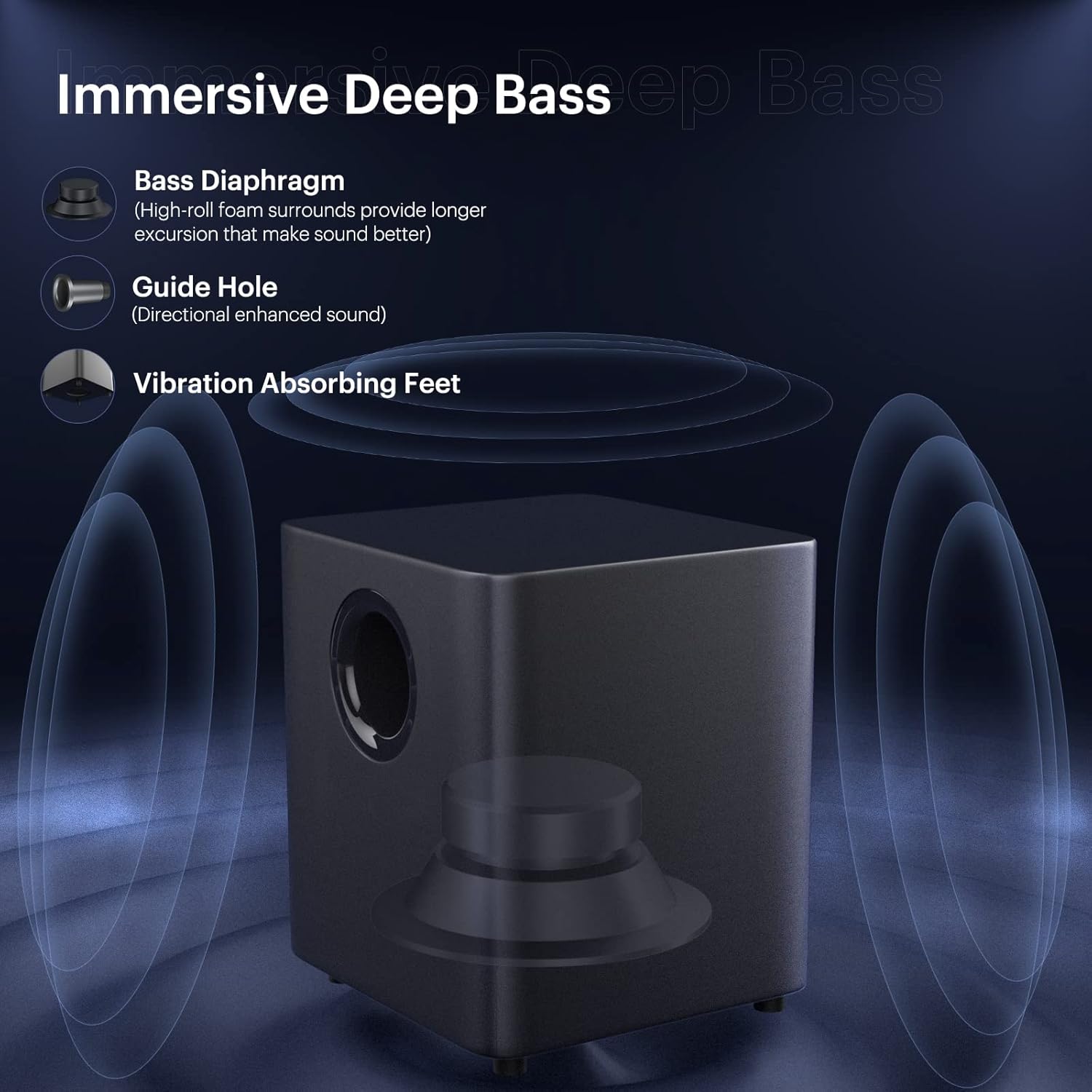
Image 3.2: Subwoofer design elements for immersive deep bass.
3.3 belaidžiai mikrofonai
Two wireless microphones are included for vocal applications. They operate on UHF frequencies and feature individual displays.

Image 3.3: Dual wireless microphones.
3.4 Nuotolinis valdymas
The included remote control provides full functionality for operating the soundbar system, including power, input selection, volume, sound modes, and microphone adjustments.
4. Sąranka
4.1 Įdėjimas
Place the soundbar on a stable, flat surface in front of your television or mount it on the wall. Position the subwoofer on the floor near the soundbar for optimal bass performance.
4.2 Žemųjų dažnių garsiakalbio prijungimas
Connect the subwoofer to the soundbar using the provided SUB OUT cable. Ensure a secure connection.
4.3 Maitinimo jungtis
Connect the power adapter to the DC IN port on the soundbar and then plug it into a power outlet. Ensure the subwoofer is also connected to a power source if it has a separate power input.
5. Ryšio parinktys
The soundbar offers various wired and wireless connection methods:

Image 5.1: Available wired and wireless connectivity ports on the soundbar.
5.1 Bluetooth ryšys
- Press the 'Bluetooth' button on the remote control or soundbar to select Bluetooth input.
- The soundbar will enter pairing mode, indicated by a flashing LED.
- On your device (smartphone, tablet, computer), search for 'THOMSON Soundbar' in the Bluetooth settings and select it to pair.
- Prijungus, LED indikatorius ims šviesti nuolat.
5.2 HDMI ARC jungtis
Connect an HDMI cable from the HDMI ARC port on the soundbar to the HDMI ARC port on your TV. Select the HDMI ARC input on the soundbar.
5.3 Optinis ryšys
Connect an optical cable from the OPT port on the soundbar to the optical output port on your TV or audio source. Select the Optical input on the soundbar.
5.4 AUX jungtis
Connect a 3.5mm audio cable from the AUX IN port on the soundbar to the audio output port on your device. Select the AUX input on the soundbar.
5.5 USB atkūrimas
Insert a USB drive into the USB port on the soundbar. The soundbar will automatically switch to USB input and begin playing compatible audio files.
6. Naudojimo instrukcijos
6.1 Maitinimo įjungimas/išjungimas
Press the 'Power' button on the remote control or the soundbar to turn the system on or off.
6.2 Įvesties šaltinio pasirinkimas
Press the 'Input' or corresponding source buttons (e.g., 'Bluetooth', 'HDMI ARC', 'Optical', 'AUX', 'USB') on the remote control to switch between audio sources.
6.3 Garsumo valdymas
Use the 'Volume +' and 'Volume -' buttons on the remote control or soundbar to adjust the master volume.
6.4 garso režimai
The soundbar offers five equalizer modes to optimize audio for different content types:
- Films: Patobulintas dialogas ir kinematografiniai efektai.
- Žaidimai: Immersive sound for gaming.
- Muzika: Subalansuotas garsas muzikos atkūrimui.
- Koncertas: Live performance audio experience.
- Naujienos: Clear voice reproduction.
Press the 'Mode' button on the remote control to cycle through these sound modes.

Image 6.1: The five available sound modes for optimized audio.
6.5 Žemų ir aukštų dažnių reguliavimas
Use the 'Bass+' / 'Bass-' and 'Treble+' / 'Treble-' buttons on the remote control to fine-tune the bass and treble levels.
6.6 Mikrofono naudojimas
To use the wireless microphones:
- Ensure the microphones have batteries installed.
- Turn on the microphones. They should automatically pair with the soundbar.
- Adjust microphone volume and echo effects using the dedicated buttons on the remote control.

Image 6.2: Using the wireless microphones for an immersive audio experience.
7. Sienų montavimas
The soundbar can be wall-mounted using the included kit. Follow these steps:
- Determine the desired mounting location on the wall, ensuring it is level and structurally sound.
- Mark the positions for drilling using the provided template or by measuring the soundbar's mounting points.
- Jei reikia, išgręžkite kreipiamąsias skyles ir įstatykite sieninius inkarus.
- Pritvirtinkite tvirtinimo laikiklius prie sienos naudodami varžtus.
- Atsargiai pritvirtinkite garso juostą prie pritvirtintų laikiklių.
Ensure all cables are connected before mounting if possible, or leave enough slack for connection after mounting.
8. Problemų sprendimas
Jei kyla problemų, žr. toliau pateiktas dažniausiai pasitaikančias problemas ir sprendimus:
| Problema | Galimas sprendimas |
|---|---|
| Nėra galios | Check if the power adapter is securely connected to the soundbar and a working power outlet. |
| Nėra garso | Ensure the correct input source is selected. Check all audio cable connections. Increase the volume on both the soundbar and the connected device. |
| Bluetooth poravimo problemos | Ensure the soundbar is in Bluetooth pairing mode. Delete 'THOMSON Soundbar' from your device's Bluetooth list and try pairing again. Move devices closer. |
| Mikrofonas neveikia | Check microphone batteries. Ensure microphones are powered on and within range of the soundbar. |
| Nuotolinio valdymo pultas neveikia | Check remote control batteries. Ensure there are no obstructions between the remote and the soundbar's sensor. |
9. Specifikacijos
- Garsiakalbio tipas: Garso juosta
- Ypatinga funkcija: Ekvalaizeris
- Rekomenduojami naudojimo būdai: Televizoriams
- Suderinami įrenginiai: Išmanusis telefonas, planšetinis kompiuteris, televizorius
- Žemųjų dažnių garsiakalbio skersmuo: 5 colių
- Erdvinio garso kanalo konfigūracija: 5.1
- Kontrolės metodas: Nuotolinis
- Belaidžio ryšio technologija: Bluetooth
- Garso juostos dydis: 37 colių
- Maitinimo šaltinis: Su laidu elektra
- Gaminio matmenys (garso juosta): 93.6 x 10.97 x 8.76 cm
- Prekės svoris: 8.91 kg (visa sistema)
- Didžiausia garsiakalbio išėjimo galia: 100 vatų
- Garso išvesties režimas: Stereo, erdvinis garsas
- Montavimo tipas: Strypo laikiklis, sieninis laikiklis
10. Saugos informacija
- Saugokite įrenginį nuo lietaus ar drėgmės.
- Neardykite įrenginio. Techninę priežiūrą patikėkite kvalifikuotiems specialistams.
- Užtikrinkite tinkamą vėdinimą aplink įrenginį, kad išvengtumėte perkaitimo.
- Laikykite įrenginį atokiau nuo tiesioginių saulės spindulių, šilumos šaltinių ir stiprių magnetinių laukų.
- Prietaisą valykite minkštu, sausu skudurėliu. Nenaudokite skystų valiklių.
11. Garantija ir palaikymas
For warranty information and technical support, please refer to the warranty card included with your product or visit the official THOMSON websvetainėje. Išsaugokite pirkimo kvitą kaip pirkimo įrodymą.


