1. Įvadas
Thank you for choosing the Gembird USB-C Gigabit Network Adapter with 3-Port USB 3.1 Hub. This device is designed to expand the connectivity of your USB-C enabled laptop, tablet, or computer, providing both high-speed Gigabit Ethernet and additional USB 3.1 ports. This manual provides essential information for setting up, operating, and maintaining your device.
2. Produkto ypatybės
- USB-C jungtis: Connects to your host device via a reversible USB-C port.
- Gigabito eterneto prievadas: Provides a stable and fast wired network connection up to 1000 Mbps.
- 3-Port USB 3.1 Hub: Adds three USB 3.1 ports for connecting peripherals such as external hard drives, flash drives, keyboards, and mice.
- Didelės spartos duomenų perdavimas: USB 3.1 ports support data transfer rates up to 5 Gbps.
- Plug and Play: No driver installation required for most modern operating systems.
3. Pakuotės turinys
Please ensure the following items are included in your package:
- Gembird USB-C Gigabit Network Adapter with 3-Port USB 3.1 Hub (Model A-CMU3-LAN-01)
4. Produktas baigtasview
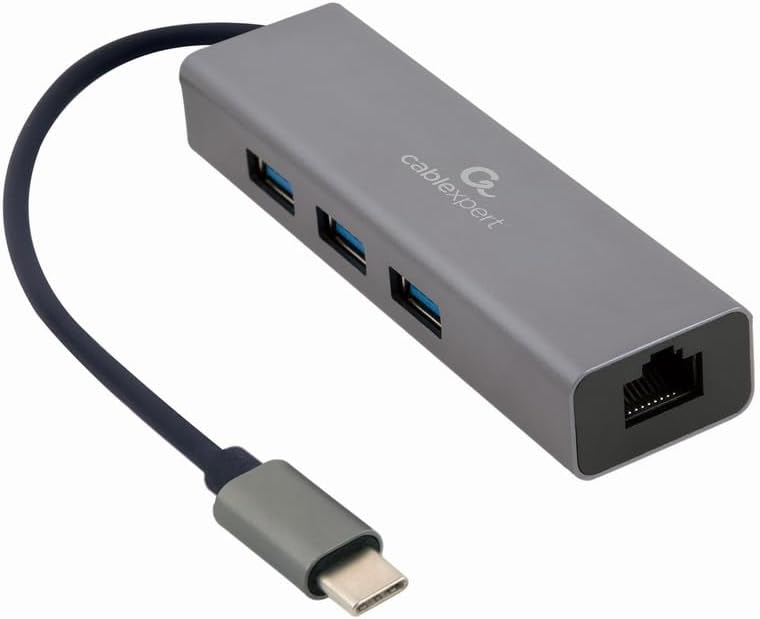
1 paveikslas: Priekyje view of the Gembird USB-C Gigabit Network Adapter, showing the USB-C cable, three USB 3.1 ports, and the RJ45 Gigabit Ethernet port.

2 paveikslas: Retail packaging for the Gembird USB-C Gigabit Network Adapter, highlighting key features like USB Type-C, USB 3.1 x 3, RJ45, Gigabit, 1000 Mbps, and Plug & Play.
5. Sąranka
Follow these steps to set up your Gembird USB-C Gigabit Network Adapter:
- Prijungti prie pagrindinio įrenginio: Plug the USB-C connector of the adapter into an available USB-C port on your laptop, tablet, or computer.
- Prisijunkite prie tinklo: Insert an Ethernet cable (RJ45) from your router or modem into the Gigabit Ethernet port on the adapter.
- Prijunkite USB periferinius įrenginius: Plug your USB devices (e.g., flash drives, external hard drives, mouse, keyboard) into the three available USB 3.1 ports on the adapter.
- Tvarkyklės diegimas: The adapter is typically plug-and-play. Your operating system (Windows, macOS, Linux, Chrome OS) should automatically detect and install the necessary drivers. If prompted, allow the system to install drivers.
6. Naudojimo instrukcijos
Once connected, the adapter functions automatically:
- Prieiga prie tinklo: Your host device should now have a wired network connection. You can verify this in your operating system's network settings.
- USB Device Access: Connected USB peripherals will be recognized by your host device and function as if directly connected.
7. Problemų sprendimas
Jei kyla problemų, žr. toliau pateiktas dažniausiai pasitaikančias problemas ir sprendimus:
- Nėra tinklo ryšio:
- Ensure the Ethernet cable is securely connected to both the adapter and your router/modem.
- Patikrinkite, ar tinkamai veikia maršrutizatorius / modemas.
- Patikrinkite tinklo nustatymus savo pagrindiniame įrenginyje.
- Try connecting the adapter to a different USB-C port on your host device.
- Neatpažinti USB įrenginiai:
- Ensure USB devices are properly plugged into the adapter's USB 3.1 ports.
- Try connecting the USB device directly to your host computer to confirm it is functional.
- Some high-power USB devices may require an external power source if your host device's USB-C port does not provide sufficient power (this adapter does not have a dedicated power input).
- Mažas tinklo greitis:
- Ensure your Ethernet cable is rated for Gigabit speeds (Cat5e or higher).
- Verify your internet service provider's speed and your router's capabilities.
- Ensure your host device's USB-C port supports USB 3.0/3.1 speeds.
8. Specifikacijos
| Modelio numeris | A-CMU3-LAN-01 |
| Techninės įrangos sąsaja | USB-C (Host), USB 3.1 (Hub), RJ45 (Ethernet) |
| Iš viso USB prievadų | 3 3.1 (USB XNUMX) |
| Ethernet prievadai | 1 (Gigabit RJ45) |
| Duomenų perdavimo sparta (USB) | Iki 5 Gb/s (USB 3.1) |
| Data Transfer Rate (Ethernet) | 10/100/1000 Mbps |
| Gaminio matmenys | 10 x 2 x 2.7 colio |
| Prekės svoris | 2.46 uncijos |
9. Priežiūra
Kad užtikrintumėte adapterio ilgaamžiškumą ir optimalų veikimą:
- Valymas: Use a soft, dry cloth to clean the exterior of the device. Avoid liquid cleaners or solvents.
- Saugykla: Kai nenaudojate, laikykite adapterį vėsioje, sausoje vietoje, toliau nuo tiesioginių saulės spindulių ir ekstremalių temperatūrų.
- Tvarkymas: Avoid dropping or subjecting the device to strong impacts. Do not attempt to disassemble the adapter.
10. Garantija ir palaikymas
This Gembird product comes with a dvejų metų garantija nuo gamyklinių defektųPrašome išsaugoti pirkimo įrodymą garantiniams reikalavimams.
For technical support or warranty inquiries, please contact your retailer or visit the official Gembird websvetainė kontaktinei informacijai.


