1. Įvadas
The Formuler Z11 Pro Max is an advanced Android 11 streaming media player designed to deliver a high-quality entertainment experience. Featuring 4K resolution support, Wireless AX connectivity, and a Gigabit LAN port, this device provides robust performance for streaming various media content. This manual provides essential information for setting up, operating, and maintaining your Formuler Z11 Pro Max.
2. Kas įskaičiuota
Patikrinkite, ar jūsų siuntinyje yra visi toliau išvardyti daiktai:
- Formuler Z11 Pro Max Unit
- HDMI kabelis
- Maitinimo kabelis
- Nuotolinio valdymo pultas
- IR Remote Extension
- 7 Colours Wireless Keyboard (Extra Accessory)
- Magnetic Car Mount (Extra Accessory)

Figure 2.1: Formuler Z11 Pro Max packaging and included accessories, including the main unit, remote, cables, wireless keyboard, and car mount.
3. Produktas baigtasview
Familiarize yourself with the components and features of your Formuler Z11 Pro Max.
3.1 Įrenginio funkcijos

Figure 3.1: The Formuler Z11 Pro Max device, showcasing its core features such as Android 11 operating system, 4GB DDR4 RAM, 32GB storage, 6th generation AX Wireless, Gigabit LAN, and 4K HDR10+ video support.
3.2 Prievadai ir jungtys

3.2 pav.: galinis view of the Formuler Z11 Pro Max, displaying the Gigabit LAN port, HDMI output, USB 2.0 port, Micro SD Card slot, IR Extension port, and Power Input (12V/1A).
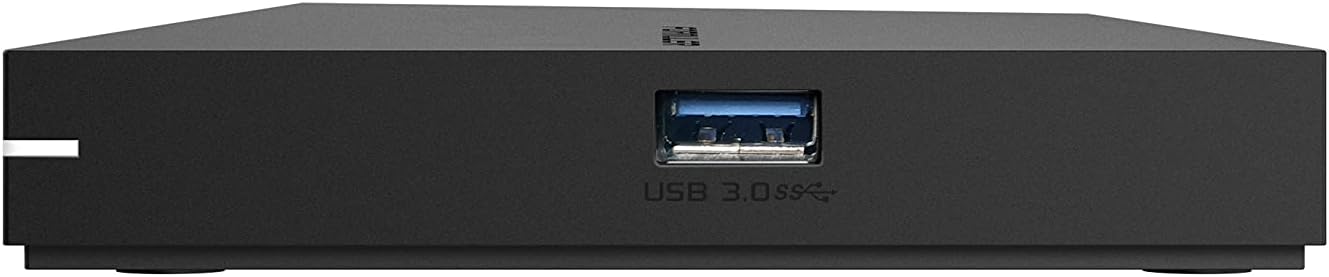
3.3 pav.: šonas view of the Formuler Z11 Pro Max, showing the USB 3.0 port for high-speed data transfer.
3.3 Nuotolinis valdymas

Figure 3.4: Diagram of the Formuler IR1 Premium Learning IR Remote, illustrating the functions of each button for both STB and TV control, including power, volume, channel navigation, menu access, and learning mode.
3.4 Pridedami priedai

Figure 3.5: The included 7-color wireless mini keyboard with a USB receiver, offering enhanced navigation and typing capabilities for the streaming media player.

Figure 3.6: The included magnetic car mount, designed for securing compatible devices in a vehicle.
4. Sąrankos instrukcijos
Follow these steps to set up your Formuler Z11 Pro Max.

Figure 4.1: Visual guide for the initial installation steps of the Formuler Z11 Pro Max.
- Prijungimas prie televizoriaus: Connect one end of the HDMI cable to the HDMI port on your Formuler Z11 Pro Max and the other end to an available HDMI input on your television.
- Prijunkite maitinimą: Plug the power cable into the 'Power Input' port on the Formuler Z11 Pro Max, then connect the other end to a power outlet.
- Power On TV and Select Input: Turn on your television and use its remote control to select the correct HDMI input source that corresponds to where you connected the Formuler Z11 Pro Max.
- Tinklo prisijungimas:
- Laidinis tinklas: For a wired connection, connect an Ethernet cable from your router or modem to the 'Gigabit LAN' port on the Formuler Z11 Pro Max.
- Bevielis tinklas: For a wireless connection, the device will prompt you to select your Wi-Fi network and enter the password during the initial setup process.
- Pradiniai nustatymai: Follow the on-screen instructions to complete the initial setup, which typically includes language selection, Google account login, and network configuration.
5. Naudojimo instrukcijos
This section provides general guidance on operating your Formuler Z11 Pro Max.
5.1 Nuotolinio valdymo pulto naudojimas
The included remote control allows you to navigate the user interface and control playback. Refer to Figure 3.4 for a detailed button layout and their functions. The remote also features a learning mode to control basic TV functions.
5.2 „Android TV“ sąsajos naršymas
The Formuler Z11 Pro Max runs on Android 11, providing a user-friendly interface. Use the directional pad and 'OK' button on your remote to navigate through menus, select applications, and confirm actions. The 'Back' button returns to the previous screen, and the 'Home' button takes you to the main Android TV home screen.
5.3 Programų diegimas
You can download and install various applications from the Google Play Store directly on your device. Ensure you are logged in with a Google account to access the store.
5.4 Medijos atkūrimas
The device supports 4K resolution and various media formats. You can play content from installed streaming apps, local storage (via USB or Micro SD card), or network shares.
6. Priežiūra
Tinkama priežiūra užtikrina jūsų įrenginio ilgaamžiškumą ir optimalų veikimą.
- Valymas: Įrenginio išorę valykite minkšta, sausa šluoste. Venkite naudoti skystus valiklius ar abrazyvines medžiagas.
- Vėdinimas: Įsitikinkite, kad prietaisas yra gerai vėdinamoje vietoje, kad neperkaistų. Neužblokuokite ventiliacijos angų.
- Programinės įrangos atnaujinimai: Periodically check for and install software updates to ensure you have the latest features and security enhancements. These can usually be found in the device's settings menu.
- Maitinimo ciklas: If the device becomes unresponsive, disconnect the power cable, wait 10 seconds, and then reconnect it to perform a power cycle.
7. Problemų sprendimas
Šiame skyriuje aptariamos dažniausiai pasitaikančios problemos, su kuriomis galite susidurti.
7.1 Nėra galios
- Įsitikinkite, kad maitinimo laidas yra tvirtai prijungtas tiek prie įrenginio, tiek prie veikiančio maitinimo lizdo.
- Patikrinkite, ar maitinimo lizdas veikia, prijungdami prie jo kitą įrenginį.
7.2 No Picture/Signal on TV
- Check that the HDMI cable is firmly connected to both the Formuler Z11 Pro Max and your TV.
- Įsitikinkite, kad jūsų televizorius nustatytas į tinkamą HDMI įvesties šaltinį.
- Išbandykite kitą HDMI kabelį arba kitą televizoriaus HDMI prievadą.
7.3 Tinklo ryšio problemos
- Laidinis: Ensure the Ethernet cable is properly connected to the device and your router. Check your router's status.
- Belaidis ryšys: Go to Settings > Network & Internet to verify your Wi-Fi connection. Ensure the Wi-Fi password is correct. Restart your router and the Formuler Z11 Pro Max.
7.4 Nuotolinio valdymo pultas nereaguoja
- Pakeiskite nuotolinio valdymo pulto baterijas.
- Įsitikinkite, kad tarp nuotolinio valdymo pulto ir įrenginio IR imtuvo nėra jokių kliūčių.
- If using the IR Extension cable, ensure it is properly connected and positioned.
8. Specifikacijos
Detailed technical specifications for the Formuler Z11 Pro Max.
| Funkcija | Specifikacija |
|---|---|
| Išvesties raiška | 4K (3840 x 2160) |
| RAM | 4GB DDR @2400MHz |
| Sandėliavimas | 32 GB eMMC |
| Operacinė sistema | Android 11 |
| Belaidis ryšys | AX 2x2 |
| Bluetooth | 5.0 |
| Ethernet | 1000M (gigabitas) |
| Matmenys (I x P x A) | 105 mm x 105 mm x 21 mm (4.13 x 4.13 x 0.83 colio) |
| Svoris | 1.83 svaro |
| Uostai | 1x Power Input, 1x USB 3.0, 1x USB 2.0, 1x HDMI, 1x Gigabit LAN, 1x Micro SD Card, 1x IR Extension |
| Spalva | Juoda |
| Gamintojas | Formuler Z11 Pro Max |
9. Garantija ir palaikymas
For warranty information and technical support, please refer to the documentation provided with your purchase or visit the official Formuler websvetainė. Pagalbos ištekliai paprastai apima DUK, trikčių šalinimo vadovus ir klientų aptarnavimo kontaktinę informaciją.


