1. Įvadas
Thank you for choosing the HW HAOWORKS M801 Voice Amplifier. This portable PA system is designed to provide clear, powerful sound amplification for various settings, including classrooms, conference halls, outdoor events, and more. Its robust design and advanced features ensure reliable performance and ease of use.

Figure 1: HW HAOWORKS M801 Voice Amplifier and Headset Microphone
2. Pakuotės turinys
Pažymėkite langelį prie šių elementų:
- 1 x Balsas Ampgarsesnis garsiakalbis
- 1 x Wireless Microphone Headset
- 1 x Adjustable Waistband
- 1 x 3.5 mm garso kabelis
- 1x pakrovėjas
- 1x USB įkrovimo laidas
- 1 x Vartotojo vadovas

Figure 2: All items included in the M801 package
3. Sąrankos vadovas
3.1 Automatinis prisijungimas
- Turn on the Voice Amppakėlimo garsiakalbis.
- Turn on the Wireless Microphone Headset.
- The microphone and speaker will automatically connect within a few seconds. The 'MIC' indicator on the speaker's display will light up when connected successfully.
3.2 Manual Connection (if automatic fails)
- Įsitikinkite, kad įjungti ir garsiakalbis, ir mikrofonas.
- Double-click the power button on the Wireless Microphone Headset. The indicator light will start blinking continuously.
- Click the power button on the microphone again. The indicator light will stop blinking, signifying a successful connection. The 'MIC' indicator on the speaker's display will also light up.
Video 1: How to connect the M801 wireless microphone. This video demonstrates the automatic and manual connection process between the amplifier and headset.

Figure 3: Visual guide for connection troubleshooting.
4. Naudojimo instrukcijos
4.1 Pagrindiniai valdikliai
The M801 features intuitive controls located on the top and sides of the unit.
- Maitinimo įjungimas/išjungimas: Use the main power switch/button to turn the unit on or off.
- Garso reguliavimas: Use the volume buttons/dial to increase or decrease the amplification level. The display shows the current volume level.
- Nutildyti: Press the mute button to temporarily silence the microphone output.
- Režimo mygtukas (M): Double-click to switch between Acoustic, Professional, and Karaoke modes for different sound effects.
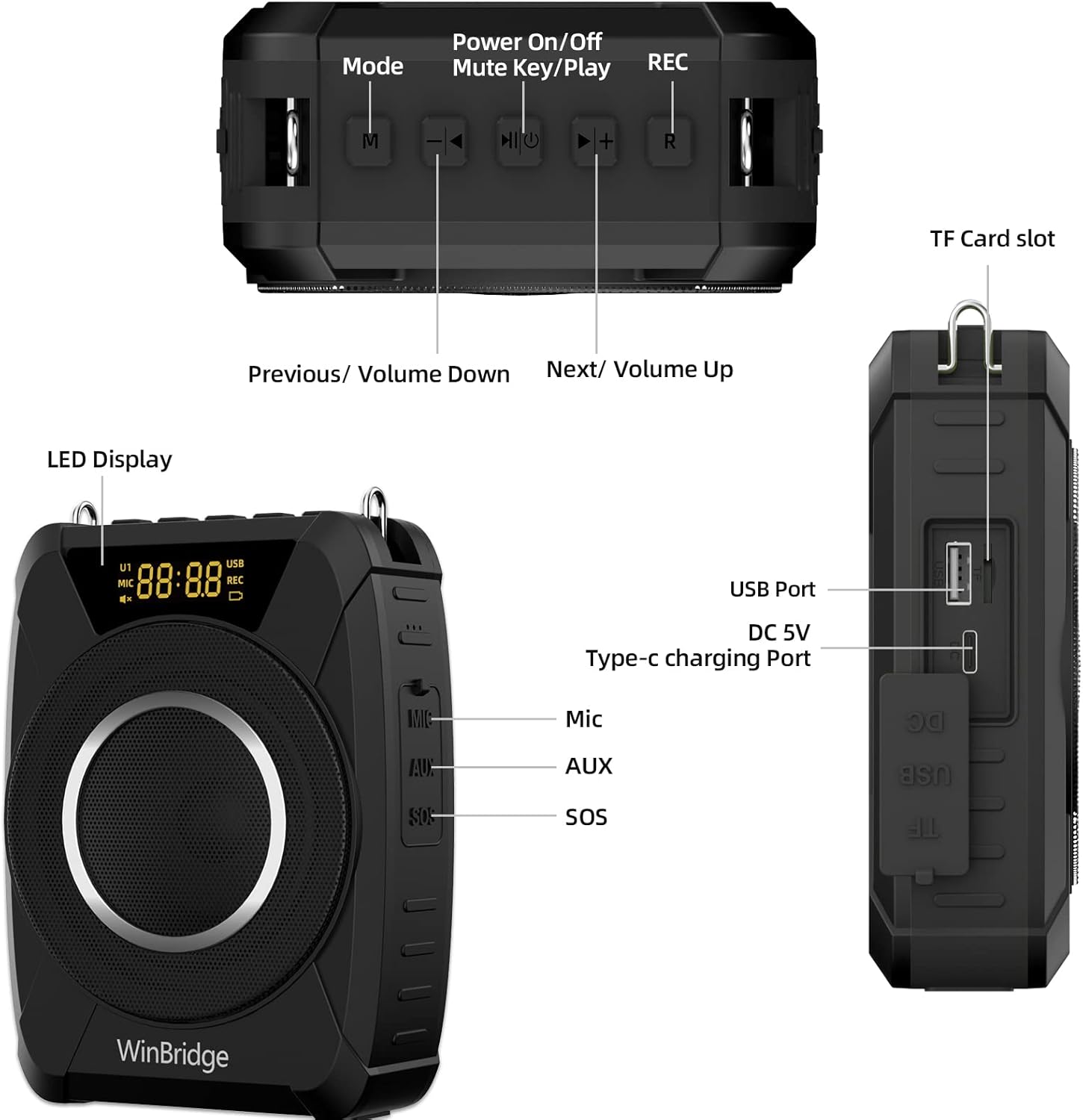
4 pav. Baigtaview of the M801 controls and input/output ports.
4.2 Audio Playback & Recording
- TF kortelės / USB atkūrimas: Insert a TF card or USB drive into the respective ports to play audio files. Use the previous/next track buttons to navigate.
- AUX įvestis: Connect external audio devices (e.g., smartphone, laptop) via the 3.5mm AUX cable.
- Įrašas: Press the 'R' button to start/stop recording. Recordings are saved to the inserted TF card or USB drive.
4.3 SOS Siren
The M801 includes an SOS siren function for emergency situations. Locate the SOS button on the side of the unit and press it to activate the alarm.
5. Pagrindinės savybės
- Powerful 20W Sound: Delivers crystal-clear audio covering up to 13,000 sq ft, suitable for rooms up to 100 people.
- UHF Wireless Connectivity: Ensures a stable and reliable connection between the microphone and ampgyvesnis.
- Kompaktiškas ir lengvas: Weighs just 0.88 lbs (0.4 kg) with dimensions of 3.94" x 1.77" x 5.51", making it highly portable.
- IPX5 atsparumas vandeniui ir patvarumas: Built with a durable silicone casing, offering protection against water splashes, dust, and drops, ideal for outdoor use.
- Ilgai veikianti baterija: Wireless microphone headset provides up to 7 hours of continuous use (1-hour charge). The amplifier offers up to 15 hours of runtime (3-hour charge).
- "Bluetooth 5.0": For fast and stable wireless pairing with devices.
- TWS funkcija: Pair two M801 units for 40W stereo sound, perfect for larger events.
Video 2: M801 20W Multifunction Waterproof Wireless Voice Amplifier. This video highlights the key features and capabilities of the M801.

Figure 5: M801's durable and outdoor-ready design.
6. Specifikacijos
| Atributas | Detalė |
|---|---|
| Prekės ženklas | HW HAOWORKS |
| Modelio numeris | M801 |
| Išėjimo vattage | 20 vatų |
| Prekės svoris | 1.48 svaro (0.67 kg) |
| Gaminio matmenys | 3.94 x 1.77 x 5.51 colio |
| Medžiaga | Silikonas, plastikas |
| Maitinimo šaltinis | Maitinamas baterijomis |
| Ryšio technologija | Wireless (UHF, Bluetooth 5.0) |
| Dažnio atsakas | 20 KHz |
| Varža | 4 omų |
| Triukšmo lygis | 20 dB |
| Baterijos | 2 ličio polimero baterija (pridedama) |
7. Priežiūra
- Valymas: Naudokite minkštą, sausą šluostę, kad nuvalytumėte paviršių amplifier and microphone. Do not use harsh chemicals or abrasive materials.
- Saugykla: Įrenginį laikykite vėsioje, sausoje vietoje, apsaugotoje nuo tiesioginių saulės spindulių ir ekstremalių temperatūrų.
- Akumuliatoriaus priežiūra: For optimal battery life, fully charge the unit before first use and recharge it regularly, even if not in frequent use. Avoid completely draining the battery.
- Uosto apsauga: Ensure all port covers are securely closed when not in use to protect against dust and water.
8. Problemų sprendimas
- Nėra garso:
- Užtikrinkite, kad abu amplifier and microphone are powered on and fully charged.
- Check if the microphone is correctly connected to the amplifier (MIC indicator on display). Refer to Section 3.
- Padidinkite abiejų įrenginių garsumą amplifier and the connected device (if using AUX/Bluetooth).
- Įsitikinkite, kad mikrofonas nėra nutildytas.
- Statinis/triukšmas:
- Pasitraukite nuo kitų elektroninių prietaisų, kurie gali sukelti trikdžius.
- Ensure the microphone is not too close to the speaker, which can cause feedback.
- Patikrinkite, ar nėra laisvų jungčių.
- Ryšio problemos:
- If automatic connection fails, try the manual connection steps (Section 3.2).
- Ensure both devices are within the effective wireless range (up to 50 feet).
- Trumpas baterijos veikimo laikas:
- Prieš naudodami įsitikinkite, kad įrenginys visiškai įkrautas.
- Sumažinkite garsumo lygius, nes didesnis garsumas eikvoja daugiau energijos.
9. Garantija ir palaikymas
The HW HAOWORKS M801 Voice Amplifier comes with a one-year warranty, ensuring your purchase is protected. HW HAOWORKS is a technology-based enterprise integrating product development, production, and sales, committed to providing quality products and services.
For any issues, questions, or support needs, please feel free to contact our dedicated customer support team. Your satisfaction is our consistent aim.
Apsaugos planai: Additional protection plans are available for purchase to extend coverage beyond the standard warranty period:
- 2 metų apsaugos planas
- 3 metų apsaugos planas
- Visapusiška apsauga: vienas planas apima visus ankstesnius ir būsimus pirkinius, kurie atitinka reikalavimus.


