Įvadas
Thank you for choosing the Ledwood Apollo S TWS Earphones. This manual provides detailed instructions on how to set up, operate, maintain, and troubleshoot your new wireless earbuds. Please read this manual carefully before use to ensure optimal performance and longevity of your device.
Pakuotės turinys
- Ledwood Apollo S TWS Earphones (Left and Right)
- Belaidžio įkrovimo dėklas
- USB įkrovimo laidas
- Vartotojo vadovas
Produktas baigtasview
The Ledwood Apollo S TWS Earphones feature a sleek design and provide a seamless wireless audio experience. The compact charging case not only protects your earbuds but also provides additional battery life on the go. The case includes a digital screen to display the current battery level.
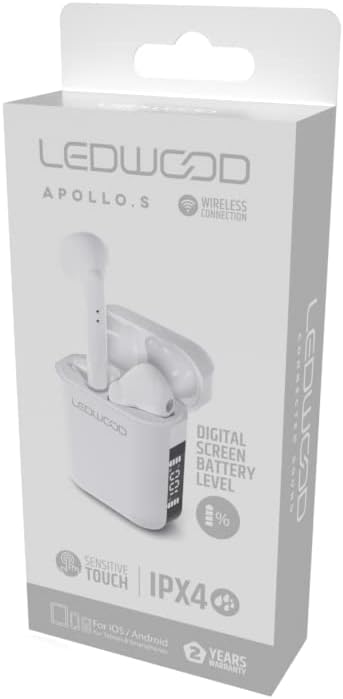
Image showing the Ledwood Apollo S TWS Earphones inside their charging case, highlighting the compact design and in-ear style.
Sąranka
1. Ausinių ir dėklo įkrovimas
- Place both earphones into the charging case. Ensure they are properly seated.
- Prijunkite USB įkrovimo laidą prie dėklo įkrovimo prievado, o kitą galą – prie USB maitinimo adapterio (nepridedamas) arba kompiuterio USB prievado.
- The digital screen on the charging case will display the current battery level during charging.
- Allow the earphones and case to fully charge before first use. The earphones will indicate full charge (e.g., LED indicator changes color or turns off).
2. Susiejimas su jūsų įrenginiu
- Įsitikinkite, kad ausinės yra įkrautos ir įdėtos į įkrovimo dėklą.
- Open the charging case. The earphones will automatically enter pairing mode (indicated by flashing LED lights on the earbuds).
- Išmaniajame telefone arba „Bluetooth“ įrenginyje eikite į „Bluetooth“ nustatymus.
- Ieškokite available devices and select "Ledwood Apollo S" from the list.
- Once connected, the earphones will provide an audio confirmation, and the LED indicators will stop flashing.
- If pairing fails, turn off Bluetooth on your device, place the earphones back in the case, close the case, then repeat the steps.
Naudojimo instrukcijos
The Ledwood Apollo S earphones feature sensitive touch controls for easy management of calls and music playback.
Palieskite valdiklius
- Leisti / pristabdyti: Vieną kartą bakstelėkite bet kurią ausinę.
- Kitas takelis: Dukart palieskite dešinįjį ausinės antgalį.
- Ankstesnis takelis: Dukart palieskite kairįjį ausinės antgalį.
- Atsiliepti / Baigti skambutį: Vieną kartą bakstelėkite bet kurią ausinę įeinančio arba aktyvaus skambučio metu.
- Atmesti skambutį: Įeinančio skambučio metu paspauskite ir 2 sekundes palaikykite nuspaudę bet kurią ausinę.
- Suaktyvinti „Voice Assistant“: Tris kartus palieskite bet kurią ausinę.
- Pagarsink: Paspauskite ir palaikykite dešinįjį ausinės antgalį.
- Patildyti: Paspauskite ir palaikykite kairįjį ausinės antgalį.
Priežiūra
Valymas
- Reguliariai valykite ausines ir įkrovimo dėklą minkštu, sausu, nepūkuotu skudurėliu.
- Nenaudokite abrazyvinių valiklių, alkoholio ar cheminių tirpiklių.
- Kad įkrovimas būtų tinkamas, įsitikinkite, kad ausinių ir dėklo įkrovimo kontaktai yra švarūs ir be nešvarumų.
Sandėliavimas
- Kai nenaudojate, laikykite ausines įkrovimo dėkle, kad jos būtų apsaugotos ir įkrautos.
- Laikykite prietaisą vėsioje, sausoje vietoje, toliau nuo ekstremalių temperatūrų ir tiesioginių saulės spindulių.
Trikčių šalinimas
- Ausinės nesusijungia: Ensure both earphones are charged. Place them back in the case, close it, then reopen to re-enter pairing mode. Check your device's Bluetooth settings.
- Nėra garso iš vienos ausinės: Try resetting the earphones by placing them in the case, closing it, and then taking them out again. Re-pair with your device.
- Įkrovimo problemos: Clean the charging contacts on both the earphones and the case. Ensure the charging cable is securely connected and the power source is functional.
- Mažas garsumas: Garsumą reguliuokite tiek prijungtame įrenginyje, tiek naudodami ausinių jutiklinius valdiklius.
Specifikacijos
| Modelio pavadinimas | Apollo S |
| Modelio numeris | LD-APOLLO-S-BLK |
| Ryšio technologija | Belaidis ryšys („Bluetooth“) |
| Kontrolės metodas | Lietimas, garsumo valdymas |
| Stilius | Į ausį |
| Atsparumo vandeniui lygis | IPX4 (atsparus vandens purslams) |
| Ypatingos savybės | Fast Charging, Digital Screen Battery Level |
| Medžiaga | Mediena |
| Gamintojas | Ledwood |
Garantija ir palaikymas
The Ledwood Apollo S TWS Earphones come with a 2 metų garantija nuo pirkimo datos, apimanti gamybos defektus. Prašome išsaugoti pirkimo įrodymą garantiniams reikalavimams.
For technical support, troubleshooting assistance, or warranty inquiries, please contact Ledwood customer service through their official websvetainę arba mažmenininką, iš kurio buvo pirktas produktas.
For more information, visit the official Ledwood websvetainė: www.ledwood.com (Pastaba: tai yra vietos rezervavimo ženklas URL nes nebuvo pateikta jokia konkreti palaikymo nuoroda).


