Įvadas
This manual provides essential information for the safe and proper installation, operation, and maintenance of your Leviton LP220-BPD 20 Space, 20 Circuit Indoor Load Center with a 200 Amp Main Circuit Breaker. Please read all instructions carefully before beginning any work. This load center is designed for indoor use and is NEMA 1 rated. The enclosure and interior are included; the door is sold separately.
Saugos informacija
ĮSPĖJIMAS: Risk of electric shock or electrocution. Installation and servicing of this electrical equipment must be performed by a qualified electrician in accordance with all national and local electrical codes. Always turn off power at the main service disconnect before working on the load center. Use appropriate personal protective equipment (PPE).
- Prieš montuodami ar atlikdami techninę priežiūrą, įsitikinkite, kad visa elektros energija yra atjungta.
- Nemontuokite šlapiose arba damp vietose, nebent jos būtų specialiai skirtos tokioms aplinkoms.
- Verify proper grounding and bonding.
- Use only Leviton circuit breakers with this load center.
- Keep the load center door closed and secured after installation.
Produktas baigtasview
The Leviton LP220-BPD Load Center offers a modern, efficient solution for residential electrical distribution. Key features include:
- Lengvas laidų sujungimas: Designed for rough-in wiring without circuit breakers installed, simplifying the process.
- Puikus laidumas: Equipped with tin-plated copper bussing for optimal electrical performance.
- Sutvarkytas išdėstymas: Stamped notches for cable ties ensure secure and neat wiring management.
- Modernus dizainas: Features a white, powder-coated finish for a clean aesthetic.
- Modulinis dizainas: Allows for in-field main breaker customization and future upgrades.
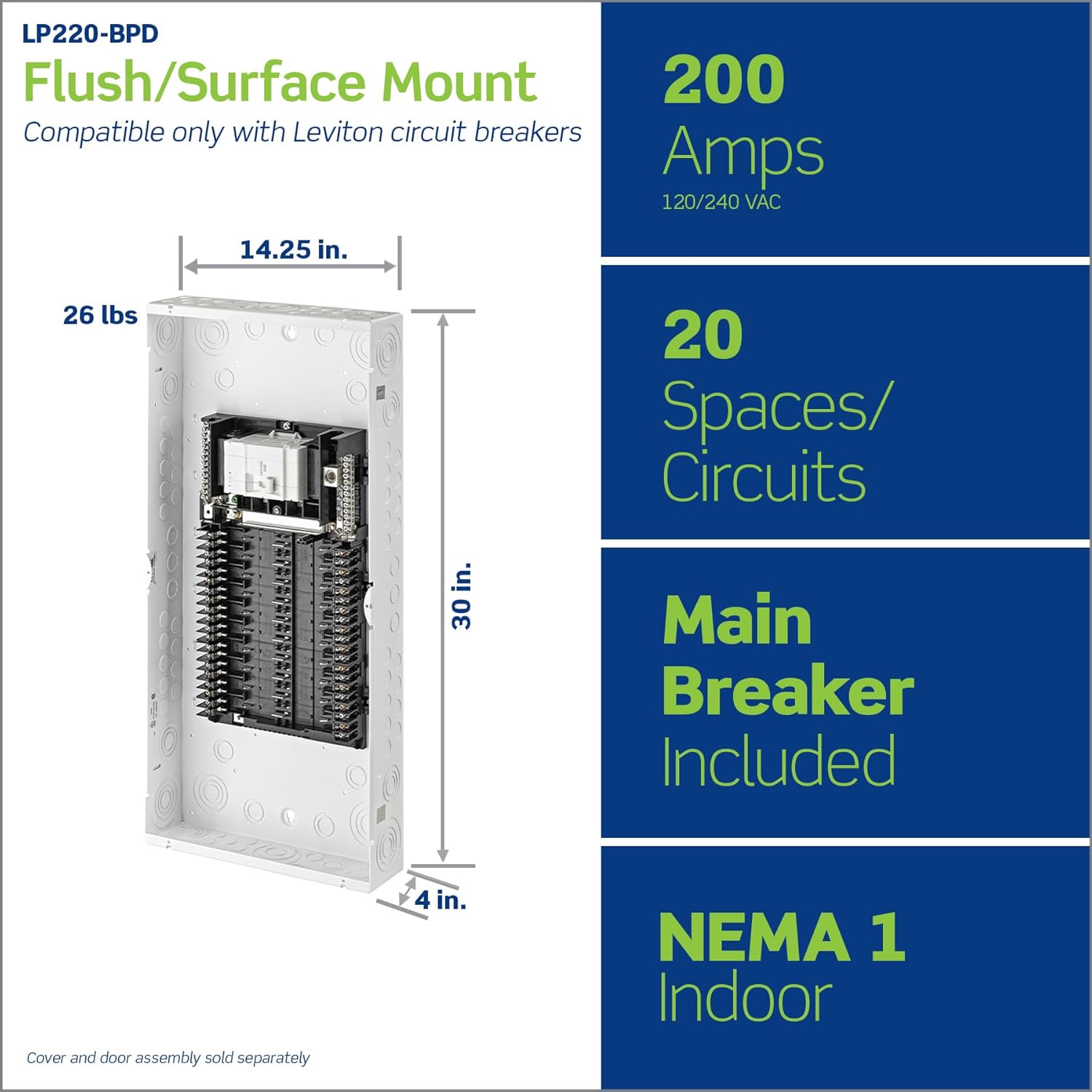
Image 1: Leviton LP220-BPD Load Center showing overall dimensions (14.25"L x 4"W x 30"H) and key specifications like 200 Amps, 20 Spaces/Circuits, Main Breaker Included, and NEMA 1 Indoor rating.

2 pav.: Vidinis view of the load center highlighting features such as notches for cable ties, white powder-coated finish, included main breaker, custom lugs for hot and neutral wires, tin-plated copper bussing, and invertibility for bottom feed applications.
Sąranka ir diegimas
Installation should only be performed by a qualified electrician. Follow all applicable electrical codes.
1. Mounting the Load Center
- Choose a suitable indoor location for flush or surface mounting, ensuring adequate clearance around the panel.
- Securely mount the load center enclosure to the wall studs or appropriate structural support.
2. Wiring at Rough-in
- With no circuit breakers present, neatly land all branch phase and neutral wires directly onto the panel's custom lugs.
- Utilize the stamped notches for cable ties to organize and secure wiring within the enclosure.
- Ensure all connections are tight and conform to torque specifications.
3. Installing Circuit Breakers
Leviton's plug-on design allows for quick and easy installation of circuit breakers.
- Align the Leviton circuit breaker with the desired space on the bussing.
- Firmly snap the breaker into place. No additional wiring is required for the breaker itself.
- Repeat for all necessary circuit breakers.

Image 3: A hand demonstrating the plug-on installation of a Leviton circuit breaker into the load center, emphasizing the ease and speed of installation.
4. Main Breaker Customization
The modular panel design and 225 Amp rated bussing allow for in-field main breaker customization, providing flexibility for future upgrades.
Video 1: Official Leviton Load Center Video. This video demonstrates the key features and installation benefits of the Leviton Load Center, including the easy wiring at rough-in, plug-on circuit breakers, and modular design for future upgrades.
Operating the Load Center
Once installed, the load center operates like a standard electrical panel. Circuit breakers protect individual circuits from overcurrents and short circuits.
Resetting a Tripped Circuit Breaker
- Locate the tripped breaker, which will typically be in an intermediate position between 'ON' and 'OFF'.
- Firmly push the breaker handle to the full 'OFF' position.
- Then, push the handle to the full 'ON' position to restore power.
- If the breaker immediately trips again, there may be a persistent fault. Do not attempt to reset it repeatedly. Consult a qualified electrician.
Priežiūra
The Leviton Load Center requires minimal maintenance. Regular inspections by a qualified electrician are recommended.
- Kasmetinė apžiūra: Have a qualified electrician inspect the load center annually for loose connections, signs of overheating, or damaged components.
- Valymas: Keep the area around the load center clear and free of obstructions. Clean the exterior with a dry cloth; do not use liquids or abrasive cleaners.
- Durys: If a door is installed (sold separately), ensure it closes securely to protect internal components.

Image 4: Illustration of two types of doors for the Leviton Load Center: a standard solid door (LDC20) and a windowed door (LDC20-W), both sold separately.
Trikčių šalinimas
For persistent electrical issues, always consult a qualified electrician.
| Problema | Galima priežastis | Sprendimas |
|---|---|---|
| Dažnai išsijungia grandinės pertraukiklis | Perkrauta grandinė, trumpasis jungimas, įžeminimas arba sugedęs prietaisas. | Reduce load on the circuit. Unplug appliances. If problem persists, consult an electrician. |
| No power to a circuit | Tripped circuit breaker, loose connection, or power outage. | Check and reset the circuit breaker. Verify main power supply. If issue continues, contact an electrician. |
| Load center feels warm | Normal operation under load, or potentially loose connections/overload. | A slight warmth is normal. If excessively hot or accompanied by burning smell, immediately turn off main power and call an electrician. |
Specifikacijos
| Atributas | Detalė |
|---|---|
| Prekės ženklas | Levitonas |
| Modelio numeris | LP220-BPD |
| Gaminio matmenys | 14.25 colio ilgio x 4 colių pločio x 30 colio aukščio |
| Kintamosios srovės adapterio srovė | 200 Amps |
| Medžiaga | Varis |
| Grandinių skaičius | 20 |
| Fazės tipas | Vienfazė |
| Prekės svoris | 22.7 svaro |
| UPC | 078477996188 |
Smart Home Integration (Optional)
The Leviton Load Center is compatible with optional smart upgrades, allowing for enhanced energy management and control. This includes the ability to install Leviton Whole Home Energy Monitors and 2nd Gen Smart Circuit Breakers, which can be enrolled in the My Leviton App.
- Electrical Anomaly Notifications: Receive alerts for unusual electrical activity.
- Remote Breaker Control: Manage circuits remotely via the My Leviton App.
- Energijos stebėjimas realiuoju laiku: Track energy consumption for individual circuits or the entire home.

Image 5: A diagram illustrating the three steps for smart home integration: 1) Install the Leviton Whole Home Energy Monitor, 2) Snap in 2nd Gen Smart Circuit Breakers, and 3) Enroll Breakers in the My Leviton App.
Garantija ir palaikymas
For specific warranty details and customer support, please refer to the official Leviton website or contact Leviton customer service directly. Keep your purchase receipt for warranty claims.
Leviton offers various protection plans for their products. For more information on available protection plans, please visit the Leviton websvetainėje arba kreipkitės į savo pardavėją.


