1. Įvadas
This manual provides essential information for the safe and efficient operation of your KLIM K9000 Portable Air Conditioner. Please read it thoroughly before use and retain it for future reference. The KLIM K9000 is a versatile 3-in-1 unit offering cooling, dehumidification, and fan functions.
2. Saugos instrukcijos
To reduce the risk of fire, electrical shock, or injury, always follow these basic precautions:
- Prieš naudodami prietaisą perskaitykite visas instrukcijas.
- Įsitikinkite, kad maitinimo šaltinis atitinka tūrįtage nurodyta reitingo etiketėje.
- Nenaudokite įrenginio su pažeistu laidu arba kištuku.
- Saugokite prietaisą nuo šilumos šaltinių ir tiesioginių saulės spindulių.
- Neužblokuokite oro įleidimo ir išleidimo angų.
- Prieš valydami arba atlikdami techninę priežiūrą, visada ištraukite įrenginį iš elektros tinklo.
- Šis prietaisas nėra skirtas naudoti asmenims (įskaitant vaikus), kurių fizinės, jutimo ar psichikos negalios arba neturintys patirties ir žinių, nebent už jų saugumą atsakingas asmuo juos prižiūrėtų arba instruktuotų, kaip naudoti prietaisą.
- Nenaudokite prietaiso drėgnoje aplinkoje arba šalia vandens.
- Naudokite tik gamintojo rekomenduojamus priedus.
3. Pakuotės turinys
Patikrinkite, ar pakuotėje yra visi reikalingi daiktai:
- KLIM K9000 Air Conditioner Unit
- Nuotolinio valdymo pultas
- Išmetimo žarna
- Išmetimo anga
- Išmetimo žarnos jungtis
- Drenažo žarna
- Window Seal Fixing Plate
- Window Cover Extension
- 2 AAA Alkaline Batteries (for remote control, if included)
4. Produktas baigtasview
The KLIM K9000 is a compact and efficient portable air conditioner designed to provide comfort in various environments. It integrates three primary functions: cooling, dehumidification, and fan operation.

4.1 paveikslas: KLIM K9000 Portable Air Conditioner unit with remote control, illustrating air circulation.
Its 3-in-1 functionality allows it to cool rooms, circulate air as a fan, and reduce humidity levels, making it suitable for various climate control needs.

4.2 paveikslas: The KLIM K9000 offers 3-in-1 comfort: cooling, dehumidifying, and fan functions, with a 9000 BTU cooling capacity.
5. Sąranka ir diegimas
Proper installation is crucial for optimal performance. Follow these steps for quick setup:
- Padėties nustatymas: Place the unit on a flat, stable surface, ensuring at least 30 cm (12 inches) of space around it for proper airflow.
- Pritvirtinkite išmetimo žarną: Connect the exhaust hose to the unit's exhaust port. Extend the hose and connect the window seal fixing plate or window cover extension.
- Lango montavimas: Secure the window seal fixing plate or extension in a compatible window opening (sliding windows). For tilt windows, a separate seal kit is required and sold separately. Ensure the hot air is expelled outdoors.
- Maitinimo jungtis: Įjunkite maitinimo laidą į įžemintą elektros lizdą.
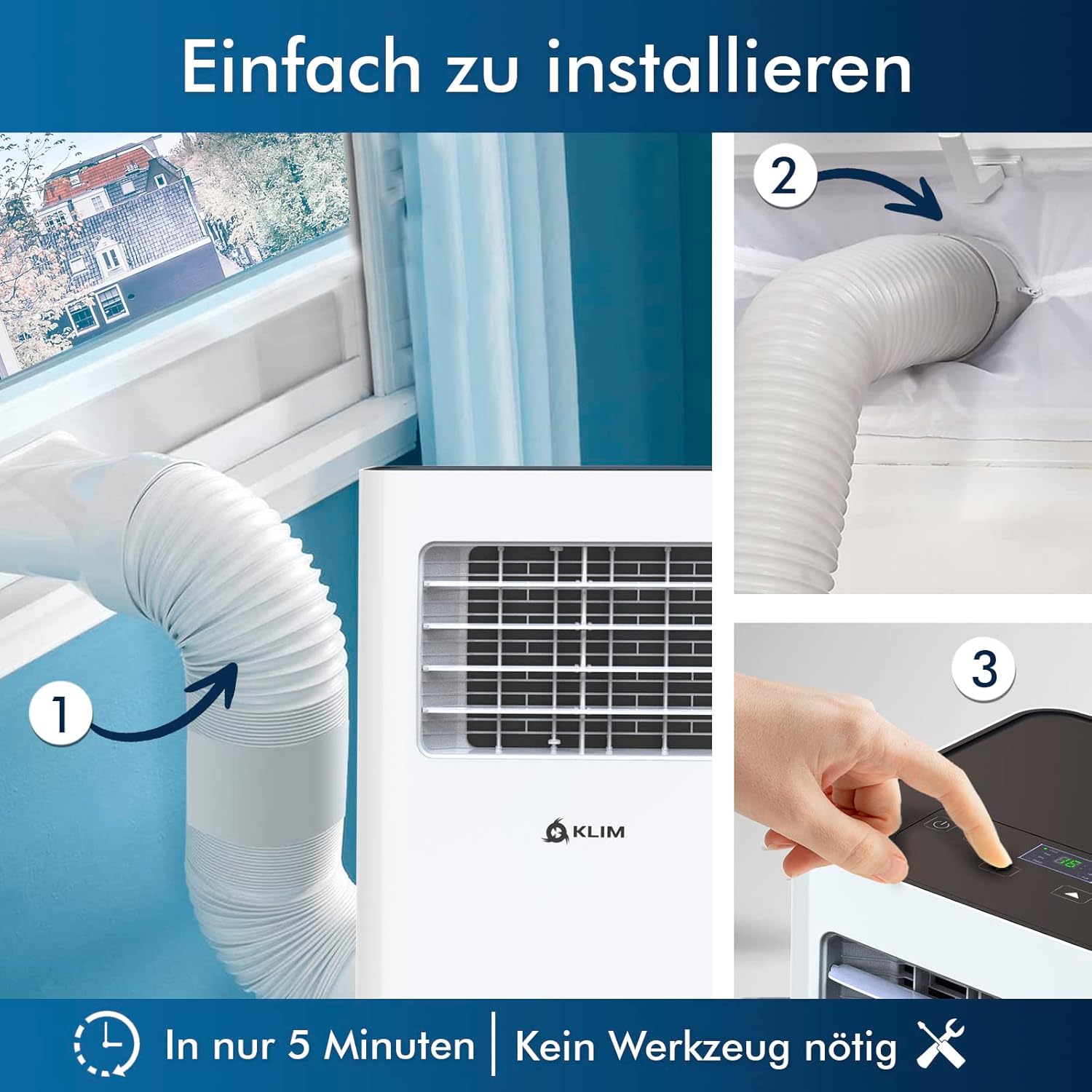
5.1 paveikslas: Visual guide for quick installation, typically completed in 5 minutes without special tools.

5.2 paveikslas: Illustration of window kit compatibility, showing options for sliding windows and mentioning a separate seal for tilt windows.
6. Naudojimo instrukcijos
The KLIM K9000 can be operated via the control panel on the unit or the included remote control.
6.1. Valdymo skydelis ir nuotolinio valdymo pultas
The remote control allows convenient operation from a distance. Ensure AAA batteries are correctly inserted. The control panel on the unit provides direct access to all functions.
6.2. Veikimo režimai
- Aušinimo režimas: Activates the compressor to cool the room. Set your desired temperature (down to 16°C). This mode is effective for rooms up to 20 m² (80 m³).
- Ventiliatoriaus režimas: Circulates air without cooling. Adjustable fan speeds are available.
- Sausintuvo režimas: Removes excess moisture from the air. In this mode, the unit collects water, which will need to be drained.
- Miegojimo rezimas: Designed for quiet operation during rest. The unit operates at a reduced noise level (approx. 65 dB) and may adjust temperature settings automatically for comfort.

6.1 paveikslas: The sleep mode provides a cool and quiet environment for restful sleep, operating at approximately 65 dB.
To switch between modes, press the "Mode" button on the control panel or remote control.
7. Priežiūra
Regular maintenance ensures the longevity and efficiency of your KLIM K9000.
7.1 Oro filtro valymas
Oro filtrą reikia valyti kas dvi savaites arba dažniau, priklausomai nuo naudojimo. Užsiteršęs filtras gali sumažinti aušinimo efektyvumą ir oro srautą.
- Atjunkite oro kondicionierių nuo maitinimo lizdo.
- Suraskite ir nuimkite oro filtrą (paprastai jis yra įrenginio gale arba šone).
- Filtrą nuplaukite šiltu muiluotu vandeniu. Kruopščiai nuskalaukite ir leiskite jam visiškai išdžiūti prieš įdėdami atgal.
- Įstatykite sausą filtrą atgal ir prijunkite įrenginį prie elektros tinklo.
7.2. Vandens nutekėjimas
The unit features an auto-evaporation system in cooling mode, reducing the need for frequent drainage. However, in high humidity or dehumidifier mode, water will accumulate and needs to be drained.
- Nuolatinis drenažas: For continuous dehumidification, attach the drainage hose to the drain outlet and direct it to a suitable container or floor drain.
- Rankinis drenažas: When the internal water tank is full, the unit may stop operating and display an indicator. To drain manually, unplug the unit, place a shallow pan or tray under the drain plug, and remove the plug. Be aware that the internal water container can be cumbersome to empty, and it may require two people to safely tilt the unit for complete drainage if using the bottom drain.
8. Problemų sprendimas
Dažniausiai pasitaikančias problemas ir jų sprendimus rasite šiame skyriuje.
| Problema | Galima priežastis | Sprendimas |
|---|---|---|
| Įrenginys neįsijungia. | Nėra elektros, suveikė automatinis jungiklis, pilnas vandens bakas. | Patikrinkite maitinimo laidą, iš naujo nustatykite jungiklį, išleiskite vandenį iš bako. |
| Nepakankamas aušinimas. | Dirty air filter, blocked air intake/outlet, open windows/doors, room too large, exhaust hose not properly installed. | Clean filter, clear obstructions, close windows/doors, ensure proper exhaust hose installation. |
| Įrenginys triukšmingas. | Normal operation sound (compressor/fan), unit not on a level surface. | The unit operates at approximately 65 dB, which is normal. Ensure it is on a flat surface. |
| Vandens nutekėjimas. | Drain plug not securely closed, drainage hose improperly connected. | Check drain plug, ensure drainage hose is securely attached and not kinked. |
Jei problema išlieka ir išbandžius šiuos sprendimus, susisiekite su klientų aptarnavimo tarnyba.
9. Specifikacijos
| Prekės ženklas | KLIM |
| Modelio numeris | K9000WH |
| Aušinimo talpa | 9000 XNUMX BTU |
| Rekomenduojamas kambario dydis | Iki 20 m² (80 m³) |
| Funkcijos | Aušinimas, Sausintuvas, Ventiliatorius |
| Energijos vartojimo efektyvumo klasė | A |
| Metinis elektros suvartojimas | 960 vatų |
| Triukšmo lygis | 65 decibelų |
| Šaldymo agentas | R-290 (Natural Refrigerant) |
| Matmenys (I x P x A) | 29.5 x 32.5 x 70.4 cm |
| Svoris | 25.58 kg |
| Medžiaga | ABS |
| Maitinimo šaltinis | Elektros kabelis |

9.1 paveikslas: The KLIM K9000's high energy efficiency (Class A) contributes to cost savings and environmental protection.
10. Garantija ir palaikymas
The KLIM K9000 Portable Air Conditioner comes with a 5 metų garantija, užtikrinant ramybę dėl jo kokybės ir našumo.
For technical assistance, warranty claims, or any questions not covered in this manual, please contact KLIM customer support through their official website or the retailer where the product was purchased. Please have your model number (K9000WH) and purchase date ready.


