Įvadas
Thank you for choosing the Oilsky M7 Bluetooth 5.0 MP3 Player. This device is designed with children in mind, offering a simple and intuitive way to enjoy music, audiobooks, and other functions. It features a durable design, long battery life, and a built-in speaker for versatile listening. Please read this manual carefully to ensure proper use and maintenance of your device.
Produktas baigtasview & Pagrindiniai bruožai
The Oilsky M7 MP3 Player combines ease of use with a range of features:
- Vaikams pritaikytas dizainas: Cute design with a dedicated music button for instant playback.
- Ilgai veikianti baterija: Integrated 750mAh rechargeable battery provides extended playback times: approximately 90 hours with wired headphones, 39 hours via Bluetooth, 27 hours with the built-in speaker, and 23 hours for FM radio.
- Ample saugykla: 32GB internal memory, expandable up to 128GB with a TF card (not included).
- Bluetooth 5.0 ryšys: Connects wirelessly to Bluetooth headphones or speakers. Note: Does not support Bluetooth data transfer to mobile phones or computers.
- HiFi Lossless Audio: Professional audio decoding chip delivers high-fidelity, lossless sound.
- Built-in HD Speaker: Enjoy music without headphones.
- Nešiojamas ir lengvas: Weighs only 53 grams, making it easy to carry.
- Daugiafunkcinis: Includes FM radio, voice recorder, alarm clock, stopwatch, and pedometer.

Image: Oilsky M7 MP3 Player highlighting the one-button play feature for easy music access.

Image: Oilsky M7 MP3 Player with children enjoying music, illustrating HiFi lossless sound quality and 32GB storage capacity.
Kas yra dėžutėje
Your Oilsky M7 MP3 Player package includes the following items:
- 1 x Oilsky M7 MP3 Player for Kids
- 1 x USB-C laidas
- 1x laidinės ausinės
- 1 x dirželis
- 1 x Vartotojo vadovas

Image: A visual representation of all items included in the Oilsky M7 MP3 Player package.
Sąranka
1. Įrenginio įkrovimas
Before first use, fully charge the MP3 player. Connect the provided USB-C cable to the device's charging port and the other end to a USB power adapter (not included) or a computer's USB port.

Image: The Oilsky M7 MP3 Player highlighting its 750mAh battery capacity.
2. „Micro SD“ kortelės įdėjimas (neprivaloma)
If you wish to expand the storage, gently insert a Micro SD card (up to 128GB) into the designated slot until it clicks into place. Ensure the card is inserted in the correct orientation.

Image: Demonstrating the insertion of a Micro SD card into the MP3 player.
3. Muzikos perkėlimas Files
Connect the MP3 player to your computer using the USB-C cable. The device will appear as a removable disk. Drag and drop your desired audio files (MP3, WMA, WAV, FLAC, APE) into the player's storage or the Micro SD card folder.

Image: Visual representation of the audio formats supported by the Oilsky M7 MP3 Player.
4. Įjungimas/išjungimas
Press and hold the power button (usually located on the side) for a few seconds to turn the device on or off.
5. Screen Lock/Unlock
To prevent accidental presses, you can lock the screen. Press and hold the menu button for 3 seconds to activate the protection lock. When the lock icon appears, press and hold the menu button again for 3 seconds to unlock the device.

Image: Visual guide on how to lock and unlock the screen of the MP3 player.
Naudojimo instrukcijos
1. Pagrindinė navigacija
Use the directional buttons (up, down, left, right) to navigate through menus and options. The center button typically acts as 'select' or 'confirm'. The 'back' or 'return' button allows you to go to the previous screen.
2. Muzikos atkūrimas
From any interface, pressing the dedicated music button will directly take you to the music playback screen. The player will resume the last played song. Use the play/pause, next/previous, and volume buttons to control playback.
3. „Bluetooth“ ryšys
To connect to Bluetooth headphones or a speaker:
- Go to the Bluetooth menu on your MP3 player.
- Ensure your Bluetooth headphones/speaker are in pairing mode.
- Pasirinkite „Ieškokite devices' on the MP3 player.
- Choose your device from the list to pair.
Important: The Oilsky M7 MP3 Player's Bluetooth function is for audio output only and cannot transfer data to mobile phones or computers.

Image: The Oilsky M7 MP3 Player demonstrating Bluetooth 5.0 connectivity with headphones and a speaker.
4. FM radijas
To use the FM radio, connect the wired headphones as they act as the antenna. Navigate to the FM Radio application, then you can scan for stations and save your favorites.
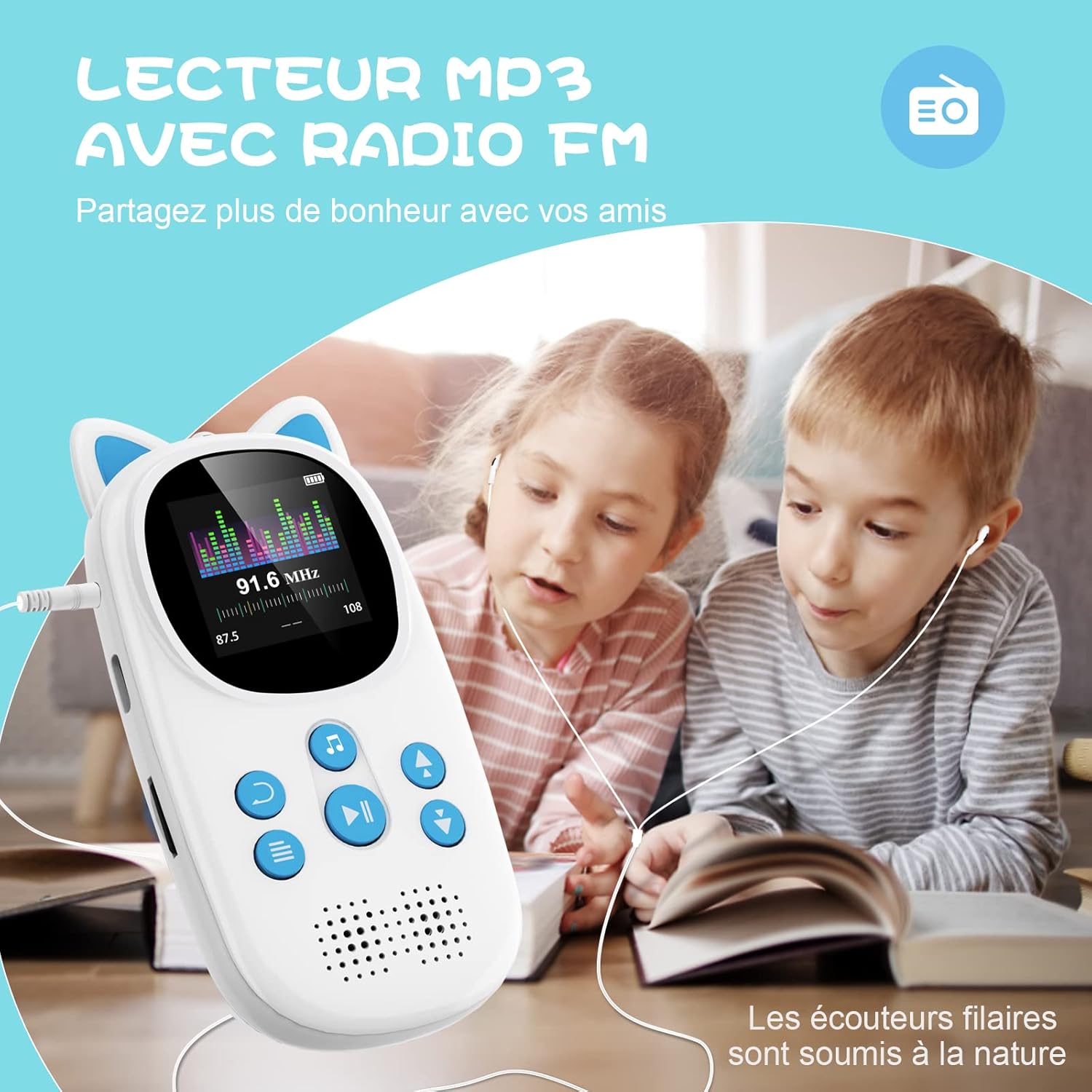
Image: Children listening to FM radio on the Oilsky M7 MP3 Player using wired headphones.
5. Diktofonas
Access the Voice Recorder function to record audio. This can be useful for capturing notes or creating personalized audio messages.

Image: The Oilsky M7 MP3 Player displaying its voice recorder feature, with children listening to a story.
6. Kitos funkcijos
The Oilsky M7 also includes:
- Žadintuvas: Nustatykite žadintuvus priminimams.
- Chronometras: Laiko matavimo veiklai.
- Pedometras: Track steps during physical activity.
- Nuotraukos: View vaizdus įrenginyje.

Image: The Oilsky M7 MP3 Player displaying its multi-functional interface with icons for various features.
Priežiūra
To ensure the longevity and optimal performance of your Oilsky M7 MP3 Player:
- Laikykite prietaisą sausą ir atokiau nuo ekstremalių temperatūrų.
- Clean the screen and body with a soft, dry cloth. Avoid using harsh chemicals.
- Stenkitės, kad prietaisas nenumestų ar nepatirtų stipraus smūgio.
- Reguliariai įkraukite akumuliatorių, net jei jo nenaudojate, kad palaikytumėte jo būklę.
- Nebandykite patys išardyti ar taisyti įrenginio.
Trikčių šalinimas
If you encounter issues with your MP3 player, try the following solutions:
| Problema | Sprendimas |
|---|---|
| Įrenginys neįsijungia | Ensure the battery is charged. Connect to a power source and try again. If unresponsive, perform a hard reset (refer to the device's specific reset method if available, or hold the power button for an extended period). |
| Nepavyksta prisijungti per Bluetooth | Ensure Bluetooth is enabled on both the MP3 player and the target device (headphones/speaker). Make sure the target device is in pairing mode. Keep devices within range. Remember, it cannot connect to phones/computers for data transfer. |
| Muzika files not recognized | Patikrinkite, ar muzika files are in a supported format (MP3, WMA, WAV, FLAC, APE). Ensure files are transferred correctly to the device's internal storage or the Micro SD card. |
| Trumpas baterijos veikimo laikas | Battery life varies based on usage (wired vs. Bluetooth, speaker vs. headphones, volume level). Ensure the device is fully charged. Reduce screen brightness or turn off unused features to conserve power. |
| Ekranas nereaguoja | Check if the screen lock is active. Unlock the screen by pressing and holding the menu button for 3 seconds. If still unresponsive, try restarting the device. |
Specifikacijos
| Funkcija | Detalė |
|---|---|
| Prekės ženklas | Oilskis |
| Modelio pavadinimas | M7 |
| Spalva | Mėlyna |
| Ekrano dydis | 1.44 colių |
| Ryšio technologija | Bluetooth 5.0, USB-C |
| Atminties talpa | 32 GB (expandable via Micro SD up to 128GB) |
| Baterijos talpa | 750 mAh |
| Ypatingos savybės | Easy to Use, Portable, Rechargeable, Built-in Speaker, HiFi Lossless Audio, FM Radio, Voice Recorder, Alarm, Stopwatch, Pedometer |
| Suderinami įrenginiai | Speaker, Headphones, Personal Computer (for file perkėlimas) |
| Medijos tipas | Micro SD |
Oficialus produkto vaizdo įrašas
Vaizdo įrašas: oficialus produkto vaizdo įrašasasing the Oilsky M7 32GB MP3 Player for children with Bluetooth 5.0 functionality. This video demonstrates the player's features and design.
Garantija ir palaikymas
For any questions regarding your Oilsky M7 MP3 Player, please do not hesitate to contact Oilsky customer service via Amazon. We are committed to providing excellent support and assistance.


