1. Įvadas
Thank you for choosing the DELTACO Gaming PM80 Wireless Optical Gaming Mouse. This manual provides essential information for setting up, operating, and maintaining your new gaming mouse. Please read these instructions carefully before use to ensure optimal performance and longevity of your device.
2. Pakuotės turinys
- DELTACO Gaming PM80 Wireless Optical Gaming Mouse
- USB belaidis imtuvas
- USB įkrovimo laidas
- Vartotojo vadovas
3. Produktas baigtasview
The DELTACO Gaming PM80 is a high-performance wireless optical gaming mouse designed for precision and comfort. It features 7 programmable buttons, adjustable DPI up to 4800, and customizable illumination. The mouse is rechargeable, ensuring uninterrupted gaming sessions.
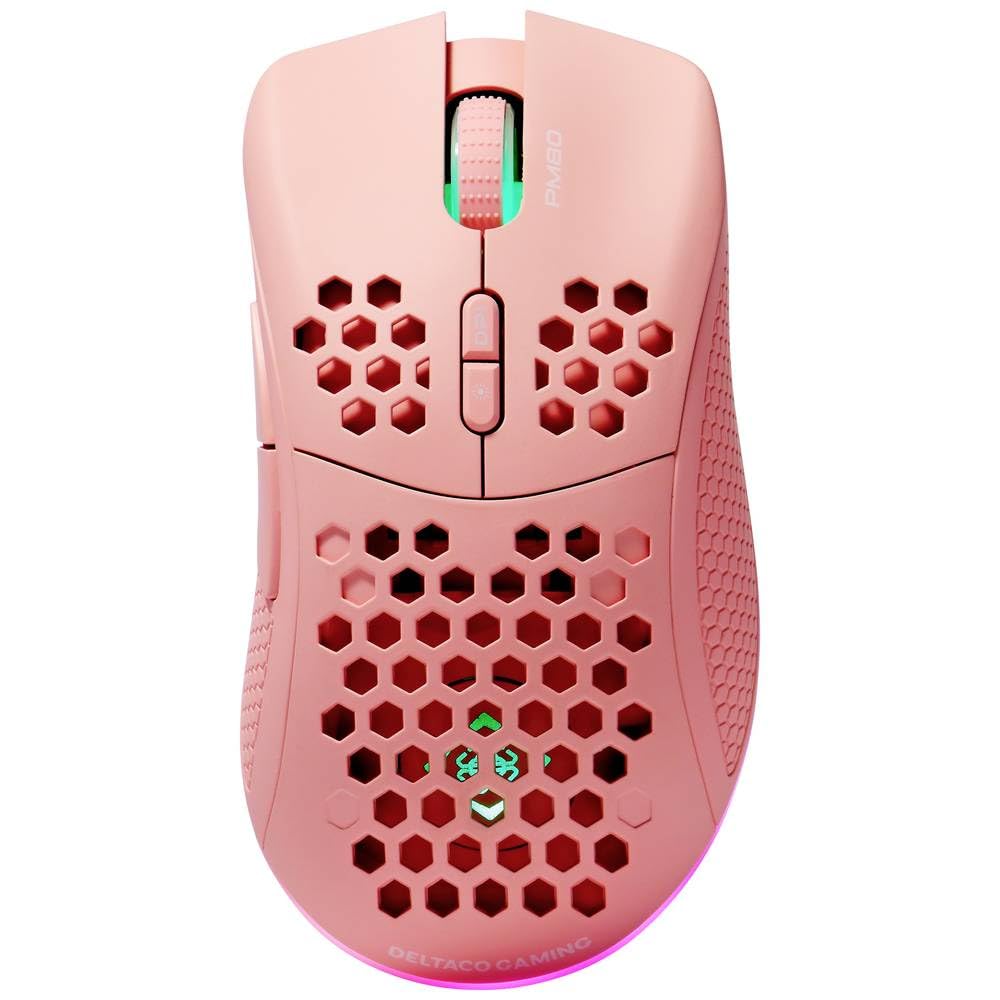
Image: DELTACO Gaming PM80 Wireless Optical Gaming Mouse. This image displays the mouse from a top-down perspective, highlighting its ergonomic design, the central scroll wheel, and the arrangement of its seven buttons.
Mygtukų funkcijos:
- Kairysis paspaudimo mygtukas: Standartinė pagrindinio paspaudimo funkcija.
- Dešinysis pelės mygtuko paspaudimas: Standartinė antrinio paspaudimo funkcija.
- Slinkties ratukas: Scrolls up/down, and acts as a middle click button.
- DPI ciklo mygtukas: Changes the mouse's sensitivity (DPI).
- Pirmyn mygtukas: Naviguoja pirmyn web naršyklės arba file tyrinėtojai.
- Mygtukas atgal: Naviguoja atgal web naršyklės arba file tyrinėtojai.
- Illumination Mode Button: Cycles through different lighting effects or turns illumination on/off.
4. Sąranka
4.1. Pelės įkrovimas
- Connect the small end of the USB charging cable to the charging port on the front of the mouse.
- Connect the larger end of the USB charging cable to an available USB port on your computer or a USB wall adapter.
- The mouse's illumination will indicate charging status (e.g., breathing effect, specific color). A full charge typically takes 2-3 hours.
- Once fully charged, the illumination may change or turn off. Disconnect the charging cable.
4.2. USB belaidžio imtuvo prijungimas
- Locate the USB wireless receiver, usually stored in a compartment on the underside of the mouse.
- Išimkite imtuvą iš jo laikymo vietos.
- Prijunkite belaidį USB imtuvą prie laisvo kompiuterio USB prievado.
- Jūsų kompiuteris turėtų automatiškai aptikti ir įdiegti reikiamas tvarkykles. Tai gali užtrukti kelias akimirkas.
4.3. Įjungimas/išjungimas
- Raskite maitinimo jungiklį pelės apačioje.
- Slide the switch to the 'ON' position to power on the mouse. The illumination will light up.
- To conserve battery life, slide the switch to the 'OFF' position when the mouse is not in use for extended periods.
5. Naudojimo instrukcijos
5.1. Pagrindinis naudojimas
Once connected and powered on, the mouse is ready for use. Move the mouse on a flat surface to control the cursor on your screen. Use the left and right click buttons for primary and secondary actions, and the scroll wheel for navigation.
5.2. DPI reguliavimas
The DPI (Dots Per Inch) setting determines the sensitivity of your mouse. The DELTACO Gaming PM80 offers multiple DPI levels up to 4800 DPI. To adjust the DPI:
- Paspauskite DPI ciklo mygtukas (typically located behind the scroll wheel).
- Each press will cycle through the available DPI settings. The mouse's illumination may change color or flash to indicate the current DPI level.
- Select the DPI setting that best suits your preference for gaming or general use.
5.3. Apšvietimo valdymas
The DELTACO Gaming PM80 features customizable illumination. To change the lighting effects:
- Paspauskite Illumination Mode Button (refer to Product Overview dėl vietos).
- Each press will cycle through different lighting modes, such as static colors, breathing effects, or off.
6. Priežiūra
6.1. Valymas
- Prieš valydami įsitikinkite, kad pelė yra išjungta.
- Pelės paviršių nuvalykite minkštu, sausu, nepūkuotu skudurėliu.
- Įsisenėjusiam purvui šiek tiek pamirkykiteampNuvalykite šluostę vandeniu arba švelniu, neabrazyviniu valikliu. Venkite per didelės drėgmės.
- Do not use harsh chemicals, solvents, or abrasive materials, as these can damage the mouse's finish.
- Use a cotton swab or compressed air to clean around the scroll wheel and button crevices.
6.2. Sandėliavimas
When not in use for extended periods, store the mouse in a cool, dry place away from direct sunlight and extreme temperatures. Ensure the power switch is in the 'OFF' position to preserve battery life.
7. Problemų sprendimas
- Pelė nereaguoja:
- Įsitikinkite, kad pelė įjungta.
- Check if the USB wireless receiver is securely plugged into a working USB port.
- Verify the mouse battery is charged. Connect the charging cable and try again.
- Pabandykite prijungti imtuvą prie kito USB prievado.
- Iš naujo paleiskite kompiuterį.
- Ryšio uždelsimas arba nutrūkstamas ryšys:
- Ensure the mouse is within close proximity to the USB receiver (ideally within 10 meters).
- Avoid placing the receiver near other wireless devices or sources of interference (e.g., Wi-Fi routers, cordless phones).
- Įsitikinkite, kad pelė yra visiškai įkrauta.
- Žymeklio judėjimas yra netolygus arba netikslus:
- Nuvalykite optinį jutiklį pelės apačioje minkštu, sausu skudurėliu.
- Įsitikinkite, kad pelę naudojate ant tinkamo paviršiaus (pvz., pelės kilimėlio). Venkite labai atspindinčių ar skaidrių paviršių.
- Adjust the DPI setting to a lower sensitivity if the cursor is too fast.
- Apšvietimas neveikia:
- Įsitikinkite, kad pelė įjungta.
- Press the Illumination Mode Button to cycle through modes, ensuring it's not set to 'off'.
- Check battery level; low battery might disable illumination.
8. Specifikacijos
| Funkcija | Detalė |
|---|---|
| Prekės ženklas | DELTACO GAMING |
| Modelio numeris | GAM-120-P |
| Ryšys | Belaidis (USB imtuvas) |
| Jutiklio tipas | Optinis |
| DPI | Iki 4800 DPI (reguliuojama) |
| Mygtukų skaičius | 7 |
| Rankų orientacija | Teisingai |
| Apšvietimas | Taip |
| Įkraunamas | Taip |
| Reikalingos baterijos | No (Internal Rechargeable) |
9. Garantija ir palaikymas
For warranty information and technical support, please refer to the warranty card included with your product or visit the official DELTACO Gaming websvetainėje. Išsaugokite pirkimo įrodymą, jei prireiktų pateikti garantinį ieškinį.


