1. Įvadas
This manual provides detailed instructions for the proper use and maintenance of your New Bee BH58 Wireless Headset. Please read this manual thoroughly before using the product to ensure optimal performance and longevity. The BH58 headset features Bluetooth V5.0 connectivity, a noise-canceling microphone, and multiple connection options for various devices.

Figure 1: New Bee BH58 Wireless Headset with included USB dongle.
2. Pakuotės turinys
Įsitikinkite, kad pakuotėje yra visi daiktai:
- New Bee BH58 Wireless Headset
- USB raktas
- USB-C įkrovimo laidas
- 3.5 mm garso laidas
- Vartotojo vadovas (šis dokumentas)
3. Produktas baigtasview
Susipažinkite su ausinių komponentais ir valdikliais.

Figure 2: Headset controls layout.
- Mikrofono nutildymo mygtukas: Nutildyti / įjungti mikrofoną pokalbio metu.
- Garsumas + / -: Reguliuokite garso garsumą.
- Power On/Off / Multifunctional Button: Power on/off, play/pause music, answer/end calls.
- 3.5 mm garso sąsaja: Laidiniam ryšiui.
- Įkrovimo prievadas (USB-C): Ausinių įkrovimui.
- Mikrofonas: Rotatable for optimal positioning.

Figure 3: The microphone can rotate 270 degrees for use on either ear.
4. Sąranka
4.1 Ausinių įkrovimas
Before first use, fully charge the headset. Connect the USB-C charging cable to the headset's charging port and the other end to a USB power source. The LED indicator will show charging status. A full charge takes approximately 1.5 hours.
4.2 Maitinimo įjungimas/išjungimas
- Maitinimas: Push the power button to the middle position and hold for 3 seconds until the LED indicator flashes red and green alternately (for computer pairing mode) or red and blue alternately (for cellphone pairing mode).
- Išjungti: Push the power button to the bottom position to turn off the headset.
4.3 Susiejimas su įrenginiais
The BH58 headset supports three connection methods: Bluetooth, USB Dongle, and Wired.
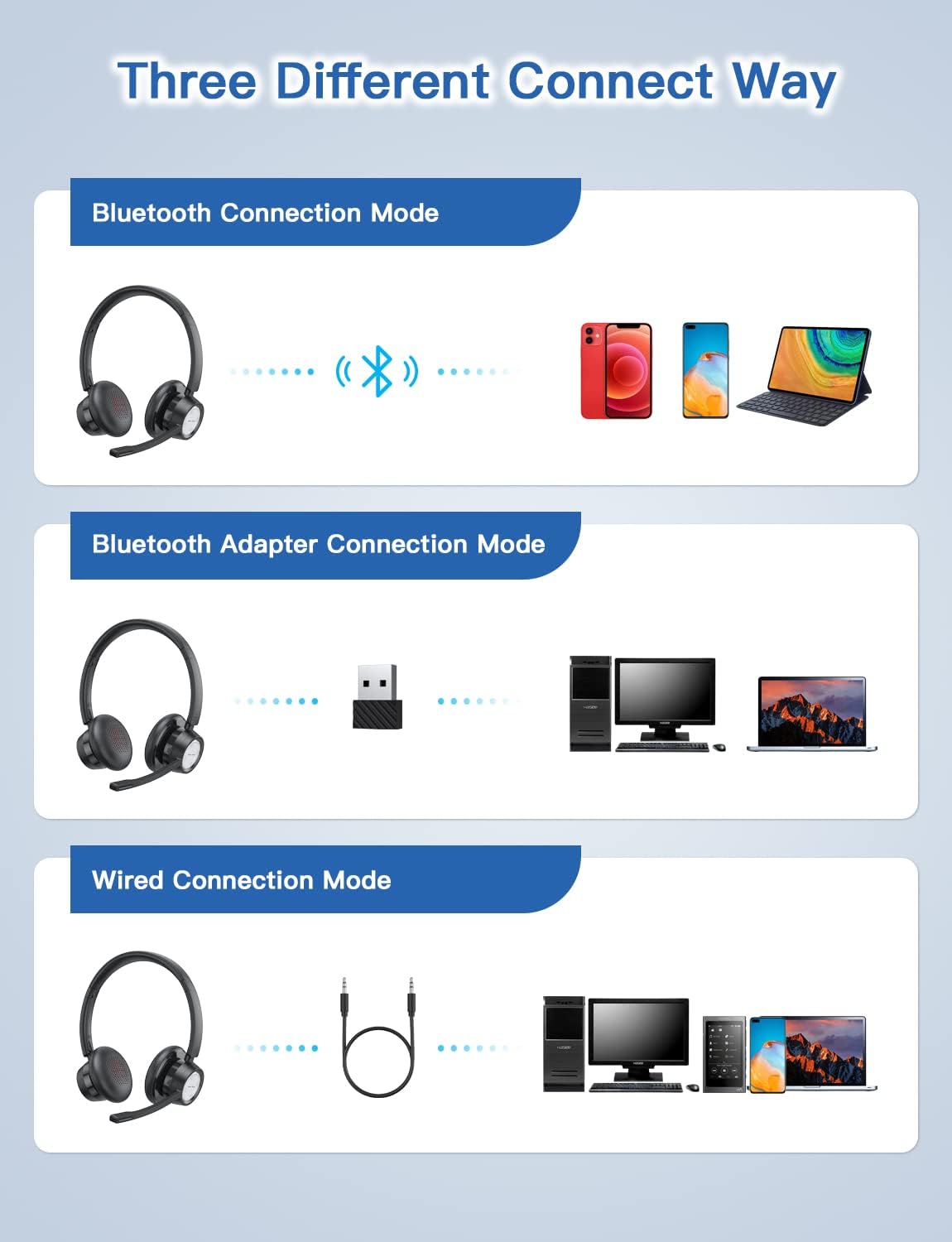
Figure 4: Multiple connection options for the BH58 headset.
4.3.1 Bluetooth Connection (for Cellphones/Tablets)
- Push the power button to the top and hold for 10 seconds until the headset LED indicator keeps flashing red and blue alternately. This indicates cellphone pairing mode.
- On your cellphone or tablet, go to 'Settings' > 'Bluetooth' and turn on Bluetooth.
- Ieškokite new devices and select 'BH58' from the list to connect.
- Once connected, you will hear a 'connected' voice prompt, and the LED indicator will flash blue every 30 seconds.
Video 1: Demonstrates the process of connecting the BH58 headset to a cellphone via Bluetooth.
4.3.2 USB Dongle Connection (for Computers without Bluetooth)
- Push the power button to the middle position to turn on the headset. The headset LED indicator keeps flashing red and green alternately, indicating computer pairing mode.
- Plug the Bluetooth transmitter (USB dongle) into your computer's USB port. It will automatically enter pairing mode. The Bluetooth transmitter LED indicator keeps flashing blue for about 3 seconds, then turns into red and blue flashing alternately.
- When hearing the 'connected' voice prompt, the connection is successful. The headset LED indicator flashes blue every 30 seconds, and the Bluetooth transmitter LED indicator is solid blue.
- On your computer, navigate to Sound Settings. Choose 'BH58' (or 'BTD-Q2' if listed) as the audio input and output device. Adjust sound settings as preferred.
Video 2: Illustrates how to connect the BH58 headset to a computer using the USB dongle and configure sound settings.
4.3.3 Laidinis ryšys
Connect the 3.5mm audio cable to the headset's 3.5mm audio interface and the other end to your device's audio jack. In wired mode, only the speaker has sound; the buttons and microphone on the headset do not function.
5. Operacija
5.1 Skambučių valdymas
- Atsiliepti / Baigti skambutį: Press the Multifunctional Button once.
- Atmesti skambutį: Press and hold the Multifunctional Button for 2 seconds.
- Nutildyti / įjungti mikrofoną: Press the Mic Mute Button during an active call.
5.2 Garso valdymas
- Pagarsink: Paspauskite garsumo + mygtuką.
- Patildyti: Paspauskite garsumo mygtuką.
- Leisti / pristabdyti muziką: Press the Multifunctional Button once.
5.3 Ausinių dėvėjimas
Adjust the headband for a comfortable fit. The microphone boom can be rotated 270 degrees to be worn on either the left or right ear. Position the microphone approximately 1-2 inches from your mouth for optimal voice clarity.

Figure 5: The headset can be adjusted for left or right ear wearing.
6. Baterijos veikimo laikas
The BH58 wireless headset offers extended battery performance:
- Pokalbio laikas: Iki 20 valandų
- Muzikos grojimo laikas: Iki 28 valandų
- Budėjimo laikas: Daugiau nei 400 XNUMX valandų
- Įkrovimo laikas: Maždaug 1.5 val

6 pav. Baigtaview of BH58 headset battery performance.
7. Priežiūra
- Reguliariai valykite ausines minkštu, sausu skudurėliu.
- Saugokite ausines nuo ekstremalių temperatūrų, drėgmės ar ėsdinančių medžiagų.
- Laikykite ausines vėsioje, sausoje vietoje, kai nenaudojate.
- Nebandykite patys ardyti ar taisyti ausinių, nes tai panaikins garantiją.
8. Problemų sprendimas
| Problema | Sprendimas |
|---|---|
| Ausinės neįsijungia. | Įsitikinkite, kad ausinės yra visiškai įkrautos. |
| Nepavyksta susieti per „Bluetooth“. | Ensure the headset is in pairing mode (LED flashing red/blue or red/green). Turn off and on Bluetooth on your device. Clear previous Bluetooth connections. |
| Nėra garso arba garso kokybė prasta. | Check volume levels on both the headset and your device. Ensure 'BH58' is selected as the audio output device in your system settings. For wired mode, ensure the cable is fully inserted. |
| Mikrofonas neveikia. | Ensure the microphone is not muted. Check that 'BH58' is selected as the audio input device in your system settings. Microphone does not work in wired mode. |
| Ausinės dažnai atsijungia. | Ensure the headset is within the effective Bluetooth range (10-45 meters depending on mode and environment). Avoid obstacles that may interfere with the signal. |
9. Specifikacijos
| Funkcija | Detalė |
|---|---|
| Modelio pavadinimas | BH58 |
| Ryšio technologija | Belaidis („Bluetooth“), laidinis (3.5 mm) |
| Belaidžio ryšio technologija | Bluetooth V5.0 |
| Triukšmo valdymas | Adaptive Noise Cancellation (ENC) |
| Mikrofonas | Omnidirectional, 270° Rotatable |
| Pokalbių laikas | Iki 20 valandų |
| Muzikos atkūrimo laikas | Iki 28 valandų |
| Budėjimo laikas | Daugiau nei 400 XNUMX valandų |
| Įkrovimo laikas | 1.5 valandos |
| Įkrovimo prievadas | USB-C |
| Bluetooth diapazonas | 10-45 meters (depending on mode/environment) |
| Medžiaga | Fabric, Memory Foam |
| Prekės svoris | 230 gramų (8.1 uncijos) |
| Suderinami įrenginiai | Computers, Laptops, Smartphones, Tablets, VoIP systems, Webinar systems, Skype, Zoom, Avaya, Call Centers, Online meeting systems, Home devices, Office devices |
10. Garantija ir palaikymas
New Bee provides excellent after-sales service, including a 12-month warranty from the date of purchase. A professional technical team and customer service center are available to assist you with any inquiries or issues.
For support, please refer to the contact information provided on the product packaging or the official New Bee websvetainę.


