Įvadas
The Edifier CX7 is an active 2.1 home entertainment system designed to deliver high-quality audio for various devices, including televisions, personal computers, and notebooks. This system features Bluetooth V5.0 connectivity, an 8-inch subwoofer, and an infrared remote control for convenient operation. This manual provides essential information for setting up, operating, and maintaining your CX7 system.
Pakuotės turinys
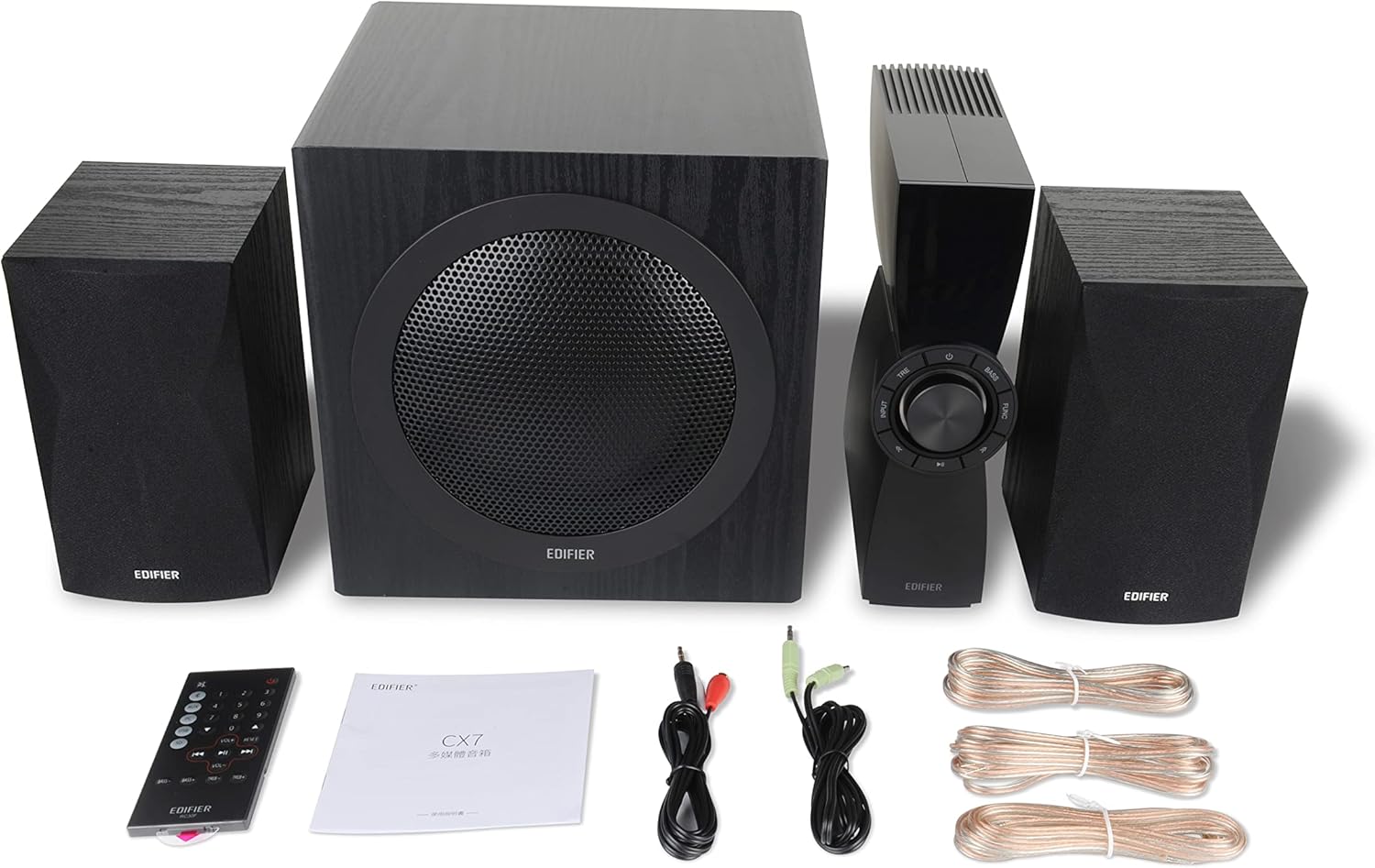
Figure 1: Edifier CX7 System Components
Patikrinkite, ar jūsų siuntinyje yra visi toliau išvardyti daiktai:
- Žemųjų dažnių garsiakalbis (1)
- Palydoviniai garsiakalbiai (2)
- Control Unit (1)
- Infrared Remote Control (1)
- 3.5mm to RCA Audio Cable (1)
- RCA to RCA Audio Cable (1)
- Speaker Connection Cables (2)
- Vartotojo vadovas (1)
Sąrankos vadovas
1. Įdėjimas
Position the subwoofer on the floor, preferably in a corner or near a wall for optimal bass response. Place the satellite speakers on either side of your listening area, equidistant from the listener, and at ear level if possible. Ensure the control unit is easily accessible.

Figure 2: Recommended System Placement
2. Garsiakalbių prijungimas
Connect the satellite speakers to the speaker output terminals on the rear of the control unit using the provided speaker cables. Ensure correct polarity (red to red, black to black) for each speaker.
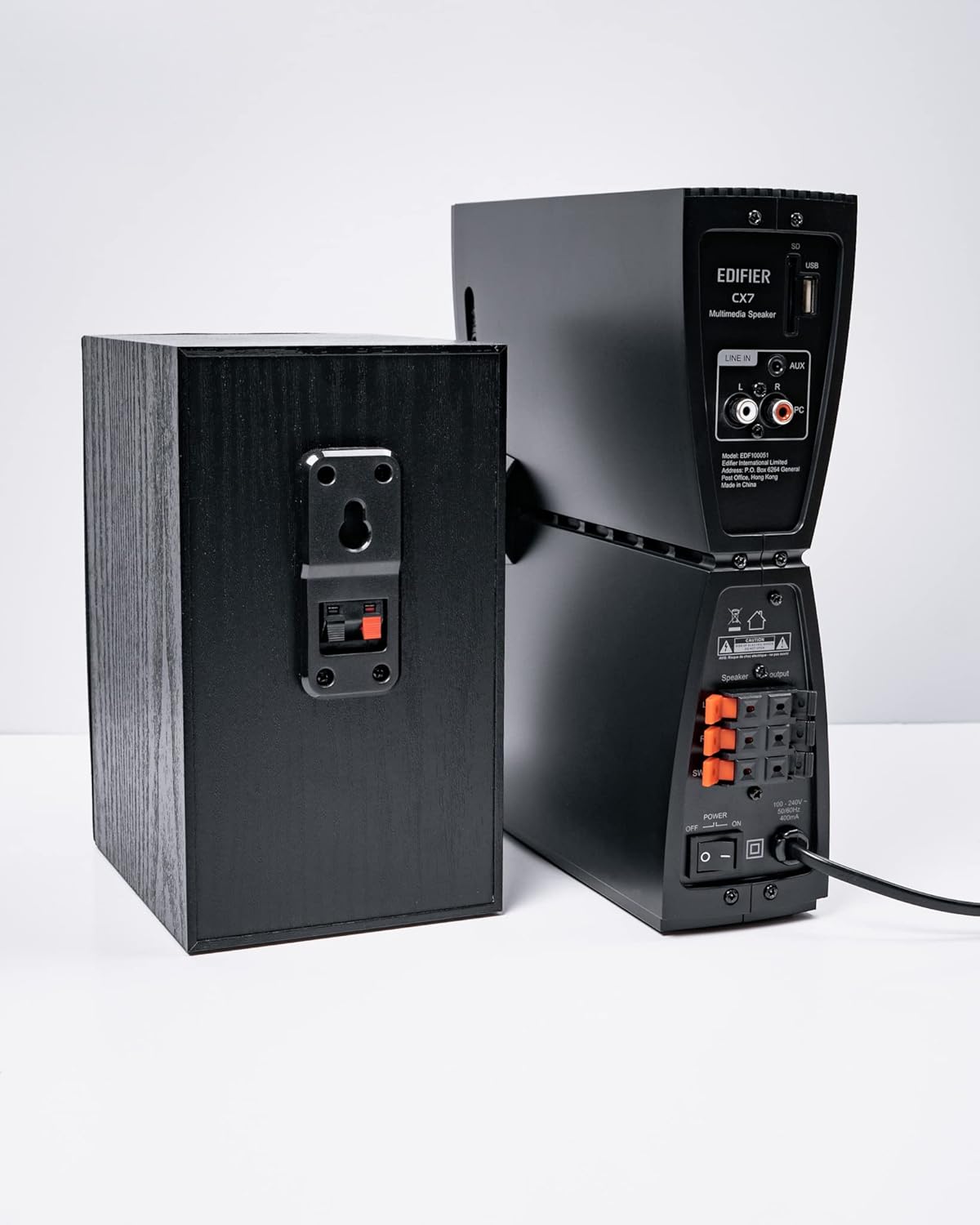
3 pav.: Garsiakalbių jungtys
3. Garso šaltinių prijungimas
The CX7 system supports multiple audio input options:
- AUX įvestis: Use the 3.5mm to RCA audio cable to connect devices like smartphones, tablets, or computers to the AUX input on the control unit.
- Kompiuterio įvestis: Use the RCA to RCA audio cable to connect your PC's audio output to the PC input on the control unit.
- Bluetooth: For wireless connection, refer to the "Bluetooth Pairing" section under Operating Instructions.
4. Maitinimo prijungimas
Connect the power cable to the control unit and then plug it into a standard wall outlet. Turn on the power switch located on the rear of the control unit.
Naudojimo instrukcijos
1. Maitinimo įjungimas/išjungimas
After connecting the power, press the power button on the control unit or the remote control to turn the system on or off. The display on the control unit will illuminate when powered on.

Figure 4: Control Unit Display
2. Įvesties pasirinkimas
Press the "INPUT" button on the control unit or the remote control to cycle through available audio sources: AUX, PC, and Bluetooth. The selected input will be displayed on the control unit's screen.

Figure 5: Control Knob and Input Buttons
3. Garsumo valdymas
Rotate the large knob on the control unit clockwise to increase volume and counter-clockwise to decrease it. Alternatively, use the "VOL+" and "VOL-" buttons on the remote control.
4. Bass and Treble Adjustment
Press the "BASS" or "TRE" (Treble) buttons on the control unit or remote control, then rotate the main knob to adjust the respective levels. The display will show the current bass/treble setting.
5. „Bluetooth“ poravimas
- Select the Bluetooth input on the CX7 system. The display will show "BT" and flash, indicating it's in pairing mode.
- Savo įrenginyje (išmaniajame telefone, planšetiniame kompiuteryje ir kt.) įjunkite „Bluetooth“ ir ieškokite galimų įrenginių.
- Select "EDIFIER CX7" from the list of found devices.
- Once paired, the "BT" indicator on the CX7 display will stop flashing and remain solid.
To disconnect a Bluetooth device, press and hold the "FUNC" button on the control unit or the Bluetooth button on the remote control for a few seconds.
6. Nuotolinio valdymo funkcijos

6 pav.: Infraraudonųjų spindulių nuotolinio valdymo pultas
The remote control provides convenient access to all major functions:
- Galia: Įjungia/išjungia sistemą.
- Įvesties pasirinkimas: Cycles through AUX, PC, Bluetooth.
- Apimtis: Reguliuoja pagrindinį garsumą.
- Žemieji / aukštieji dažniai: Reguliuoja žemų ir aukštų dažnių lygius.
- Nutildyti: Nutildo / įjungia garsą.
- Atkūrimo valdikliai: Play/Pause, Previous/Next track (for Bluetooth mode).
Priežiūra
- Valymas: Use a soft, dry cloth to clean the surfaces of the speakers and control unit. Do not use liquid cleaners or abrasive materials.
- Vėdinimas: Ensure adequate ventilation around the control unit and subwoofer to prevent overheating. Do not block ventilation openings.
- Aplinka: Saugokite sistemą nuo ekstremalių temperatūrų, drėgmės, dulkių ar tiesioginių saulės spindulių.
- Išjungti: If the system will not be used for an extended period, disconnect it from the power outlet.
Trikčių šalinimas
| Problema | Galima priežastis | Sprendimas |
|---|---|---|
| Nėra garso |
|
|
| „Bluetooth“ ryšys nepavyksta |
|
|
| Iškraipytas garsas |
|
|
Specifikacijos
| Funkcija | Detalė |
|---|---|
| Modelio pavadinimas | CX7 |
| Garsiakalbio tipas | 2.1 garsiakalbių sistema |
| Ryšio technologija | Bluetooth |
| Belaidžio ryšio technologija | Bluetooth V5.0 |
| Bluetooth diapazonas | 10 metrai |
| Garso išvesties režimas | Aplink |
| Didžiausia garsiakalbio išėjimo galia | 69 vatų |
| Žemųjų dažnių garsiakalbio ryšio technologija | Bevielis |
| Žemų dažnių garsiakalbio skersmuo | 8 colių |
| Medžiaga | Polipropilenas |
| Spalva | Juoda |
| Gaminio matmenys | 16.93 "D x 17.72" P x 13.39" A |
| Prekės svoris | 29 svaro (13.2 kilogramo) |
| Maitinimo šaltinis | Su laidu elektra |
| Valdiklio tipas | Nuotolinio valdymo pultas |
| Rekomenduojami naudojimo būdai | Skirta televizoriams, kompiuteriams, išmaniesiems telefonams ar planšetiniams kompiuteriams |
Garantija ir palaikymas
For warranty information and technical support, please refer to the warranty card included with your product or visit the official Edifier websvetainėje. Išsaugokite pirkimo kvitą kaip pirkimo įrodymą garantiniams reikalavimams.
Edifier Official Websvetainė: www.edifier.com


