1. Produktas baigtasview
The ProtoArc K100-A is an ultra-slim wireless Bluetooth keyboard specifically designed for Mac devices. It features a full-size layout with a numeric keypad, responsive scissor-switch keys for quiet typing, and adjustable white LED backlighting. This keyboard supports connection to up to three devices simultaneously, allowing for seamless switching between your MacBook, iMac, iPad, or iPhone. Its built-in rechargeable battery ensures long-lasting use.

Image: The ProtoArc K100-A keyboard connected to a MacBook, iPad, and iPhone, showcasing jo daugiafunkcinį pajėgumą.
2. Pakuotės turinys
- ProtoArc K100-A apšviesta Bluetooth klaviatūra
- USB-C įkrovimo laidas
- Vartotojo vadovas (šis dokumentas)
3. Darbo pradžia
3.1 Klaviatūros įkrovimas
Before first use, fully charge the keyboard. Connect the provided USB-C charging cable to the keyboard's Type-C port and the other end to a USB power source (e.g., computer USB port, USB wall adapter). A full charge takes approximately 4-5 hours. The built-in 1200mAh lithium-ion battery provides a standby time of 3-4 months.

Image: The keyboard's Type-C charging port with the charging cable inserted.
3.2 Maitinimo įjungimas/išjungimas
Locate the power switch on the side or back of the keyboard. Slide it to the "ON" position to power on the keyboard. Slide it to "OFF" when not in use to conserve battery.
4. „Bluetooth“ ryšys
The ProtoArc K100-A keyboard supports connection to three different devices via Bluetooth. Follow these steps to pair your devices:
- Įsitikinkite, kad klaviatūra įjungta.
- Press and hold one of the Bluetooth channel keys (BT1, BT2, arba BT3) for 3-5 seconds until the corresponding indicator light flashes rapidly. This indicates the keyboard is in pairing mode.
- On your Mac device (MacBook, iMac, iPad, iPhone), go to Sistemos nustatymai (arba Sistemos nuostatos) > Bluetooth.
- Įjunkite „Bluetooth“ ir ieškokite galimų įrenginių.
- Pasirinkite „ProtoArc K100-A"iš įrenginių sąrašo.
- Follow any on-screen prompts to complete the pairing process. The indicator light will stop flashing and remain solid for a few seconds, then turn off, indicating successful pairing.
- Pakartokite šiuos veiksmus su ne daugiau kaip dviem papildomais įrenginiais, naudodami kitus „Bluetooth“ kanalų klavišus.

Image: The dedicated Bluetooth channel keys (BT1, BT2, BT3) on the keyboard.
4.1 Įrenginių perjungimas
Norėdami perjungti susietus įrenginius, tiesiog paspauskite atitinkamą „Bluetooth“ kanalo klavišą (BT1, BT2, arba BT3) once. The keyboard will connect to the selected device within a few seconds.
5. Naudojimo instrukcijos
5.1 Foninio apšvietimo valdymas
The keyboard features soft white LED backlighting with three adjustable brightness levels (low, medium, high). To adjust the backlight brightness, press the backlight key (often indicated by a sun icon or similar) located on the top right of the keyboard. Pressing it repeatedly cycles through the brightness levels and turns the backlight off.

Image: The keyboard with its white adjustable backlight at different brightness levels.
5.2 spartieji klavišai
The keyboard includes 12 shortcut keys for enhanced productivity on Mac devices. These keys provide quick access to functions such as brightness adjustment, mission control, media playback, volume control, and more. Refer to the key labels for specific functions.

Image: Detail of the keyboard's silent scissor-switch keys, designed for quiet and responsive typing.
6. Priežiūra ir priežiūra
- Keep the keyboard clean by wiping it with a soft, dry cloth. Avoid using harsh chemicals or abrasive materials.
- Nelaikykite klaviatūros ekstremalioje temperatūroje, drėgmėje ar tiesioginiuose saulės spinduliuose.
- Avoid spilling liquids on the keyboard. If a spill occurs, immediately power off the keyboard and allow it to dry completely before use.
- When not in use for extended periods, power off the keyboard to preserve battery life.
- The keyboard automatically enters sleep mode after 30 minutes of inactivity to save power. Press any key to wake it up.
7. Problemų sprendimas
- Keyboard not connecting/disconnecting frequently:
- Įsitikinkite, kad klaviatūra yra visiškai įkrauta.
- Verify Bluetooth is enabled on your device and the keyboard is within range (up to 10 meters).
- Pabandykite iš naujo susieti klaviatūrą su savo įrenginiu.
- Įsitikinkite, kad nėra jokių kitų stiprių belaidžių signalų, kurie trukdytų ryšiui.
- Keys not responding or delayed response:
- Patikrinkite akumuliatoriaus lygį ir, jei reikia, įkraukite.
- Įsitikinkite, kad klaviatūra tinkamai prijungta per „Bluetooth“.
- If the keyboard has entered sleep mode, press any key and wait a few seconds for it to reconnect.
- Foninis apšvietimas neveikia:
- Įsitikinkite, kad klaviatūra įjungta.
- Press the backlight key to cycle through brightness levels and turn it on.
- If the battery is very low, the backlight may not function to conserve power. Charge the keyboard.
8. Specifikacijos
| Modelio numeris | K100-A |
| Prekės ženklas | ProtoArc |
| Ryšio technologija | Bluetooth |
| Suderinami įrenginiai | Mac OS 12.2 or higher (MacBook, MacBook Pro, MacBook Air, iMac, iMac Pro, Mac Pro/Mini, iPad, iPhone) |
| Ypatingos savybės | Backlit, Rechargeable, Multi-Device Connection (3 devices) |
| Baterijos talpa | 1200mAh ličio jonai |
| Įkrovimo laikas | 4-5 valandas |
| Budėjimo laikas | 90-120 dienas |
| Gaminio matmenys | 16.79 colių ilgis x 4.78 colių plotis x 0.57 colio aukštis |
| Prekės svoris | 1.59 svaro |
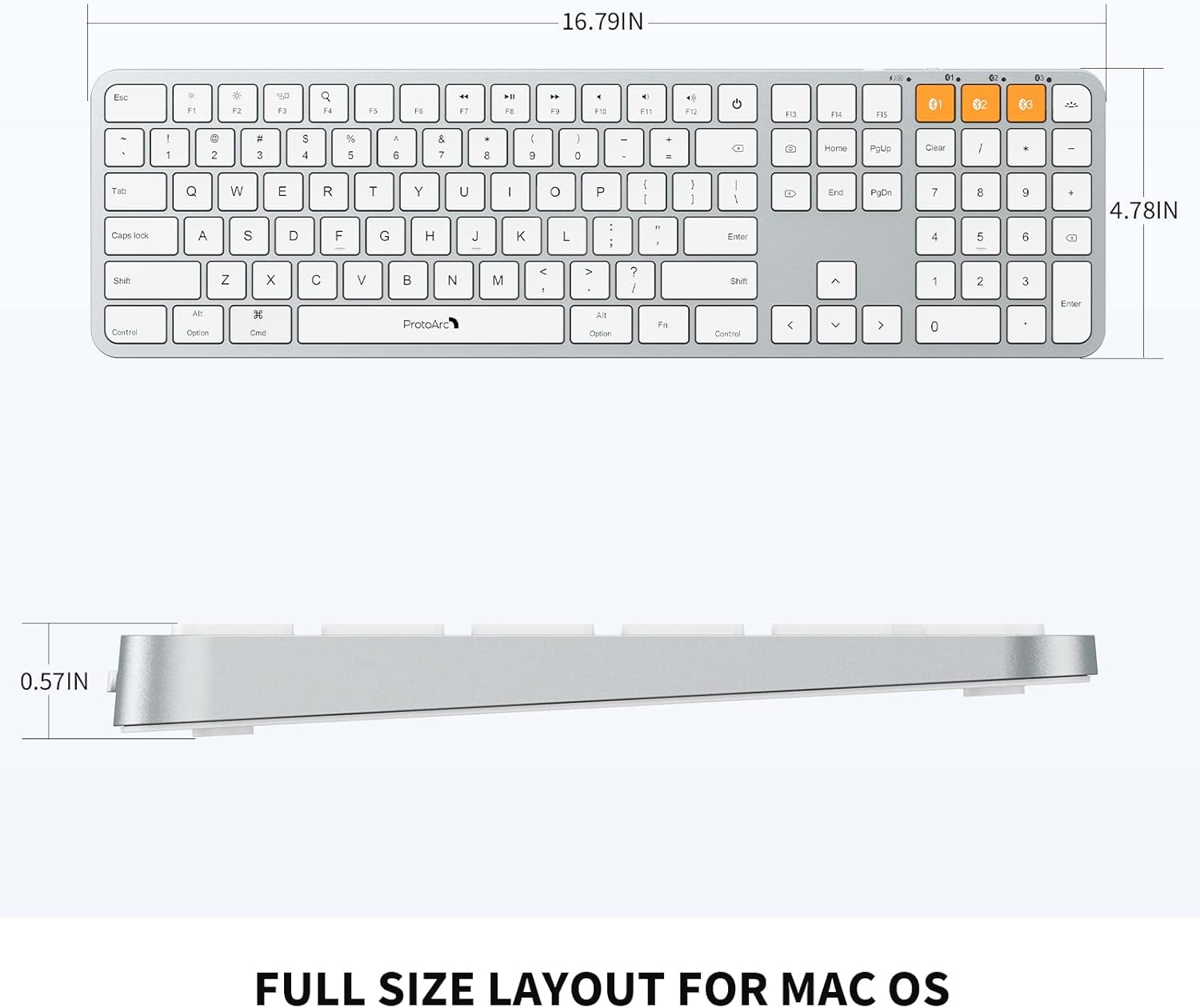
Image: Dimensional diagram of the ProtoArc K100-A keyboard.
9. Garantija ir palaikymas
For warranty information and technical support, please refer to the official ProtoArc websvetainėje arba susisiekite tiesiogiai su jų klientų aptarnavimo tarnyba. Išsaugokite pirkimo kvitą garantiniams reikalavimams.


