1. Įvadas
This manual provides detailed instructions for the installation, operation, and maintenance of your CAMECHO Android 11 Autoradio. Please read this manual thoroughly before using the product to ensure proper function and safety. This unit is designed for specific BMW 1 Series models.
2. Taikomi modeliai
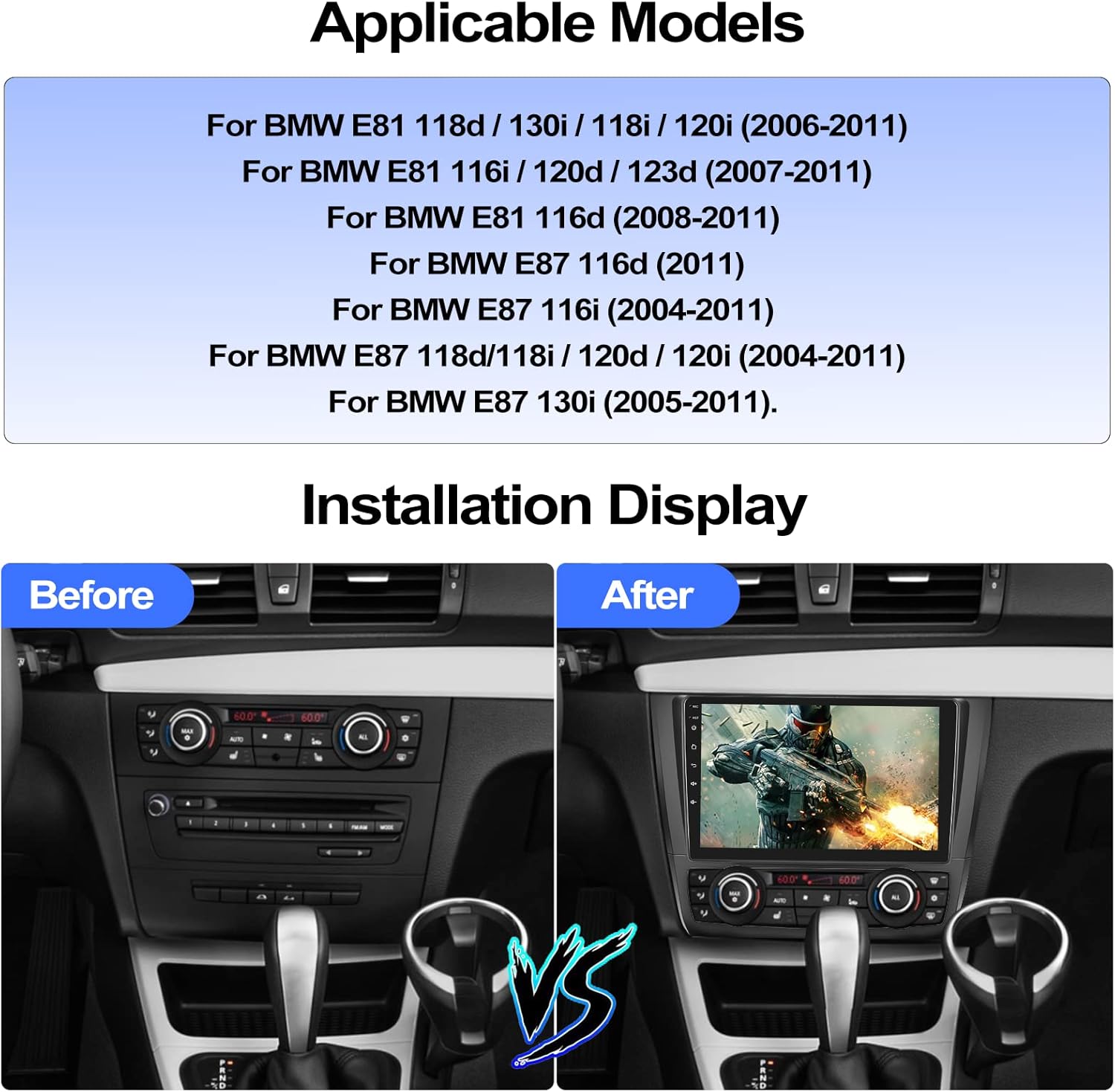
This CAMECHO Android 11 Autoradio is compatible with the following BMW 1 Series models:
- For BMW E81 118d / 130i / 118i / 120i (2006-2011)
- For BMW E81 116i / 120d / 123d (2007-2011)
- For BMW E81 116d (2008-2011)
- For BMW E87 116d (2011)
- For BMW E87 116i (2004-2011)
- For BMW E87 118d/118i / 120d / 120i (2004-2011)
- For BMW E87 130i (2005-2011)
3. Gaminio specifikacijos
| Funkcija | Specifikacija |
|---|---|
| Operacinė sistema | Android 11 |
| Ekrano dydis | 9 colių |
| Atmintis (RAM + ROM) | 1 GB RAM + 16 GB ROM |
| Ekrano raiška | 1024*600 |
| Išėjimo galia | 4 * 45 W |
| Navigacija | Integruoti neprisijungus pasiekiami žemėlapiai (duomenims atsisiųsti reikalingas internetas) |
| USB prievadai | Du prievadai |
| Garso formatai | APE/FLAC/WAV/MP3/WMA ir kt. |
| Vaizdo įrašų formatai | MKV / RMVB / AVI / MP4 / MDV ir kt. |
| Vaizdo formatai | PNG / JPEG / JPG / GIF / WBMP / BNP ir kt. |
| Factory Settings Password | 8888 |
| Bluetooth Pairing Password | 0000 |
| Ryšio technologija | Bluetooth, USB |
| Ypatingos savybės | 9-inch HD touchscreen, integrated navigation, Bluetooth, rearview camera support, MirrorLink, app support, advanced audio processing |
| Suderinami įrenginiai | Smartphone, tablet, speaker |
| Garso išvesties režimas | Stereo |
| Erdvinio garso kanalo konfigūracija | 5.1 |
4. Pakuotės turinys
Produkto paketą sudaro šie elementai:
- Radio Unit ×1
- Maitinimo laidas × 1
- Antenna Adapter ×1
- Original USB Cable ×1
- Radio Antenna ×1
- Konversijos kabelis ×1
- Canbus ×1
- Galinisview Camera (AHD) ×1
- External Microphone ×1
- Installation Frame (Black) ×1

5. Sąranka ir diegimas
Proper installation is crucial for the optimal performance of your autoradio. It is recommended that installation be performed by a qualified professional.
5.1. Patikrinimas prieš montavimą
Before starting the installation, ensure all components listed in the package contents are present and undamaged. Disconnect the vehicle's battery to prevent electrical shorts.
5.2. Laidų schema
Refer to the following diagrams for connecting the power, audio, and accessory cables.
Maitinimo jungtis: Prijunkite pagrindinį maitinimo laidą prie transporto priemonės laidų. Įsitikinkite, kad poliškumas yra teisingas.
USB jungtys: Two USB ports are available for external devices. Connect the provided USB cables.
GPS antena: Prijunkite GPS anteną ir pritvirtinkite ją vietoje, kur nėra šviesos. view dangaus optimaliam signalo priėmimui.
Radijo antena: Prijunkite radijo antenos adapterį prie automobilio antenos kabelio.
5.3. Rear Camera Wiring
Į komplektą įeina AHD galinisview camera requires specific wiring for automatic activation when reversing.
- Connect the camera's video output to the "Backup Camera" input on the autoradio.
- Connect the camera's power cable to the vehicle's reverse lamp power supply. This ensures the camera activates when reverse gear is engaged.
- Ensure the camera is mounted securely and provides a clear view galo.
5.4. Installation Display
The following image illustrates the appearance of the vehicle's dashboard before and after the autoradio installation.
6. Naudojimo instrukcijos
6.1. Maitinimo įjungimas/išjungimas
The unit will typically power on automatically when the vehicle's ignition is turned on. To manually power off, press and hold the power button on the unit or use the software interface.
6.2. GPS navigacija
The autoradio comes with integrated offline maps. To use navigation, ensure the GPS antenna is properly connected. For updated map data or online navigation, an internet connection is required.

You can download additional navigation software like WAZE, NAVFREE, or Google Maps from the app store once connected to Wi-Fi.
6.3. „Wi-Fi“ ryšys
Connect the autoradio to a Wi-Fi network (e.g., your smartphone's hotspot) to access online features, download apps, and update maps.
6.4. „Bluetooth“ laisvų rankų įranga
Pair your smartphone via Bluetooth for hands-free calling and audio streaming. The default Bluetooth pairing password is 0000.

- Eikite į autoradijo „Bluetooth“ nustatymus.
- Įjunkite „Bluetooth“ savo išmaniajame telefone ir ieškokite galimų įrenginių.
- Select the autoradio from the list and enter the pairing password if prompted.
- Prijungus, galite skambinti / priimti skambučius ir leisti muziką per automobilio garsiakalbius.
6.5. FM/RDS radijas
Access the FM/RDS radio function to listen to your favorite stations. The RDS (Radio Data System) provides additional information like station name and song title.
6.6. Belaidis „CarPlay“ ir „Android Auto“
The unit supports wireless Apple CarPlay and Android Auto. Connect your smartphone via Wi-Fi or the original USB cable to access navigation, contacts, messages, and music directly on the autoradio screen.
- „Apple CarPlay“: Suderinamas su iOS 15 ir naujesnėmis versijomis.
- „Android Auto“: Suderinamas su Android 11 ir naujesne versija.
6.7. Veidrodinis saitas
Mirror Link allows you to display your smartphone's screen on the autoradio. This feature supports both iOS and Android devices.

- iOS sistema: Prisijunkite per „Wi-Fi“.
- Android sistema: Connect via Wi-Fi or USB cable.
6.8. Padalinto ekrano funkcija
Pasinaudokite padalinto ekrano funkcija, kad vienu metu paleistumėte dvi programas, pvz., navigaciją ir muzikos atkūrimą.

6.9. Vairo valdikliai
The autoradio supports original steering wheel controls via the included Canbus. This allows you to control audio volume, track changes, and other functions without taking your hands off the wheel.
To configure steering wheel controls, navigate to the "Steering Learn" menu in the settings. The factory settings password is 8888.
6.10. AHD galinio vaizdo kamera
Į komplektą įeina AHD galinisview kamera suteikia aiškų view behind your vehicle. When you shift into reverse gear, the system automatically displays the camera feed on the screen.
The camera features night vision, a 120° wide-angle view, and IP69 waterproofing for reliable performance in various conditions.
6.11. Pasirenkamos funkcijos
The autoradio supports various external functions that can be added by purchasing and installing additional accessories:
- OBD2: Dėl transporto priemonės diagnostikos.
- DAB+: Skaitmeniniam garso transliavimui.
- DVR: Skirta vaizdo registratoriui įrašyti.
- External USB Interface: For additional USB connectivity.

7. Priežiūra
- Ekrano valymas: Jutiklinį ekraną valykite minkšta, nepūkuota šluoste. Nenaudokite abrazyvinių valiklių ar tirpiklių.
- Programinės įrangos atnaujinimai: Reguliariai tikrinkite programinės įrangos atnaujinimus per „Wi-Fi“, kad užtikrintumėte optimalų našumą ir prieigą prie naujų funkcijų.
- Bendra priežiūra: Venkite įrenginio ilgalaikio laikymo tiesioginiuose saulės spinduliuose, itin aukštose temperatūrose ar drėgmės.
8. Problemų sprendimas
| Problema | Galima priežastis / sprendimas |
|---|---|
| Įrenginys neįsijungia. | Check power cable connections and vehicle's fuse box. Ensure the vehicle's ignition is on. |
| Nėra garso. | Check speaker wiring. Ensure volume is not muted or set too low. Verify audio source selection. |
| GPS signalas silpnas arba netikslus. | Ensure GPS antenna is properly connected and mounted in a clear location. Update map data if necessary. |
| „Bluetooth“ susiejimas nepavyksta. | Ensure Bluetooth is enabled on both devices. Try restarting both devices. Default pairing password is 0000. |
| Vairo valdikliai neveikia. | Verify Canbus connection. Access "Steering Learn" menu in settings (password 8888) and configure controls. |
| Galinė kamera nerodo vaizdo. | Check camera wiring, especially the connection to the reverse lamp. Ensure the camera is powered. |
| Neteisingas laikas / data. | Connect to Wi-Fi to allow automatic time synchronization or manually set the time in system settings. |
Jei susiduriate su čia nepaminėtomis problemomis, pagalbos ieškokite pagalbos skyriuje.
9. Informacija apie garantiją
This CAMECHO Autoradio comes with a 2 metų gamintojo garantijaPrašome išsaugoti pirkimo įrodymą garantiniams reikalavimams. Garantija taikoma medžiagų ir gamybos defektams, atsiradusiems įprasto naudojimo sąlygomis.
For detailed warranty terms and conditions, please contact CAMECHO customer support.
10. Parama
For technical assistance, troubleshooting, or any questions regarding your CAMECHO Android 11 Autoradio, please contact our customer support team:
- El. paštas: CAMECHOVIP@126.com
Our professional customer service team is available to assist you.


