1. Įvadas
The FOXWELL NT624 Elite is a professional diagnostic scan tool designed for comprehensive vehicle system analysis and maintenance services. This device provides full OBD2 functions, all-system diagnostics, and various special reset functions for a wide range of vehicle makes.
2. Pagrindinės savybės
- Visa sistemos diagnostika: Reads and clears fault codes, views live data, and retrieves ECU information for all available vehicle systems (Engine, ABS, SRS, Transmission, etc.).
- Visos OBD2 funkcijos: Supports all 10 OBD2 test modes, including reading/clearing codes, live data, freeze frame, I/M readiness, O2 monitor test, on-board monitor test, component test, vehicle information, and module present.
- 8 Hot Maintenance Services: Includes Oil Light Reset, SAS (Steering Angle Sensor) Calibration, EPB (Electronic Parking Brake) Service, Throttle Body Relearn, ABS Bleeding, Injector Coding, BRT (Battery Replacement) Service, and DPF (Diesel Particulate Filter) Regeneration.
- Platus transporto priemonių aprėptis: Compatible with over 90 vehicle makes.
- Automatinis VIN nuskaitymas: Automatiškai identifikuoja transporto priemonės informaciją greitai diagnostikai.
- Tiesioginis duomenų rodymas: Shows live sensor data in text and graph formats for easy analysis.
- Nemokami atnaujinimai visą gyvenimą: Ensures the tool stays current with the latest vehicle models and diagnostic functions.
3. Pakuotės turinys
The FOXWELL NT624 Elite package typically includes the following items:
- FOXWELL NT624 Elite Main Unit
- Diagnostic Cable (OBDII connector)
- USB laidas atnaujinimams
- Vartotojo vadovas
- Apsauginis dėklas
- SD Card (pre-installed in the device)
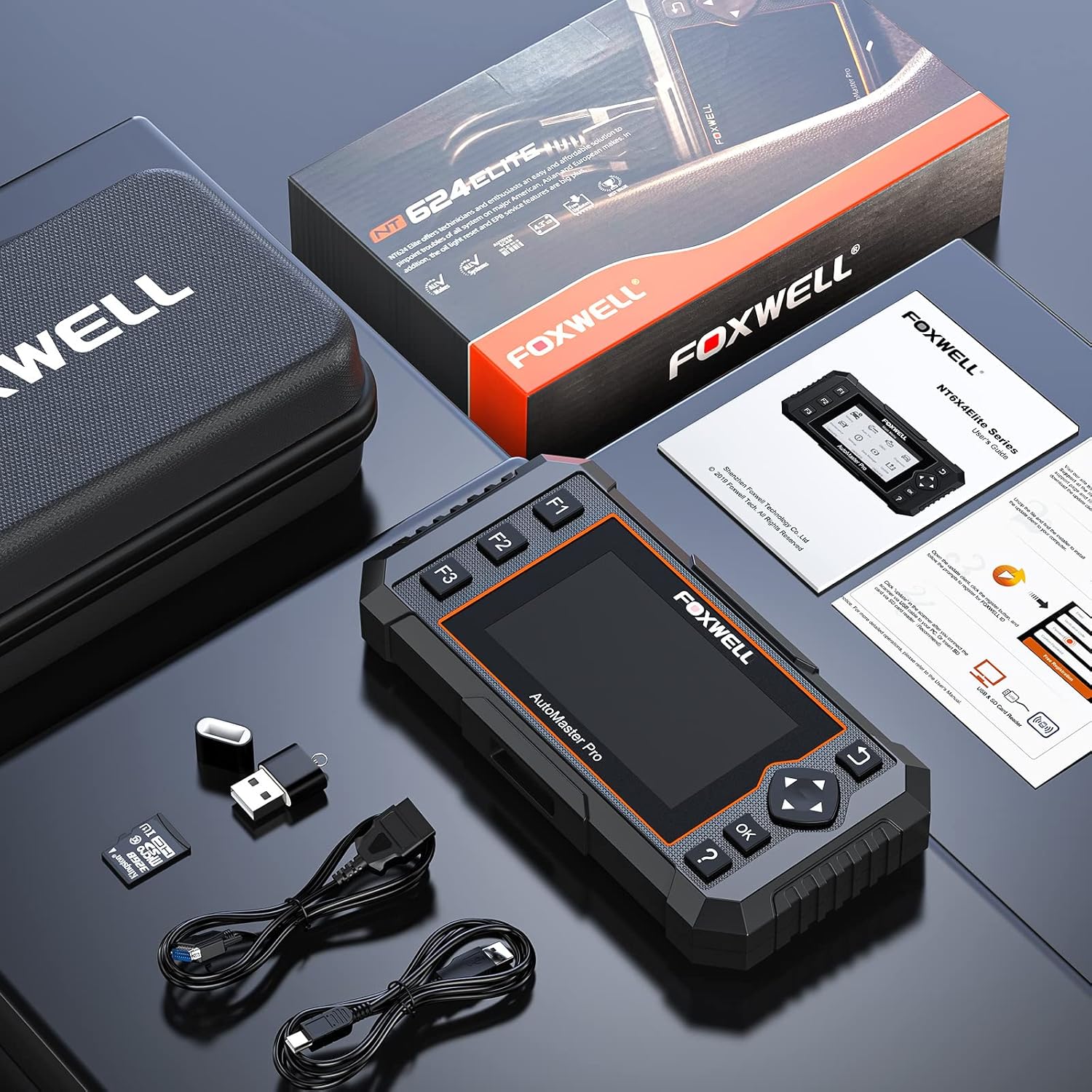
Image: Contents of the FOXWELL NT624 Elite package, showing the diagnostic tool, OBDII cable, USB cable, SD card, and carrying case.
4. Sąranka ir pirmasis naudojimas
- Maitinimas: Connect the diagnostic cable to the vehicle's OBDII port, usually located under the dashboard on the driver's side. The device will power on automatically.
- Language and Unit Settings: Upon first use, navigate to "Settings" from the main menu to select your preferred language and measurement units (e.g., Metric or Imperial).
- Programinės įrangos naujinimas: It is recommended to update the software to the latest version before first use. Connect the device to a computer via the USB cable and visit the official FOXWELL websvetainė, kurioje rasite atnaujinimo instrukcijas ir programinę įrangą.

Image: The FOXWELL NT624 Elite diagnostic tool connected to a vehicle's OBDII port, ready for operation.
5. Naudojimo instrukcijos
5.1. Naršymas pagrindiniame meniu
Use the directional buttons (up, down, left, right) to navigate through the menu options on the 4.3-inch screen. Press the "OK" button to confirm a selection and "Back" to return to the previous screen.

Image: The main menu of the FOXWELL NT624 Elite, showing options like History, Auto VIN, OBDII, Diagnostic, Maintenance, Settings, Data Manager, and Update.
5.2. Visa sistemos diagnostika
- From the Main Menu, select "Diagnostic".
- Choose the vehicle make, model, and year. The Auto VIN function can often detect this automatically.
- Select "Auto Scan" to scan all available systems or choose a specific system (e.g., Engine, ABS, SRS).
- The tool will display fault codes (DTCs), live data streams, and other system information.
- Norėdami išvalyti kodus, išsprendę pagrindinę problemą, pasirinkite parinktį „Išvalyti kodus“.

Image: The FOXWELL NT624 Elite displaying diagnostic results for various automotive systems, including ABS, SRS, Engine, and ESP.
5.3. OBD2 Functions
- From the Main Menu, select "OBDII".
- Choose the desired OBD2 function:
- Skaitykite kodus: Rodo esamus, laukiančius patvirtinimo ir nuolatinius diagnostikos gedimų kodus.
- Ištrinti kodus: Clears diagnostic trouble codes from the vehicle's computer.
- Tiesioginiai duomenys: Shows real-time data from vehicle sensors.
- Sustabdyti kadrą: Displays a snapshot of operating conditions when an emission-related fault occurred.
- I/M pasirengimas: Checks if the various emission-related systems are operating correctly and are ready for inspection and maintenance testing.
- O2 monitoriaus testas: Gauna O2 jutiklio monitoriaus bandymo rezultatus.
- Borto monitoriaus testas: Retrieves results for emission-related powertrain components and systems that are continuously monitored.
- Komponento testas: Leidžia pradėti transporto priemonės EVAP sistemos nuotėkio bandymą.
- Informacija apie transporto priemonę: Retrieves VIN, Cal ID, CVN, etc.
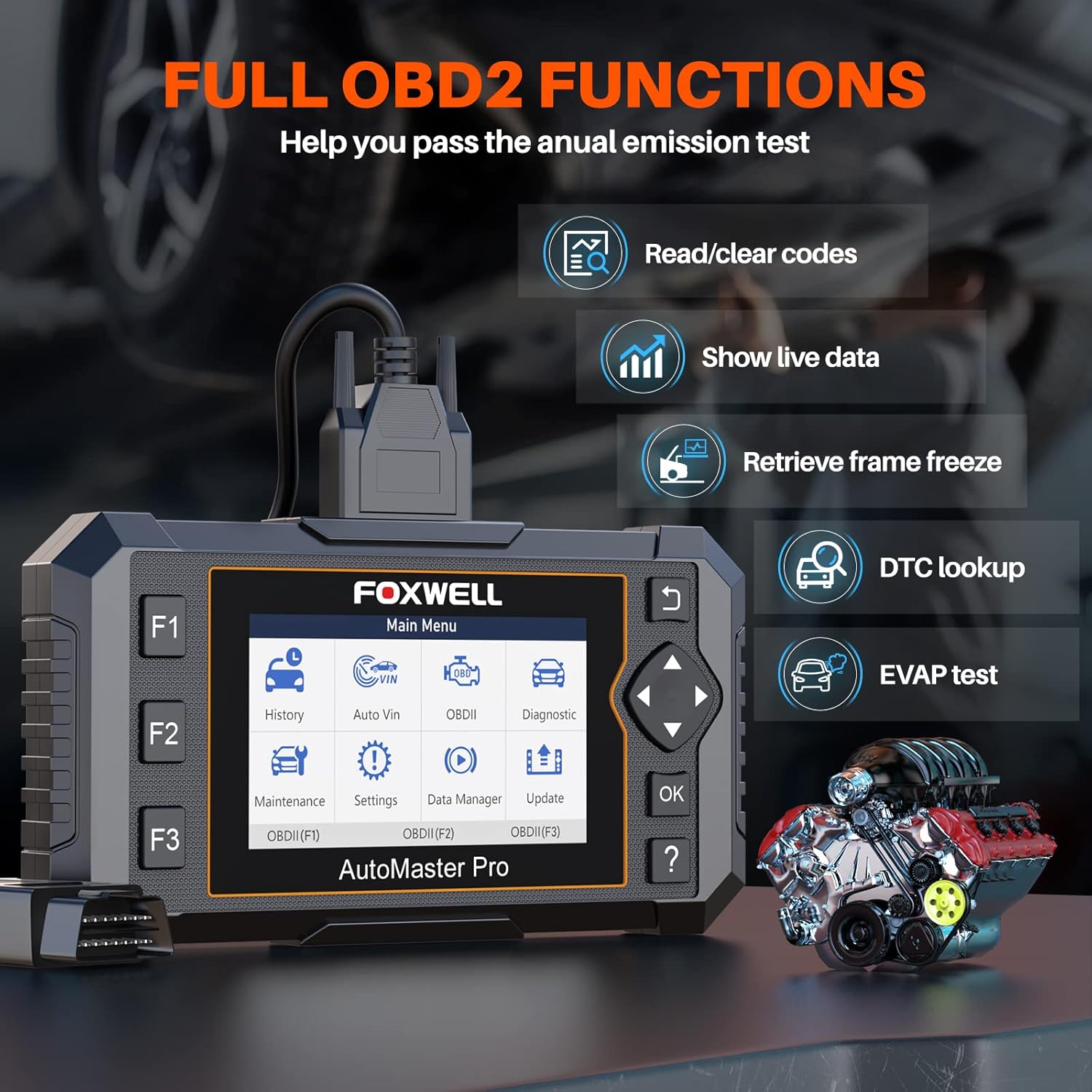
Image: The FOXWELL NT624 Elite screen showing various full OBD2 functions, including Read/Clear codes, Show live data, Retrieve frame freeze, DTC lookup, and EVAP test.
5.4. Priežiūros paslaugos
From the Main Menu, select "Maintenance" to access special reset functions. Follow the on-screen prompts for each service.
- Alyvos lemputės atstatymas: Atstato alyvos keitimo lemputę.
- SAS kalibravimas: Kalibruoja vairo kampo jutiklį.
- EPB paslauga: Deactivates and reactivates the Electronic Parking Brake system for brake pad replacement.
- Droselio sklendės perprogramavimas: Iš naujo išmoksta droselio sklendės padėtį po valymo ar keitimo.
- ABS kraujavimas: Atlieka ABS stabdžių nuorinimo procedūras.
- Purkštuko kodavimas: Koduoja naujus purkštukų numerius ECU.
- BRT Service: Performs battery replacement registration.
- DPF regeneracija: Initiates Diesel Particulate Filter regeneration.

Image: The FOXWELL NT624 Elite screen highlighting the 8 hot maintenance services available, including Oil Light Reset, ABS Bleeding, Throttle, Injector, SAS, BRT, EPB, and DPF.
6. Data Management and Analysis
The NT624 Elite allows you to view and analyze live data streams, which can be displayed in both text and graphical formats. This helps in understanding vehicle performance and diagnosing intermittent issues.

Image: The FOXWELL NT624 Elite displaying live data in a graphical format on its screen, illustrating sensor readings over time for detailed analysis.
The device also stores diagnostic history, which can be reviewed later. Connect the tool to a computer to print diagnostic reports or manage saved data.
7. Priežiūra ir atnaujinimai
7.1. Programinės įrangos atnaujinimai
The FOXWELL NT624 Elite offers lifetime free software updates. To update the device:
- Visit the official FOXWELL websvetainė (www.foxwelltech.com).
- Download and install the update client software on your computer.
- Register your device and create an account.
- Connect the NT624 Elite to your computer using the provided USB cable.
- Follow the on-screen instructions in the update client to download and install the latest software versions.
7.2. Prietaiso priežiūra
- Laikykite prietaisą švarų, be dulkių ir drėgmės.
- Store the device in its protective carrying case when not in use.
- Venkite numesti įrenginį ir nelaikykite jo ekstremalioje temperatūroje.
8. Problemų sprendimas
| Problema | Galima priežastis | Sprendimas |
|---|---|---|
| Įrenginys neįsijungia. | Loose OBDII connection; vehicle's ignition is off; vehicle battery low. | Įsitikinkite, kad OBDII laidas yra tvirtai prijungtas. Įjunkite automobilio degimą. Patikrinkite automobilio akumuliatoriaus įkrovą.tage. |
| Ryšio su transporto priemone klaida. | Incorrect vehicle protocol selected; faulty OBDII port; software issue. | Verify vehicle compatibility. Check the OBDII port for damage. Update the device software. Try on another compatible vehicle. |
| Ekranas užstringa arba įrenginys nereaguoja. | Software glitch; low power. | Restart the device by disconnecting and reconnecting. Ensure stable power supply from the vehicle. Perform a software update. |
| Update fails. | Unstable internet connection; incorrect update client usage; firewall issues. | Ensure a stable internet connection. Follow the update instructions carefully. Temporarily disable firewall/antivirus if necessary. |
9. Specifikacijos
- Modelis: NT624 Elitas
- Ekranas: 4.3 colio spalvotas ekranas
- Operacinė sistema: Windows XP (for update client compatibility, device runs proprietary OS)
- Ryšys: OBDII, USB
- Matmenys: 8.8 x 3 x 13.1 colių (apytiksliai)
- Svoris: 2.07 svaro (apytiksliai)
- Galia: 8-18V vehicle power via OBDII
- Darbinė temperatūra: 0–60 °C (32–140 °F)
- Laikymo temperatūra: -20 iki 70°C (nuo -4 iki 158°F)
10. Palaikymas ir garantija
For technical support, product inquiries, or warranty information, please contact FOXWELL customer service through their official websvetainėje arba kontaktinę informaciją, pateiktą ant jūsų produkto pakuotės.
The FOXWELL NT624 Elite comes with a standard manufacturer's warranty. Please refer to the warranty card included in your package for specific terms and conditions.
Vaizdo įrašas: Viršijimasview of the FOXWELL NT624 Elite diagnostic tool's features and functions. This video demonstrates the user interface and capabilities of the device.


