Įvadas
The OWON PC321-TY is a 3-phase WiFi Smart Energy Monitor designed to provide real-time monitoring of your home's electricity consumption. This device helps you track energy usage, measure voltage, current, and power factor, enabling informed decisions to save energy and reduce costs. It connects to your home's 2.4 GHz Wi-Fi network and provides data through a dedicated mobile application.
Svarbi saugos informacija
ĮSPĖJIMAS: Galia klamp must be installed and maintained only by a qualified electrician. To ensure safety, do not touch the device terminals during testing. Always turn off all power to the equipment before installation or maintenance. Failure to follow these instructions may result in electric shock, fire, or serious injury.
Produktas baigtasview
The OWON PC321-TY energy monitor consists of a main unit and three 80A current sensors (clamps). It is designed for installation within your electrical panel to monitor the power consumption of your entire home or specific circuits. The device communicates wirelessly via Wi-Fi to provide real-time data to your smartphone.

Image: The OWON PC321-TY main unit and current clamps installed inside an electrical breaker box, with a smartphone showing the energy monitoring application interface.
The monitor accurately measures voltage, current, power factor, and active power. It provides energy data within 2 seconds with an accuracy of ±2%. The system supports monitoring individual appliances like air conditioners, ovens, water heaters, washing machines, and dryers.
Sąranka ir diegimas
1. Programos diegimas
Download and install the "SmartLife" application on your smartphone. This app is required to configure and monitor the energy meter.
2. Prietaiso montavimas
The main unit can be mounted using the provided mounting bracket. Secure the bracket to a suitable surface within your electrical panel using screws, then slide the main unit onto the bracket.

Image: Illustration of the energy monitor being mounted onto its wall bracket.
3. Connecting Current Clamps
Prijunkite srovę klamps to the main unit. Ensure a secure connection for each clamp.

Image: Detail of connecting the current clamp cable to the main monitor unit.
4. Klamp Kryptis
The arrow on each current clamp must point towards the load (P1 → P2 or K → L) to ensure accurate measurement of current flow. Incorrect orientation will result in inaccurate readings.
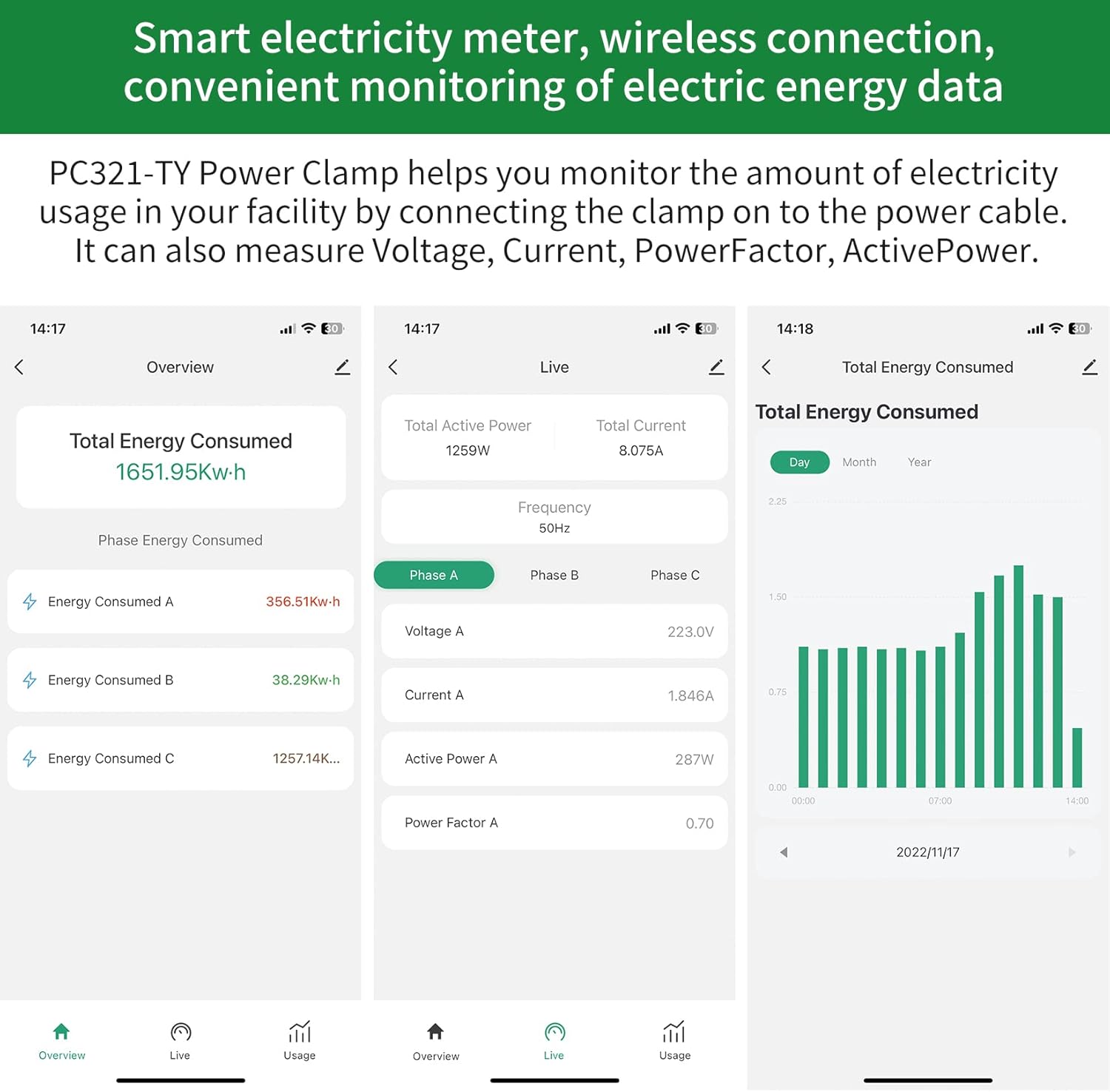
Image: A current clamp installed on a wire, with an arrow clearly indicating the correct direction towards the electrical load.
5. Elektros instaliacijos schemos
Refer to the following diagrams for correct wiring in single-phase and three-phase electrical systems. Ensure that the current transformers (CTs) for L1/L2/L3 correspond to the respective phases of the circuit being measured.

Image: Detailed wiring diagram for installing the OWON PC321-TY in a single-phase electrical system.

Image: Detailed wiring diagram for installing the OWON PC321-TY in a three-phase electrical system.
Naudojimo instrukcijos
Once installed and connected to your 2.4 GHz Wi-Fi network, the OWON PC321-TY will begin transmitting energy data to the SmartLife app. Open the app on your smartphone to view real-time and historical energy consumption.
1. Energijos stebėjimas realiuoju laiku
The app displays current power usage, voltage, current, and power factor for each phase. Data is updated frequently, typically every 2 seconds, providing an accurate overview of your electricity consumption.
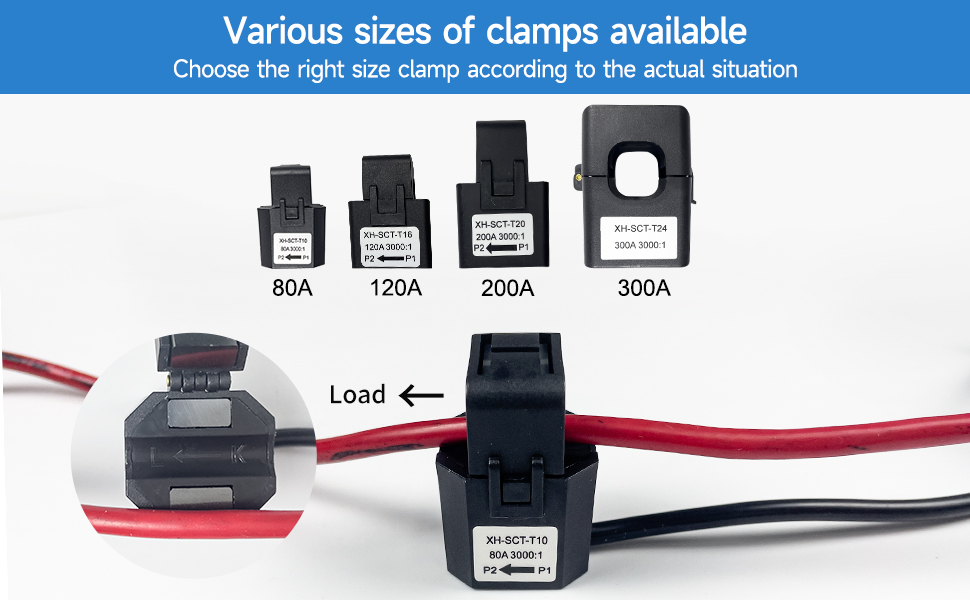
Image: Screenshots of the SmartLife app displaying total energy consumed, live power data, and historical usage graphs.
2. Historical Data and Reporting
The SmartLife app stores historical energy consumption data, allowing you to review daily, monthly, and yearly usage patterns. This feature helps identify trends and opportunities for energy saving.
3. Device Monitoring
With three current sensors, you can monitor the energy consumption of specific high-power appliances or circuits. This allows for detailed analysis of individual device usage.
Priežiūra
The OWON PC321-TY is designed for low maintenance. Periodically inspect the physical connections of the main unit and current clamps to ensure they are secure and free from damage. Keep the device clean and free of dust. No user-serviceable parts are inside the main unit.
Trikčių šalinimas
- Programėlėje nėra duomenų: Ensure the device is powered on and connected to your 2.4 GHz Wi-Fi network. Check your router for internet connectivity. Restart the device and the SmartLife app.
- Netikslūs rodmenys: Verify that the current clamps are installed correctly with the arrow pointing towards the load. Ensure the clamps are fully closed around the wires.
- Įrenginys neprisijungęs: Check your Wi-Fi signal strength at the installation location. If the signal is weak, consider relocating your router or using a Wi-Fi extender. Re-pair the device with the SmartLife app if necessary.
- Programos ryšio problemos: Ensure your smartphone has a stable internet connection. Update the SmartLife app to the latest version.
Specifikacijos
| Funkcija | Specifikacija |
|---|---|
| Modelis | O-321-80A |
| Stilius | 3 phases / 80 A |
| ttage | 240 voltų |
| Srovės jutikliai | 3 x 80A clamps |
| Matavimo tikslumas | ±2 % |
| Wi-Fi dažnis | 2.4 GHz |
| Duomenų atnaujinimo greitis | Kas 2 sekundžių |
Gaminio matmenys

Image: Diagram illustrating the physical dimensions of the OWON PC321-TY main unit and its connected components.
Garantija ir palaikymas
Specific warranty information for the OWON PC321-TY is not provided in this manual. Please refer to the product packaging or the manufacturer's official website for detailed warranty terms and conditions. For technical support, contact OWON customer service through their official channels.


