This manual provides comprehensive instructions for the installation, operation, and maintenance of the Axis F9114 Main Unit. Please read this manual carefully before using the product to ensure proper functionality and safety.
Produktas baigtasview
The AXIS F9114 is a main unit designed for the F-Series surveillance system. It supports up to four F21 or F7 sensor units, providing a flexible and discreet surveillance solution. This unit acts as the central processing hub for connected camera sensors.
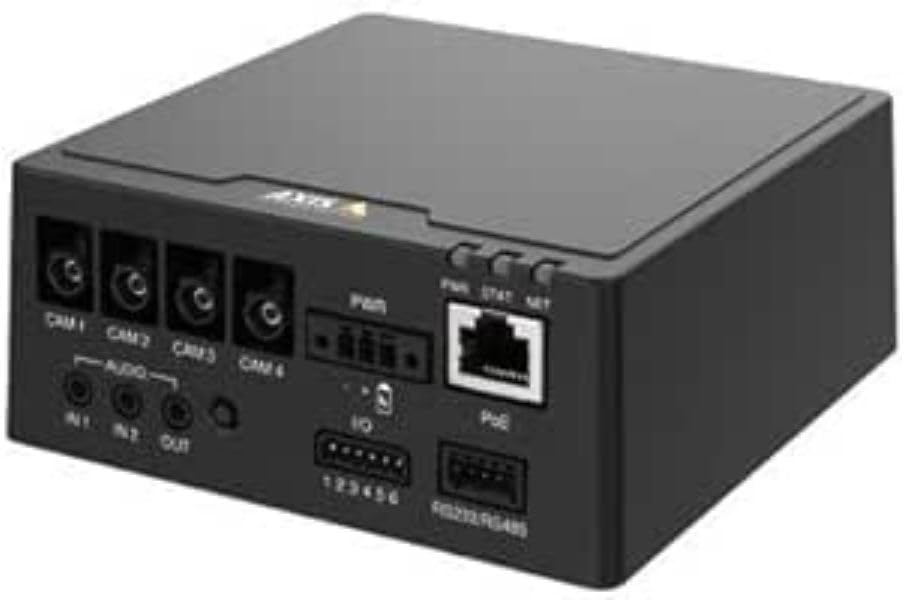
1 paveikslas: Priekyje view of the AXIS F9114 Main Unit, showing camera input ports (CAM 1-4), audio input/output, power input, I/O ports, and an Ethernet port with PoE support.
Pagrindinės funkcijos:
Supports up to 4 Axis F-Series sensor units (e.g., F21, F7).
Central processing unit for video and audio streams.
Kompaktiškas dizainas lanksčiam montavimui.
Integrated Power over Ethernet (PoE) for simplified power and data connectivity.
Multiple I/O ports for external device integration.
Audio input/output capabilities.
Sąranka ir diegimas
Pakuotės turinys:
AXIS F9114 Main Unit
Diegimo vadovas
(Power supply and sensor units sold separately, unless specified)
Connecting Sensor Units:
Ensure the main unit is powered off before connecting any sensor units.
Connect the cables from your AXIS F-Series sensor units (e.g., F21, F7) to the designated "CAM 1", "CAM 2", "CAM 3", and "CAM 4" ports on the rear of the F9114 Main Unit. Ensure a secure connection.
Each sensor unit requires a dedicated port.
Įrenginio maitinimas:
Maitinimas per Ethernet (PoE): Connect an Ethernet cable from a PoE-enabled switch or injector to the "PoE" port on the F9114. This will provide both power and network connectivity.
Išorinis maitinimo šaltinis: If PoE is not used, connect a compatible DC power adapter (not included) to the "PWR" input terminal. Refer to specifications for voltage reikalavimus.
Tinklo prisijungimas:
Connect an Ethernet cable from your network to the "PoE" port on the F9114. This provides network access for configuration and video streaming.
Garso ir I/O jungtys:
Garsas: Connect external microphones to "IN 1" or "IN 2" and speakers to "OUT" if audio functionality is required.
I/O: Use the "IO" terminal block for connecting external devices such as alarm sensors or relays. Refer to the detailed wiring diagram in the full technical documentation for specific connections.
Operacija
Pradinis įjungimas:
Once all connections are secure and power is supplied, the unit will begin its startup sequence. Observe the LED indicators for status.
LED indikatoriai:
PWR (galia): Indicates power status. (e.g., Solid green for normal operation).
STAT (Status): Indicates operational status. (e.g., Flashing for network activity, solid for ready).
NETAS (tinklas): Indicates network connection and activity.
Prieiga prie įrenginio:
Use the AXIS IP Utility or a network scanner to discover the IP address of the F9114 on your network.
Atidarykite a web browser and enter the IP address to access the device's web sąsaja.
Log in using the default credentials (refer to the installation guide or Axis website for current defaults).
Follow the on-screen instructions to configure network settings, video streams, and other system parameters.
Vaizdo įrašų valdymas:
The F9114 integrates with various video management software (VMS) solutions. Refer to your VMS documentation for adding and managing the device.
Priežiūra
Valymas: Išorinį įrenginio paviršių valykite minkštu, sausu skudurėliu. Nenaudokite stiprių cheminių medžiagų ar abrazyvinių valiklių.
Firmware atnaujinimai: Reguliariai tikrinkite „Axis Communications“ website for firmware updates. Keeping the firmware updated ensures optimal performance, security, and access to new features.
Aplinkos sąlygos: Kad išvengtumėte pažeidimų, užtikrinkite, kad įrenginys veiktų nurodytose temperatūros ir drėgmės ribose.
Trikčių šalinimas
Dažnos problemos ir sprendimai:
Nėra galios:
Verify power cable connection (if using external power).
Ensure PoE switch/injector is active and providing power (if using PoE).
Patikrinkite maitinimo šaltinį.
Nėra tinklo ryšio:
Patikrinkite Ethernet kabelio jungtį.
Verify network switch/router functionality.
Confirm IP address settings are correct or DHCP is functioning.
No Video from Sensor Unit:
Ensure sensor unit cables are securely connected to the F9114.
Verify the sensor unit is compatible with the F9114.
Check the sensor unit's status indicators (if available).
Access the F9114 web interface to confirm sensor unit detection and configuration.
Pamiršote slaptažodį:
Refer to the Axis Communications support documentation for password reset procedures, which typically involve a factory reset button or specific software tools.
For more detailed troubleshooting, refer to the comprehensive support resources available on the Axis Communications websvetainę.
Specifikacijos
Funkcija
Detalė
Prekės ženklas
„Axis Communications“.
Modelio numeris
01991-001
Prekės svoris
1.87 svaro
Gaminio matmenys (IxPxH)
19.69 x 19.69 x 11.02 colio
Gamintojas
AŠIS - KAMERA
ASIN
B0BWNS49VS
Pasiekiama pirmoji data
23 m. vasario 2023 d
Note: Specifications are subject to change without notice. For the most current information, please refer to the official Axis Communications websvetainę.
Garantija ir palaikymas
Informacija apie garantiją:
For detailed warranty information, please refer to the warranty statement provided with your product or visit the official Axis Communications websvetainėje. Išsaugokite pirkimo įrodymą garantiniams reikalavimams.
Techninė pagalba:
If you encounter issues that cannot be resolved using this manual or the troubleshooting section, please contact Axis Communications technical support. Support resources, including FAQs, documentation, and contact information, are available on their official websvetainę.
AXIS gaminių palyginimo lentelės, 2025 m. trečiasis ketvirtis: tinklo vaizdo, garso, prieigos kontrolės ir domofonų sistemos Šiame „Axis Communications“ 2025 m. trečiojo ketvirčio dokumente pateikiamos išsamios gaminių palyginimo lentelės, kuriose pateikiamas platus jų siūlomų tinklo vaizdo, garso, prieigos kontrolės ir domofonų sprendimų asortimentas. Joje išsamiai aprašomos įvairių gaminių linijų, įskaitant kameras, įrašymo įrenginius, programinę įrangą ir domofonų sistemas, specifikacijos, funkcijos ir modelių informacija.
AXIS M43 panoraminių kamerų serijos diegimo vadovas Šiame diegimo vadove pateikiama esminė informacija apie AXIS M43 panoraminių kamerų serijos, įskaitant AXIS M4327-P ir AXIS M4328-P modelius, įrengimą. Jame aptariamos diegimo procedūros, sauga ir atitiktis reglamentams.
AXIS High PoE Midspan ir skirstytuvų diegimo vadovas „AXIS T8123 High PoE Midspan“ ir „AXIS T8126/T8128 High PoE“ skirstytuvų diegimo vadovas, kuriame aprašoma „Power over Ethernet“ sprendimų sąranka, specifikacijos ir trikčių šalinimas.
AXIS Camera Station S20 Appliance Series Installation Guide This installation guide provides essential instructions for setting up and installing the AXIS Camera Station S20 Appliance Series, including models S2008, S2016, and S2024. It covers hardware overview, cable connections, software setup, and network configuration for professional video surveillance systems.