1. Įvadas
This manual provides detailed instructions for the ENDORFY Thock Wireless Mechanical Keyboard, model EY5A078. It covers setup, operation, maintenance, and troubleshooting to ensure optimal performance and longevity of your device. Please read this manual thoroughly before using the keyboard.

Image 1.1: The ENDORFY Thock Wireless Mechanical Keyboard EY5A078. This image displays the full QWERTY layout with illuminated keys, showcasing the keyboard's design and RGB capabilities.
2. Pakuotės turinys
Patikrinkite, ar pakuotėje yra visi reikalingi daiktai:
- ENDORFY Thock Wireless Mechanical Keyboard EY5A078
- USB-C to USB-A Cable (detachable)
- 2.4 GHz USB imtuvas
- Klaviatūros traukiklis
- Jungiklio traukiklis
- Vartotojo vadovas (šis dokumentas)
3. Sąranka ir prijungimas
The ENDORFY Thock Wireless Mechanical Keyboard offers three connection modes: wired, 2.4 GHz wireless, and Bluetooth.
3.1. Laidinis ryšys
- Locate the USB-C port on the keyboard (typically on the back or top edge).
- Prijunkite pridėtą USB-C į USB-A laidą prie klaviatūros.
- Prijunkite USB-A kabelio galą prie laisvo kompiuterio USB prievado.
- Klaviatūra bus automatiškai aptikta ir paruošta naudoti.
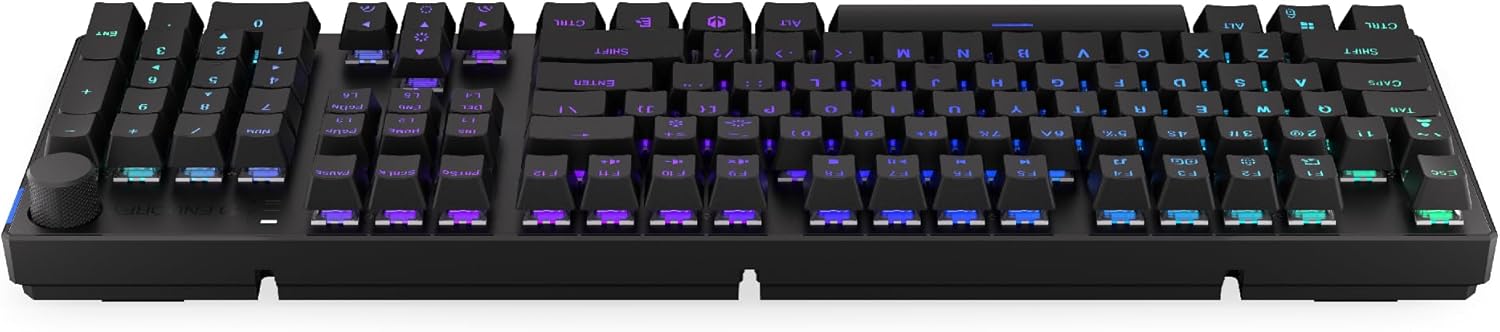
3.1 paveikslėlis: Šonas view of the keyboard, highlighting the USB-C port for wired connection and charging.
3.2. 2.4 GHz belaidis ryšys
- Locate the 2.4 GHz USB receiver. It may be stored in a compartment on the underside of the keyboard.
- Prijunkite 2.4 GHz USB imtuvą prie laisvo kompiuterio USB prievado.
- On the keyboard, locate the mode switch (usually on the back or side) and set it to the 2.4 GHz wireless mode (often indicated by a specific icon or "2.4G").
- The keyboard should automatically connect. An indicator light may confirm the connection.

Image 3.2: Underside of the keyboard, showing the compartment for storing the 2.4 GHz USB receiver and adjustable feet.
3.3. „Bluetooth“ ryšys
- On the keyboard, set the mode switch to Bluetooth mode (often indicated by a Bluetooth icon or "BT").
- The keyboard may have multiple Bluetooth profiles (e.g., BT1, BT2, BT3). Select one by pressing Fn + 1, Fn + 2, or Fn + 3. The corresponding indicator light will flash.
- Kompiuteryje arba įrenginyje atidarykite „Bluetooth“ nustatymus ir ieškokite naujų įrenginių.
- Select "ENDORFY Thock Wireless" (or similar name) from the list of available devices.
- Vykdykite visus ekrane pateikiamus nurodymus, kad užbaigtumėte susiejimo procesą.
- Once paired, the indicator light on the keyboard will stop flashing and remain solid.
4. Operacija
4.1. Key Functions and Shortcuts
The keyboard features various function key combinations (Fn + Key) for multimedia control, lighting adjustments, and other settings.
- Fn + F1–F12: Multimedia and system functions (e.g., volume control, media playback, calculator). Refer to the keycap legends for specific functions.
- Fn + rodyklių klavišai: Adjust RGB lighting effects (e.g., brightness, speed, direction).
- Fn + 1/2/3: Perjungti „Bluetooth Pro“files.
- Fn + 4: Switch to 2.4 GHz wireless mode.
- Fn + 5: Perjunkite į laidinį režimą.
4.2. RGB apšvietimo valdymas
The ENDORFY Thock keyboard features programmable RGB backlighting. Use the following combinations to customize the lighting:
- Fn + rodyklė dešinėn: Change lighting effect.
- Fn + rodyklė kairėn: Change lighting effect direction.
- Fn + rodyklė aukštyn: Padidinti ryškumą.
- Fn + rodyklė žemyn: Sumažinti ryškumą.
- Fn + Ins: Keisti spalvą.
- Fn + Del: Adjust effect speed.
4.3. Tūrio rankenėlė
The dedicated volume knob located on the top right of the keyboard allows for quick audio adjustments.
- Sukti pagal laikrodžio rodyklę: Padidinti garsumą.
- Sukti prieš laikrodžio rodyklę: Sumažinti garsumą.
- Paspauskite žemyn: Nutildyti / įjungti garsą.

Image 4.1: Detail of the volume knob and status indicator lights, located on the upper right side of the keyboard.
4.4. Karšto keitimo jungikliai
The ENDORFY Thock keyboard features hot-swappable switches, allowing you to change mechanical switches without soldering. This enables customization of typing feel.
- Nuimti klaviatūros dangtelį: Norėdami švelniai nuimti norimą klavišo dangtelį, naudokite pateiktą klavišo dangtelio traukiklį.
- Nuimkite jungiklį: Pateiktu jungiklio traukikliu atsargiai suimkite viršutinį ir apatinį jungiklio spaustukus ir patraukite jį tiesiai aukštyn.
- Įdėkite naują jungiklį: Suderinkite naujo jungiklio kaiščius su spausdintinės plokštės skylėmis. Tvirtai spauskite jungiklį, kol jis spragtelės ir užsifiksuos. Įsitikinkite, kad kaiščiai nėra sulenkti.
- Pakeiskite klaviatūros dangtelį: Uždėkite klavišo dangtelį atgal ant naujo jungiklio koto.

4.2 pav.: Stambus planas view of the Kailh Box Brown mechanical switches, demonstrating the hot-swappable design.
5. Priežiūra
5.1. Klaviatūros valymas
Reguliarus valymas padeda išlaikyti klaviatūros veikimą ir išvaizdą.
- Prieš valydami atjunkite klaviatūrą nuo kompiuterio.
- Norėdami kruopščiai išvalyti, nuimkite klavišų dangtelius specialiu raktu.
- Norėdami pašalinti dulkes ir šiukšles iš tarpų tarp klavišų, naudokite suslėgtą orą.
- Wipe keycaps and the keyboard surface with a soft, damp audinys. Venkite stiprių cheminių medžiagų.
- Prieš prijungdami klaviatūrą iš naujo, įsitikinkite, kad ji yra visiškai sausa.
5.2. Klaviatūros dangtelio ir jungiklio keitimas
Refer to Section 4.4 for detailed instructions on replacing keycaps and switches. Use only compatible keycaps and switches to avoid damage.
6. Problemų sprendimas
| Problema | Galima priežastis | Sprendimas |
|---|---|---|
| Klaviatūra nereaguoja (laidinė) | Atsilaisvinęs kabelis, sugedęs USB prievadas. | Įsitikinkite, kad USB-C laidas yra tvirtai prijungtas. Išbandykite kitą USB prievadą arba laidą. |
| Klaviatūra nereaguoja (belaidė) | Low battery, incorrect mode, receiver not plugged in, pairing issue. | Charge the keyboard. Ensure mode switch is set correctly (2.4G or BT). Re-pair Bluetooth or re-insert 2.4 GHz receiver. |
| RGB apšvietimas neveikia | Lighting turned off, low battery, software issue. | Check lighting controls (Fn + Arrow keys). Charge the keyboard. Restart computer. |
| Keys double-typing or not registering | Dust/debris under switch, faulty switch. | Clean under keycaps with compressed air. If issue persists, replace the switch (refer to Section 4.4). |
7. Specifikacijos
- Modelis: EY5A078
- Prekinis ženklas: ENDORFY
- Ryšys: Wired (USB-C), 2.4 GHz Wireless, Bluetooth
- Jungiklio tipas: Kailh Box Brown (Hot-swappable)
- Klaviatūros dangteliai: PBT dvigubas šūvis
- Išdėstymas: Full-size QWERTY
- Foninis apšvietimas: Programuojamas RGB
- Operacinės sistemos: Linux, Mac OS X 10.12 Sierra, Windows 10
- Spalva: Juoda
- Medžiaga: Polibutileno tereftalatas (PBT)
- Ypatingos savybės: Detachable cable, Volume knob with mute, Hot-swappable switches
- Baterija: Ličio jonų (į komplektą įeina)
8. Garantija ir palaikymas
ENDORFY products are covered by a manufacturer's warranty. For detailed warranty information, please refer to the warranty card included with your product or visit the official ENDORFY website. For technical support, product inquiries, or service requests, please contact ENDORFY customer support through their official channels.
Oficialus Websvetainė: www.endorfy.com
9. Saugos informacija
- Laikykite klaviatūrą atokiau nuo skysčių ir per didelės drėgmės.
- Saugokite, kad klaviatūra nepatektų į ekstremalias temperatūras.
- Do not attempt to disassemble or modify the keyboard beyond hot-swapping switches and keycaps, as this may void the warranty and cause damage.
- Naudokite tik pridedamą arba rekomenduojamą įkrovimo laidą.
- Dispose of the battery and electronic components responsibly according to local regulations.


