Įvadas
Ačiū, kad pirkoteasing the Sparkleiot 4WD RC Technical Car Chassis Kit. This kit provides a comprehensive set of components for building your own remote-controlled 4-wheel drive technical car. This manual will guide you through the assembly, operation, and maintenance of your new RC model. Please read all instructions carefully before beginning assembly or operation.
Produktas baigtasview ir komponentai
Your Sparkleiot 4WD RC Technical Car Chassis Kit includes the following components:
- Chassis Brick Set: A loose set of building blocks and parts for constructing the car chassis. Self-assembly is required.
- IR nuotolinis valdymas: Used to control the vehicle's movement. Designed to be used with the IR Receiver.
- IR imtuvas: Receives signals from the IR Remote Control to operate the motors.
- M Motor (1 piece): Provides power for the vehicle's drive system.
- Servo Motor (1 piece): Controls the steering mechanism. Svarbu: Do not connect this directly to the battery box.
- AAA Battery Box (1 piece): Powers the motors and receiver. Requires 6 AAA batteries (not included).
- 62.4x20mm Wheels (4 pieces): Off-road style wheels for traction.

Image: All individual components included in the kit, such as the remote control, battery box, motors, wheels, and various chassis parts.
Surinkimo instrukcijos
This kit requires self-assembly. A basic paper instruction guide may be included. For detailed, step-by-step assembly instructions, please contact Sparkleiot customer support to request the official PDF document.
Svarbiausi surinkimo taškai:
- Važiuoklės konstrukcija: Carefully follow the provided instructions to assemble the chassis using the various building blocks and connectors.
- Variklio montavimas: Securely attach the M Motor and Servo Motor to their designated positions on the chassis.
- Ratų tvirtinimas: Mount the four 62.4x20mm wheels onto the axles.
- Baterijos dėžutė: Install 6 AAA batteries into the battery box, ensuring correct polarity.
- Laidų jungtys: Connect the M Motor, Servo Motor, and IR Receiver to the battery box according to the instructions.

Vaizdas: Stambus planas view of the partially assembled chassis, showing the intricate arrangement of gears, axles, and structural beams.
Critical Servo Motor Connection Warning:
DO NOT connect the Servo Motor directly to the AAA Battery Box. The Servo Motor must be connected through the IR Receiver. Direct connection to the battery box will cause the servo motor to burn out and become permanently damaged.

Image: A visual guide illustrating the correct method of connecting the servo motor via the receiver, and the incorrect method of direct connection to the battery box.
Naudojimo instrukcijos
Once assembly is complete and all components are correctly connected, you can begin operating your RC Technical Car.
- Maitinimas: Ensure the AAA Battery Box has fresh batteries and is switched ON.
- Nuotolinio valdymo pulto poravimas: The IR Remote Control and IR Receiver are designed to work together. Ensure both are powered on. If the car does not respond, check the connection between the receiver and the motors.
- Vairavimas: Use the joysticks or buttons on the IR Remote Control to control the car's forward, backward, left, and right movements. Refer to the remote control's markings for specific functions.

Image: The fully assembled 4WD RC car chassis alongside its remote control, ready for operation.
Priežiūra
Regular maintenance will ensure the longevity and optimal performance of your RC Technical Car.
- Valymas: Use a soft, dry cloth to clean the chassis and components. Avoid water or harsh chemicals.
- Akumuliatoriaus priežiūra: Remove batteries from the battery box and remote control when not in use for extended periods to prevent leakage.
- Komponentų patikrinimas: Periodically inspect all connections, gears, and axles for wear or damage. Replace any damaged parts as needed.
- Saugykla: Rinkinį laikykite vėsioje, sausoje vietoje, apsaugotoje nuo tiesioginių saulės spindulių.
Trikčių šalinimas
| Problema | Galima priežastis | Sprendimas |
|---|---|---|
|
Automobilis nereaguoja į nuotolinio valdymo pultą. |
|
|
|
Servo motor is not working or appears damaged. |
|
|
|
Automobilis juda lėtai arba netolygiai. |
|
|
Specifikacijos
- Modelio numeris: SK0423B
- Pagrindinė medžiaga: Plastikiniai
- Rekomenduojamas amžius: 14 metai ir daugiau
- Produkto dydis: 24.89 x 16 x 6.1 cm (apytiksliai 9.8 x 6.3 x 2.4 colio)
- Produkto svoris: 498.95 g (apie 1.1 svaro)
- Reikalingos baterijos: 6 x AAA batteries for the battery box (not included)
- Suderinamumas: Standartiniai statybiniai blokai
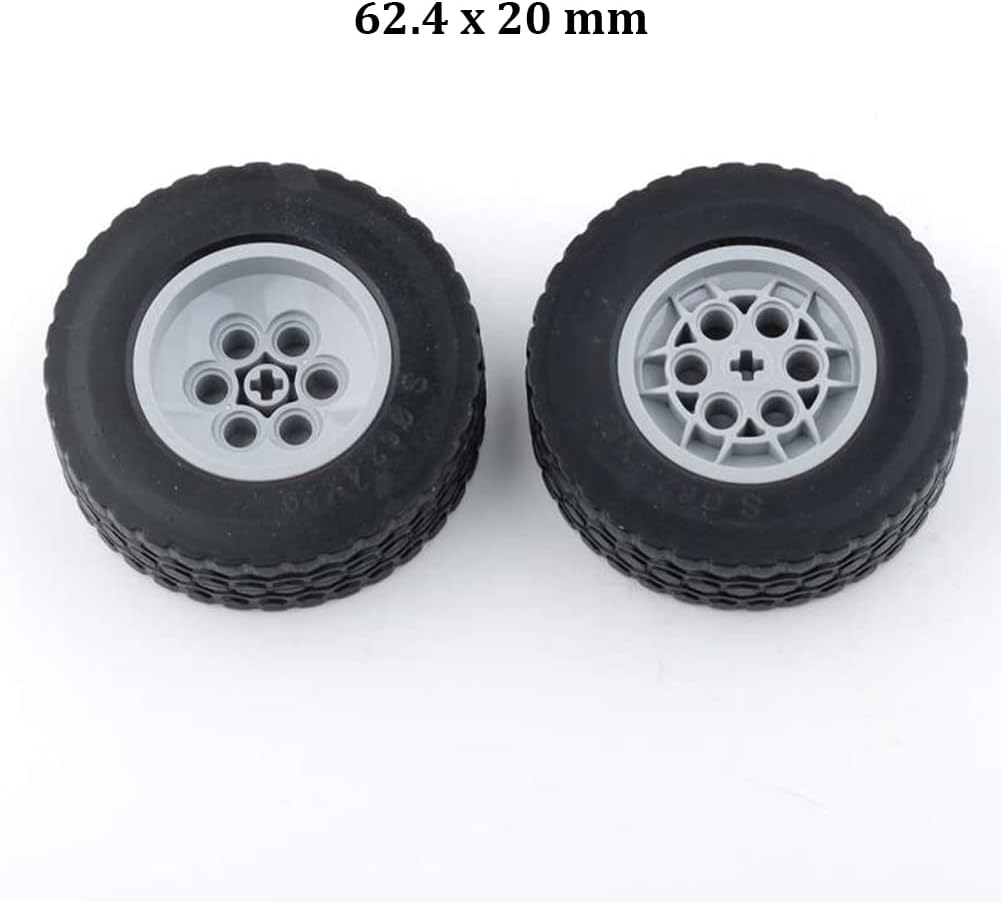
Image: Two off-road wheels with dimensions 62.4 x 20 mm, highlighting their tread pattern and hub design.
Saugos informacija
- Amžiaus rekomendacija: This product is recommended for users 14 years and older. It contains small parts that may be a choking hazard for younger children.
- Elektros jungtys: Always ensure correct wiring as per instructions. Never connect the servo motor directly to the battery box.
- Baterijos sauga:
- Use only the specified type and number of batteries (6 x AAA).
- Nemaišykite senų ir naujų baterijų arba skirtingų tipų baterijų.
- Įdėkite baterijas teisingu poliškumu (+ ir -).
- Nedelsdami išimkite išsikrovusias baterijas.
- Nesujunkite trumpojo jungimo akumuliatoriaus gnybtų.
- Nemeskite baterijų į ugnį.
- Priežiūra: Adult supervision is recommended during assembly and operation, especially for younger users within the recommended age range.
Garantija ir palaikymas
Specific warranty details are not provided with this kit. For any questions regarding assembly, operation, troubleshooting, or to request the detailed PDF instruction document, please contact Sparkleiot customer support. Please refer to your purchase documentation for contact information or visit the official Sparkleiot websvetainę.


